
Listen to this article
Checking audio support
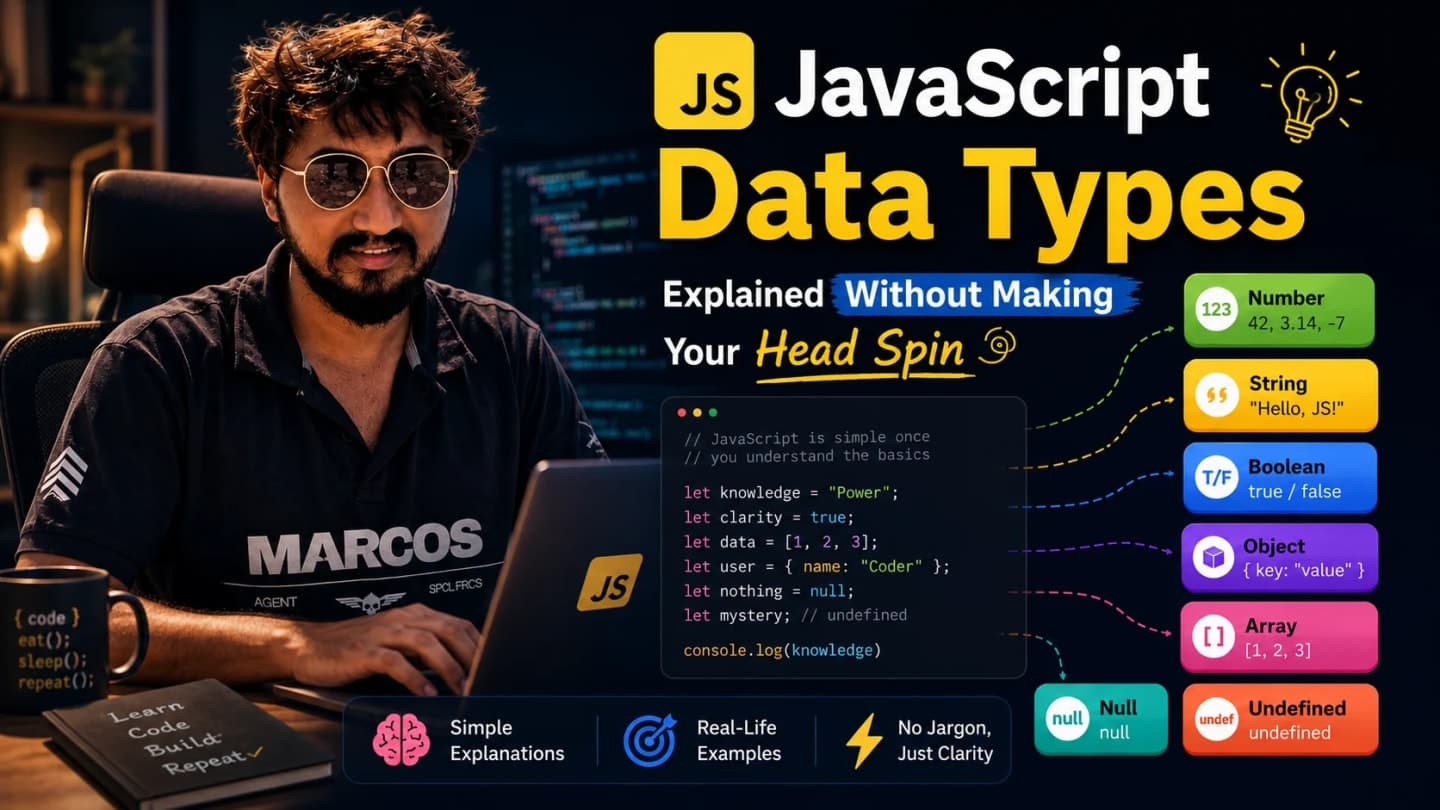
Every value you write in JavaScript has a type, even when you are not thinking about it.
The text inside a button has a type. The price coming from an API has a type. The true or false value that decides whether a modal opens has a type. The list of products you render on a page has a type. Even the function you pass into an onClick handler has a type.
When beginners start JavaScript, data types often feel like a small theory chapter before the “real coding” begins. But in actual frontend work, data types are not theory. They are the reason your UI renders correctly, your forms validate properly, your API data does not break the screen, and your React state behaves the way you expect.
I have seen production bugs caused by a number arriving as a string, an empty array being treated like meaningful data, null being handled like an object, or a boolean flag coming from an API as the text “false”. Small type confusion, big debugging session.
If variables are the boxes where we keep values, data types tell us what kind of thing is inside each box.
What Are Data Types In JavaScript?
A data type is the category of a value. It tells JavaScript what kind of value it is dealing with.
For example, “Siddhant” is text, so it is a string. 25 is a number. true is a boolean. A list of article titles is an array. A user profile with name, email, and role is an object.
This matters because different values behave differently. You can add numbers. You can join strings. You can loop over arrays. You can read properties from objects. If you confuse one type with another, JavaScript may still run, but the result can be completely different from what you expected.
const articleTitle = 'JavaScript Data Types';
const readingTime = 9;
const isPublished = false;
const tags = ['javascript', 'frontend', 'beginners'];
const author = { name: 'Siddhant', role: 'Developer' };

console.log(typeof articleTitle); // string
console.log(typeof readingTime); // number
console.log(typeof isPublished); // boolean
At a beginner level, that is the main idea: JavaScript values have categories, and those categories affect how the values behave.

Why Programming Languages Need Data Types
Imagine you are building a simple shopping cart. The product name is text. The price is a number. The “is item available?” value is true or false. The cart items are a list. The customer information is an object.
If everything were treated the same way, your program would not know what to do. Should it add two values? Display them? Loop over them? Check if they are empty? Store them as a structured record?
Data types help a programming language understand the nature of a value. For developers, data types help us read code with confidence.
In frontend applications, this shows up everywhere. A React component may receive props from a parent. A Next.js page may receive data from an API. A form may collect values from input fields. If we do not understand the type of each value, we start guessing. Guessing is where many bugs begin.
JavaScript Is Dynamically Typed
JavaScript is dynamically typed. That means you do not have to declare the type of a variable when you create it. JavaScript figures out the type from the value at runtime.
let value = 'Hello';
console.log(typeof value); // string

value = 100;
console.log(typeof value); // number

value = true;
console.log(typeof value); // boolean
This flexibility is one reason JavaScript feels friendly in the beginning. You can start quickly without writing a lot of type declarations.
But the same flexibility can also create confusion. A variable can hold a string now and a number later. If you are not careful, your code may work in one situation and fail in another.
Developer tip: JavaScript gives you freedom, but production code needs discipline. Use clear names, predictable values, and validation around API data.
Primitive vs Non-Primitive Data Types
Before we go type by type, there is one big grouping beginners should understand: primitive and non-primitive values.
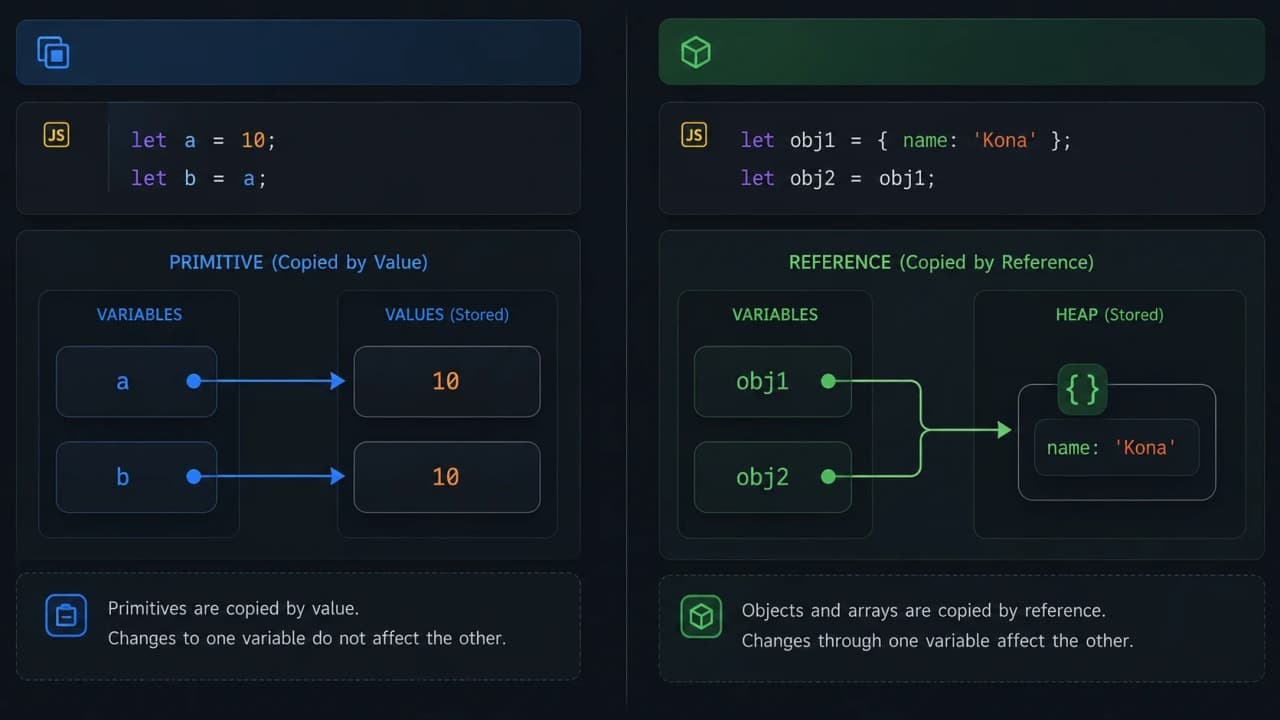
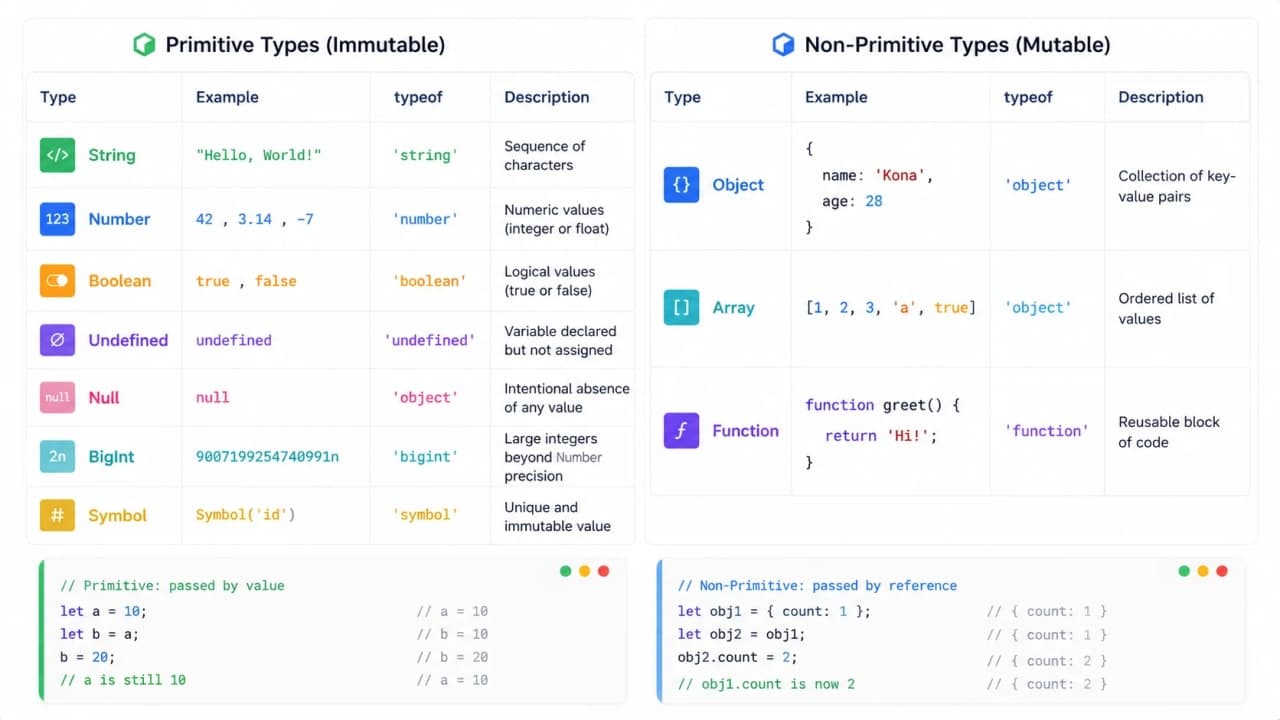
Primitive values are simple values. They are copied directly. Non-primitive values, like objects and arrays, are more like references to a structure in memory.
Primitive types: string, number, boolean, undefined, null, bigint, symbol
Non-primitive types: objects, arrays, functions
Do not worry if reference behavior feels slightly abstract right now. We will come back to it with examples because it is very important for React developers.
String: Text Values
A string is text. Names, titles, messages, slugs, URLs, button labels, form input values, and API text fields are usually strings.
const userName = 'Siddhant';
const category = 'Dev Diaries';
const message = 'Welcome back, ' + userName;

console.log(message); // Welcome back, Siddhant
In frontend work, strings are everywhere. The title of an article is a string. The label of a CTA button is a string. The error message below an input field is a string.
Beginner confusion with strings
The most common confusion happens when a value looks like a number but is actually a string.
const price = '500';

console.log(typeof price); // string
console.log(price + 100); // 500100
JavaScript joins the values because one of them is a string. If you expected 600, this result feels strange. In real projects, this often happens with form inputs because input values usually come as strings.
const priceInput = '500';
const price = Number(priceInput);

console.log(price + 100); // 600
Important note: always check values coming from forms and APIs. Do not assume a number-looking value is actually a number.
Number: Numeric Values
JavaScript uses the number type for regular numeric values: prices, counts, percentages, scores, widths, indexes, and calculations.
const articleCount = 12;
const readingTime = 8.5;

console.log(articleCount + 3); // 15
console.log(readingTime * 2); // 17
In JavaScript, integers and decimal numbers both use the number type. That keeps things simple for beginners.
Frontend example
const currentPage = 2;
const pageSize = 10;

const offset = (currentPage - 1) * pageSize;

console.log(offset); // 10
This kind of calculation appears in pagination, sliders, analytics, cart totals, dashboard counters, and UI measurements.
Beginner mistake
A common mistake is doing math with values that came from an input field without converting them first.
const quantityFromInput = '2';
const price = 500;

console.log(quantityFromInput + price); // 2500, not 502
This is why form validation is not only about required fields. It is also about making sure values are the type your code expects.
Boolean: true or false
A boolean has only two possible values: true or false. It is used for yes/no decisions.
const isLoggedIn = true;
const hasNotifications = false;

if (isLoggedIn) {
  console.log('Show dashboard');
}
In frontend applications, booleans drive UI decisions. Should we show a loading spinner? Is the user logged in? Is the modal open? Is the submit button disabled?
const isLoading = false;
const hasError = true;

if (isLoading) {
  console.log('Show loader');
} else if (hasError) {
  console.log('Show error message');
} else {
  console.log('Show content');
}
Developer observation: good boolean names usually start with is, has, can, or should. Names like isOpen, hasAccess, canEdit, and shouldFetch make code much easier to read.
Undefined: Value Not Assigned Yet
undefined usually means a variable exists, but no value has been assigned to it yet.
let selectedArticle;

console.log(selectedArticle); // undefined
You also get undefined when you try to read a missing property from an object.
const user = { name: 'Siddhant' };

console.log(user.email); // undefined
In API-heavy frontend apps, this happens a lot. Maybe the backend did not send a field. Maybe the response shape changed. Maybe the value loads later.
Important note
How is it so far?
Vote with other readers
Do not blindly access deeply nested properties without checking if the parent exists. That is how you get errors like “Cannot read properties of undefined”.
const response = { user: null };

console.log(response.user?.name); // undefined, no crash
Null: Intentionally Empty
null means intentionally empty. It is commonly used when we want to say: there is no value here right now, and that is expected.
const selectedUser = null;

if (selectedUser === null) {
  console.log('No user selected yet');
}
The difference between undefined and null is subtle for beginners. A simple way to think about it: undefined often means “not assigned or missing”; null often means “intentionally empty”.
In real API responses, null is very common. A user may not have a profile image yet. A blog article may not have a published date while it is still a draft. A deleted optional field may come back as null.
const article = {
  title: 'JavaScript Data Types',
  publishedAt: null
};

if (article.publishedAt === null) {
  console.log('This article is not published yet');
}
Important note: typeof null returns object. This is a famous JavaScript oddity. Just remember it and move on. Even senior developers still mention it in code reviews because it catches beginners often.
BigInt: Very Large Integers
BigInt is used for integers that are too large for the regular number type to safely handle.
const bigNumber = 9007199254740993n;

console.log(typeof bigNumber); // bigint
Most beginners do not need BigInt on day one. But it is useful to know it exists, especially when dealing with very large IDs, financial systems, or data where precision matters.
Frontend developers usually see BigInt less often than strings, numbers, booleans, arrays, and objects. Still, if an API sends extremely large numeric IDs, you should be careful before treating them like normal numbers.
Symbol: Unique Identifiers
Symbol is a primitive type used to create unique values. Two symbols with the same description are still different.
const firstId = Symbol('id');
const secondId = Symbol('id');

console.log(firstId === secondId); // false
Beginners do not use Symbol often in normal React UI work. It appears more in library-level code, advanced object behavior, and situations where unique property keys are useful.
For now, understand the basic idea: Symbol creates a unique value that will not accidentally collide with another symbol.
Objects: The Shape Of Real Application Data
Objects are one of the most important parts of JavaScript. An object stores related data using key-value pairs.
const user = {
  name: 'Siddhant',
  role: 'Senior Developer',
  experience: 6,
  isActive: true
};

console.log(user.name); // Siddhant
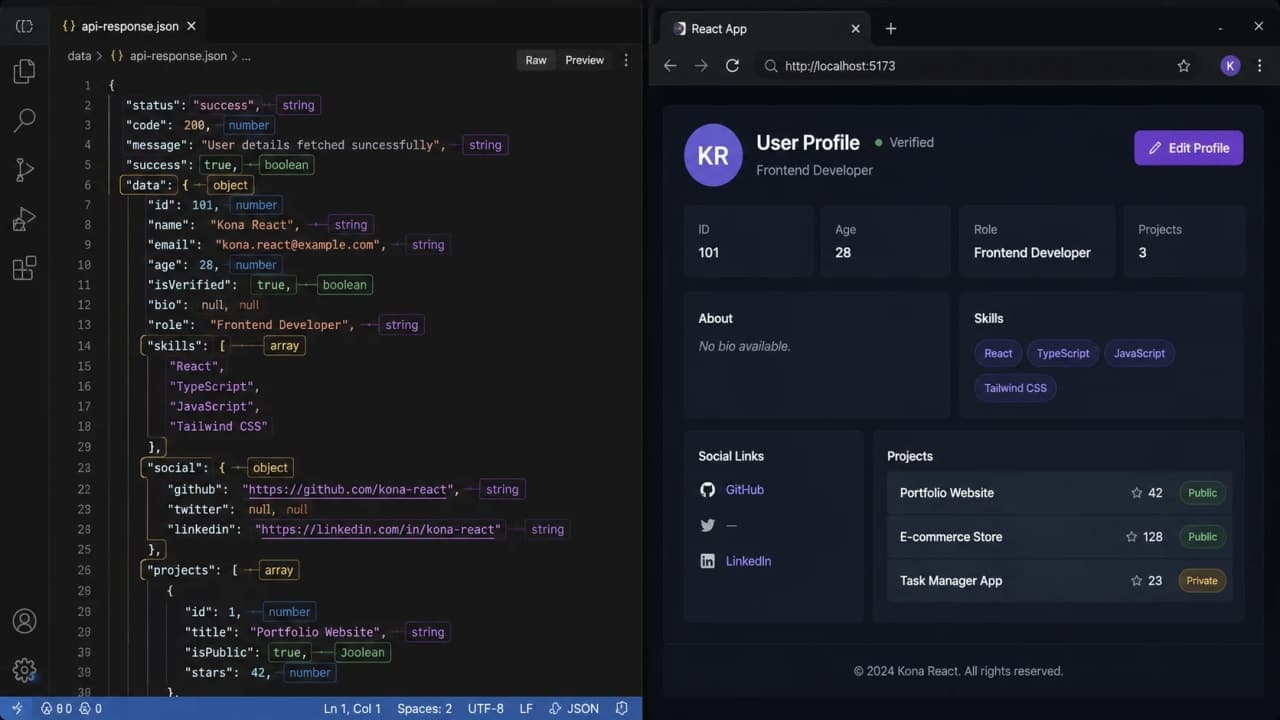
Objects are everywhere in frontend development because real application data is structured. A user is not just one value. An article has a title, slug, author, status, tags, image, and dates. A product has name, price, category, and stock status.
API response example
const apiResponse = {
  success: true,
  data: {
    id: 101,
    title: 'JavaScript Data Types',
    category: 'Dev Diaries',
    tags: ['javascript', 'frontend']
  }
};

console.log(apiResponse.data.title);
When you work with APIs in React or Next.js, most responses come as objects or arrays of objects. That is why understanding objects early makes frontend development much less confusing.
Arrays: Lists Of Values
An array is used when you want to store a list. In frontend development, arrays are heavily used because screens often display lists: articles, users, products, notifications, comments, search results, menu items, and more.
const categories = ['JavaScript', 'React', 'Next.js'];

console.log(categories[0]); // JavaScript
console.log(categories.length); // 3
Arrays are technically objects in JavaScript, which is why typeof [] returns object. That surprises many beginners.
console.log(typeof []); // object
console.log(Array.isArray([])); // true
Use Array.isArray when you specifically want to check if something is an array.
Frontend rendering example
const articles = [
  { title: 'Variables Explained', slug: 'variables' },
  { title: 'Data Types Explained', slug: 'data-types' }
];

articles.forEach((article) => {
  console.log(article.title);
});
In React, this same idea becomes mapping over an array to render UI. If the API sends an empty array, your UI should show an empty state instead of a broken layout.
Functions Are Also Values
In JavaScript, functions are values. You can store a function in a variable, pass it to another function, and return it from a function.
const greetUser = function (name) {
  return 'Hello ' + name;
};

console.log(greetUser('Siddhant')); // Hello Siddhant
This is one reason JavaScript works so naturally with event handlers and React components.
function handleClick() {
  console.log('Button clicked');
}

const buttonConfig = {
  label: 'Save',
  onClick: handleClick
};

buttonConfig.onClick();
That onClick value is a function. In real React code, passing functions around is normal: button clicks, form submits, callbacks, effects, event handlers, and custom hooks all depend on this idea.
Reference vs Value Behavior
This is the section that starts making JavaScript feel deeper. Primitive values are copied by value. Objects and arrays are copied by reference.
Primitive copy
let firstName = 'Siddhant';
let anotherName = firstName;

anotherName = 'Rahul';

console.log(firstName); // Siddhant
console.log(anotherName); // Rahul
Changing anotherName does not affect firstName because the string value was copied.
Object reference copy
const user = { name: 'Siddhant' };
const anotherUser = user;

anotherUser.name = 'Rahul';

console.log(user.name); // Rahul
This feels surprising at first. anotherUser did not receive a separate copy of the object. It received a reference to the same object.
This matters a lot in React. If you mutate an object or array directly, React may not understand that something changed in the way you expect. That is why React developers often create new arrays and objects instead of editing old ones directly.
const user = { name: 'Siddhant', role: 'Developer' };

const updatedUser = {
  ...user,
  role: 'Senior Developer'
};

console.log(updatedUser);
Developer tip: when working with state, prefer creating new objects and arrays. It keeps your updates predictable and easier to debug.
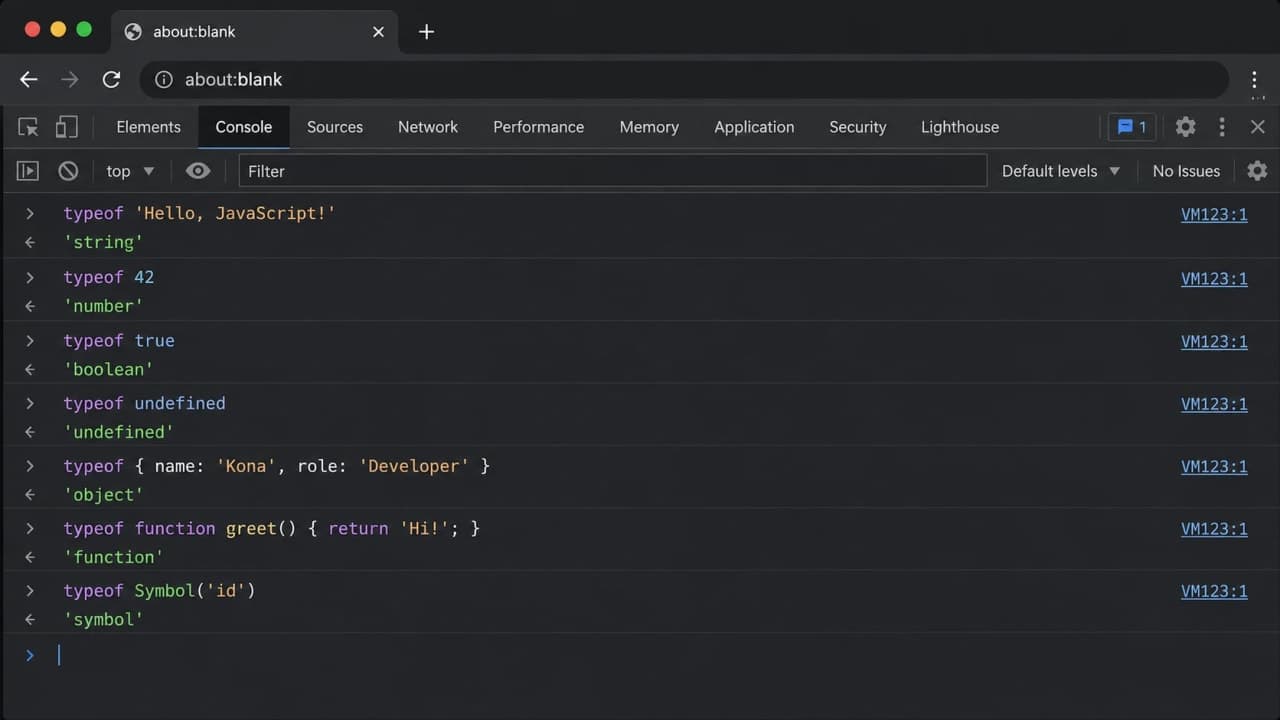
The typeof Operator
The typeof operator tells you the type of a value. It is useful for quick checks, console debugging, and understanding what JavaScript thinks a value is.
console.log(typeof 'Hello'); // string
console.log(typeof 42); // number
console.log(typeof true); // boolean
console.log(typeof undefined); // undefined
console.log(typeof null); // object
console.log(typeof 10n); // bigint
console.log(typeof Symbol('id')); // symbol
console.log(typeof {}); // object
console.log(typeof []); // object
console.log(typeof function () {}); // function
Two outputs need special attention: typeof null is object, and typeof array is object. For arrays, use Array.isArray. For null, check directly with value === null.
Truthy And Falsy Values
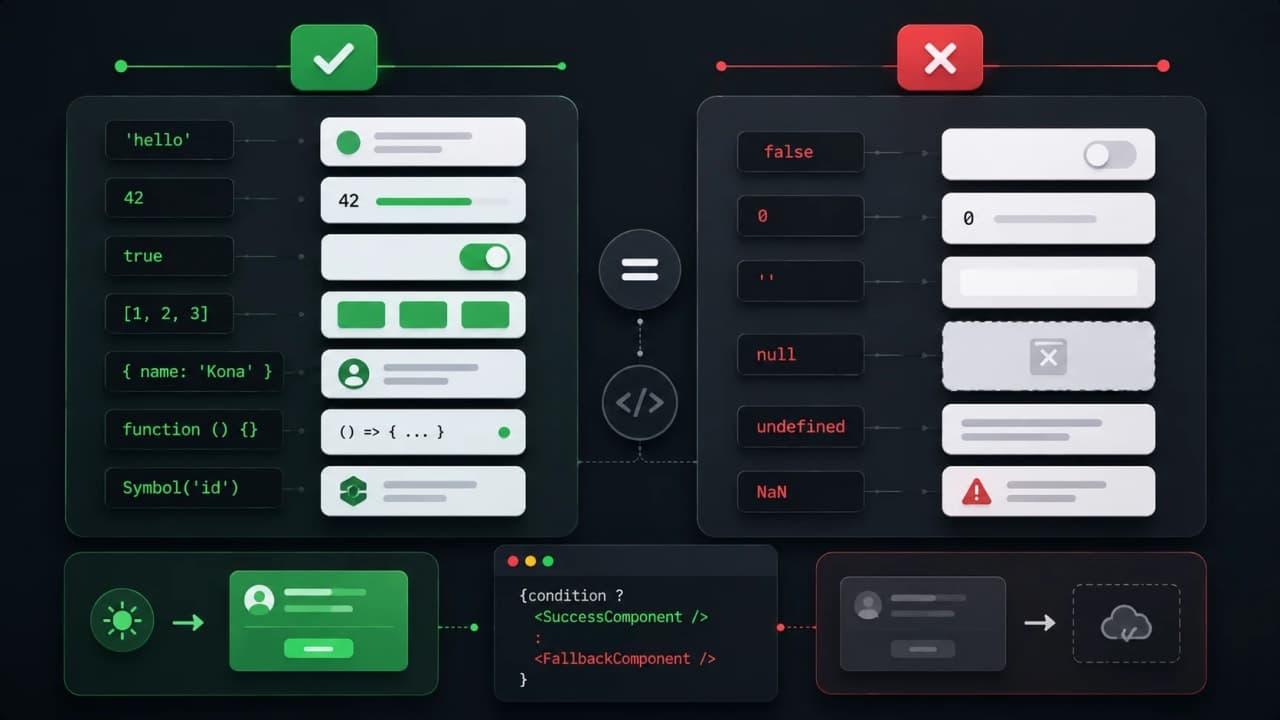
In JavaScript, values can behave like true or false in conditions, even if they are not actual booleans. This is called truthy and falsy behavior.
Falsy values include false, 0, empty string, null, undefined, NaN, and 0n. Most other values are truthy.
const userName = '';

if (userName) {
  console.log('Show profile');
} else {
  console.log('Ask user to enter name');
}
Because userName is an empty string, JavaScript treats it as falsy.
Frontend scenario
const articles = [];

if (articles.length) {
  console.log('Render article list');
} else {
  console.log('Show empty state');
}
This is very common in frontend code. You check if data exists, if loading is true, if an error is present, or if an array has items.
Important note: an empty array is truthy. So if you write if (articles), it will pass even when the array is empty. Use articles.length when you care about items inside the array.
Common Beginner Mistakes
Confusing null and undefined
undefined usually means missing or not assigned. null usually means intentionally empty. APIs often use null for empty optional fields, while JavaScript gives undefined for missing properties.
Thinking arrays are a separate typeof result
Arrays return object with typeof. Use Array.isArray when checking arrays.
Forgetting that input values are strings
HTML input values usually come as strings. Convert them before doing numeric calculations.
Trusting API data without checking it
Frontend bugs often happen because the UI expects one type but the API sends another. Defensive checks are not overengineering when the screen depends on external data.
Mutating React state directly
Objects and arrays use references. Direct mutation can create confusing UI bugs. Create new objects or arrays when updating state.
How Data Types Affect Real Frontend Development
Data types show up in almost every practical frontend problem.
In API handling, you need to know whether data is an object, array, null, or missing. In form validation, you need to know whether values are strings, numbers, booleans, or empty. In state management, you need to understand references so updates behave correctly. In rendering, you need truthy and falsy behavior so the right UI appears.
function getArticleTitle(response) {
  if (!response || !response.data) {
    return 'Untitled article';
  }

  return response.data.title || 'Untitled article';
}

console.log(getArticleTitle(null)); // Untitled article
This kind of defensive thinking comes from real projects. You cannot always control what comes from a network request, but you can control how safely your UI handles it.
In scalable React applications, good type awareness reduces accidental crashes, weird empty screens, broken calculations, and hard-to-debug rendering issues.
Final Thoughts
JavaScript data types may look like a beginner chapter, but they stay with you throughout your frontend journey. Strings build your text. Numbers drive calculations. Booleans control decisions. null and undefined explain missing values. Objects and arrays shape almost every API response. Functions power interactions and reusable logic.
If you are learning JavaScript, spend time in the browser console. Try typeof on different values. Compare null and undefined. Push items into an array. Copy an object and change a property. Break small examples and observe what happens.
That experimentation is where the concept becomes real. After data types, a natural next step is operators, functions, conditions, and arrays in more depth. Those topics build directly on what you learned here.
Take your time. JavaScript becomes much friendlier when values stop feeling mysterious.
Lock in the takeaway
JavaScript Dev Diaries


Frequently asked questions
What are JavaScript data types?
JavaScript data types describe the kind of value you are working with, such as strings, numbers, booleans, objects, arrays, null, and undefined.
Why should frontend beginners learn data types early?
Data types affect form values, API responses, comparisons, rendering decisions, and many small bugs that beginners meet in real projects.
Is typeof enough to understand every JavaScript value?
typeof is helpful, but it has quirks. For example, arrays need Array.isArray, and null returns object because of old JavaScript behavior.