
Listen to this article
Checking audio support
Most beginners notice variables first. Then they notice data types. But the moment JavaScript starts making decisions, comparing values, calculating totals, checking login state, or deciding what UI to show, operators quietly enter the room.
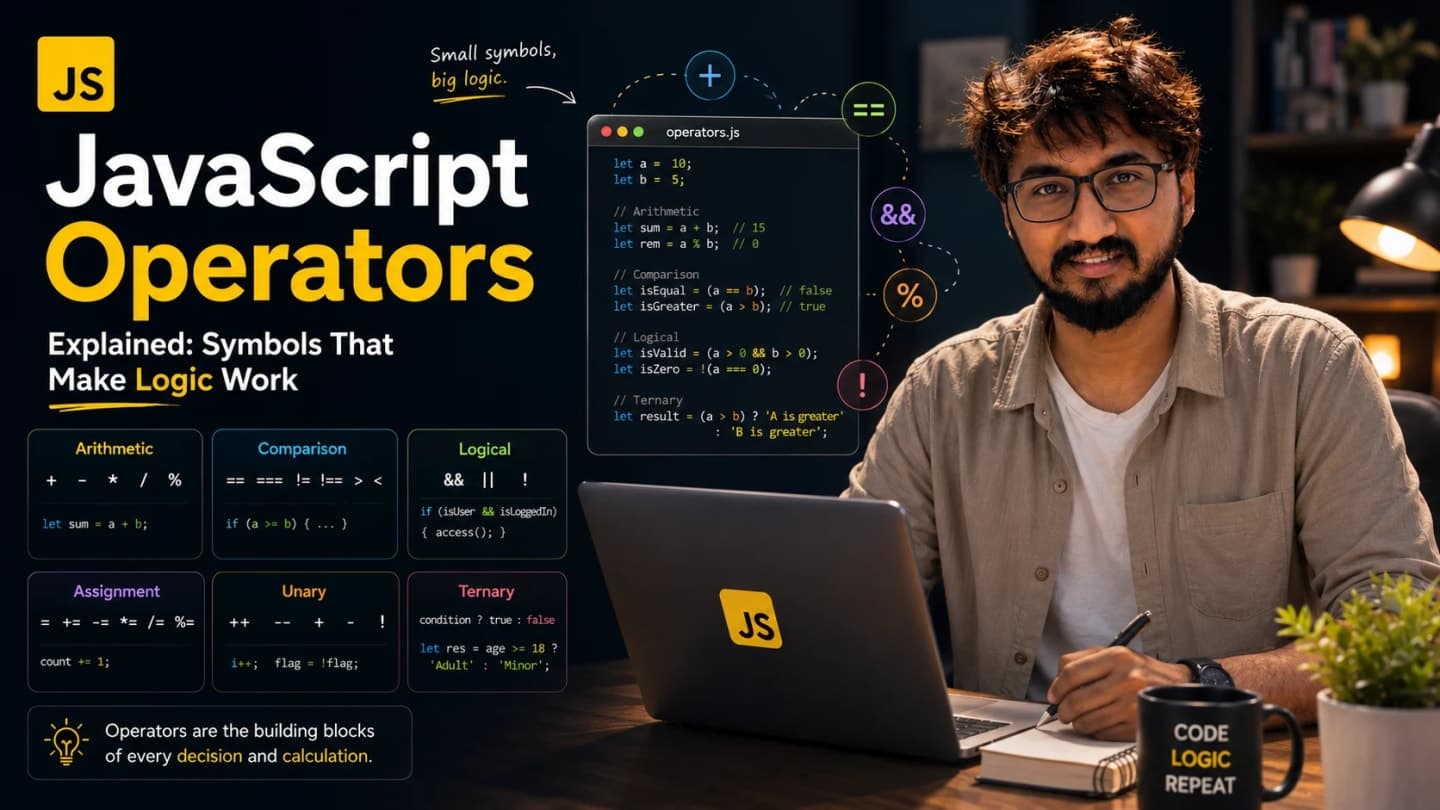
Operators are the small symbols that make JavaScript logic work. They look tiny, but they control a huge part of the code developers write every day.
In real frontend projects, operators appear everywhere: cart totals, pagination, filtering data, API response checks, authentication logic, form validation, loading states, feature toggles, conditional rendering, and small “should this button be disabled?” decisions.
I have seen simple operator mistakes create very confusing production bugs. A loose equality check lets the wrong value pass. A fallback with || hides a valid zero. A long ternary makes a component unreadable. An API field is missing and the page crashes because optional chaining was not used.
Operators are not just symbols. They are the small decisions your application makes thousands of times.
What You Will Learn
What JavaScript operators are and why they matter in everyday frontend code.
How arithmetic, assignment, comparison, and logical operators work with practical examples.
Why modern teams prefer strict equality over loose equality.
How short-circuiting, ternary, optional chaining, and nullish coalescing help with UI logic.
Common operator mistakes beginners should avoid while writing React or API-heavy JavaScript.
What Are Operators In JavaScript?
An operator is a symbol or keyword that tells JavaScript to perform an action with values.
A simple plus sign can add numbers. A greater-than sign can compare two values. A double ampersand can check if two conditions are true. A question mark can choose between two outputs.
Real-life analogy: values are ingredients, and operators are the actions you perform with them. You can add, compare, assign, check, combine, fallback, or choose.
const total = 100 + 50;
const isAdult = 21 >= 18;
const canEdit = true && false;

console.log(total); // 150
console.log(isAdult); // true
console.log(canEdit); // false
These examples are small, but the same thinking powers bigger frontend logic.

Why Programming Languages Need Operators
Without operators, your code could store values but not do much with them. You could have a price and a quantity, but no clean way to calculate a total. You could have a user role and a required permission, but no clean way to compare them.
Operators let programs move from static data to useful behavior.
In frontend development, that behavior often becomes visible UI. A comparison decides whether an error message appears. A logical operator decides whether a menu renders. A nullish fallback decides which name appears when an API field is missing.
Arithmetic Operators: Calculations In Code
Arithmetic operators are used for math. You will see them in counters, prices, totals, pagination, UI measurements, discounts, analytics, and sometimes animation logic.
Addition, subtraction, multiplication, and division
const itemPrice = 499;
const quantity = 3;
const deliveryFee = 50;

const subtotal = itemPrice * quantity;
const finalTotal = subtotal + deliveryFee;

console.log(finalTotal); // 1547
This is a very normal frontend calculation. The UI may display the final price, but JavaScript has to calculate it first.
Modulo: the remainder operator
The modulo operator % gives the remainder after division. Beginners often ignore it, but it is useful in UI patterns.
const index = 5;
const isEvenRow = index % 2 === 0;

console.log(isEvenRow); // false
You might use this idea for alternating row styles, carousel indexes, or grouping items.
Exponentiation
const square = 4 ** 2;
const cube = 3 ** 3;

console.log(square); // 16
console.log(cube); // 27
You may not use ** daily in normal React UI work, but it is good to know when calculations become more mathematical.
Increment and decrement
let notificationCount = 0;

notificationCount++;
notificationCount++;
notificationCount--;

console.log(notificationCount); // 1
In modern React state, you usually do not mutate values like this directly inside state objects. But for simple local counters, loops, and plain JavaScript examples, increment and decrement are common.
Assignment Operators: Updating Values
Assignment operators put values into variables or update existing values.
let total = 100;

total += 50; // same as total = total + 50
total -= 20; // same as total = total - 20
total *= 2;  // same as total = total * 2
total /= 4;  // same as total = total / 4

console.log(total); // 65
Assignment operators are shortcuts. They are useful when the meaning is obvious, but do not overuse shortcuts if they make the code harder for a beginner to read.
Frontend example: pagination
let currentPage = 1;

function goToNextPage() {
  currentPage += 1;
}

goToNextPage();
console.log(currentPage); // 2
In React, this would usually be handled through state setters, but the operator idea is the same: update the current value based on the previous value.
Comparison Operators: Asking Questions
Comparison operators ask questions and return true or false. Is this value equal to that value? Is this number greater? Is this field missing? Is the user old enough?
console.log(10 > 5); // true
console.log(10 < 5); // false
console.log(10 >= 10); // true
console.log(8 <= 6); // false
Comparison operators are the base of conditions. Without them, your app cannot decide what should happen next.
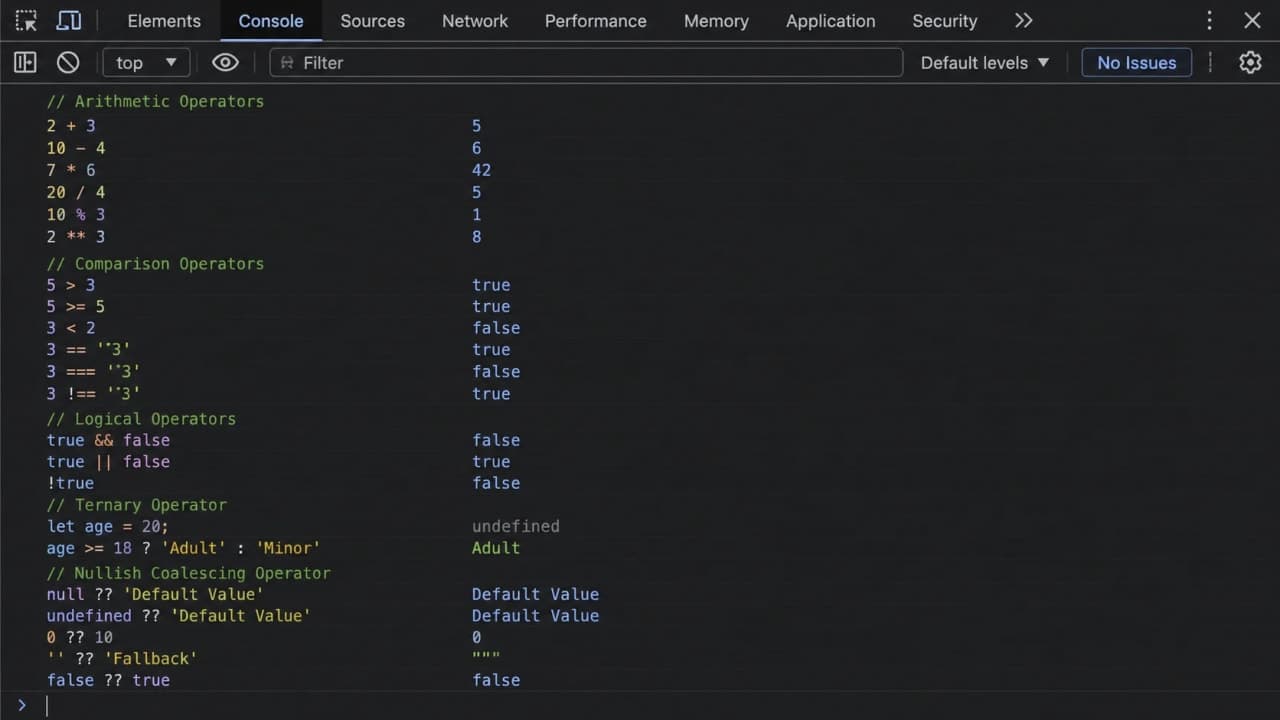
Loose equality vs strict equality
This is one of the most important JavaScript operator lessons: == and === are not the same.
Loose equality == compares values after JavaScript tries to convert types. Strict equality === compares both value and type.
console.log(5 == '5'); // true
console.log(5 === '5'); // false
With ==, JavaScript converts the string “5” into a number-like value before comparing. With ===, JavaScript says: one is a number and one is a string, so they are not strictly equal.
Modern frontend teams usually prefer === because it avoids surprise conversion. When you are debugging production UI, surprise conversion is not your friend.
A real debugging style example
const apiResponse = { statusCode: '200' };

if (apiResponse.statusCode === 200) {
  console.log('Show success UI');
} else {
  console.log('Show fallback UI');
}

// Shows fallback UI because '200' is a string, not a number
The fix is not to switch blindly to ==. The better fix is to normalize the API value.
const statusCode = Number(apiResponse.statusCode);

if (statusCode === 200) {
  console.log('Show success UI');
}
Developer tip: use === by default. If types do not match, fix the data shape instead of letting JavaScript guess for you.
Logical Operators: Combining Conditions
Logical operators help you combine or reverse conditions.
&& means AND
|| means OR
! means NOT
AND operator
const isLoggedIn = true;
const hasAdminRole = false;

if (isLoggedIn && hasAdminRole) {
  console.log('Show admin dashboard');
} else {
  console.log('Hide admin dashboard');
}How is it so far?
Vote with other readers
Both conditions must be true for && to pass.
OR operator
const role = 'editor';

if (role === 'admin' || role === 'editor') {
  console.log('Allow article editing');
}
Only one condition needs to be true for || to pass.
NOT operator
const isFormValid = false;

if (!isFormValid) {
  console.log('Disable submit button');
}
The ! operator flips a boolean-like value. true becomes false, and false becomes true.
Truthy And Falsy In Conditions
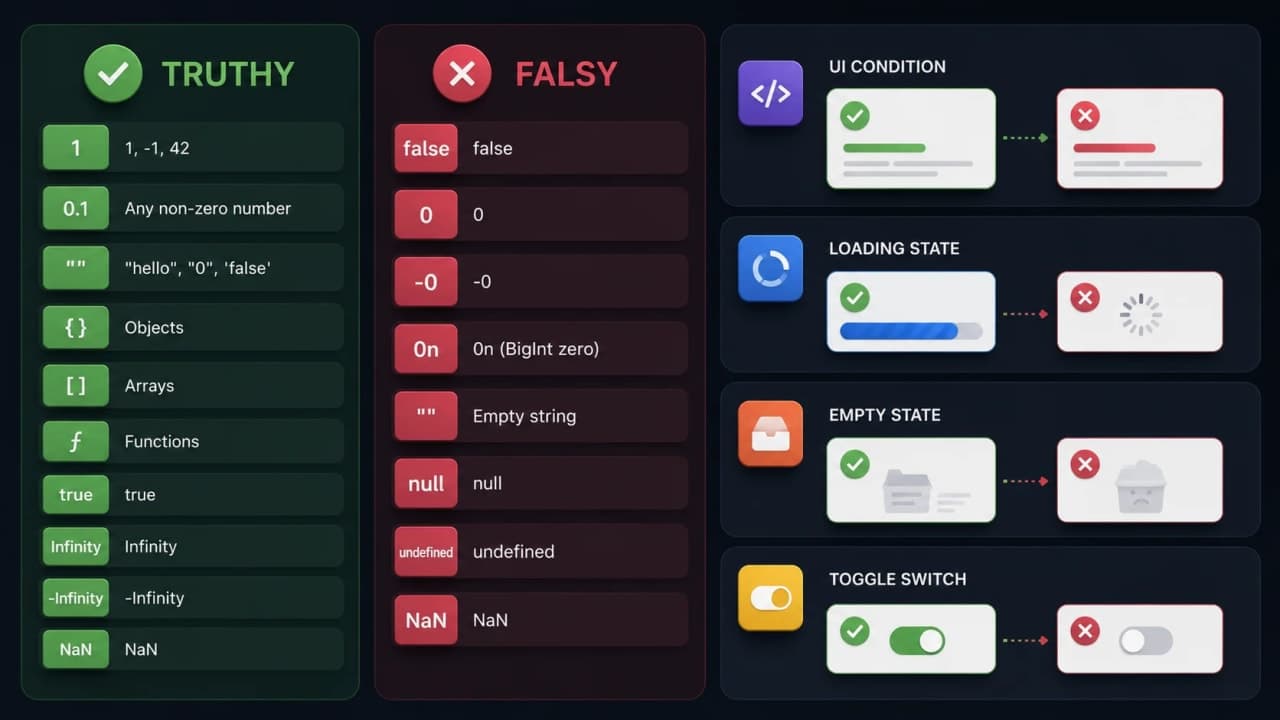
Logical operators often work with truthy and falsy values, not just true and false.
Falsy values include false, 0, empty string, null, undefined, NaN, and 0n. Most other values are truthy.
const searchTerm = '';

if (searchTerm) {
  console.log('Run search');
} else {
  console.log('Ask user to type something');
}
Because an empty string is falsy, JavaScript goes to the else branch.
Short-Circuit Evaluation: A Frontend Favorite
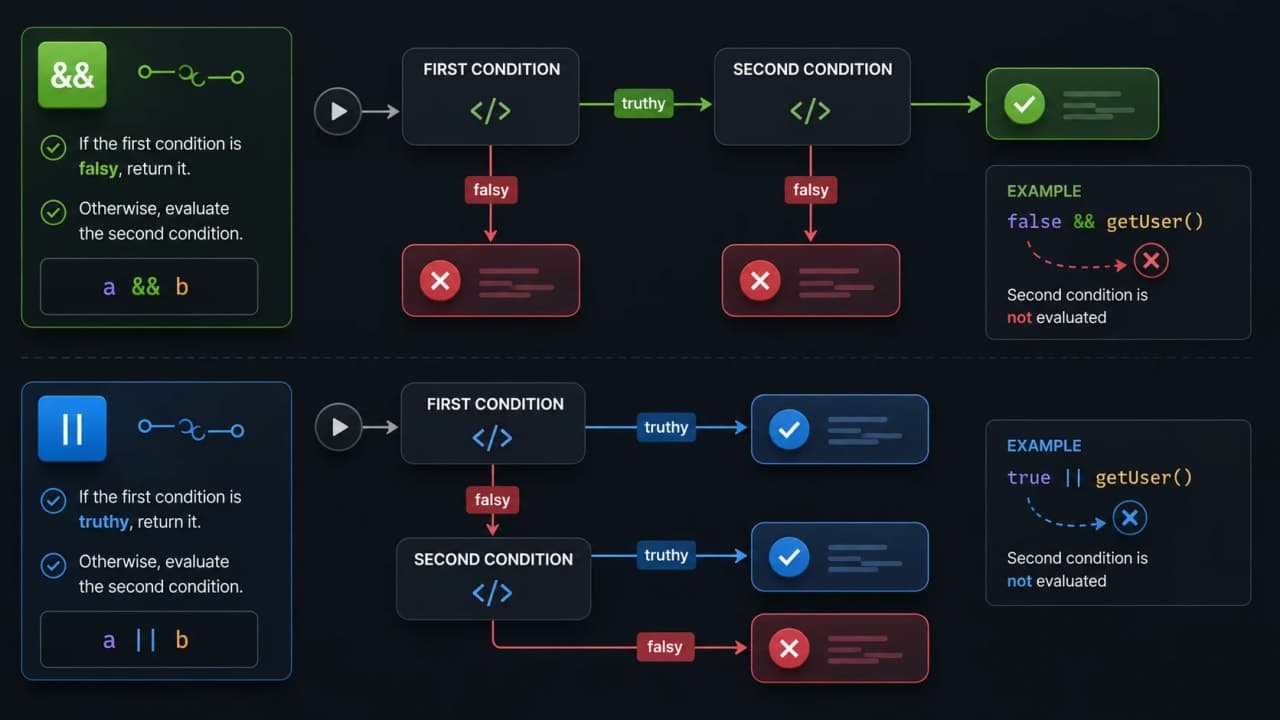
Short-circuit evaluation means JavaScript stops reading a logical expression once it already knows the result.
Short-circuit with &&
const isLoggedIn = true;

isLoggedIn && console.log('Render profile menu');
If isLoggedIn is false, JavaScript does not run the second part. This pattern appears a lot in React conditional rendering.
const hasError = true;

const message = hasError && 'Something went wrong';

console.log(message); // Something went wrong
Short-circuit with ||
const displayName = '';
const fallbackName = displayName || 'Guest User';

console.log(fallbackName); // Guest User
This looks useful, but it can also hide valid falsy values like 0. That is where nullish coalescing becomes better.
The Ternary Operator
The ternary operator is a shorter way to choose between two values.
const isPublished = true;
const label = isPublished ? 'Published' : 'Draft';

console.log(label); // Published
This is very common in UI labels, button text, CSS class decisions, and small conditional values.
When ternary is helpful
const isSaving = false;
const buttonText = isSaving ? 'Saving...' : 'Save article';

console.log(buttonText);
When ternary becomes painful
const label = isLoading ? 'Loading' : hasError ? 'Error' : isEmpty ? 'Empty' : 'Ready';This works, but it is not kind to the next developer. If the logic has more than two clear branches, use if/else or a small helper function.
Nullish Coalescing: Safer Fallbacks With ??
The nullish coalescing operator ?? gives a fallback only when the left side is null or undefined.
const count = 0;

console.log(count || 10); // 10
console.log(count ?? 10); // 0
This is important. 0 may be a valid value. Empty string may be a valid value. false may be a valid value. The || operator treats all falsy values as fallback-worthy. ?? only falls back for null or undefined.
API example
const article = {
  views: 0,
  authorName: null
};

const views = article.views ?? 'No views yet';
const author = article.authorName ?? 'Unknown author';

console.log(views); // 0
console.log(author); // Unknown author
Real-world observation: ?? is very useful in dashboards, counters, analytics, and API-heavy pages where zero is meaningful.
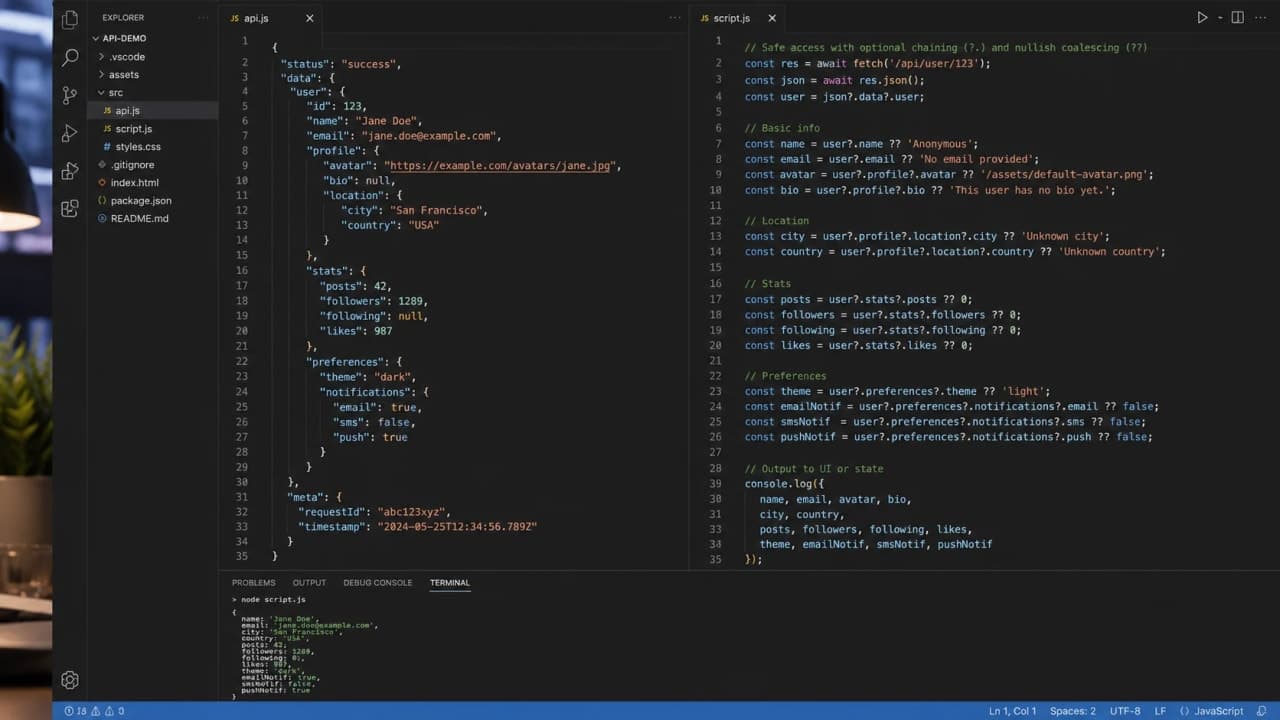
Optional Chaining: Safe Access With ?.
Optional chaining helps you safely read nested values that may not exist.
const response = {
  user: null
};

console.log(response.user?.profile?.image); // undefined
Without optional chaining, this code could crash because user is null.
Frontend API handling
const article = {
  author: {
    name: 'Siddhant'
  }
};

const authorName = article.author?.name ?? 'Guest author';

console.log(authorName); // Siddhant
Optional chaining and nullish coalescing work beautifully together. One safely reads the value. The other gives a sensible fallback.
The typeof Operator
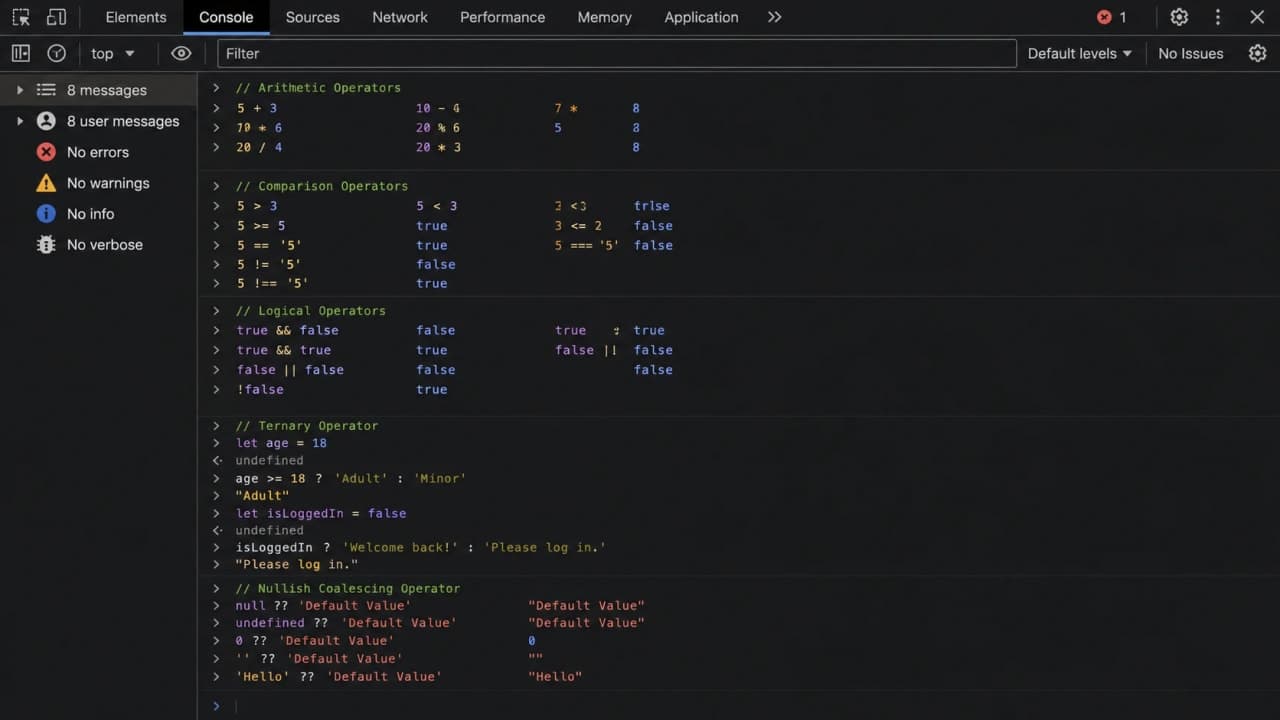
typeof tells you the type of a value. It is useful when debugging browser console output or checking uncertain API values.
console.log(typeof 'hello'); // string
console.log(typeof 25); // number
console.log(typeof true); // boolean
console.log(typeof undefined); // undefined
console.log(typeof null); // object
console.log(typeof []); // object
console.log(typeof function () {}); // function
Two classic surprises: typeof null is object, and typeof array is object. For arrays, use Array.isArray. For null, compare directly with value === null.
Operator Precedence: What Runs First?
Operator precedence means JavaScript has rules for which operator runs first in a larger expression.
const result = 10 + 5 * 2;

console.log(result); // 20, not 30
Multiplication runs before addition. This is normal math behavior, but in code it can become harder to read when expressions grow.
My practical advice: when in doubt, use parentheses. They make your intention obvious.
const result = (10 + 5) * 2;

console.log(result); // 30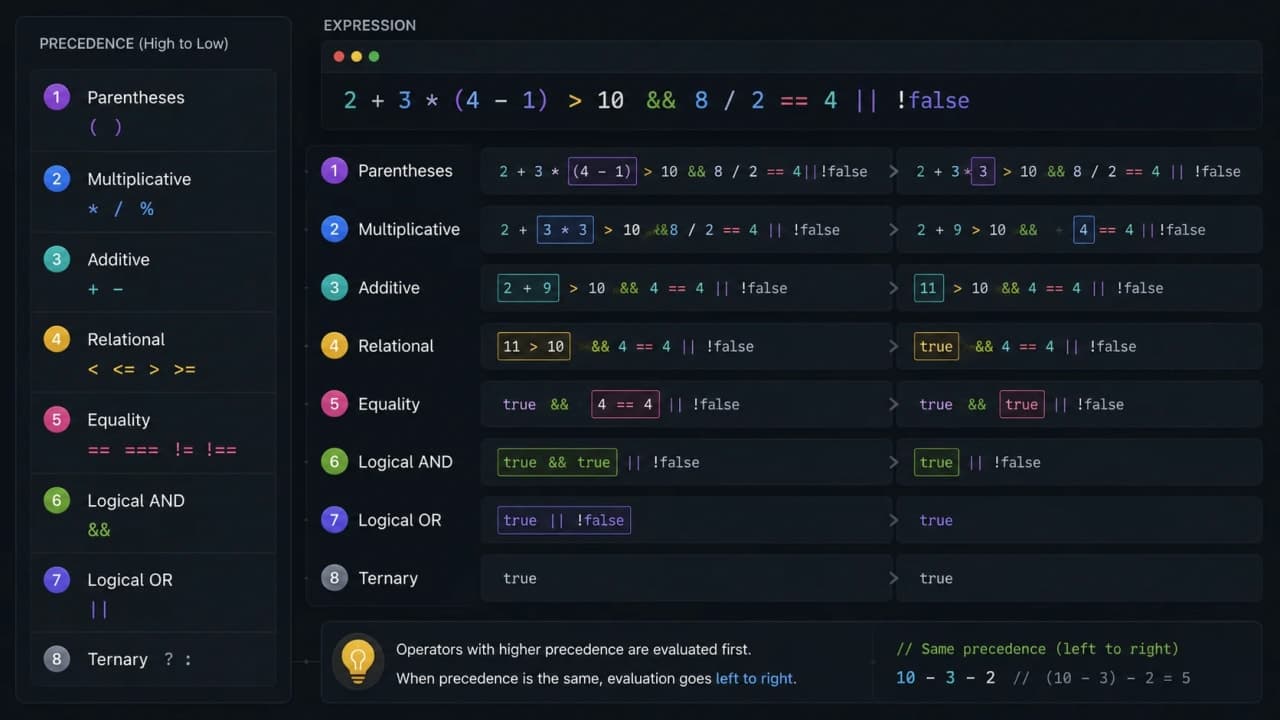
Common Beginner Mistakes
Using == instead of ===
Loose equality can create confusing type conversion. Use strict equality by default.
Confusing || with ??
Use || when any falsy value should trigger a fallback. Use ?? when only null or undefined should trigger a fallback.
Writing unreadable ternary chains
A ternary is great for a small either/or decision. For complex branching, use clear if/else logic.
Forgetting truthy and falsy behavior
Empty strings, 0, null, and undefined behave differently in UI conditions. Check the exact value you care about.
Ignoring operator precedence
If a condition or calculation looks too clever, add parentheses or split it into named variables.
How Operators Affect Real Frontend Development
Operators are everywhere in frontend work. React rendering uses comparisons and logical checks. API handling uses optional chaining, nullish coalescing, and strict equality. Form validation uses logical operators. Authentication checks use && and ||. Filtering data uses comparisons. State updates often use arithmetic or assignment patterns.
const articles = [
  { title: 'Operators', category: 'Dev Diaries', published: true },
  { title: 'Draft Notes', category: 'Dev Diaries', published: false }
];

const publishedArticles = articles.filter((article) => {
  return article.category === 'Dev Diaries' && article.published === true;
});

console.log(publishedArticles);
This is not abstract theory. This is the kind of logic that decides what users see on a real page.
const isLoading = false;
const error = null;
const data = [{ id: 1, title: 'JavaScript Operators' }];

if (isLoading) {
  console.log('Show loader');
} else if (error) {
  console.log('Show error message');
} else if (data.length === 0) {
  console.log('Show empty state');
} else {
  console.log('Render list');
}
In production UI, these tiny checks decide whether the user sees confidence or confusion.
Practice Task
Open your browser console and try these small exercises before moving to the next topic. Operators become much clearer when you test them yourself.
Open the browser console and compare 5 == "5" with 5 === "5".
Try 0 || 10 and 0 ?? 10, then explain why the output is different.
Create a small loading/error/empty/list condition using if/else.
console.log(5 == '5');
console.log(5 === '5');
console.log(0 || 10);
console.log(0 ?? 10);

const user = { profile: null };
console.log(user.profile?.image ?? 'No image yet');
Interview Questions
What is the difference between == and === in JavaScript?
How does short-circuit evaluation work with && and ||?
What problem does the nullish coalescing operator solve?
Why is optional chaining useful when handling API responses?
Final Thoughts
JavaScript operators look small, but they carry a lot of responsibility. They calculate totals, compare values, combine conditions, protect your UI from missing API data, and decide what appears on the screen.
If you are a beginner, do not try to memorize every operator in one sitting. Open the browser console and experiment. Compare 5 == "5" and 5 === "5". Try 0 || 10 and 0 ?? 10. Try optional chaining on an object where a nested field is missing. Watch what JavaScript does.
That practice will make operators feel less like symbols and more like tools.
After this, a natural next step is conditions, loops, functions, and arrays. Operators are the bridge into all of them because they help your code ask questions and choose actions.
Take it slowly. Logic becomes clearer one small expression at a time.
Lock in the takeaway
JavaScript Dev Diaries

Frequently asked questions
What are operators in JavaScript?
Operators are symbols or keywords that tell JavaScript to perform actions with values, such as calculating totals, comparing values, checking conditions, or choosing fallback UI text.
Should beginners use == or === in JavaScript?
Beginners should use === by default because it checks both value and type. Loose equality with == can convert types behind the scenes and create confusing bugs.
What is short-circuit evaluation in JavaScript?
Short-circuit evaluation means JavaScript stops reading a logical expression once it already knows the result. It is commonly used in React-style conditional rendering and fallback logic.
When should I use ?? instead of ||?
Use ?? when you only want a fallback for null or undefined. This protects valid falsy values like 0, false, and an empty string from being replaced accidentally.