
Listen to this article
Checking audio support
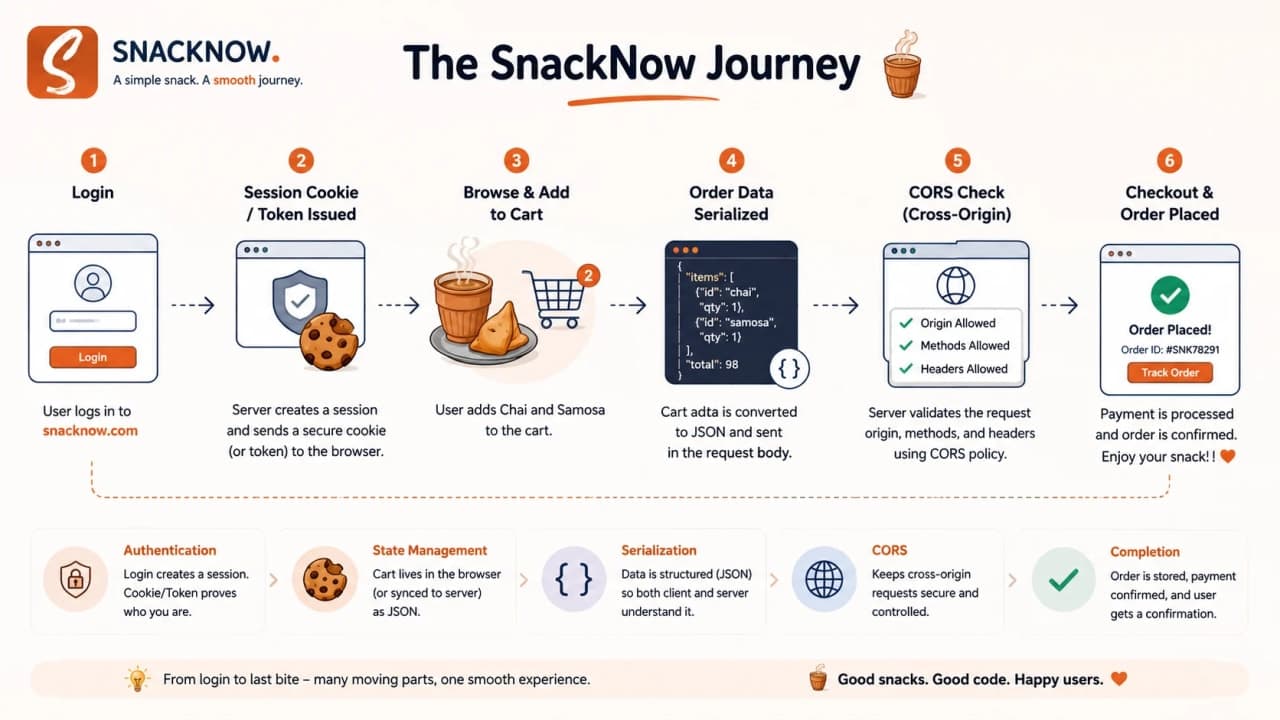
At 6 PM, Riya opens SnackNow with a very normal plan: order chai, two samosas, maybe one sandwich if the day has been dramatic enough. She logs in, adds items to the cart, applies a coupon, chooses her address, and taps place order.
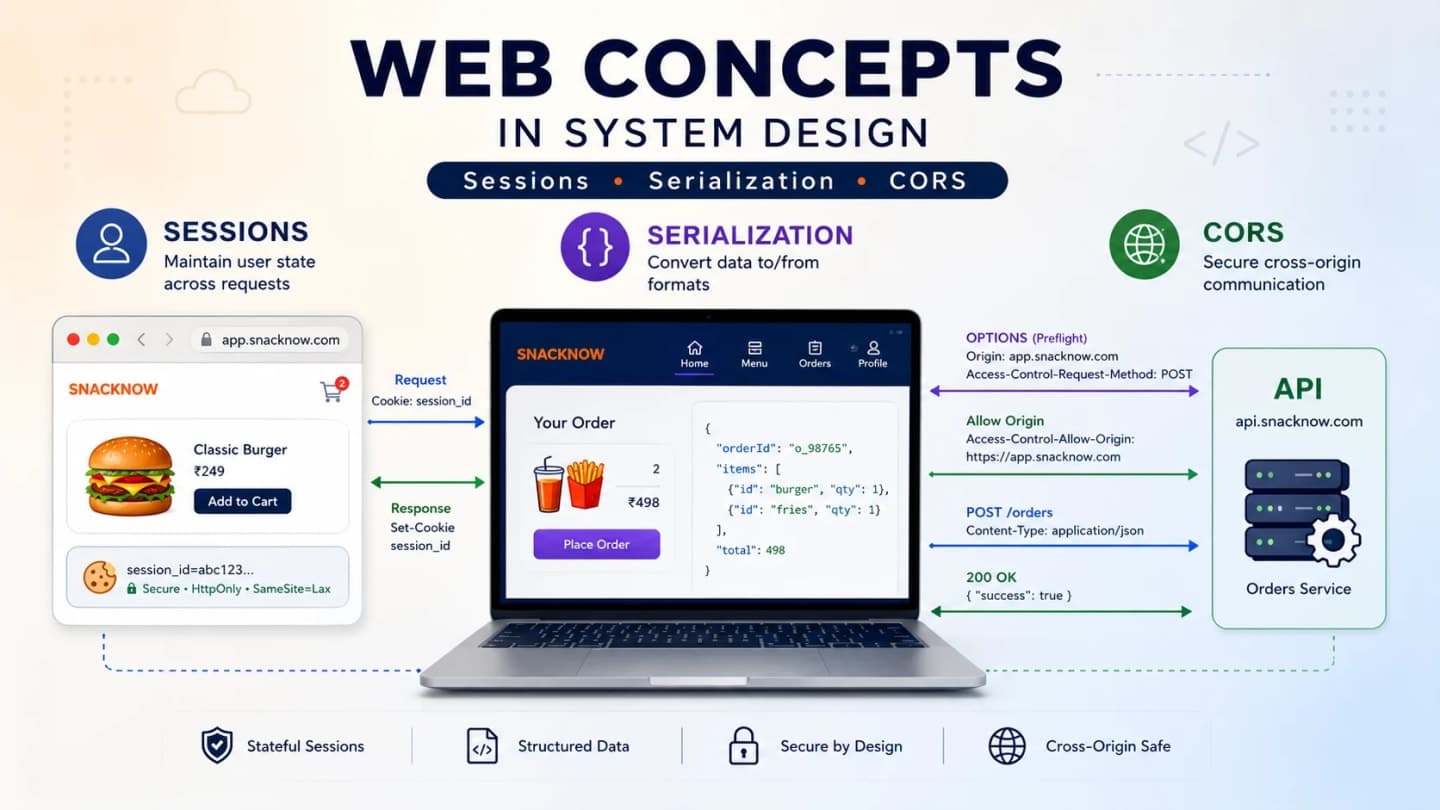
To Riya, this feels simple. To the system, it is a small obstacle course. The server must remember her, the browser and backend must exchange structured data, and the browser must decide whether the frontend is allowed to read the API response.
Modern web apps feel smooth because engineers solve invisible web problems before users notice them. We are not going to memorize a glossary. We are going to follow Riya until the system breaks, then fix each break with the concept that actually belongs there.
1. Riya Opens SnackNow at 6 PM
SnackNow begins as a small food-ordering website. It has chai, samosa, sandwich, poha, momos, and cold coffee. Very ambitious menu, very regular evening hunger. Riya signs in, adds snacks, changes quantity, applies EVENING10, picks her office address, and expects the app to behave like every modern app she uses.
Behind that ordinary journey, three problems are waiting. First, HTTP does not automatically remember her between requests. Second, the cart object inside the app cannot travel through the network as a raw in-memory object. Third, when SnackNow later hosts the frontend and backend on different origins, the browser blocks some calls for safety.
The story works only if we keep the staircase in order. We start with memory, then data travel, then browser security. If we jump straight to JWT, Protobuf, and CORS headers, beginners get that familiar feeling: haan words toh samajh aa rahe hain, but picture nahi ban rahi.
Hidden problem | Where Riya notices it | Concept that solves it |
|---|---|---|
The server forgets her | Login works, but cart or checkout acts like a stranger | HTTP statelessness, cookies, sessions, tokens |
The order cannot travel as an object | Frontend and backend need a shared data format | Serialization and deserialization |
The browser blocks the API call | Frontend and API live on different origins | Same-Origin Policy, CORS, preflight |
Checkpoint: We have one app, one user, and three invisible web problems. Every concept below appears because SnackNow actually needs it.
2. The First Bug: SnackNow Forgets Riya
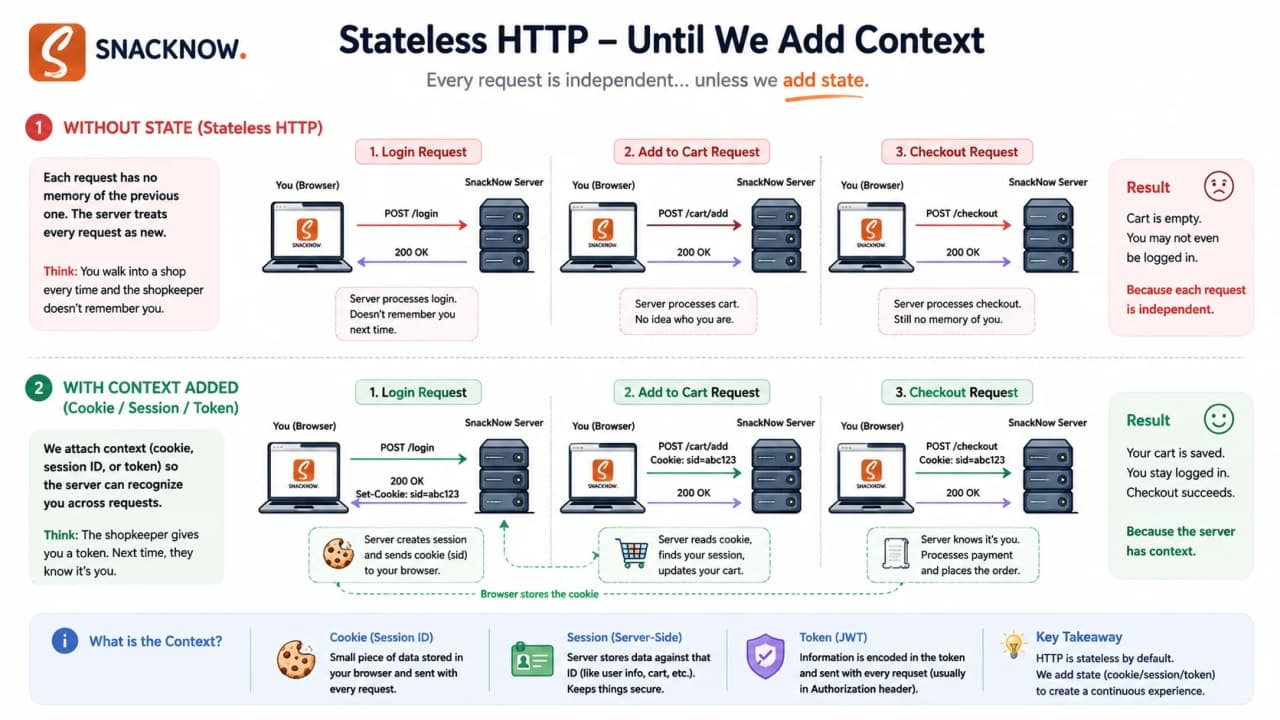
Riya logs in successfully. The page says, Welcome back, Riya. Then she clicks Add Samosa. The browser sends another request to the server. The server receives that request and, by default, it does not magically know it came after login. It sees a new request.
This is HTTP statelessness. The word sounds heavy, but the idea is simple: each HTTP request is independent unless the app adds some way to carry or reference memory.
Stateless means the protocol does not remember previous interactions automatically. It does not mean the application has no database. It means every request must bring enough context for the server to process it correctly.
Need | Why stateless HTTP struggles | SnackNow example |
|---|---|---|
Login | A later request does not automatically know the previous login request | Add to cart needs to know this is Riya |
Cart | Cart items are built across many requests | Chai added first, samosa added later |
Address | Checkout needs a selected address from earlier steps | Office address must remain selected |
Preferences | User choices span sessions | Dark mode or veg-only filter |
Checkout | Payment and order creation need identity and cart state | Place order cannot happen for an unknown user |
Admin access | Role must persist across pages | Admin APIs must not treat everyone as guest |
Request 1: POST /login
Request 2: POST /cart/items
Request 3: GET /cart
Request 4: POST /checkout

Without state, each request arrives like a stranger carrying no memory of the previous one.
The snippet is not code to run. It is the shape of the problem. Request 1 may authenticate Riya, but Request 2 still needs proof that it belongs to the same person. Request 3 needs the cart. Request 4 needs identity, cart, address, coupon, and permissions.
Warning: Do not say stateless means the server cannot store anything. A server can store databases, sessions, caches, and logs. Stateless HTTP means the protocol itself does not tie requests together.
Interview-ready answer: HTTP is stateless because the server treats each request independently. Web apps maintain continuity by adding state mechanisms such as cookies, server-side sessions, tokens, and storage.
Checkpoint: HTTP forgets by default. SnackNow needs a designed memory layer before login, cart, and checkout can feel continuous.
3. State: The Memory SnackNow Has to Design
The fix begins with a small word: state. State is any information the app needs to remember across requests. Riya is logged in. Her cart contains chai and samosa. Her address is selected. Her coupon is applied. Her role is customer, not admin. Her mobile app may need the same identity later.
SnackNow has two broad choices. It can store the real memory on the server and give the browser only a reference. Or it can give the client a verifiable token that carries useful identity claims. Both are valid. Both can be misused. That is why this topic causes so much interview confusion.
State type | Stored where? | SnackNow example | Risk |
|---|---|---|---|
Cookie | Browser | session_id=abc123 sent automatically | Can be overused or poorly flagged |
Server-side session | Server/session store | Riya's userId, role, login time | Needs shared storage when scaling |
JWT/token | Client carries token; server verifies | Bearer token for mobile API | Harder revocation and unsafe payload mistakes |
LocalStorage | Browser JavaScript storage | Non-sensitive UI preference | Readable by JavaScript, XSS risk |
SessionStorage | Browser tab storage | Temporary checkout step state | Lost when tab closes |
This is where many beginners mix words. A cookie is a browser storage and transport mechanism. A session is server-side memory linked to a user. A token is proof or authorization data the client sends with requests. They can work together, but they are not the same object wearing different hats.
Tip: When explaining state in interviews, separate storage location from purpose. Where is it stored? What does it prove? Who can read it? Who can revoke it?
Checkpoint: State is the memory SnackNow adds on top of stateless HTTP. Cookies, sessions, tokens, and browser storage are different tools, not synonyms.
4. Cookies: The Browser's Small Pocket Note
After Riya logs in, SnackNow can hand her browser a small note. Not a snack, sadly. A cookie. The browser stores it and automatically sends it back with matching future requests.
A cookie can store many things, but for authentication it usually stores a small reference like a session ID. The server sends it with Set-Cookie. Later, the browser sends it back with Cookie. Riya does not manually attach it. The browser handles that part.
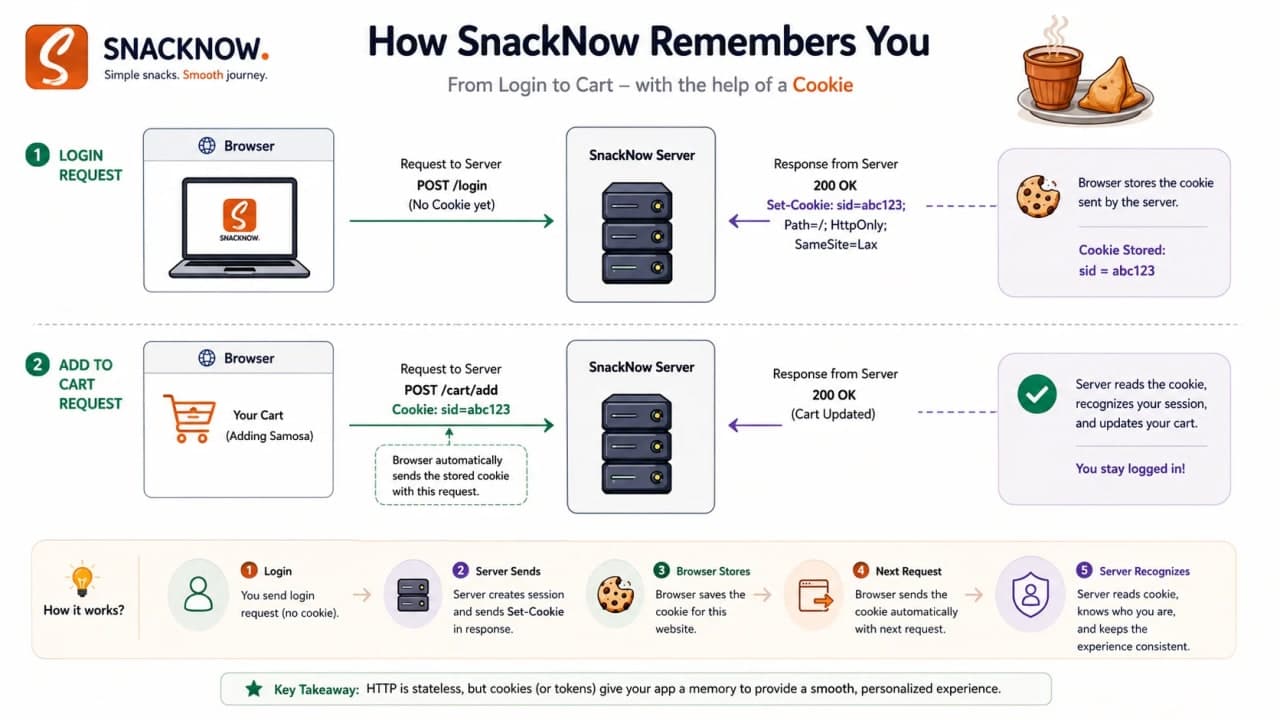
HTTP/1.1 200 OK
Set-Cookie: session_id=abc123; Secure; HttpOnly; SameSite=Lax
The first line says the login response succeeded. Set-Cookie tells the browser to store a cookie. session_id=abc123 is the name and value. Secure tells the browser to send it only over HTTPS. HttpOnly keeps JavaScript from reading it. SameSite=Lax limits when it is sent on cross-site requests.
GET /cart HTTP/1.1
Host: snacknow.com
Cookie: session_id=abc123
Now the server sees the cookie and can look up Riya's session. The browser's pocket note does not have to contain the whole user profile. In fact, it should not.
Cookie attribute | Meaning | SnackNow example | Security value |
|---|---|---|---|
Name/value | The actual cookie key and value | session_id=abc123 | Reference to session or preference |
Domain | Which hosts receive it | snacknow.com | Prevents broad accidental sharing when scoped carefully |
Path | Which paths receive it | / | Can restrict cookie to part of the site |
Expires/Max-Age | When it expires | 1 hour session | Limits damage from old cookies |
Secure | Only over HTTPS | Checkout cookie never over HTTP | Reduces network theft |
HttpOnly | JavaScript cannot read it | session_id hidden from document.cookie | Reduces XSS cookie theft |
SameSite | Controls cross-site sending | Lax or Strict for session cookie | Helps reduce CSRF |
A cookie is only safe when its contents, scope, lifetime, and security attributes are designed intentionally.
Warning: Do not store raw passwords, card details, or secret profile data directly in cookies. If the browser carries it, assume it needs careful protection.
Interview-ready answer: A cookie is a small browser-stored value automatically sent with matching HTTP requests. In session authentication, it often carries only a session ID, while real session data stays server-side.
Checkpoint: Cookies carry small notes between browser and server. They can help SnackNow recognize Riya, but they need proper flags and minimal sensitive data.
5. Server-Side Sessions: The Real File Stays at the Counter
SnackNow now chooses a traditional web-app approach: keep Riya's real login memory on the server. The browser carries only a file number. The real file stays at the counter.
That is server-side session authentication. The server stores session data such as user ID, role, login time, and maybe device metadata. The browser stores only the session ID, usually in a cookie. On each request, the server uses the ID to retrieve the session data.
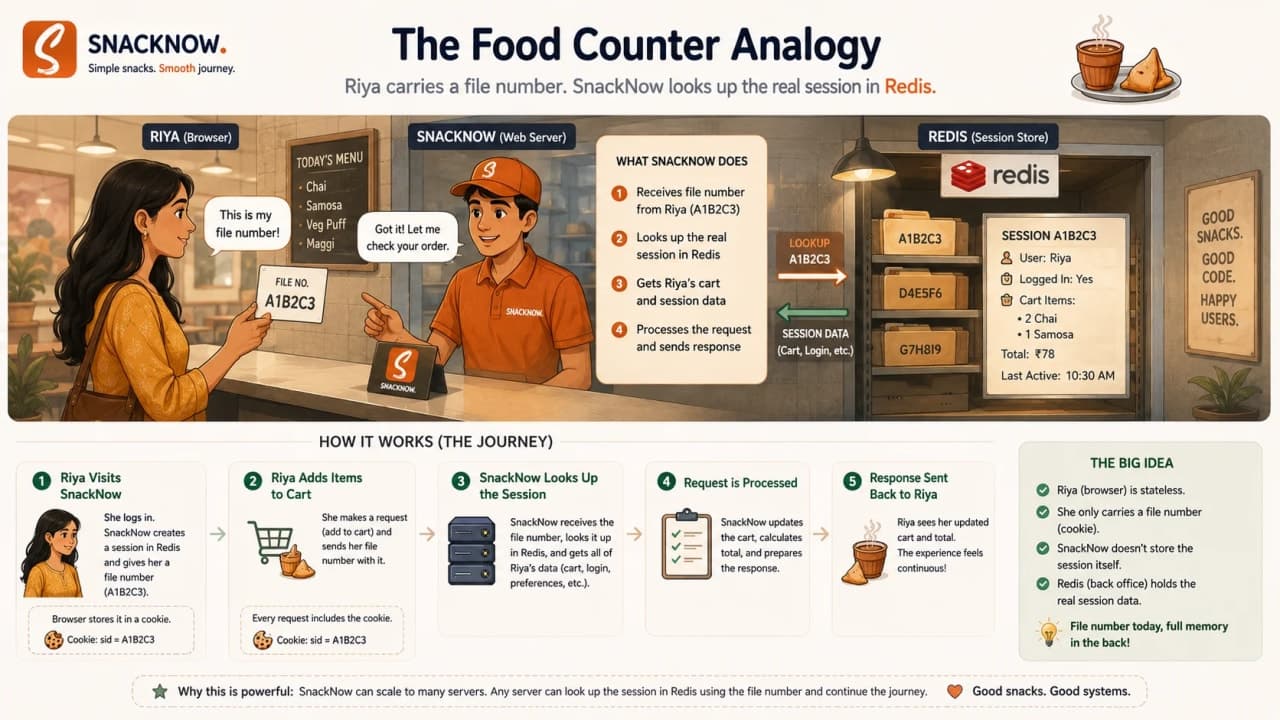
Riya submits login credentials.
SnackNow validates them.
Server creates a session record.
Server sends a session ID cookie.
Browser sends that cookie on future requests.
Server looks up the session and processes the request as Riya.
Part | Who stores it? | What it contains | SnackNow example |
|---|---|---|---|
Session ID | Browser cookie | Opaque reference | abc123 |
Session data | Server/session store | User ID, role, login timestamp | Riya/customer/login at 6:02 PM |
Cookie | Browser | Transport for session ID | Cookie: session_id=abc123 |
Session store | Server memory, DB, Redis, Memcached | Actual lookup table | abc123 -> user_riya |
The advantage is control. SnackNow can revoke a session, expire it, rotate it after login, and keep sensitive details off the client. The cost is storage. If every logged-in user has a session record, the backend must store and retrieve that record reliably.
Storage option | Benefit | Problem | Best fit |
|---|---|---|---|
Server memory | Very simple | Breaks across multiple servers | Tiny single-server app |
Database | Durable and queryable | Can add latency and DB load | Moderate systems needing persistence |
Redis | Fast shared session store | Needs operational monitoring | Scaled web apps |
Memcached | Fast distributed cache | Less persistence/control | Simple high-speed session caching |
Warning: If sessions live only in one server's memory, a load-balanced request to another server may make Riya look logged out.
Interview-ready answer: Server-side sessions store user state on the server and send only a session ID to the client, usually through an HttpOnly Secure cookie. They are easy to revoke but require shared storage when scaling.
Checkpoint: Server-side sessions make SnackNow remember Riya by keeping real memory on the backend and letting the browser carry only a lookup key.
6. JWT and Token-Based Auth: A Signed Pass Riya Carries
SnackNow grows. It adds a mobile app, partner coupons, and internal APIs. Some teams now prefer not to look up a server session on every request. They want the client to carry proof that can be verified by the API.
That introduces token-based authentication. A token is a credential the client sends with future requests. A common token format is JWT, or JSON Web Token. A JWT usually has three parts: header, payload, and signature.
A JWT is signed proof, not a secret diary. Its payload is encoded, not automatically hidden. If you put sensitive secrets inside an ordinary signed JWT payload, you have misunderstood the tool.
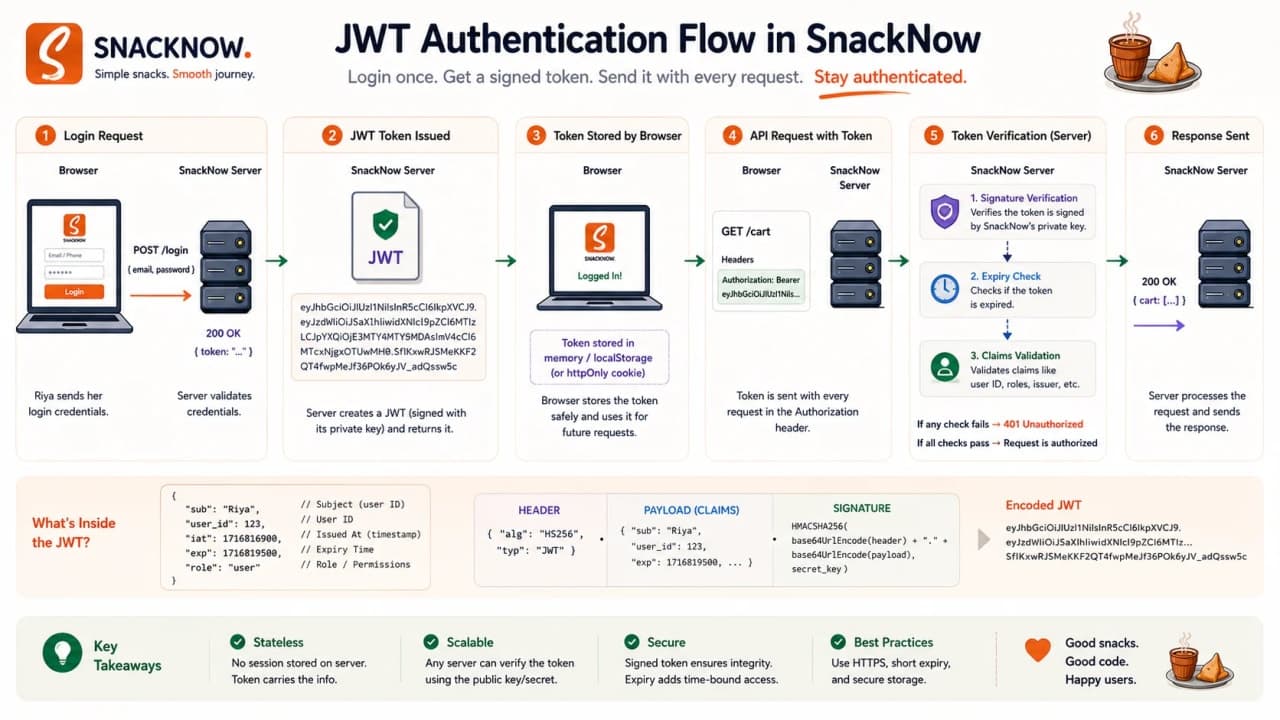
header.payload.signature{
"user_id": "user_123",
"role": "customer",
"exp": 1730000000
}The header describes token type and signing algorithm. The payload contains claims, such as user ID, role, and expiry. The signature lets the server detect tampering. If someone changes customer to admin without the signing key, verification fails.
GET /orders/current HTTP/1.1
Host: api.snacknow.com
Authorization: Bearer eyJhbGciOi...
The request uses the Authorization header instead of automatically attached cookies. The API verifies the token signature and expiry before returning Riya's current order.
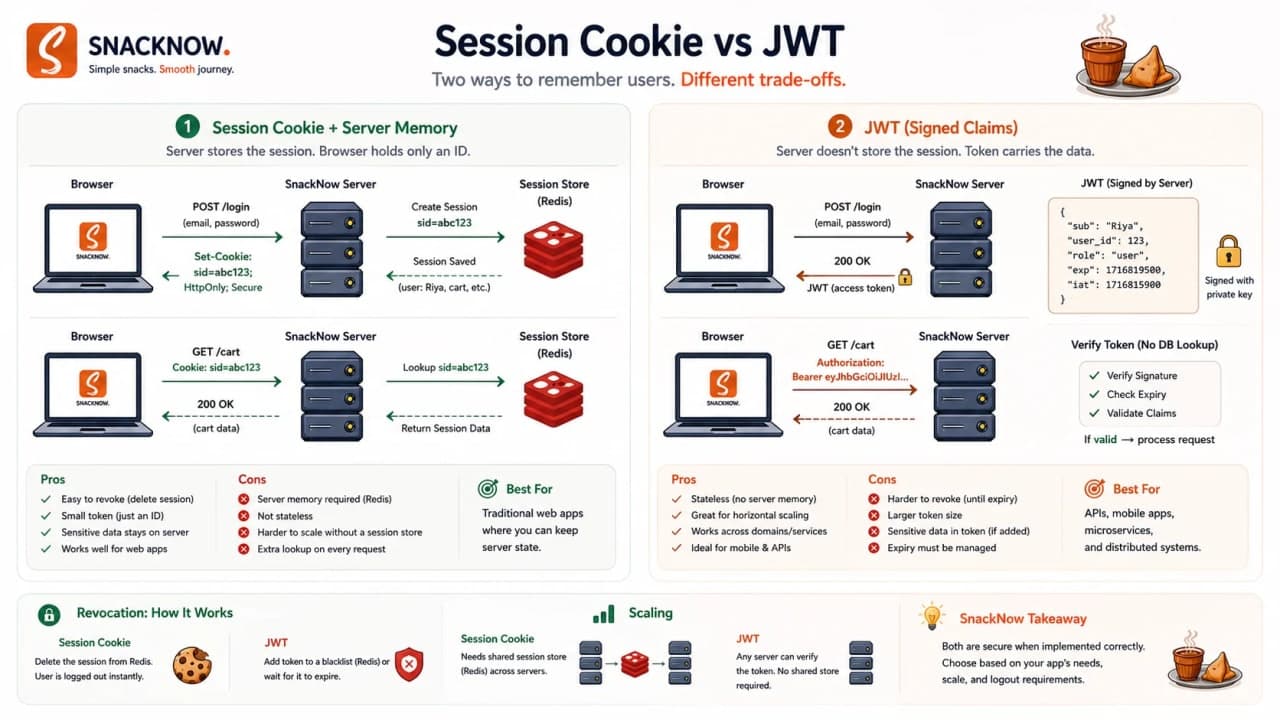
Feature | Server-side session | Token/JWT |
|---|---|---|
Storage | Session data stored server-side | Claims carried by client |
Scalability | Needs session lookup/shared store | API can verify without session lookup |
Revocation | Easy to delete server session | Harder unless you add blocklist/short expiry |
Security | Sensitive data can stay server-side | Payload must not contain secrets unless encrypted |
Best use | Traditional web apps, easy logout | APIs, mobile apps, cross-service auth |
Common risk | Unshared sessions behind load balancer | Long-lived tokens and unsafe storage |
Warning: Do not say JWT is always better. JWT solves some scaling and API problems, but it makes revocation, storage, expiry, and refresh-token design more important.
Interview-ready answer: Use JWT when stateless verification across APIs or services matters. Use server-side sessions when central control, revocation, and simpler browser auth are more important.
Checkpoint: Tokens let Riya carry signed proof. Sessions let SnackNow keep the real memory. The right choice depends on scale, revocation, clients, and security model.
7. OAuth: When SnackNow Lets Google Help With Login
One day SnackNow adds Continue with Google. Riya clicks it because nobody wants another password after 6 PM. This is where OAuth enters, but we should keep it practical.
OAuth is an authorization framework. In everyday login screens, it is often used as part of a sign-in flow, but the core idea is permission delegation: SnackNow does not need Riya's Google password. Google verifies Riya and issues tokens through a controlled flow.
Term | Plain meaning | SnackNow example |
|---|---|---|
Resource owner | The user who owns the account/data | Riya |
Client app | The app requesting access | SnackNow |
Authorization server | The provider that issues tokens | Google authorization server |
Resource server | API holding protected user info | Google profile API |
Access token | Short-lived permission credential | SnackNow uses it to fetch basic identity |
Refresh token | Credential to obtain new access tokens | Used carefully on backend/mobile flows |
Riya chooses Google login.
SnackNow redirects her to Google.
Google authenticates her and asks for consent when needed.
SnackNow receives an authorization result.
SnackNow exchanges it for tokens through the proper flow.
SnackNow creates its own app session or token for Riya.
Tip: For system design interviews, explain OAuth at the role and token level. Do not drown the answer in every grant type unless the interviewer asks.
Interview-ready answer: OAuth lets a client obtain limited authorization from an authorization server without handling the user's password directly. In SnackNow, Google can verify Riya, then SnackNow maps that identity to its own user/session.
Checkpoint: OAuth helps SnackNow delegate identity or resource access, but SnackNow still needs its own session/token strategy after the login flow.
8. Session Security: When a Tiny ID Becomes a Big Problem
Now the story gets serious. If someone steals Riya's session ID, SnackNow may treat the attacker as Riya. The server is not psychic. If the presented credential is valid, it looks valid unless we add protections.
Session hijacking happens when an attacker obtains a session ID or token and uses it to impersonate the user. CSRF happens when another site tricks Riya's browser into sending an authenticated request to SnackNow, often because cookies are attached automatically.
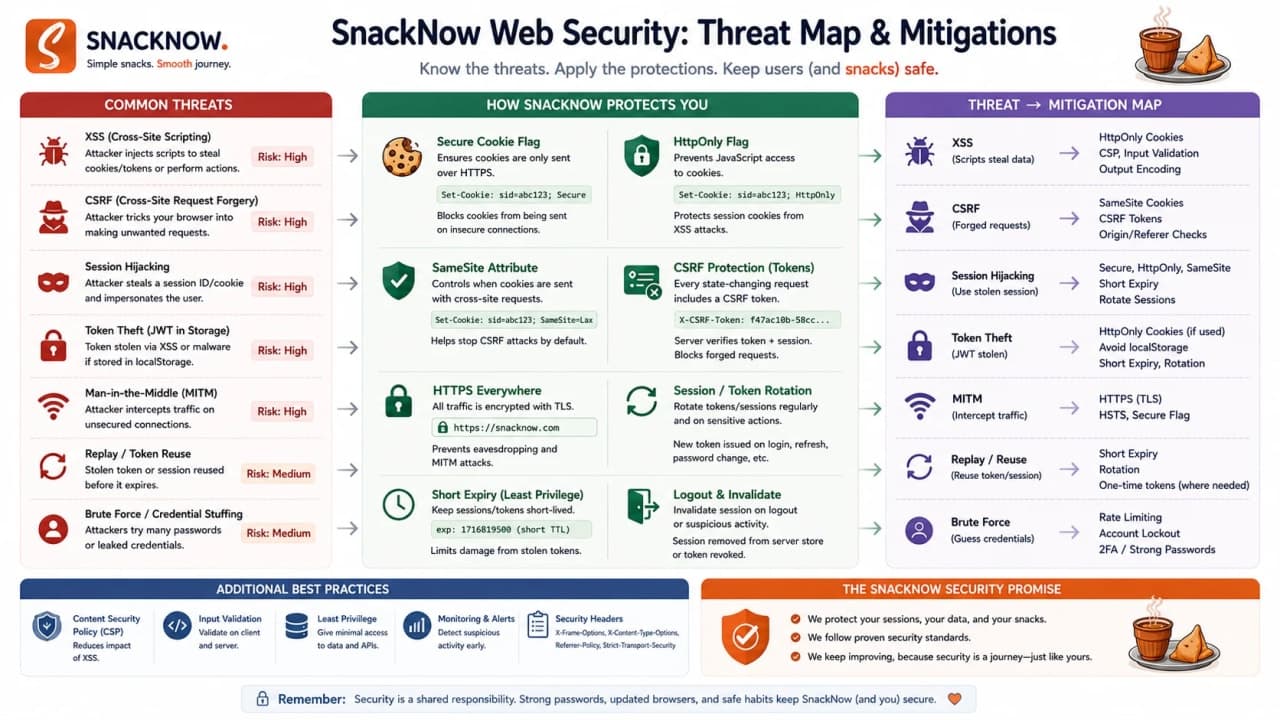
Imagine Riya is logged into SnackNow in one tab. In another tab, a malicious page tries to submit a request to change her delivery address or place an order. If SnackNow uses cookie-based auth and has no CSRF defense, the browser may attach the cookie. The malicious site cannot necessarily read the response, but the action may still happen.
Threat | What happens | SnackNow example | Mitigation |
|---|---|---|---|
Session hijacking | Attacker uses stolen session ID | Attacker sees Riya's orders | HTTPS, Secure, HttpOnly, rotation, short expiry |
CSRF | Browser sends authenticated request from another site | Malicious page submits address change | SameSite, CSRF token, Origin/Referer check |
XSS token theft | Injected script reads accessible token | Token in localStorage is stolen | Avoid sensitive tokens in JS-readable storage, fix XSS |
Token leakage | Token appears in logs, URLs, or third-party tools | Bearer token copied into error report | No tokens in URLs, careful logging, short expiry |
Long-lived sessions | Old credential remains useful | Lost phone stays logged in forever | Expiration, device management, re-auth for sensitive actions |
Authentication is not complete until storage, cookie flags, expiry, rotation, CSRF defense, and revocation are designed together.
Use HTTPS/TLS so credentials do not travel in clear text.
Set Secure and HttpOnly on sensitive cookies.
Use SameSite thoughtfully to reduce cross-site cookie risk.
Rotate session IDs after login and privilege change.
Use CSRF tokens or origin checks for state-changing cookie-auth requests.
Require re-authentication for payment, password, or address-sensitive changes.
Warning: CORS is not CSRF protection by itself. CSRF is about the browser sending an authenticated action; CORS mainly decides whether frontend JavaScript can read a cross-origin response.
Interview-ready answer: Session security means protecting the credential, limiting its lifetime, preventing forged state-changing requests, and giving the system a way to revoke or rotate access.
Checkpoint: Riya's memory layer is useful only if attackers cannot easily borrow it. Session design must include theft, forgery, expiry, and revocation.
9. Scaling Sessions: Riya Meets the Load Balancer
SnackNow becomes popular. Three backend servers now sit behind a load balancer. Riya logs in on Server 1. Her next cart request lands on Server 2. If the session lives only in Server 1 memory, Server 2 has no idea who she is. Riya gets logged out, and support gets one of those messages: It works sometimes.
There are three common fixes: sticky sessions, distributed sessions, and stateless tokens. Each is a tradeoff, not a magic answer.
The reason this bug feels confusing in real life is that nothing is broken for every user. Riya may refresh five times and stay logged in, then suddenly hit the one request that lands on the wrong server. That is why random logout bugs often survive basic testing. The system works while traffic is small, then the load balancer exposes an assumption the team did not know they had.
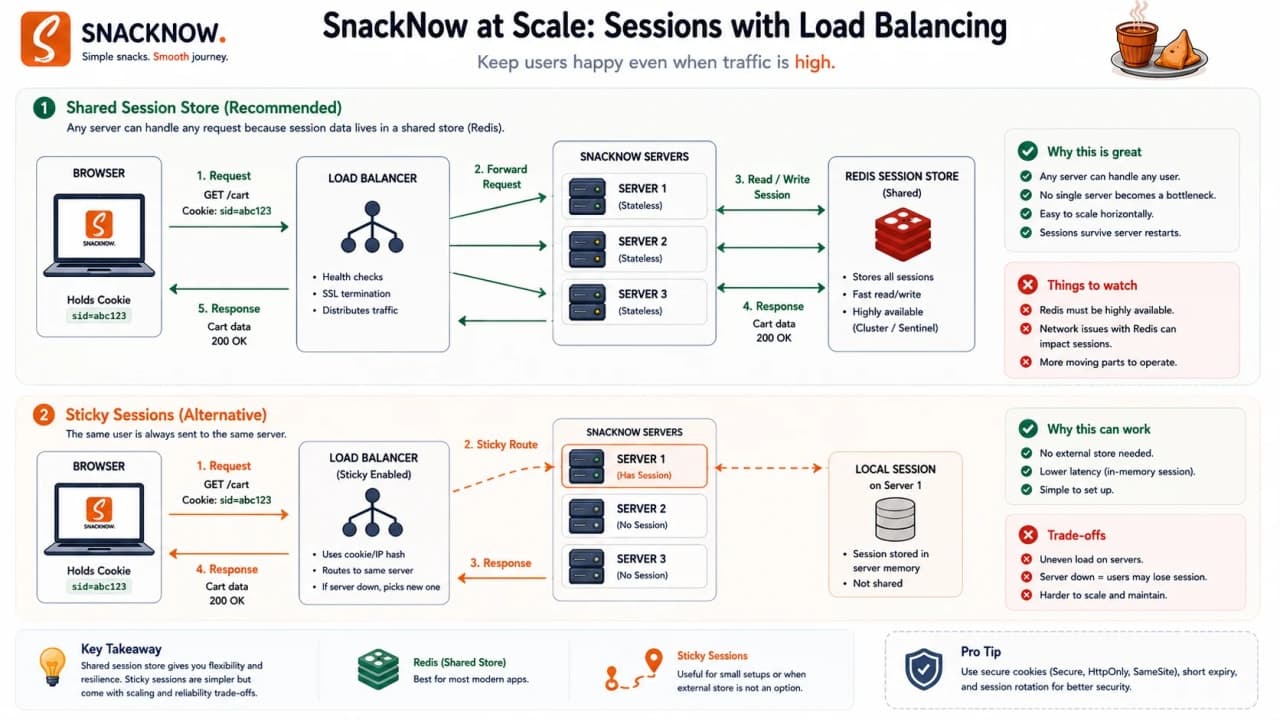
Scaling strategy | How it works | Benefit | Problem | Best use |
|---|---|---|---|---|
Sticky sessions | Load balancer sends Riya to the same server | Simple for legacy apps | Uneven load and server failure pain | Short-term/simple deployments |
Redis/Memcached session store | All servers read shared session state | Any server can handle request | Cache must be reliable and monitored | Scaled web apps |
Database session store | Sessions stored in durable DB | Persistence and queryability | Can add DB load | Lower traffic or audit-heavy sessions |
JWT/stateless token | Server verifies token without session lookup | Scales across APIs | Revocation and token lifetime become harder | Mobile APIs and service ecosystems |
In microservices, teams often use a central identity provider, OAuth/OpenID Connect style flows, short-lived access tokens, refresh tokens, API Gateway checks, and service-level token validation. But for a beginner, the core remains simple: many servers need either shared memory or verifiable proof.
A good design discussion should name the failure mode out loud. If Redis goes down, can everyone still check out? If a JWT is stolen, how quickly does it expire? If sticky sessions send too many hungry users to one server, does one machine become the evening bottleneck? These questions make the answer practical instead of theoretical.
For SnackNow's first real scale step, a shared session store is usually the easiest story to defend. The app keeps server-side control, Riya can be logged out quickly, and any backend server can recognize her. Later, when mobile APIs, partner integrations, or service-to-service calls become more important, tokens can join the design. The point is sequence: solve today's failure without pretending tomorrow's architecture is already needed.
Interview-ready answer: A load-balanced system handles sessions by using sticky sessions, a distributed session store like Redis/Memcached, database-backed sessions, or stateless tokens depending on fault tolerance, revocation, latency, and operational maturity.
Checkpoint: Scaling session memory means Riya should stay recognized even when different servers handle her requests.
10. Sessions in One Breath
HTTP forgets. Cookies carry small notes. Server-side sessions store real memory on the server. Tokens carry signed proof. Security decides whether that memory can be stolen. Scaling decides whether many servers can share or verify that memory.
SnackNow can now recognize Riya. But another problem immediately appears. Her cart is not just a word. It is structured data: user ID, items, quantity, price, coupon, address, payment status. How does that object travel from browser to backend without falling apart?
Checkpoint: We understand recognition now. Next we need data travel.
11. The Second Bug: The Order Object Cannot Travel as an Object
Inside the frontend, Riya's cart feels like a neat object. Inside the backend, the order becomes another object. But the network does not send live application objects with methods, memory pointers, and runtime behavior. It sends bytes.
Serialization is the process of converting a data structure into a format that can be transmitted or stored. Deserialization converts that format back into usable data on the other side.
Serialization is packing the order into a delivery box; deserialization is opening the box and rebuilding the order safely.
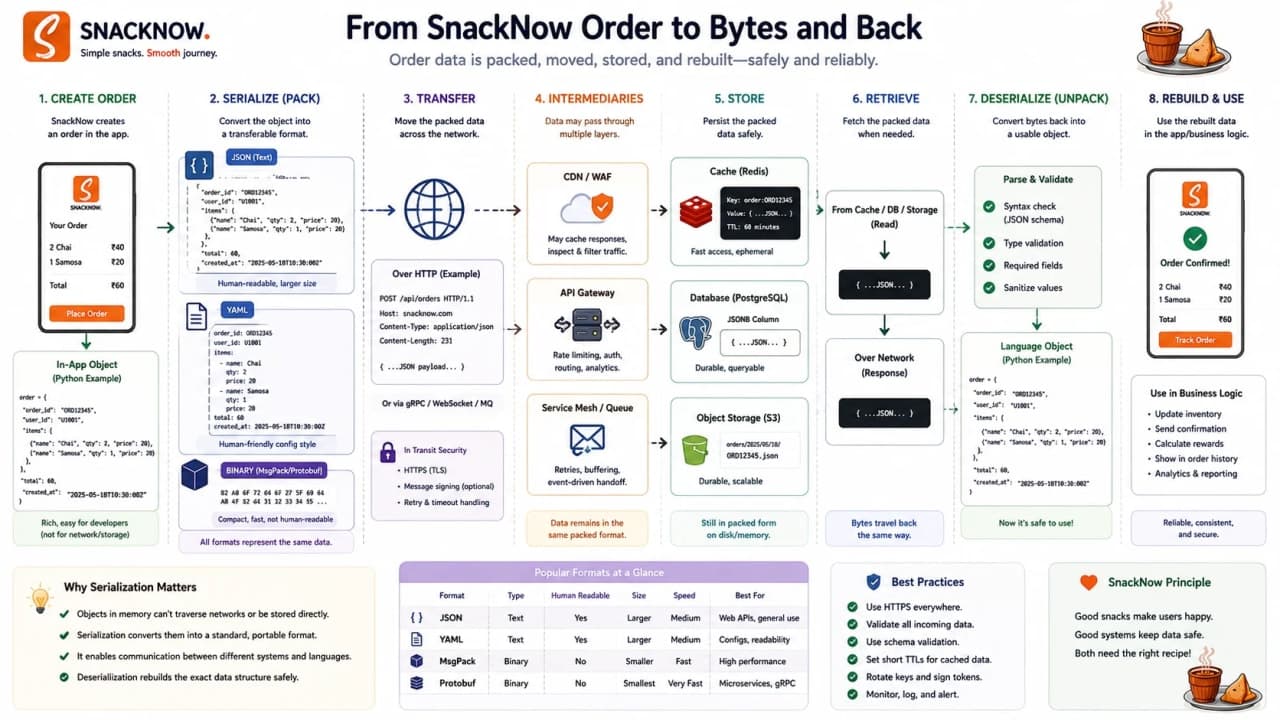
Application object
  -> serialize
  -> JSON / XML / Protobuf / Avro / BSON
  -> network / cache / database
  -> deserialize
  -> application object
The important word is safely. SnackNow does not only need data to travel. It needs the receiver to understand what arrived, validate it, reject nonsense, and avoid dangerous deserialization behavior.
This is the first place where many explanations get vague, so keep the picture concrete. The browser cannot send a JavaScript object as a living object. It cannot send object methods, memory addresses, or runtime references. It sends a text or binary representation. The backend parses that representation and builds its own backend object from it.
That means two teams are secretly making a contract. The frontend promises to send fields with certain names and shapes. The backend promises to interpret those fields in a specific way. If the frontend sends qty but the backend expects quantity, the network did not fail. The contract failed. Serialization makes the contract visible.
Step | Meaning | SnackNow example |
|---|---|---|
Object in memory | Runtime structure inside app | cart.items[0].quantity = 2 |
Serialize | Convert to transferable format | JSON body sent to API |
Transmit/store | Move through network/cache/database | POST /orders or Redis cache |
Deserialize | Parse back into usable data | Backend reads items and coupon |
Validate | Check shape and allowed values | Quantity must be positive |
Interview-ready answer: Serialization converts application data into a format that can travel or be stored; deserialization converts it back. In system design, this affects API performance, compatibility, caches, databases, and security.
How is it so far?
Vote with other readers
Checkpoint: Data must be packed before it travels. The format choice affects readability, speed, schema control, storage, and safety.
12. JSON: The Everyday Food Box of Web APIs
SnackNow's browser frontend sends the cart to the backend using JSON. JSON is popular because humans can read it, browsers understand it naturally, and REST APIs commonly use it.
{
  "user_id": "user_123",
  "items": [
    { "name": "Masala Chai", "quantity": 2 },
    { "name": "Samosa", "quantity": 4 }
  ],
  "coupon": "EVENING10"
}
The braces hold an object. user_id identifies Riya. items is a list. Each item has a name and quantity. coupon is the applied code. This is easy to debug, which matters when someone says the samosa count is wrong.
JSON strength | JSON weakness | SnackNow example |
|---|---|---|
Human-readable | Larger than binary formats | Easy to inspect cart payload |
Browser-friendly | No strict schema by default | Frontend and backend must validate |
Widely supported | Parsing can cost CPU at scale | REST APIs and admin dashboards |
Flexible | Type ambiguity can surprise teams | Number/date handling needs care |
JSON is a very good default for public web APIs. It starts struggling when payloads are huge, throughput is extreme, schemas need strict evolution, or internal services need very low latency.
Checkpoint: JSON is the practical default for SnackNow's browser API because it is readable, common, and easy to debug.
13. XML: The Older, More Formal Food Box
Then SnackNow integrates with an older invoice provider. The provider does not want JSON. It wants XML. This feels old-school, but enterprise systems have long memories. Some of them remember things from before Riya had a smartphone.
<order>
  <user_id>user_123</user_id>
  <item>
    <name>Masala Chai</name>
    <quantity>2</quantity>
  </item>
</order>
XML is tag-based, verbose, human-readable, and common in legacy systems, SOAP-style integrations, strict enterprise contracts, and configuration files. It can support schemas and validation, but the payloads are usually larger and noisier than JSON.
Feature | JSON | XML |
|---|---|---|
Readability | Readable and compact | Readable but verbose |
Size | Usually smaller | Usually larger due to tags |
Parsing speed | Often faster/simple in web APIs | Can be slower/heavier |
Schema support | Optional through JSON Schema and conventions | Strong historical schema support |
Common use | REST APIs, browser apps | SOAP, legacy enterprise, config |
Debugging | Easy in API tools | Readable but bulky |
Legacy support | Modern default | Still common in older integrations |
Warning: Do not dismiss XML as useless. In system design, legacy integrations are real. The mature answer is not trendy; it is compatible.
Checkpoint: XML is heavier than JSON but still useful when SnackNow talks to legacy or strict enterprise systems.
14. Protobuf: The Compact Sealed Packet
SnackNow gets busier. Internal services talk constantly: Order calls Payment, Payment notifies Notification, Menu talks to Inventory. JSON is readable, but sending repeated field names thousands of times per second starts to feel wasteful.
Protocol Buffers, or Protobuf, is a compact binary serialization format. It uses a schema, field types, and field numbers. It is common with gRPC and internal service-to-service communication where efficiency matters more than human readability.
message OrderItem {
  string name = 1;
  int32 quantity = 2;
}

message CreateOrderRequest {
  string user_id = 1;
  repeated OrderItem items = 2;
  string coupon = 3;
}
message defines a structure. string and int32 are field types. The numbers like 1 and 2 identify fields in the wire format. repeated means the field can appear multiple times, which fits cart items.
Feature | JSON | Protobuf |
|---|---|---|
Human-readable | Yes | No, binary |
Payload size | Larger | Smaller |
Speed | Good enough for many APIs | Usually faster for service calls |
Schema | Optional | Required |
Browser friendliness | Very high | Needs generated tooling |
Best use | Public APIs and debugging | Internal APIs, gRPC, high-throughput calls |
Debuggability | Easy to inspect | Harder without tools/schema |
Choose Protobuf when schema discipline and efficiency are worth the loss of easy human readability.
Checkpoint: Protobuf helps SnackNow reduce internal payload size and parsing overhead, but it requires schema discipline and tooling.
15. Avro: When Event Data Keeps Changing
SnackNow starts sending analytics events: OrderPlaced, PaymentCompleted, CouponApplied, DeliveryDelayed. A month later, the analytics team wants city. Then delivery type. Then coupon source. Event data keeps changing, but old consumers should not break every time the schema evolves.
Avro is a schema-based serialization system often used in big data and streaming pipelines. It is compact, supports schemas, and is especially known for schema evolution. That means producers and consumers can handle certain compatible changes over time.
{
  "type": "record",
  "name": "OrderPlaced",
  "fields": [
    { "name": "order_id", "type": "string" },
    { "name": "user_id", "type": "string" },
    { "name": "amount", "type": "double" },
    { "name": "city", "type": ["null", "string"], "default": null }
  ]
}
The schema names the event and its fields. Adding city with a default lets older consumers survive if they do not know that field yet. That is the practical value: a growing system can change data contracts without constantly breaking pipelines.
Need | Why Avro helps | SnackNow example |
|---|---|---|
Big data pipelines | Compact record serialization | Daily order analytics |
Schema evolution | Compatible field changes can be managed | Add city to OrderPlaced |
Streaming systems | Works well with event pipelines | Kafka-style analytics events |
Cross-language data | Schema communicates shape | Data team and backend share contract |
Checkpoint: Avro is useful when SnackNow's event data grows over time and many consumers need compatible schemas.
16. BSON: Why MongoDB Does Not Store Plain JSON Internally
SnackNow may store menu documents or flexible order metadata in MongoDB. The data looks JSON-like when developers query it, but MongoDB stores documents as BSON, Binary JSON.
BSON supports richer types such as ObjectId, Date, binary data, different numeric types, and Decimal128. It is designed for storage and traversal inside MongoDB, not as the default format for every web API.
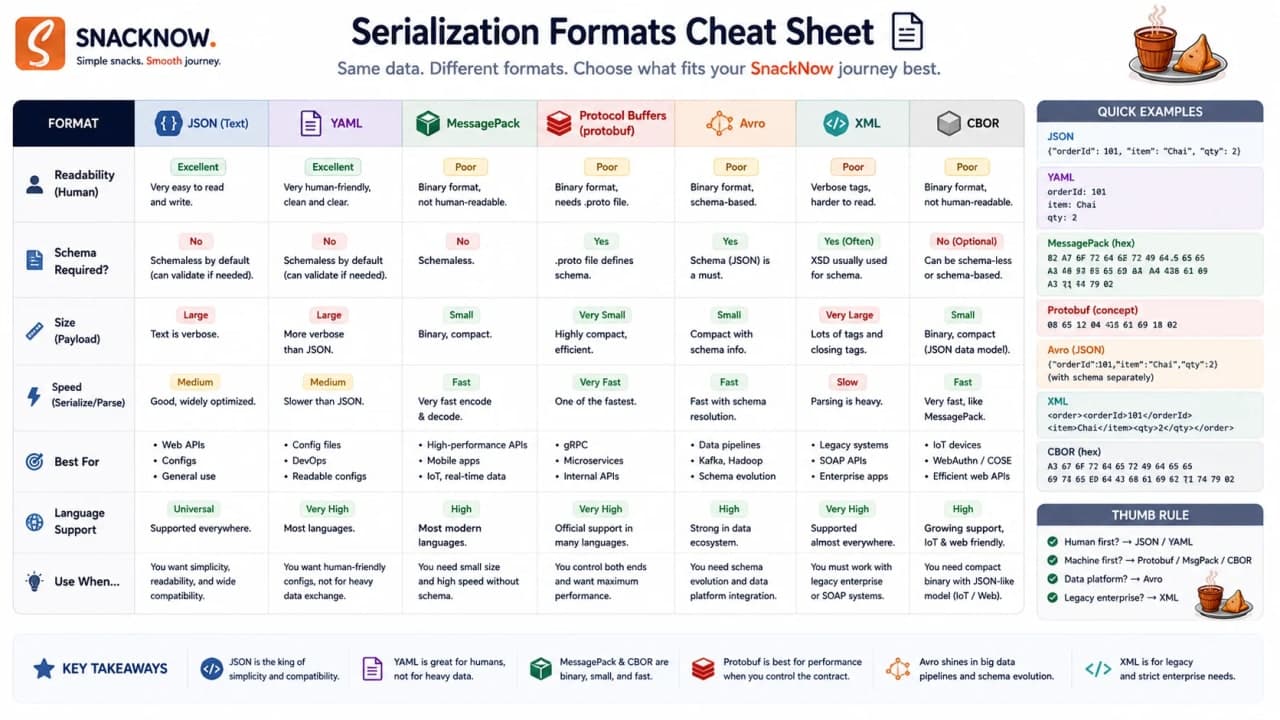
Format | Human-readable? | Schema required? | Common use | SnackNow example |
|---|---|---|---|---|
JSON | Yes | No by default | REST/browser APIs | Cart payload |
XML | Yes, verbose | Often schema-backed | Legacy enterprise/SOAP | Invoice provider |
Protobuf | No | Yes | gRPC/internal services | Payment request |
Avro | No usually | Yes | Streaming/big data | OrderPlaced analytics event |
BSON | No | Database type system | MongoDB documents | Menu document with ObjectId and Date |
Checkpoint: BSON is useful inside MongoDB because it stores JSON-like documents with richer binary data types.
17. Serialization Performance: The Cost of Packing the Box
SnackNow's order status API becomes popular. People keep refreshing. The mobile app polls. Customer support watches the same status. Now the team cares about payload size, CPU, memory, bandwidth, and compatibility.
Serialization format choice affects response time, transfer cost, parsing cost, storage size, schema compatibility, and debug speed. The trick is not to crown one winner. The trick is to choose based on the pressure.
Suppose the SnackNow team sees slow checkout. The beginner answer is, Use Protobuf. The senior answer is, Measure first. Maybe the payload is large because the frontend asks for the full menu on every cart update. Maybe the API returns unused fields. Maybe gzip would help. Maybe the database query is slow and serialization is not the problem at all.
Formats matter most after you know the bottleneck. If the browser API is small and needs easy debugging, JSON is still excellent. If the internal Payment service receives thousands of typed messages per second, Protobuf becomes more attractive. If analytics events evolve every week, Avro's schema evolution matters more than whether a developer can read the raw bytes casually.
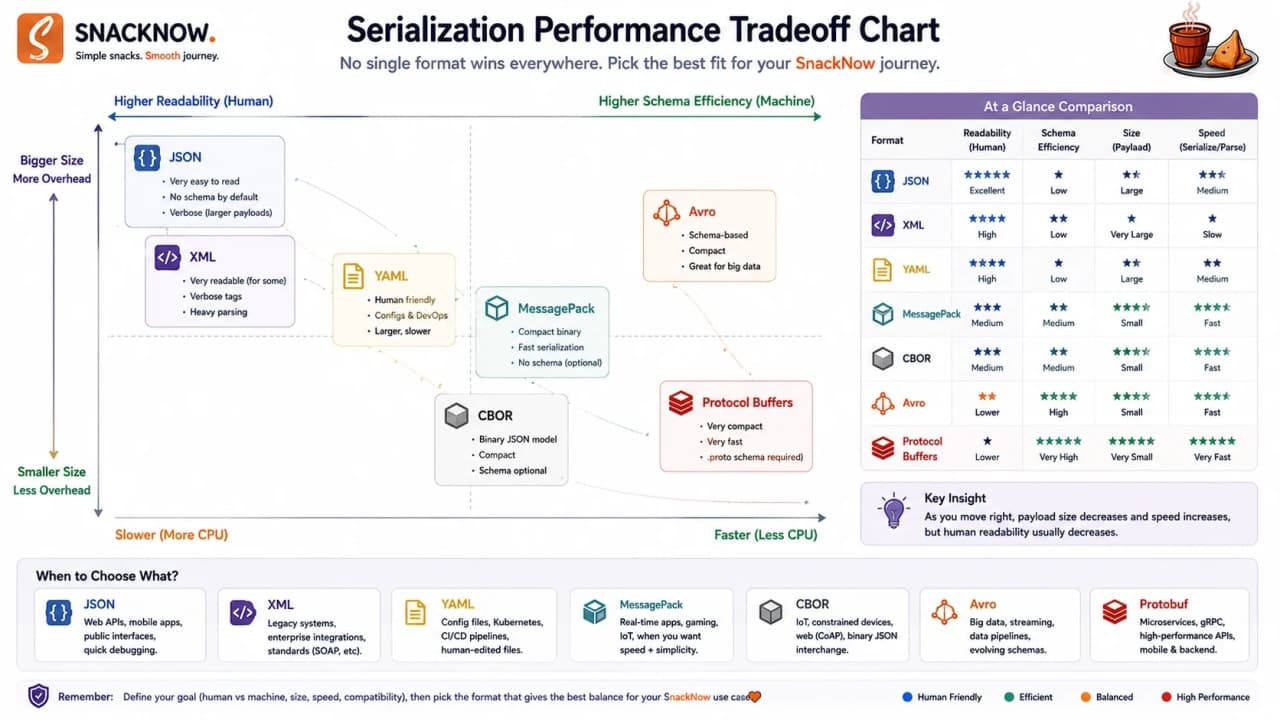
Concern | Why it matters | Better format usually | Tradeoff |
|---|---|---|---|
Human debugging | Engineers need to inspect payloads quickly | JSON/XML | Larger payloads |
Small payload | Bandwidth and latency matter | Protobuf/Avro | Needs schema/tools |
Fast parsing | CPU can become expensive | Protobuf/Avro | Less readable |
Schema compatibility | Data changes over time | Avro/Protobuf | Schema management required |
Browser API support | Frontend needs easy support | JSON | Less compact |
Big data pipelines | Events and analytics evolve | Avro | Not ideal for manual debugging |
Database storage | Type-rich document storage | BSON | Usually database-specific |
Choose serialization format based on the system's needs, not because one format sounds more advanced.
Checkpoint: Serialization performance is a tradeoff between readability, efficiency, schema control, compatibility, and tooling.
18. Serialization in APIs, Caches, Databases, and Logs
Serialization is not one tiny line in a controller. SnackNow uses it everywhere: APIs, internal service calls, cache entries, database storage, event streams, logs, and audit trails.
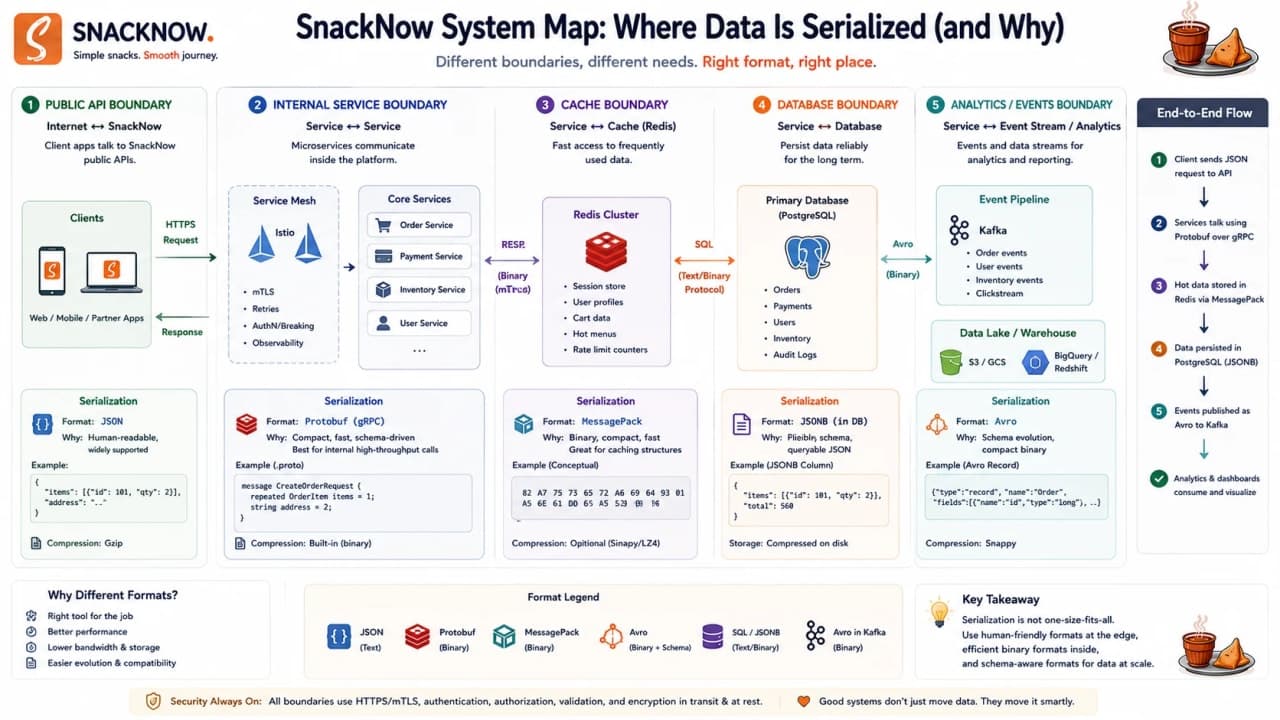
Where used | Format commonly used | Why | SnackNow example |
|---|---|---|---|
Public API | JSON | Browser-friendly and readable | POST /orders |
Internal service call | Protobuf | Compact and typed | Order to Payment |
Cache | JSON/MessagePack/Protobuf | Fast storage and retrieval | Redis menu cache |
Database | BSON/JSON-like storage | Rich document storage | MongoDB menu document |
Big data pipeline | Avro/Protobuf | Schema evolution and compact records | OrderPlaced stream |
Config file | JSON/YAML/XML | Human-readable settings | Feature flag config |
Legacy integration | XML | Enterprise compatibility | Invoice or banking API |
A mature system may use multiple formats. JSON for the browser, Protobuf internally, Avro for analytics, BSON in MongoDB. That is not inconsistency. That is choosing the right box for the right route.
The engineering rule is to keep boundaries explicit. Public API payloads need clear versioning and validation. Cache payloads need expiry and compatibility because old cached values may survive deployments. Event payloads need schema rules because consumers may run old code. Database payloads need migration thinking because stored data outlives the request that created it.
So when someone asks, Which serialization format should we use? a strong answer starts with the boundary. Browser to API is a different boundary from API to cache. API to analytics is different from API to payment. Each route has its own pressure, owner, failure mode, and debugging need.
Checkpoint: SnackNow does not need one serialization format everywhere. It needs clear rules for where each format belongs.
19. Deserialization Security: Never Open a Suspicious Box Blindly
Now SnackNow receives data from outside: browser requests, partner APIs, webhooks, analytics events, and admin uploads. Not every box should be trusted. Some boxes are damaged. Some are oversized. Some are malicious.
Unsafe deserialization happens when a system blindly rebuilds incoming data into objects or executable structures. In severe cases, this can lead to remote code execution, denial of service, tampering, or injection-style attacks.
Never deserialize untrusted data without validation. The box may not contain snacks. It may contain trouble.
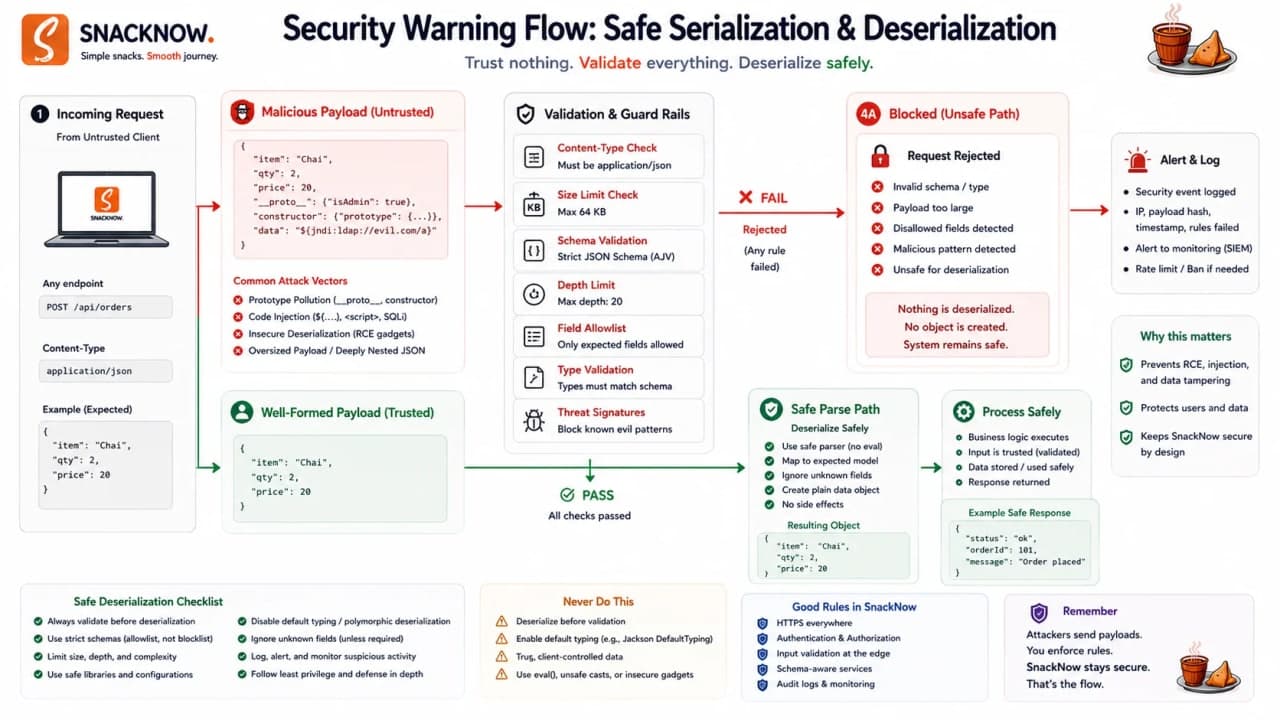
Risk | What can happen | SnackNow example | Defense |
|---|---|---|---|
Object injection | Attacker influences constructed objects | Malicious serialized object hits admin API | Avoid unsafe object deserialization |
Remote code execution | Payload triggers dangerous code paths | Unsafe language-specific deserializer | Use safe formats/libraries and allowlists |
Denial of service | Huge/deep payload consumes CPU/memory | Massive nested cart payload | Size limits, depth limits, timeouts |
Data tampering | Payload changes price/role/state | coupon discount becomes 99% | Schema validation and server-side recalculation |
Injection | Serialized content carries malicious values | Address field used unsafely later | Validate and encode at boundaries |
Validate shape, types, and allowed values.
Limit payload size and nesting depth.
Avoid deserializing untrusted language-native objects.
Prefer safe parsers and strict schemas.
Use HTTPS/TLS and signatures where tampering matters.
Monitor parse errors and rejection patterns.
For SnackNow, this means the backend must not trust the price sent by the browser. If Riya's browser says samosa costs 1 rupee, the server should recalculate from its own catalog. If the payload says Riya has an admin role, the server should ignore that client-provided authority. If the cart has a million nested items, the parser should reject it before it burns CPU and memory.
This is why deserialization belongs in system design, not only security trivia. The receiving service is a boundary. Every boundary needs size limits, schema validation, authentication context, authorization checks, and careful logging. A parse error should not expose internals, but it should leave enough trace for engineers to see what kind of bad input arrived.
Interview-ready answer: Deserialization is risky when untrusted data is rebuilt without validation. Safe systems use strict schemas, size limits, safe libraries, allowlists, and never trust client-provided authority fields.
Checkpoint: Serialization packs data; deserialization opens it. Opening must include validation, limits, and distrust of outside input.
20. Serialization in One Breath
Serialization packs data so it can travel or be stored. JSON is readable and common. XML is verbose but still useful in legacy systems. Protobuf is compact and fast for service-to-service calls. Avro shines in data streams and schema evolution. BSON helps MongoDB store richer document data. Deserialization must be handled carefully because unsafe unpacking can become a security hole.
SnackNow can now remember Riya and send her cart data safely. Then the frontend moves to https://www.snacknow.com and the API moves to https://api.snacknow.com. Riya taps Place Order. The browser blocks the request. The app looks broken, but the browser is doing its job.
Checkpoint: We understand data travel now. Next we need browser permission for cross-origin communication.
21. The Third Bug: The Browser Blocks SnackNow's API Call
During local development, the frontend runs at http://localhost:3000 and the backend at http://localhost:8080. In production, the frontend lives at https://www.snacknow.com and the API at https://api.snacknow.com. Riya clicks Place Order and the browser console says: blocked by CORS policy.
This is the moment many developers blame the backend, the frontend, the internet, and occasionally their chair. But the browser is enforcing a security rule called the Same-Origin Policy.
The most important debugging habit is to separate three facts. Did the browser send the request? Did the server answer? Did the browser allow frontend JavaScript to read the answer? CORS mainly lives in the third question. That is why an API can appear to work in server logs and still fail in the browser.
Warning: A CORS error often means the browser refused to expose the response to frontend JavaScript. It does not always mean the server never received the request.
Checkpoint: The browser is now part of the system design. It has security rules that protect users like Riya.
22. Same-Origin Policy: The Browser's First Security Rule
An origin is the combination of protocol, domain, and port. Change any one of those, and from the browser's point of view, it may be a different origin.
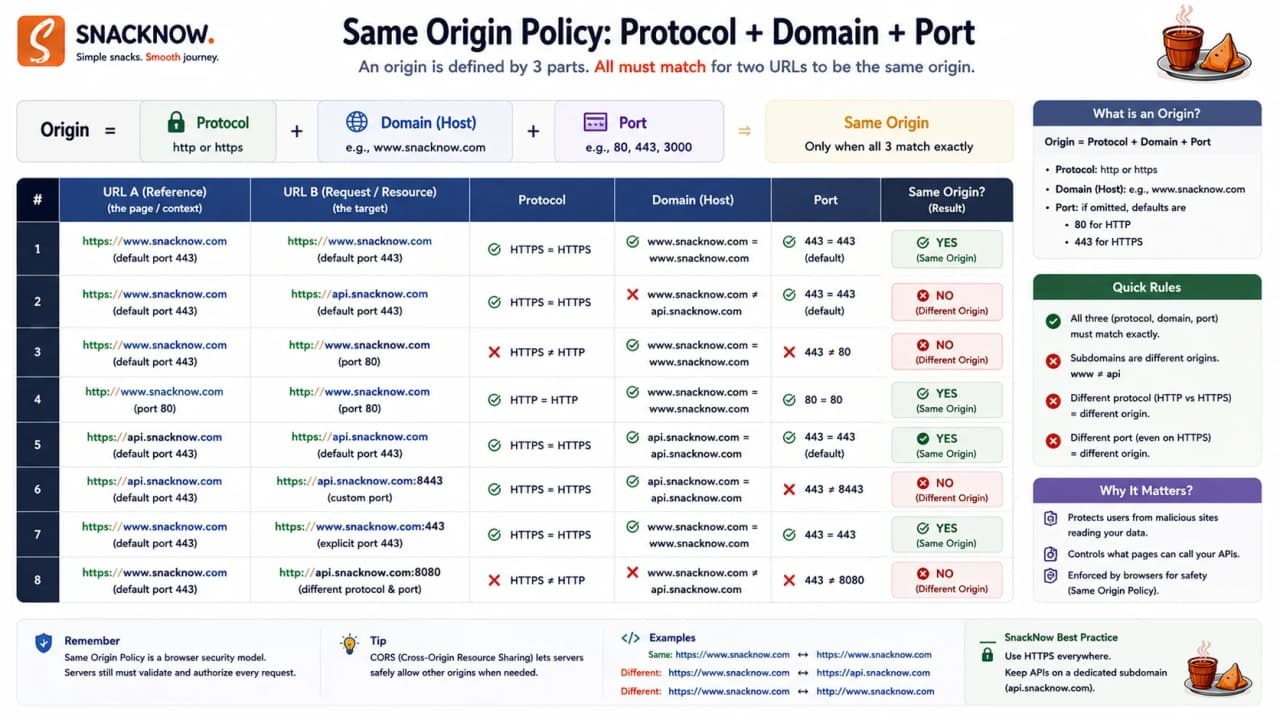
URL | Protocol | Domain | Port | Same origin as https://www.snacknow.com? |
|---|---|---|---|---|
https://www.snacknow.com/menu | https | www.snacknow.com | 443 | Yes |
http://www.snacknow.com/menu | http | www.snacknow.com | 80 | No - protocol differs |
https://api.snacknow.com/orders | https | api.snacknow.com | 443 | No - domain/subdomain differs |
https://www.snacknow.com:8443/orders | https | www.snacknow.com | 8443 | No - port differs |
https://www.snacknow.com/cart | https | www.snacknow.com | 443 | Yes |
Same-Origin Policy prevents scripts from one origin from freely reading data from another origin. A random website should not be able to read Riya's SnackNow order history just because she is logged in.
Same-Origin Policy is not an error. It is the browser protecting the user.
Interview-ready answer: Same-Origin Policy is a browser security rule that restricts scripts from one origin from reading resources from another origin unless controlled permission is granted.
Checkpoint: Same-origin means protocol, domain, and port match. The browser blocks cross-origin reads by default to protect Riya's private data.
23. CORS: The Browser's Security Guard
CORS means Cross-Origin Resource Sharing. It is a browser-enforced, server-controlled permission system for cross-origin requests. The server says which origins may read the response. The browser enforces that decision.
SnackNow frontend at www.snacknow.com calls the API at api.snacknow.com. The API must return headers saying this frontend origin is allowed. If the headers are missing or wrong, the browser blocks frontend JavaScript from reading the response.
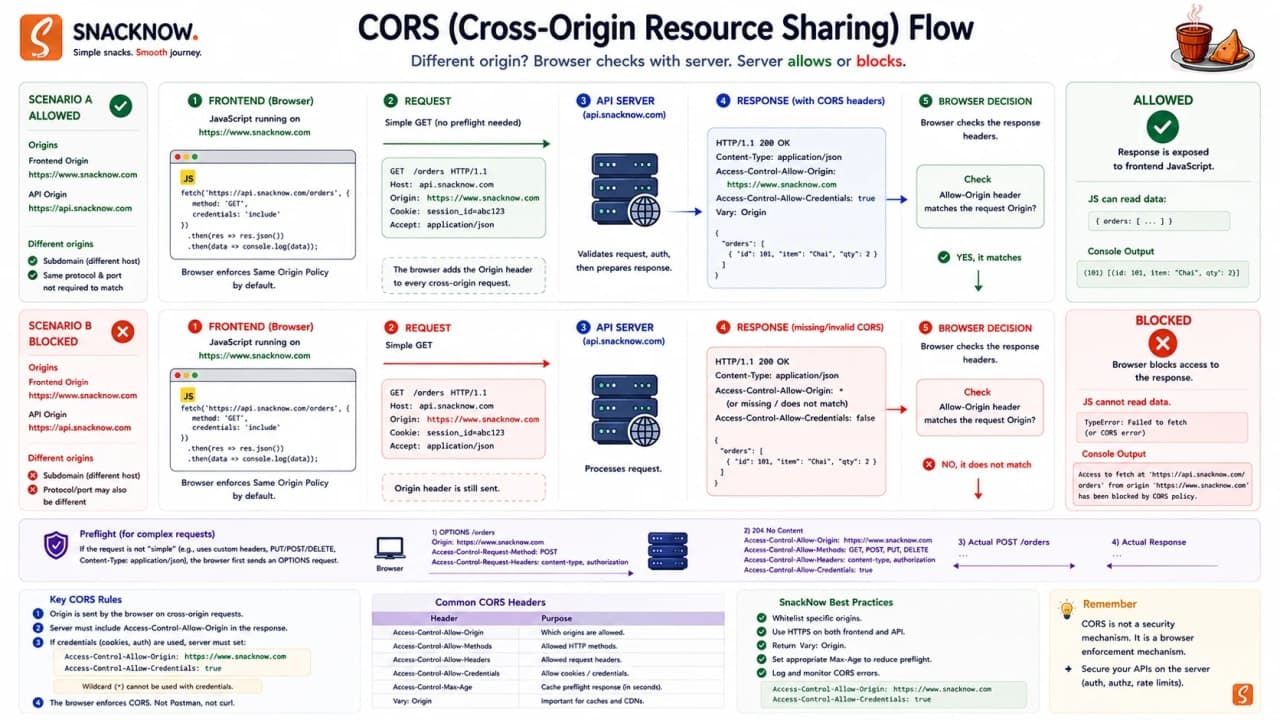
Access-Control-Allow-Origin: https://www.snacknow.comThis header says the API permits https://www.snacknow.com to read the response. It does not mean everyone is authenticated. It does not replace login. It simply controls browser cross-origin response access.
CORS decides which browser origins can read responses; it does not replace authentication, authorization, CSRF protection, or input validation.
Interview-ready answer: CORS lets a server explicitly allow selected browser origins to read cross-origin responses. The browser enforces it; non-browser clients like curl or server-side jobs are not protected by CORS.
Checkpoint: CORS is controlled permission for cross-origin browser reads. It is not the same as backend security.
24. Preflight: Asking Permission Before the Real Request
Riya places an order. The frontend sends JSON and an Authorization header. The browser decides this request needs a permission check first. So before the real POST, it sends an OPTIONS request called a preflight request.
Request type | What happens | SnackNow example | Why it matters |
|---|---|---|---|
Simple request | Browser may send directly | GET /menu | Lower overhead |
Preflight request | Browser asks permission first with OPTIONS | POST /orders with Authorization and JSON | Server must handle OPTIONS and return allowed method/header info |
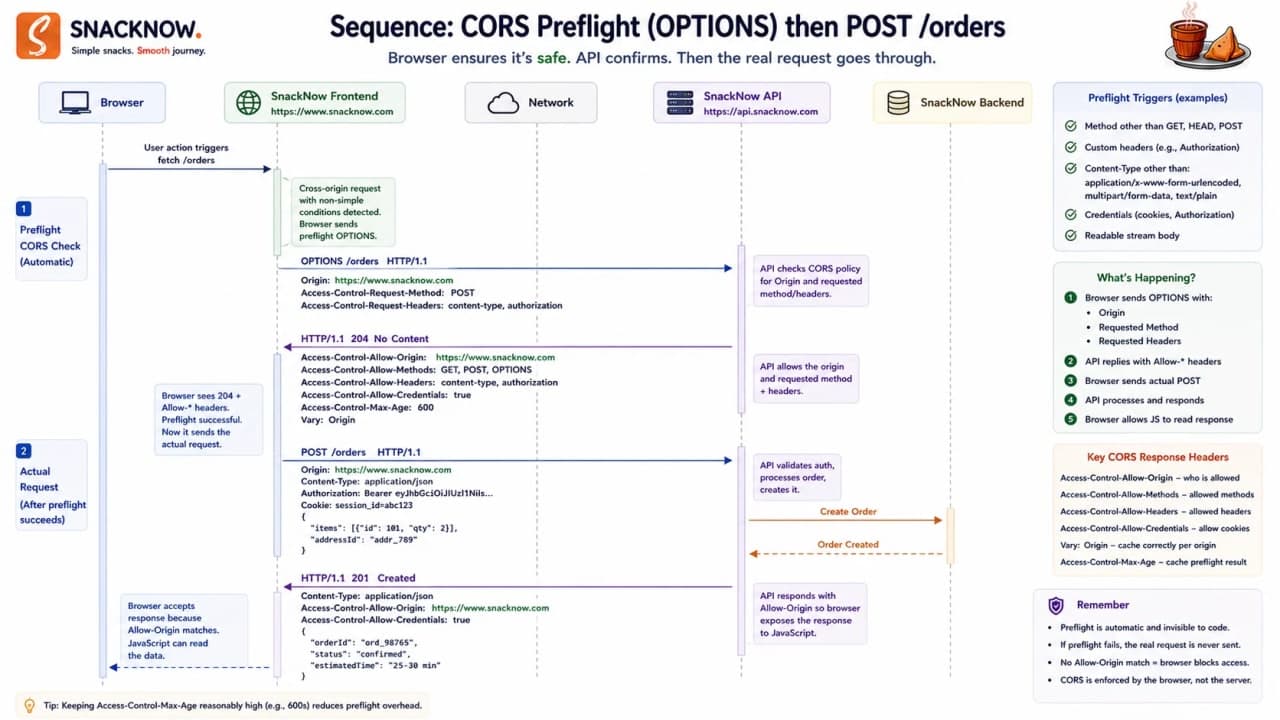
OPTIONS /orders HTTP/1.1
Origin: https://www.snacknow.com
Access-Control-Request-Method: POST
Access-Control-Request-Headers: Authorization, Content-Type
The browser is asking: this origin wants to send POST to /orders and include Authorization plus Content-Type headers. Is that allowed?
HTTP/1.1 204 No Content
Access-Control-Allow-Origin: https://www.snacknow.com
Access-Control-Allow-Methods: GET, POST
Access-Control-Allow-Headers: Authorization, Content-Type
The API answers yes for this origin, method, and headers. Only then does the browser send the real order request. If the preflight response is missing, wrong, or returns an error without CORS headers, Riya sees a CORS error.
This is also why CORS bugs can look like backend bugs. The real POST may never happen because the OPTIONS request failed first. Or the POST may happen, but the error response may omit CORS headers, so the frontend cannot read the useful error body. A clean production API handles CORS consistently on success, validation errors, authentication errors, and server errors.
When debugging SnackNow, an engineer should open the Network tab and look for the OPTIONS request. If it is missing, the request may have been simple. If it is present and failing, inspect the response headers. If OPTIONS passes but POST fails, move to auth, validation, or backend logic. This ordering prevents the team from randomly changing frontend code while the browser is simply asking for a permission slip.
Interview-ready answer: A preflight request is an OPTIONS request the browser sends before certain cross-origin requests to verify that the server allows the method and headers.
Checkpoint: Preflight is the browser asking permission before sending a more sensitive cross-origin request.
25. CORS Headers: The Permission Slip
CORS headers are the permission slip. The browser reads them carefully. One missing line can make a perfectly working API look broken in the browser.

Header | Who sends it? | Meaning | SnackNow example | Common mistake |
|---|---|---|---|---|
Origin | Browser | The requesting origin | https://www.snacknow.com | Assuming backend chooses it |
Access-Control-Allow-Origin | Server | Which origin may read response | https://www.snacknow.com | Using * for sensitive APIs |
Access-Control-Allow-Methods | Server | Allowed methods for preflighted request | GET, POST | Forgetting OPTIONS/POST |
Access-Control-Allow-Headers | Server | Allowed custom headers | Authorization, Content-Type | Not allowing Authorization |
Access-Control-Allow-Credentials | Server | Whether credentialed actual request may be exposed | true | Combining broad origins with credentials |
Access-Control-Expose-Headers | Server | Response headers frontend may read | X-Request-Id | Expecting frontend to read hidden headers |
Access-Control-Max-Age | Server | How long preflight result can be cached | 600 | Setting too high without understanding changes |
Warning: Credentialed requests need extra care. Do not use wildcard origins for sensitive credentialed APIs.
Checkpoint: CORS headers must match the actual origin, method, headers, and credential behavior of the browser request.
26. Dangerous CORS Misconfigurations
Under pressure, someone may say, Just set Access-Control-Allow-Origin to star and move on. That might silence the browser. It might also create a security problem.
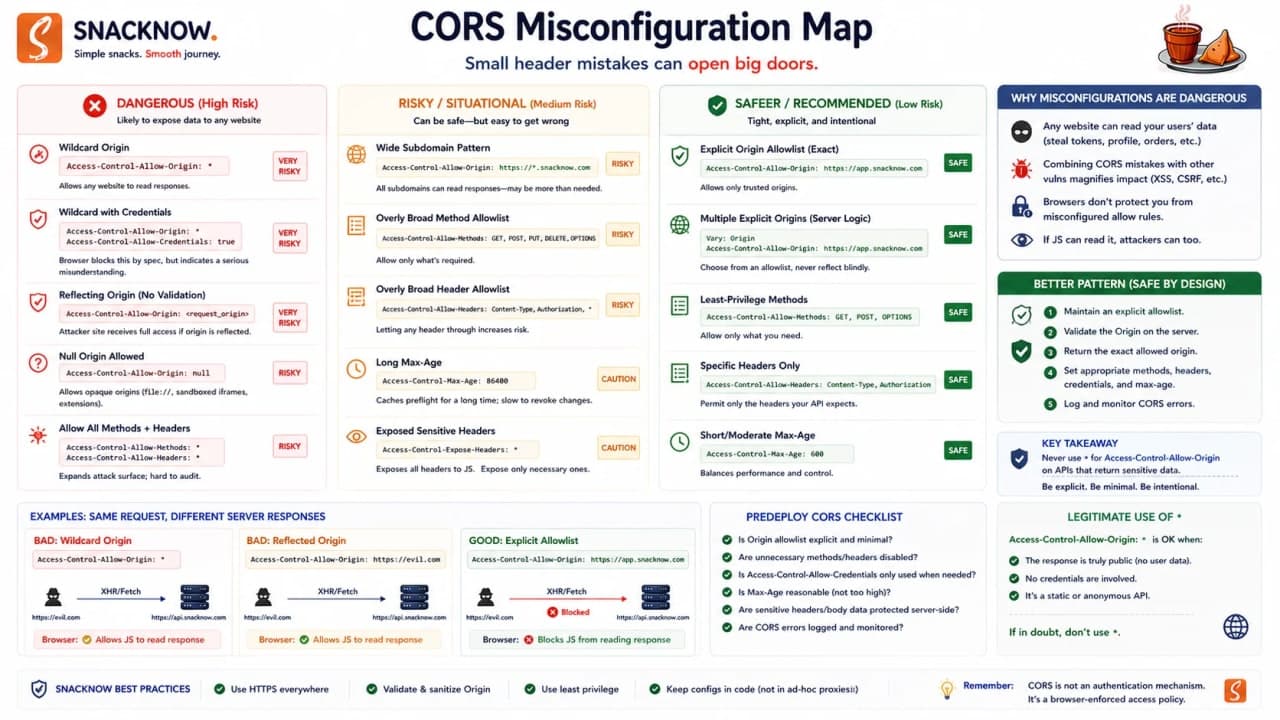
Misconfiguration | Why it is dangerous | Safer approach |
|---|---|---|
Access-Control-Allow-Origin: * | Lets any origin read non-credentialed responses; dangerous for sensitive APIs | Use explicit allowlist |
Reflecting any Origin | Attacker origin can be mirrored back as allowed | Check origin against trusted list first |
Credentials allowed broadly | Sensitive cookies/tokens may be exposed to untrusted origins | Allow credentials only for trusted origins |
Allowing all headers | Permits more request shapes than needed | Allow only required headers |
No environment-specific allowlist | Dev/test origins leak into production | Separate dev, staging, production config |
Treating CORS as auth | Non-browser clients bypass it | Use real authentication and authorization |
CORS is not a lock on the API door. It is a rule the browser follows before exposing responses to frontend JavaScript. Your backend still needs auth, authorization, input validation, rate limiting, CSRF defenses where relevant, and logging.
Think about an attacker with a script outside the browser, or a backend job, or curl. Those clients do not care about browser CORS rules. They can still send requests. If the API has no authentication, CORS will not save it. If the API lets any authenticated user read any order, CORS will not fix authorization. CORS is one browser-facing layer in a larger security design.
Interview-ready answer: The safest CORS setup uses an explicit trusted-origin allowlist, minimal methods and headers, careful credentials handling, and does not treat CORS as authentication.
Checkpoint: CORS should be precise. Broad CORS is not convenience; it is often hidden risk.
27. CORS in REST and GraphQL APIs
SnackNow's REST APIs use JSON. Later, the team experiments with GraphQL for menu and order status screens. Both can hit CORS because both run over HTTP and are often called by browser frontend code.
API type | Why CORS appears | Common preflight reason | Security note |
|---|---|---|---|
REST | Frontend calls API on another origin | Authorization header or JSON POST | Configure only required routes/origins |
GraphQL | Usually POST with JSON and auth headers | Content-Type and Authorization | Do not expose admin schema casually |
Public API | May be intentionally cross-origin | Custom headers or non-simple methods | Still rate-limit and authenticate protected data |
Internal API | Should usually not be browser-exposed | If exposed by mistake | Network and gateway controls matter |
The common mistake is to debug GraphQL or REST logic when the actual issue is an OPTIONS route that returns 404, or a production allowlist that forgot the frontend origin.
Checkpoint: REST and GraphQL both need correct CORS when browser JavaScript calls them across origins.
28. Reverse Proxy and API Gateway: Making the Browser's Life Easier
There are two practical helpers. A reverse proxy can make frontend and API appear same-origin to the browser. An API Gateway can centralize CORS rules for multiple backend services.
For example, the browser calls https://www.snacknow.com/api/orders. Internally, the reverse proxy forwards that to the backend. From the browser's perspective, this may be same-origin. That reduces browser CORS friction, but it does not remove backend security needs.
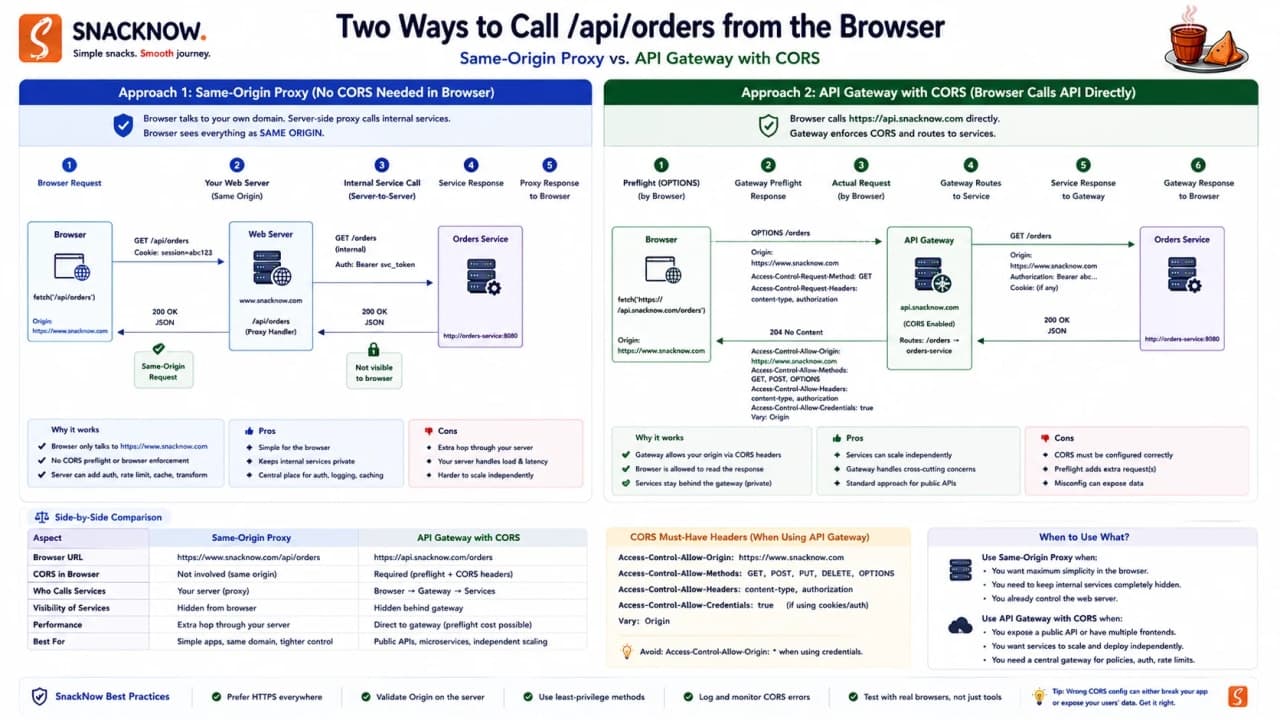
Approach | How it helps | Best for | Risk |
|---|---|---|---|
Backend CORS config | API directly returns CORS headers | Simple APIs | Rules drift across services |
Reverse proxy | Browser sees same origin API path | Frontend/backend under one public domain | Proxy misrouting or hidden auth assumptions |
API Gateway | Centralizes origin/method/header policies | Multiple APIs/services | Gateway config can become broad |
Same-origin deployment | Avoids cross-origin browser call | Simple web apps | Less flexible domain separation |
Interview-ready answer: Reverse proxies can avoid browser CORS by serving API paths from the same origin, while API gateways can centralize CORS policies. Neither replaces authentication or authorization.
Checkpoint: Proxy and gateway designs can reduce CORS chaos, but security still belongs in the full request path.
29. Full SnackNow Flow: Login, Cart, Data, and CORS Together
Now the full story clicks. Riya opens SnackNow. The browser loads the frontend. She logs in. SnackNow creates a session or returns a token. Her browser stores a cookie or token. She adds chai and samosa. The cart is serialized as JSON. The API deserializes it, validates it, stores order data, and may cache or stream related data in other formats.
If the frontend and API are on different origins, the browser checks CORS. If the request needs preflight, the browser asks permission first with OPTIONS. If the API returns the right CORS headers, the browser lets frontend JavaScript read the response. Riya sees order placed. The app feels boringly smooth, which is exactly the goal.
The broken version of SnackNow had three missing pieces. It had login without reliable memory, data movement without a clear contract, and browser calls without explicit cross-origin permission. The fixed version does not feel more complicated to Riya. It feels simpler. That is the quiet promise of good system design: complexity moves behind the scenes so the user can complete a normal task.
This is also the best way to answer in interviews. Do not start with twenty definitions. Start with the flow. User logs in, request needs identity, data needs to move, browser enforces origin rules. Then introduce the exact concept at the moment it solves a real failure. The interviewer can see that you are designing a working system, not reciting flashcards.
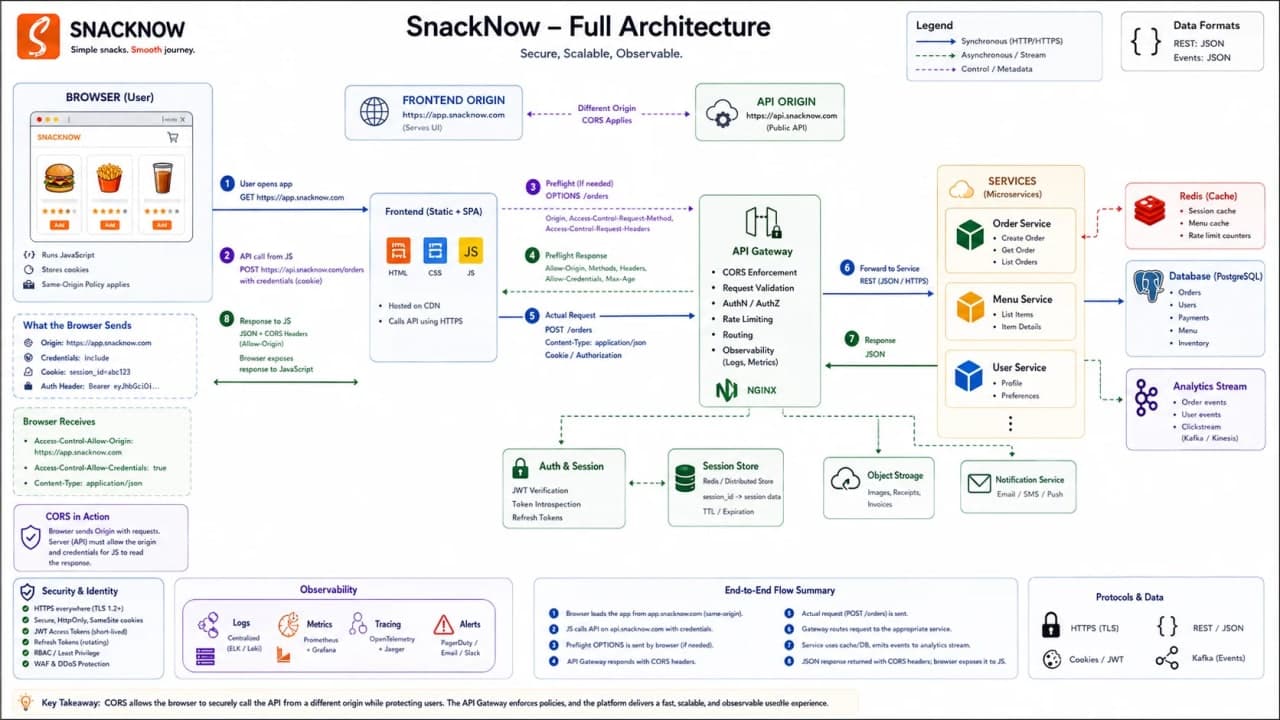
Browser requests SnackNow frontend.
Riya logs in.
Server creates session or returns token.
Browser stores cookie or app stores token according to design.
Riya adds items to cart.
Cart data is serialized as JSON.
API receives, deserializes, validates, and processes it.
Backend writes to database and may cache/store/stream serialized forms.
Browser applies Same-Origin Policy and CORS checks for cross-origin API calls.
Preflight happens when method, headers, or content type require it.
Correct headers allow frontend code to read response.
Riya sees her order status.
Checkpoint: The three concepts are connected: sessions remember Riya, serialization moves her data, and CORS controls whether the browser lets the frontend read the API response.
30. Practical Debugging Guide
This is where the article should pay rent. If a developer reads for almost an hour, they should debug better afterward. So here is how real bugs map back to the concepts.

Symptom | Likely concept | What to check | Fix direction |
|---|---|---|---|
User gets logged out randomly | Session scaling | Session store, sticky routing, token expiry, load balancer behavior | Use shared session store or correct token strategy |
Cart disappears after refresh | State storage | Was cart only in memory? Is cookie sent? Is session expired? | Persist cart server-side or durable client-safe storage |
CORS error in browser | CORS/preflight | Allow-Origin, allowed headers, OPTIONS route, credentials config | Return correct CORS headers on success and errors |
API works in Postman but not browser | Browser security | Postman ignores CORS; browser does not | Fix CORS instead of backend business logic |
API is slow | Serialization/performance | Payload size, JSON parse cost, repeated large fields, cache misses | Compress, reduce payload, cache, consider binary formats internally |
Bad payload crashes parser | Deserialization security | Payload size, schema validation, unsafe parser behavior | Validate, limit, reject untrusted object deserialization |
Tip: When debugging, first ask: is this memory, data shape, browser security, or backend logic? That one question removes a lot of noise.
Checkpoint: Most confusing web bugs become clearer once you map them to state, serialization, or browser security.
31. Common Beginner Mistakes
Beginners usually do not fail because they are careless. They fail because the words sound similar. Cookie, session, token, storage, CORS, CSRF, origin, header, preflight - it is a lot. So let us name the traps directly.
Mistake | Why it hurts | Better thinking |
|---|---|---|
Thinking stateless means apps cannot remember anything | Confuses protocol behavior with app design | Apps add memory using state mechanisms |
Confusing cookies with sessions | Leads to wrong storage/security choices | Cookie transports data; session is server-side memory |
Storing sensitive data directly in cookies | Browser carries too much risk | Store opaque IDs or minimal safe values |
Saying JWT is always better | Ignores revocation and storage risk | Choose based on client, scale, and security needs |
Putting passwords in JWT payload | Payload is not automatically secret | Put only safe claims; encrypt only if using proper JWE |
Ignoring CSRF with cookie auth | Browser auto-sends cookies | Use SameSite, CSRF tokens, Origin checks |
Storing sessions in one server memory behind load balancer | Users randomly log out | Use sticky sessions or shared store |
Thinking serialization is only JSON.stringify | Misses performance/schema/security tradeoffs | Choose format by use case |
Choosing Protobuf because it sounds advanced | Adds schema/tooling cost without need | Use JSON unless efficiency/schema pressure exists |
Deserializing untrusted payloads blindly | Can create serious vulnerabilities | Validate and use safe parsers |
Thinking CORS protects APIs from all clients | Non-browser clients ignore it | Use real auth and authorization |
Using * for sensitive APIs | Broad read access risk | Use explicit trusted origin allowlist |
Not handling OPTIONS | Preflight fails before real request | Handle preflight and return correct headers |
Warning: The worst web security bugs often start as convenience shortcuts that were never revisited.
Checkpoint: Beginners become stronger when they stop memorizing terms and start recognizing the exact mistake each term prevents.
32. Interview-Ready Mental Models
Here is the compact mental model section. Use it for revision, but do not treat it as a substitute for the story. The story is what makes the words stick.
Topic | One-sentence definition | SnackNow hook | Common mistake | Interview phrase |
|---|---|---|---|---|
HTTP statelessness | Each request is independent by default | Server forgets Riya after login | Thinking app cannot store data | Requests must carry or reference context |
State | Information remembered across requests | Cart, address, login | Mixing all state tools together | State needs a storage and trust model |
Cookie | Browser note sent automatically | Pocket note | Putting secrets inside | Cookie transports session reference |
Server-side session | Server memory keyed by session ID | Order file at counter | One-server memory only | Easy revocation, shared store needed at scale |
JWT | Signed claims carried by client | Signed pass | Payload treated as secret | Stateless verification with revocation tradeoff |
OAuth | Authorization delegation framework | Continue with Google | Calling it only login | Provider grants limited access through tokens |
CSRF | Forged authenticated browser action | Bad tab uses Riya's cookie | Ignoring cookie auto-send | Use CSRF tokens/SameSite/origin checks |
Serialization | Pack data for travel/storage | Food box | Thinking only JSON exists | Format choice affects speed and compatibility |
Deserialization | Unpack data back into usable structure | Open the box | Trusting all boxes | Validate before rebuilding |
Same-Origin Policy | Browser blocks cross-origin reads by default | Security guard | Treating it as bug | Browser protects user data |
CORS | Server permission read by browser | Allowed counter | Using it as auth | Controls browser read access, not backend security |
Preflight | OPTIONS permission check before sensitive cross-origin request | Guard asks first | Forgetting OPTIONS route | Browser asks before real request |
Checkpoint: A good interview answer defines the term, gives the SnackNow problem it solves, names the tradeoff, and warns about the common mistake.
33. Interview FAQ Without Duplicating the Editor FAQ
The public FAQ for this draft is stored in the dedicated Visible FAQ field, which keeps schema and reader-facing questions clean without duplicating thirty-plus long answers inside the article body.
For interview prep, use the same answer pattern throughout the article: define the concept, connect it to SnackNow, name the tradeoff, and call out the common mistake.
Checkpoint: The complete FAQ stays in the editor FAQ field, while the article body keeps the teaching flow light enough to save reliably.
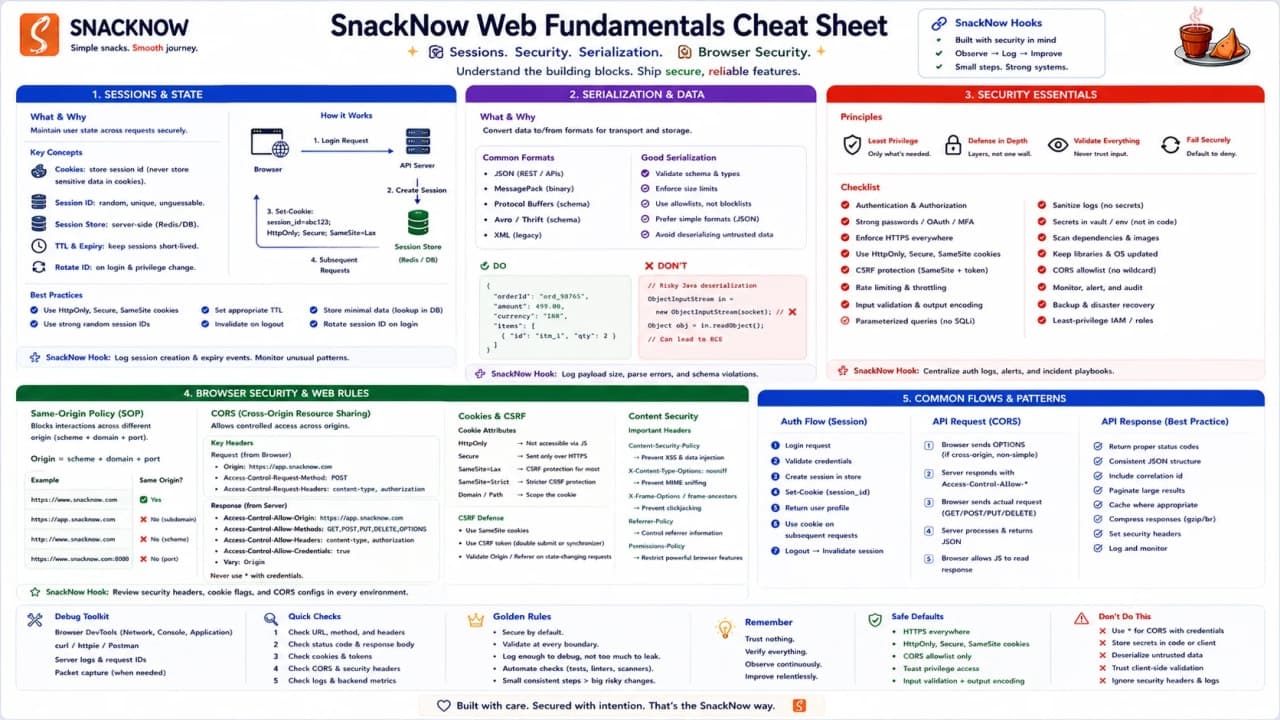
34. One-Page Cheat Sheet
Use this final table as revision. It is intentionally compact, but every row points back to a SnackNow moment from the story.
Concept | Simple meaning | SnackNow memory hook | Best used for | Common mistake | Interview keyword |
|---|---|---|---|---|---|
HTTP statelessness | Requests are independent | Server forgets Riya | Explaining why state is needed | Server cannot store anything | independent requests |
Cookie | Browser note sent automatically | Pocket note | Session ID transport | Storing secrets | Set-Cookie/Cookie |
Session | Server-side memory | Real file at counter | Web app login | One-server memory | server-side state |
Session ID | Opaque lookup key | File number | Session lookup | Treating it as user data | opaque identifier |
JWT | Signed claims token | Signed pass | APIs/mobile/services | Payload as secret | claims/signature/expiry |
OAuth | Delegated authorization | Continue with Google | Provider login/resource access | Only calling it login | authorization framework |
CSRF | Forged browser action | Bad tab uses Riya's cookie | Cookie-auth protection | Relying only on CORS | forged request |
Session hijacking | Stolen credential reuse | Someone steals file number | Threat modeling sessions | No rotation/expiry | credential theft |
Secure | HTTPS-only cookie | No HTTP pocket note | Cookie transport | Thinking it hides data from JS | HTTPS flag |
HttpOnly | JS cannot read cookie | Pocket note hidden from scripts | Session cookies | Skipping with auth cookies | XSS mitigation |
SameSite | Cross-site cookie control | Does the browser carry it? | CSRF reduction | Treating as full CSRF solution | cookie context |
Sticky sessions | Same server routing | Same counter every time | Simple scaling | Failure/uneven load | affinity |
Distributed session store | Shared session memory | All counters share files | Load-balanced web apps | No monitoring | Redis/Memcached |
Serialization | Pack data | Delivery box | APIs/cache/database | Only JSON | data format |
Deserialization | Unpack data | Open the box | Receiving data | Trusting untrusted payloads | validation |
JSON | Readable web format | Everyday box | Browser REST APIs | No schema validation | human-readable |
XML | Verbose tagged format | Formal box | Legacy/enterprise | Dismissing all legacy | SOAP/schema |
Protobuf | Compact schema binary | Sealed packet | gRPC/internal calls | Using too early | field numbers |
Avro | Schema-evolving records | Growing event box | Streams/big data | Breaking schema changes | schema evolution |
BSON | Binary JSON-like storage | Database box | MongoDB | Plain JSON assumption | ObjectId/Date |
Same-Origin Policy | Default browser restriction | Security guard | Protect user data | Calling it backend bug | origin |
CORS | Cross-origin permission | Allowed counter | Browser API calls | Using as auth | Allow-Origin |
Preflight | OPTIONS permission check | Guard asks first | Sensitive cross-origin requests | No OPTIONS handler | OPTIONS |
Reverse proxy | Same-origin facade | /api under same domain | Simpler browser routing | Security assumptions | proxy |
API Gateway | Central policy layer | One gate for services | Multi-service APIs | Over-broad rules | centralized CORS |
Checkpoint: The cheat sheet is useful only because the story made the terms concrete.
35. Final Mental Model
When Riya uses SnackNow, HTTP does not remember her by default. Cookies, sessions, and tokens give the app a safe way to recognize her. Serialization packs her cart and order data so it can travel between browser, server, cache, database, and event pipelines. CORS lets the browser decide whether one origin is allowed to read data from another origin, based on the server's permission.
You do not need to memorize these terms like dictionary entries. Remember the app. Riya logs in, carries a cookie or token, sends packed data, and the browser security guard checks whether the frontend is allowed to talk to the API.
That is the heart of web concepts in system design: memory, data travel, and browser trust.
Once this picture is clear, interview answers become less scary. You are not reciting words. You are explaining what breaks, why it breaks, and how engineers design the fix. That is the difference between reading notes and actually understanding the web.
Research Notes and Further Reading
This draft uses the attached PDFs as the main teaching spine and cross-checks current technical accuracy with MDN cookies, MDN CORS, OWASP CSRF guidance, OWASP deserialization guidance, RFC 7519 for JWT, RFC 6749 for OAuth 2.0, Protocol Buffers docs, Apache Avro, and MongoDB BSON docs.
Lock in the takeaway
Frequently asked questions
Why is HTTP considered stateless?
HTTP treats each request independently, so applications need cookies, sessions, or tokens to remember users across requests.
How do cookies and sessions work together?
The browser carries a cookie containing a session ID, while the server uses that ID to retrieve the real session data.
When should JWT be used instead of sessions?
JWT is useful for APIs, mobile apps, and service ecosystems where stateless verification matters, but revocation and expiry must be designed carefully.
What is serialization in system design?
Serialization converts data structures into formats that can be transmitted or stored, such as JSON, XML, Protobuf, Avro, or BSON.
When should Protobuf be chosen over JSON?
Protobuf is useful for high-throughput internal service calls where compact binary payloads and typed schemas matter more than human readability.
Why is unsafe deserialization dangerous?
Unsafe deserialization can rebuild malicious data into dangerous objects or consume resources unless inputs are validated and limited.
What is Same-Origin Policy?
Same-Origin Policy is a browser security rule that prevents scripts from one origin from freely reading another origin's data.
What does CORS do?
CORS lets a server tell the browser which trusted origins may read a cross-origin response.
What is a preflight request?
A preflight is an OPTIONS request the browser sends before certain cross-origin requests to check allowed methods and headers.
Is CORS authentication?
No. CORS controls browser response access and does not replace authentication, authorization, CSRF protection, or input validation.
How do reverse proxies help with CORS?
A reverse proxy can expose API paths under the same origin as the frontend, reducing browser CORS friction while preserving backend security needs.
What should beginners remember about web concepts?
Sessions remember the user, serialization moves data, and CORS controls browser cross-origin response access.