
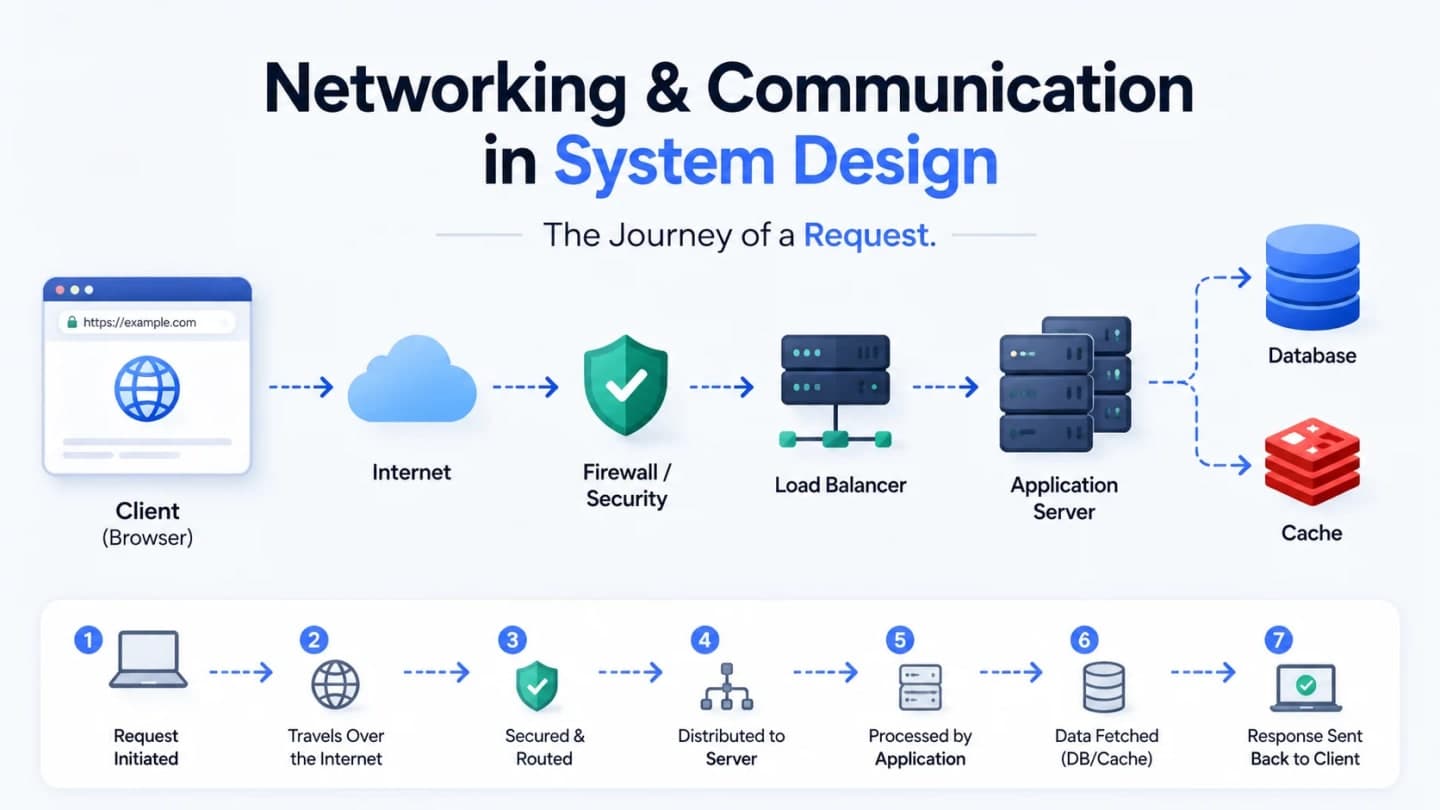
Listen to this article
Checking audio support
1. A Tiny Story Before the Big Words Begin
Maya is tired, slightly hungry, and very serious about one thing: masala chai.
She opens her laptop, types:
https://chaicart.comand presses Enter.
To Maya, this feels like one tiny action. Browser khola, URL type kiya, done. But behind that one line, a whole invisible delivery network wakes up.
Somewhere, DNS starts finding an address. A browser prepares a secure connection. A request travels across networks. Servers decide what to do. A database may get involved. Later, when ChaiCart becomes popular, load balancers, proxies, API gateways, caches, and CDNs join the story.
This is why networking feels scary at first. It is not because the ideas are impossible. It is because people usually teach them as separate definitions.
So we will not do that.
We will follow Maya's one request from her browser to ChaiCart's backend and back. By the end, you should be able to say, calmly and confidently:
"I understand what happens when I open a website."
And, more importantly for interviews:
"I can explain why DNS, IP addresses, load balancers, proxies, API gateways, and CDNs exist in real systems."
2. Why Networking Matters in System Design
System design is not only about databases, queues, and fancy architecture diagrams.
At the most basic level, system design is about components talking to each other.
A browser talks to a server. A server talks to a database. One backend service talks to another service. A CDN talks to the origin server. A load balancer talks to many application servers.
If communication is slow, your system feels slow.
If communication fails, your system feels broken.
If communication is insecure, your system becomes risky.
For ChaiCart, the first version is tiny:
Maya -> Internet -> ChaiCart Server -> Database -> ChaiCart Server -> MayaEach arrow matters.
The arrow from Maya to the internet carries her browser request. The arrow from the internet to the server finds the machine that runs ChaiCart. The arrow from the server to the database asks for menu items, prices, and order details. The final arrows carry the response back.
When ChaiCart has one customer, this is simple.
When ChaiCart has ten thousand customers ordering cutting chai, samosas, bun maska, and ginger tea during office break, suddenly every arrow becomes a design decision.
Networking affects:
scalability: can the system handle more users?
reliability: does it keep working when one machine fails?
performance: how fast does the user get a response?
security: who is allowed to access what?
efficiency: are we wasting server and network resources?
latency: how long does the request take to travel?
In distributed systems and cloud computing, networking is not background noise. It is the road system.
If the roads are confused, the city gets stuck.
3. The Big Picture: What Happens When You Open a Website?

Before we zoom into every detail, here is the friendly version.
Maya's browser wants to open ChaiCart. But the browser does not magically know where ChaiCart lives. It must first turn `chaicart.com` into an IP address. Then it connects to that address, sends a request, waits for a response, and renders the page.
sequenceDiagram
    participant Browser as Maya's Browser
    participant DNS as DNS Resolver
    participant Server as ChaiCart Web Server
    participant DB as ChaiCart Database

    Browser->>DNS: What IP address belongs to chaicart.com?
    DNS-->>Browser: Here is the IP address
    Browser->>Server: GET / over HTTPS
    Server->>DB: Fetch homepage/menu data
    DB-->>Server: Menu data
    Server-->>Browser: HTML, CSS, JS, and data
    Browser-->>Browser: Render ChaiCart homepage
That is the whole journey in one picture.
Now we slow it down.
4. IP Addresses: The Internet's Address System
Maya can remember `chaicart.com`.
Computers prefer numbers.
An IP address is a numerical label assigned to a device on a network. It lets machines find and talk to each other.
Think of ChaiCart's server like a shop in a big city. The name "ChaiCart" is easy for humans. But delivery people still need a real address. On the internet, that machine-friendly address is the IP address.
Domain Name vs IP Address
Thing | Human View | Machine View |
|---|---|---|
Domain name | chaicart.com | Easy for people to remember |
IP address | 203.0.113.42 | Easy for machines to route |
When Maya types `chaicart.com`, the browser eventually needs an IP address to connect to a real server.
IPv4 and IPv6
There are two major IP address versions you should know.
Feature | IPv4 | IPv6 |
|---|---|---|
Address size | 32-bit | 128-bit |
Format | Dotted decimal | Colon-separated hexadecimal |
Example | 192.168.1.1 | 2001:0db8:85a3::8a2e:0370:7334 |
Address space | Around 4.3 billion addresses | Extremely large address space |
Scalability | Limited, address exhaustion is a real issue | Better suited for future scale, IoT, mobile, and global growth |
Security note | Security depends on configuration | Better native support for IPsec, but encryption still depends on configuration and actual usage |
Adoption | Still widely used | Growing, but not universal everywhere |
IPv4 is still everywhere. It uses 32 bits, which gives around 4.3 billion addresses. That sounded huge once. Then humanity connected phones, laptops, servers, routers, smart TVs, cars, watches, cameras, refrigerators, and random office printers that somehow still need emotional support.
IPv6 was designed for a much larger internet. It uses 128 bits, giving a massive address space.
Important interview point: do not say "IPv6 automatically encrypts all traffic." A safer answer is:
IPv6 has better native support for IPsec, but encryption still depends on configuration and how the network is actually set up.
Public IP and Private IP
ChaiCart's public website needs to be reachable from the internet. That means something in front of ChaiCart needs a public IP.
But inside ChaiCart's cloud network, not every server needs to be directly exposed to the whole world.
Type | Meaning | Example Use |
|---|---|---|
Public IP | Reachable from the internet | Load balancer, public web endpoint |
Private IP | Used inside a private network | App servers, databases, internal services |
Common private IPv4 ranges are:
10.0.0.0     - 10.255.255.255
172.16.0.0  - 172.31.255.255
192.168.0.0 - 192.168.255.255
Private IPs help conserve public IPv4 addresses and reduce direct exposure of internal systems.
NAT: Many Internal Devices, One Public Face
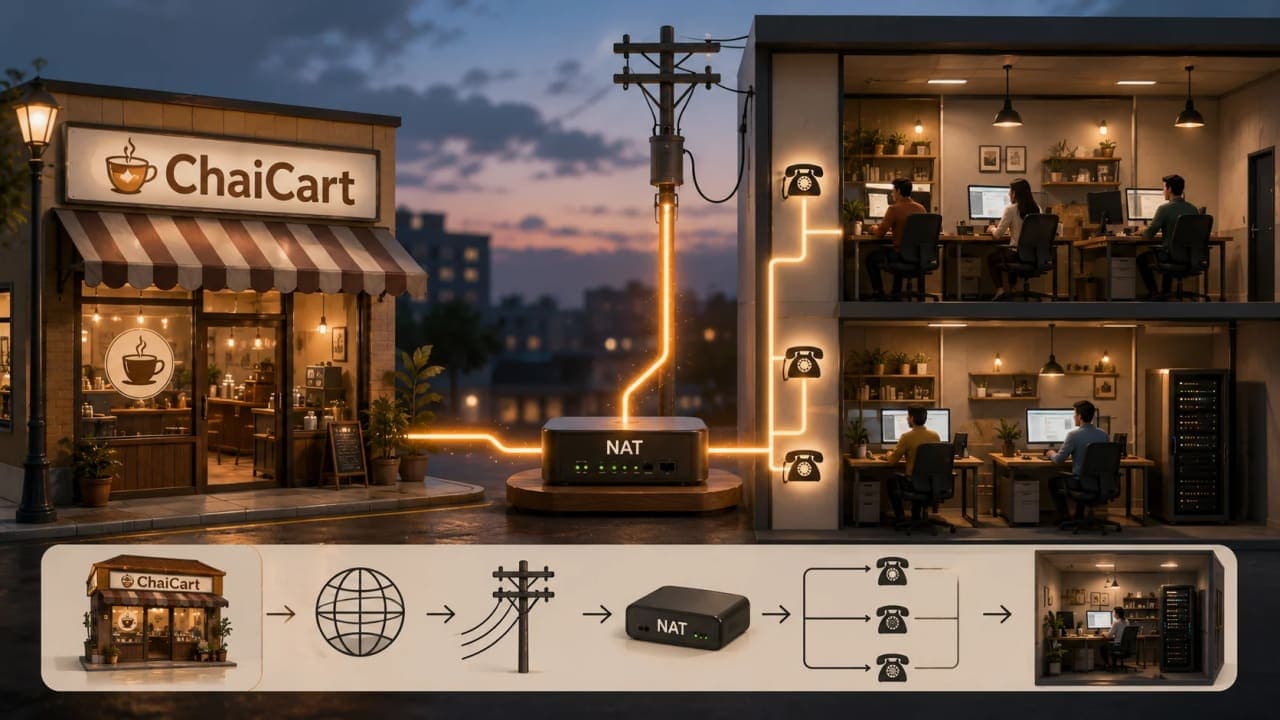
NAT means Network Address Translation.
Imagine ChaiCart's office has twenty employees, but only one public phone number. Inside the office, everyone has an extension:
Public phone number: +91-99999-00000

Internal extensions:
101 - Orders
102 - Kitchen
103 - Delivery
104 - Billing
Outside callers see the main number. Inside the office, the receptionist knows which extension should receive the call.
NAT works similarly. Many private devices can share one public IP address. The router or gateway keeps track of which internal device made which outbound request and routes the response back correctly.
Role of IPs in System Design
IPs show up everywhere in real systems:
cloud networking: public subnets, private subnets, VPCs
containers: internal service IPs
microservices: service-to-service communication
firewalls: allow or block traffic by IP range
VPNs: private access to internal systems
load balancers: routing traffic to backend IPs
DNS: mapping names to IP addresses
For ChaiCart, the browser does not care whether the backend has one server or fifty. It starts with one question:
"Where is `chaicart.com`?"
That leads us to DNS.
JavaScript Example: Resolving a Domain to an IP
Problem:
Maya typed a domain name, but machines need an IP address. In Node.js, we can ask the operating system to resolve a hostname.
Code:
const dns = require("node:dns");

dns.lookup("chaicart.com", (error, address, family) => {
  if (error) {
    console.error("DNS lookup failed:", error);
    return;
  }

  console.log("IP address:", address);
  console.log("IP version:", family === 4 ? "IPv4" : "IPv6");
});
Line-by-line:
`require("node:dns")` loads Node's DNS module.
`dns.lookup("chaicart.com", callback)` asks the system to resolve the hostname.
`error` is set if the lookup fails.
`address` is the resolved IP.
`family` tells you whether the result is IPv4 or IPv6.
Result:
The actual result depends on the domain's DNS records. Since ChaiCart is our fictional story app, you can test the same code with a real domain like `example.org`.
Quick takeaway:
`dns.lookup()` is useful when your Node app wants name resolution similar to other applications on the same machine. For direct DNS queries, Node also provides functions like `dns.resolve4()`.
Interview Answer Box
An IP address is a machine-readable network address used to identify devices and route traffic. In system design, IPs matter for public access, private networking, cloud architecture, firewalls, VPNs, load balancers, containers, and service communication.
5. DNS: Turning `chaicart.com` Into a Server Address
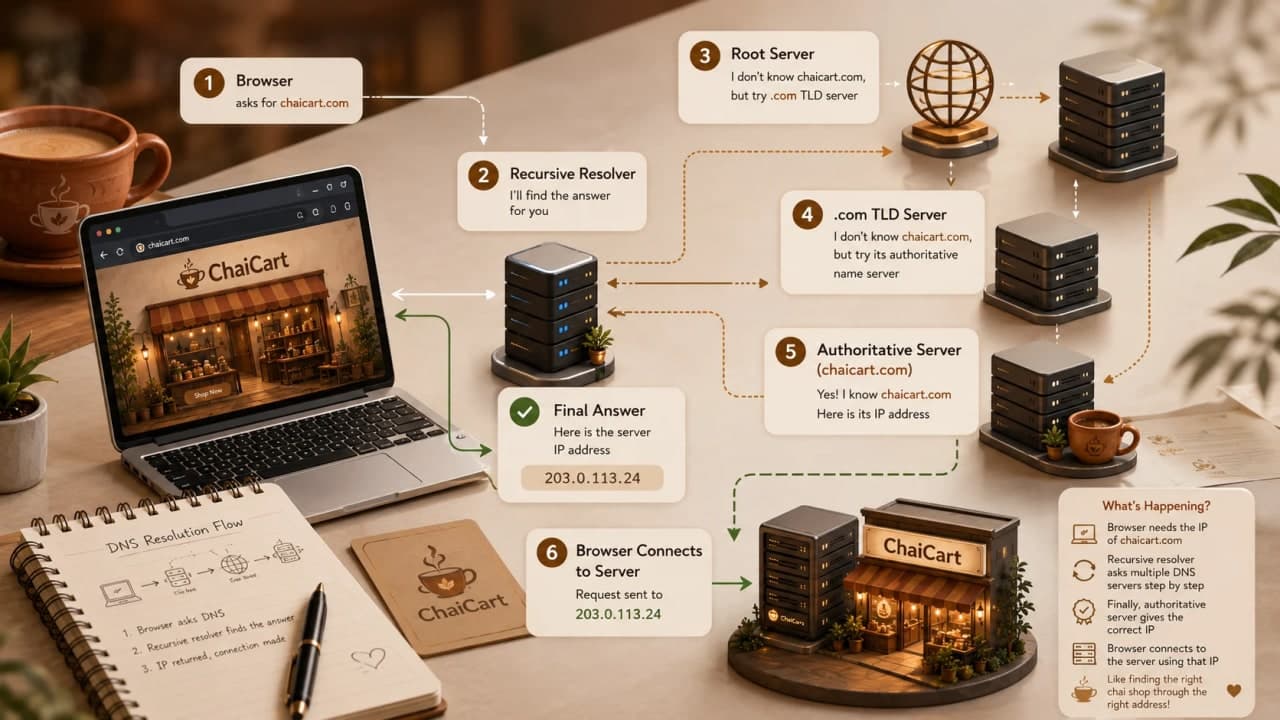
DNS stands for Domain Name System.
People often call it the phonebook of the internet. That analogy is not perfect, but it is good enough for the first mental model.
Maya knows the shop name: `chaicart.com`.
The browser needs an address.
DNS converts the name into an IP address.
DNS Resolution, Step by Step
When Maya enters `https://chaicart.com`, the browser does not immediately shout across the internet. It checks nearby memory first.
1. Browser cache
2. Operating system cache
3. Recursive DNS resolver
4. Root DNS server
5. TLD DNS server
6. Authoritative DNS server
7. IP returned to browser
Here is the slower version:
The browser checks whether it already knows the IP for `chaicart.com`.
If not, the operating system checks its own DNS cache.
If still not found, the request goes to a recursive resolver, often from the ISP or a configured DNS provider.
The resolver may ask a root DNS server where `.com` domains are handled.
The `.com` TLD server points toward ChaiCart's authoritative DNS server.
The authoritative DNS server returns the actual DNS record for `chaicart.com`.
The resolver gives the IP back to Maya's browser.
sequenceDiagram
    participant Browser
    participant OS as OS Cache
    participant Resolver as Recursive Resolver
    participant Root as Root DNS
    participant TLD as .com TLD DNS
    participant Auth as Authoritative DNS

    Browser->>OS: Do we know chaicart.com?
    OS-->>Browser: Not cached
    Browser->>Resolver: Resolve chaicart.com
    Resolver->>Root: Who handles .com?
    Root-->>Resolver: Ask .com TLD
    Resolver->>TLD: Who handles chaicart.com?
    TLD-->>Resolver: Ask authoritative DNS
    Resolver->>Auth: What is chaicart.com's IP?
    Auth-->>Resolver: IP address
    Resolver-->>Browser: IP address
Recursive vs Authoritative DNS
DNS Server Type | What It Does |
|---|---|
Recursive resolver | Does the lookup work on behalf of the client |
Root server | Points resolvers toward the correct top-level domain servers |
TLD server | Handles domains like .com, .org, .net |
Authoritative server | Stores the actual DNS records for a domain |
The authoritative DNS server is like ChaiCart's official address book entry. It gives the final answer.
The recursive resolver is like the helpful person who makes all the calls for you.
DNS Caching and TTL
If every browser had to repeat the full DNS journey every time, the internet would feel painfully slow.
So DNS uses caching.
Caching can happen in:
browser cache
operating system cache
recursive resolver cache
TTL means Time To Live. It tells caches how long a DNS answer should be considered valid.
Low TTL means changes can spread faster, but DNS systems do more work.
High TTL means better caching and less DNS load, but changes take longer to show everywhere.
For ChaiCart, this matters during migrations. Suppose ChaiCart moves from one hosting provider to another. If DNS TTL is high, some users may keep reaching the old IP for a while.
DNS-Based Load Balancing
DNS can also return different IPs for the same domain.
For example:
chaicart.com -> 203.0.113.10
chaicart.com -> 203.0.113.11
chaicart.com -> 203.0.113.12
This can help distribute traffic. More advanced DNS systems can use geography, latency, failover, or Anycast routing.
But DNS load balancing is not the same as a full application load balancer. DNS decisions can be affected by caching, TTL, and resolver behavior.
DNS Security Risks
DNS is foundational, so attacking DNS can cause serious problems.
Common risks include:
DNS spoofing or cache poisoning
DDoS attacks against DNS infrastructure
man-in-the-middle attacks on DNS queries
floods of fake domain lookups
Mitigations include DNSSEC, DNS-over-HTTPS, DNS-over-TLS, rate limiting, Anycast DNS, and resilient DNS providers.
Beginner note:
DNS does not deliver the webpage. DNS only helps the browser find where to send the request.
Interview Answer Box
DNS resolves a domain name into an IP address. The browser checks local caches first, then a recursive resolver may contact root, TLD, and authoritative DNS servers. DNS caching and TTL improve performance, while DNS failover and routing help large systems stay reliable.
6. Ports, HTTP, HTTPS, TCP, and UDP: The Connection Begins
Now Maya's browser knows where ChaiCart lives.
But an IP address alone is not enough.
A server can run many services. It might serve web traffic, SSH access, database connections, metrics, internal APIs, and more.
Ports identify which service the client wants.
Common examples:
Port | Usually Used For |
|---|---|
80 | HTTP |
443 | HTTPS |
22 | SSH |
5432 | PostgreSQL |
6379 | Redis |
Maya typed `https://chaicart.com`, so the browser uses HTTPS, normally over port `443`.
TCP vs UDP
Most normal website browsing uses TCP.
TCP focuses on reliable delivery. It makes sure data arrives in order and retransmits missing pieces when needed.
UDP is lighter and faster, but does not provide the same delivery guarantees by itself. It is common in use cases like live video, gaming, DNS queries, and newer protocols built for speed.
For beginners, remember this:
Protocol | Simple Feeling |
|---|---|
TCP | "Please deliver everything correctly and in order." |
UDP | "Send it quickly; the application can decide how to handle loss." |
HTTPS and TLS
HTTPS is HTTP over a secure TLS connection.
TLS helps protect:
confidentiality: others should not read the request easily
integrity: others should not silently modify it
authenticity: the browser can verify it is talking to the expected site
When Maya sees the lock icon in her browser, it means the browser has established a secure HTTPS connection with the site.
It does not mean the website is automatically safe in every possible way. It means the connection is encrypted and authenticated at the transport layer.
Real-World Engineering Note
When you build a Node.js backend, you often do not terminate TLS inside your app server directly. In production, TLS may terminate at a reverse proxy, load balancer, CDN, or cloud edge service.
Your Node app might receive traffic over private networking after the edge has already handled HTTPS.
That brings us to the client-server model.
7. The Client-Server Model: Maya Asks, ChaiCart Answers
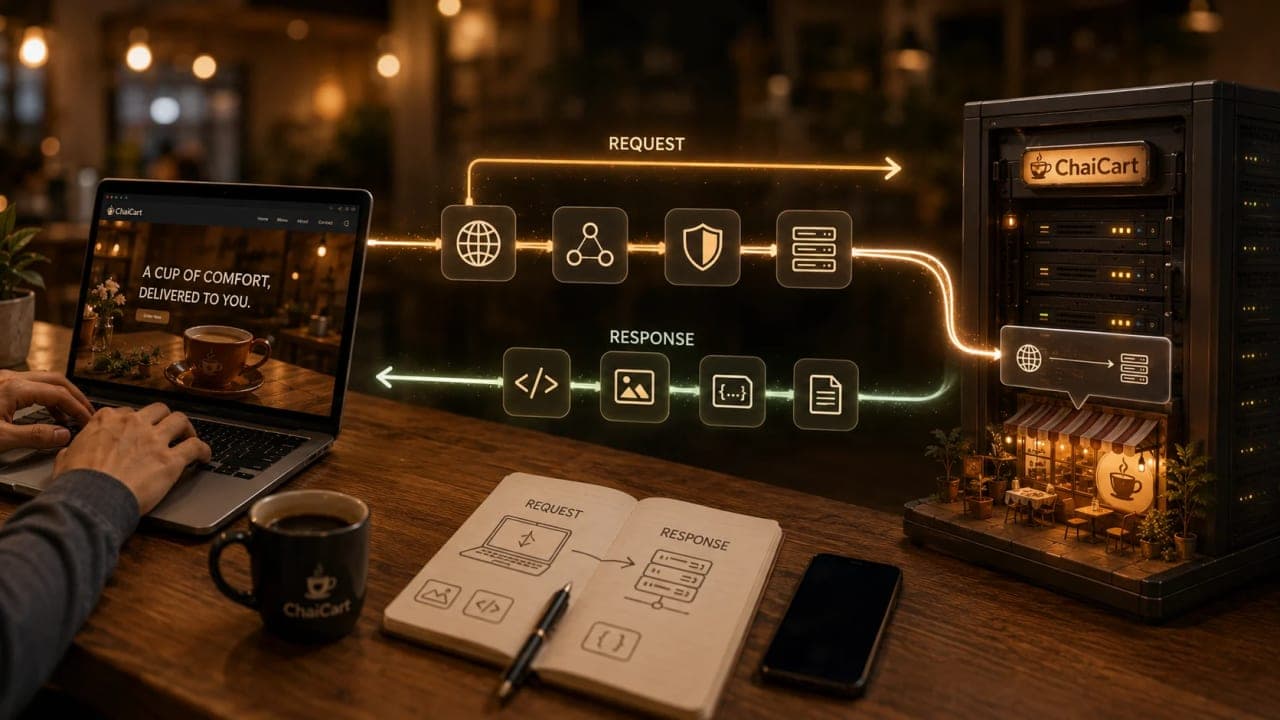
The client-server model is the foundation of most web systems.
The client sends a request.
The server processes it and sends a response.
In our story:
Maya's browser is the client.
ChaiCart's web server is the server.
The internet is the network between them.
The HTTP Request-Response Cycle
Maya's browser sends something like:
GET / HTTP/1.1
Host: chaicart.com
Accept: text/html
User-Agent: MayaBrowser/1.0
ChaiCart's server replies:
HTTP/1.1 200 OK
Content-Type: text/html
Cache-Control: public, max-age=300

<!doctype html>
<html>
  <body>
    <h1>Welcome to ChaiCart</h1>
  </body>
</html>
The status code `200 OK` says the request worked.
Other common status codes:
Status | Meaning |
|---|---|
200 | Success |
301 / 302 | Redirect |
400 | Bad request |
401 | Authentication required |
403 | Forbidden |
404 | Not found |
429 | Too many requests |
500 | Server error |
503 | Service unavailable |
A Tiny Node.js Server
Problem:
ChaiCart needs a basic server that can answer a browser request.
Code:
const http = require("node:http");

const server = http.createServer((request, response) => {
  if (request.url === "/health") {
    response.writeHead(200, { "Content-Type": "application/json" });
    response.end(JSON.stringify({ status: "ok" }));
    return;
  }

  response.writeHead(200, { "Content-Type": "text/html" });
  response.end("<h1>Welcome to ChaiCart</h1><p>Masala chai is brewing.</p>");
});

server.listen(3000, () => {
  console.log("ChaiCart server running on http://localhost:3000");
});
Line-by-line:
`http.createServer()` creates a server.
Each incoming request enters the callback.
`/health` returns a small JSON response. Load balancers commonly use health endpoints.
Other requests return a simple HTML page.
`listen(3000)` starts the server on port `3000`.
Quick takeaway:
How is it so far?
Vote with other readers
Your backend is just one participant in a bigger network journey. A real production request may pass through DNS, CDN, reverse proxy, load balancer, API gateway, and only then reach your app.
Synchronous and Asynchronous Communication
In a normal HTTP request, Maya waits for the response. That is synchronous from the user's point of view.
But modern apps also use asynchronous communication.
Examples:
AJAX or `fetch()` calls in the background
WebSockets for live order updates
message queues between backend services
background workers for sending receipts
At first, ChaiCart can handle orders in one request:
Browser -> Server -> Database -> Server -> BrowserLater, ChaiCart may send order confirmation through a queue:
Order API -> Queue -> Email Worker -> Email ProviderThe user does not need to wait for every internal task to finish.
Stateless vs Stateful Servers
HTTP is commonly treated as stateless: each request should contain enough information for the server to handle it.
For scalable systems, stateless servers are easier to load balance. If any ChaiCart app server can process Maya's request, traffic distribution becomes simpler.
Stateful systems remember ongoing context on a specific server. WebSocket connections, multiplayer sessions, and some real-time apps often need more careful connection management.
Common Mistake
Do not say:
"The browser talks directly to the database."
Usually, it should not.
The browser talks to a backend server or API. The backend talks to the database. Exposing a database directly to browsers would be a serious security and architecture problem.
Interview Answer Box
In the client-server model, the client sends a request over the network and the server returns a response. Web browsers, mobile apps, API consumers, web servers, databases, and microservices all fit this model in different ways. HTTP is a common request-response protocol used for websites and APIs.
8. One Server Is Cute Until ChaiCart Becomes Famous
For a few days, ChaiCart's one server works beautifully.
Maya orders chai. Her friends order chai. Someone posts a reel saying "best ginger chai near office" and suddenly everyone wants in.
The single server starts struggling.
Symptoms appear:
pages load slowly
API requests time out
CPU usage spikes
memory fills up
database connections pile up
deployments feel risky
This is where scaling begins.
Vertical Scaling
Vertical scaling means making the server bigger.
Small server -> Bigger server -> Even bigger serverThis helps for a while.
But there are limits. One machine can only become so large, and one machine is still one point of failure.
Horizontal Scaling
Horizontal scaling means adding more servers.
Server A
Server B
Server C
Now ChaiCart has more capacity.
But a new problem appears:
Which server should Maya's request go to?
Users should not manually choose server A, B, or C. That would be absurd. Imagine a website asking, "Please select your preferred backend machine before ordering samosa." Bas wahi reh gaya tha.
We need a traffic manager.
That is the load balancer.
9. Load Balancing: The Traffic Manager

A load balancer sits in front of multiple servers and distributes incoming requests.
Users
  |
  v
Load Balancer
  |
  +--> ChaiCart Server A
  +--> ChaiCart Server B
  +--> ChaiCart Server C
The user still sees one website.
Behind the scenes, the load balancer decides which healthy server should handle the request.
What Problem Does Load Balancing Solve?
Load balancing solves the problem of handling growing traffic in a scalable and reliable way.
It helps ChaiCart:
avoid overloading one server
use multiple servers efficiently
bypass unhealthy servers
deploy or maintain servers with less risk
improve availability
Common Load Balancing Strategies
Strategy | Simple Meaning |
|---|---|
Round robin | Send requests to servers in order |
Least connections | Send request to the server with fewer active connections |
IP hash | Use client IP to choose a server, useful for sticky behavior |
Weighted routing | Send more traffic to stronger servers |
Latency-based routing | Prefer the server or region with better response time |
Layer 4 vs Layer 7 Load Balancing
Layer 4 load balancing works around transport-level details such as IP addresses and ports.
Layer 7 load balancing understands application-level information such as HTTP paths, headers, cookies, and methods.
Example:
/api/orders  -> Order service
/api/menu    -> Menu service
/images/*    -> Static content service
A Layer 7 load balancer can make smarter HTTP-aware routing decisions.
Health Checks
A load balancer should not send traffic to broken servers.
So it performs health checks:
GET /healthIf ChaiCart Server B stops responding, the load balancer removes it from rotation.
Load Balancer
  +--> Server A: healthy
  +--> Server B: unhealthy, skip
  +--> Server C: healthy
Node.js Health Check Example
const http = require("node:http");

const server = http.createServer((request, response) => {
  if (request.url === "/health") {
    response.writeHead(200, { "Content-Type": "application/json" });
    response.end(JSON.stringify({
      status: "ok",
      service: "chaicart-api"
    }));
    return;
  }

  response.writeHead(200, { "Content-Type": "application/json" });
  response.end(JSON.stringify({ message: "ChaiCart API is ready" }));
});

server.listen(3000);
Quick takeaway:
A boring `/health` endpoint can be a very important production feature.
What If One Server Fails?
In a single-server system, one server failure can mean total downtime.
In a load-balanced system, the load balancer can stop sending traffic to the failed server and continue using healthy servers.
This is why load balancing improves availability, not only performance.
Interview Answer Box
A load balancer distributes incoming traffic across multiple servers. It improves scalability by sharing load and improves availability by routing around unhealthy servers. It may operate at Layer 4 using IP and ports or Layer 7 using HTTP-level information like paths, headers, and cookies.
10. Proxies: The Middle People With a Job

A proxy is an intermediary.
It sits between one side and another side, forwarding requests and responses.
But the direction matters.
Forward Proxy
A forward proxy is used by clients.
Maya's Browser -> Forward Proxy -> Internet -> WebsiteThe website may see the proxy instead of Maya directly.
Forward proxies are used for:
privacy
content filtering
corporate browsing rules
caching
controlled internet access
VPN-like use cases
Example:
ChaiCart's office may route employee internet traffic through a forward proxy so the company can filter risky websites or log outbound requests.
Reverse Proxy
A reverse proxy is used by servers.
User -> Reverse Proxy -> ChaiCart Backend ServersThe user talks to the reverse proxy. The backend servers stay hidden behind it.
Reverse proxies are used for:
load balancing
caching
SSL/TLS termination
compression
DDoS protection
hiding backend server details
Forward Proxy vs Reverse Proxy
Feature | Forward Proxy | Reverse Proxy |
|---|---|---|
Used by | Clients | Servers |
Sits in front of | Client/user | Backend servers |
Hides | Client identity | Server identity |
Common use | Privacy, filtering, outbound control | Load balancing, caching, security |
Example | Corporate proxy, VPN-style proxy | NGINX, Cloudflare, HAProxy, API gateway |
SSL/TLS Termination
If the reverse proxy handles HTTPS, it may decrypt incoming TLS traffic at the edge, then forward the request internally.
This is called TLS termination or SSL termination.
Why do this?
centralize certificate management
reduce work on app servers
inspect and route HTTP traffic
enforce security policies in one place
But you must design internal traffic carefully. In sensitive systems, traffic may still need encryption between the proxy and backend servers.
Common Mistake
Do not say:
"A proxy and load balancer are the same thing."
A load balancer can be implemented as a kind of reverse proxy, but not every proxy is a load balancer.
The job defines the design.
Interview Answer Box
A forward proxy sits in front of clients and helps them access the internet with privacy, filtering, or caching. A reverse proxy sits in front of backend servers and helps with load balancing, caching, TLS termination, security, and hiding backend infrastructure.
11. API Gateway: The Front Desk for Microservices

ChaiCart keeps growing.
The one backend becomes messy. So the team splits it into services:
Menu Service
Order Service
Payment Service
User Service
Delivery Service
Notification Service
Now Maya's browser should not have to know every internal service address.
It should not call:
menu.internal.chaicart
orders.internal.chaicart
payments.internal.chaicart
delivery.internal.chaicart
That would expose too much complexity.
Instead, ChaiCart introduces an API gateway.
Browser / Mobile App
        |
        v
    API Gateway
        |
        +--> Menu Service
        +--> Order Service
        +--> Payment Service
        +--> Delivery Service
What an API Gateway Does
An API gateway is a centralized entry point for API requests.
It can handle:
routing
authentication
authorization
rate limiting
throttling
caching
request transformation
response transformation
logging
monitoring
security policies
For ChaiCart:
`GET /api/menu` goes to Menu Service.
`POST /api/orders` goes to Order Service.
`POST /api/payments` goes to Payment Service.
`GET /api/delivery/status` goes to Delivery Service.
Maya's browser sees one API surface.
ChaiCart's backend can remain modular.
API Gateway vs Load Balancer
This is a common interview question.
Feature | Load Balancer | API Gateway |
|---|---|---|
Primary job | Distribute traffic | Manage API traffic |
Routing level | Server or service instances | API paths, clients, policies |
Auth support | Usually not the main purpose | Common built-in responsibility |
Rate limiting | Sometimes | Common |
Request transformation | Limited | Common |
Microservices fit | Useful | Very useful |
Example question | "Which server should handle this?" | "Which service should handle this, and is this client allowed?" |
The simple version:
A load balancer spreads traffic. An API gateway governs API traffic.
In real systems, they can overlap. An API gateway may use load balancing internally, and a reverse proxy can route traffic too. But conceptually, the API gateway has more API-management responsibility.
Rate Limiting and Throttling
Suppose one client sends 10,000 order requests per minute.
Maybe it is a bug. Maybe it is abuse. Maybe someone wrote a while loop and went for lunch.
An API gateway can apply rate limits:
Allow: 100 requests per minute per user
Reject: extra requests with 429 Too Many Requests
Throttling slows traffic down. Rate limiting blocks or rejects traffic after a threshold.
Authentication and Authorization
Authentication asks:
"Who are you?"
Authorization asks:
"Are you allowed to do this?"
For ChaiCart:
Anyone can view the menu.
Only logged-in users can place an order.
Only admins can update menu prices.
The API gateway can verify tokens before requests reach internal services.
Caching at the Gateway
Some API responses are requested repeatedly.
For example:
GET /api/menuIf the menu changes rarely, the gateway may cache the response briefly. That reduces load on the Menu Service.
But you must cache carefully. You probably should not cache Maya's personal order history and serve it to someone else. That is the kind of bug that turns a normal Tuesday into a long incident call.
Observability
An API gateway is a useful place to collect:
request counts
latency
error rates
client IDs
route-level metrics
authentication failures
rate limit events
This helps engineers answer:
Is ChaiCart slow for everyone or only one route?
Which API is failing?
Did traffic spike suddenly?
Are bots abusing one endpoint?
Interview Answer Box
An API gateway is a centralized entry point for API traffic. It routes requests to backend services and can handle authentication, authorization, rate limiting, caching, transformation, logging, and monitoring. It is especially useful in microservices and multi-client architectures.
12. CDN: Bringing ChaiCart Closer to the World

ChaiCart is now popular outside Maya's city.
People from Mumbai, Bengaluru, Singapore, London, and Toronto are browsing the menu. The original ChaiCart server is still hosted in one region.
Without a CDN, faraway users may experience higher latency because content has to travel a long distance.
A CDN, or Content Delivery Network, is a globally distributed network of servers that delivers content from locations closer to users.
Origin Server and Edge Server
Term | Meaning |
|---|---|
Origin server | The original source of the content |
Edge server | CDN server closer to the user |
PoP | Point of Presence, a CDN location containing edge servers |
For ChaiCart:
The origin server stores the real website assets.
Edge servers cache images, CSS, JavaScript, and sometimes API responses.
Users get content from a nearby edge when possible.
CDN Request Flow
sequenceDiagram
    participant User as Maya's Browser
    participant CDN as CDN Edge Server
    participant Origin as ChaiCart Origin Server

    User->>CDN: Request /images/masala-chai.webp
    alt Cache hit
        CDN-->>User: Serve image from edge
    else Cache miss
        CDN->>Origin: Fetch image
        Origin-->>CDN: Return image
        CDN-->>User: Serve image and cache it
    end
Cache Hit vs Cache Miss
A cache hit means the CDN already has the requested content.
A cache miss means the CDN does not have it yet, so it fetches the content from the origin server.
Cache hit  -> fast, served from edge
Cache miss -> fetch from origin, then store for future requests
CDN TTL and Cache Invalidation
CDN TTL controls how long content stays fresh in the CDN cache.
If ChaiCart updates its homepage banner but the CDN still has the old version, users may see stale content until TTL expires.
To fix this, teams use:
short TTL for frequently changing content
long TTL for versioned static assets
cache invalidation or purge for urgent changes
hashed filenames like `app.9f3a2c.js` for safe long-term caching
Static and Dynamic Content
Static content is easier to cache:
images
CSS
JavaScript bundles
fonts
videos
Dynamic content needs more care:
personalized order history
cart state
payment data
user-specific recommendations
Some dynamic API responses can be cached when they are public and safe. For example, ChaiCart's menu might be cacheable for a short time. Maya's private order receipt should not be globally cached.
CDN Security Benefits
CDNs can also help with:
DDoS protection
TLS termination at the edge
web application firewall rules
bot filtering
hiding the origin server
global failover
But again, do not overstate it. A CDN improves security posture, but it does not magically make bad application code safe.
Interview Answer Box
A CDN is a distributed network of edge servers that cache and deliver content closer to users. It reduces latency, lowers origin load, improves availability, and can provide security features like DDoS protection and TLS termination. A cache hit is served from the edge; a cache miss fetches from the origin.
13. The Full Journey of Maya's Request
Now let us combine everything.
Maya opens:
https://chaicart.comIn a mature ChaiCart system, the request may look like this:
Maya's Browser
  |
  | 1. DNS lookup
  v
DNS Resolver
  |
  | 2. IP returned
  v
CDN / Edge Network
  |
  | 3. Static assets served from cache if possible
  v
Reverse Proxy / Load Balancer
  |
  | 4. Route to healthy backend
  v
API Gateway
  |
  | 5. Auth, rate limit, route API calls
  v
Backend Services
  |
  | 6. Query/update data
  v
Database / Cache / Queue
  |
  | 7. Response travels back
  v
Maya's Browser
Mermaid version:
flowchart LR
    A["Maya's Browser"] --> B["DNS Resolver"]
    B --> C["CDN Edge"]
    C --> D["Reverse Proxy / Load Balancer"]
    D --> E["API Gateway"]
    E --> F["Menu Service"]
    E --> G["Order Service"]
    E --> H["Payment Service"]
    F --> I["Database / Cache"]
    G --> I
    H --> I
    I --> E
    E --> D
    D --> C
    C --> A
Not every system has every layer.
A tiny internal tool may not need a CDN or API gateway.
A simple monolith may only need DNS, HTTPS, a server, and a database.
A high-traffic global app may need all of these and more.
Good system design is not adding every component because it sounds impressive. Good system design is knowing which component solves which problem.
14. How This Appears in Real JavaScript Backend Work
When you are a JavaScript developer, these concepts show up more often than you think.
DNS and Environment Config
Your app might connect to:
DATABASE_URL=postgres://user:pass@db.internal:5432/chaicart
REDIS_URL=redis://cache.internal:6379
API_BASE_URL=https://api.chaicart.com
Those hostnames must resolve to IPs somewhere.
HTTP Clients
Your Node backend might call another service:
async function fetchMenu() {
  const response = await fetch("https://api.chaicart.com/menu");

  if (!response.ok) {
    throw new Error(`Menu request failed: ${response.status}`);
  }

  return response.json();
}
This small `fetch()` call may involve DNS, TCP, TLS, HTTP, proxies, gateways, services, and caches.
Timeout Thinking
Network calls can fail or hang.
So production code should think about:
timeouts
retries
backoff
circuit breakers
idempotency
observability
Beginner note:
If your backend calls another backend, you are now designing a distributed system, even if the code looks like one simple function call.
Logging the Request Path
ChaiCart engineers might log:
request ID
user ID
route
status code
latency
upstream service
cache hit or miss
gateway decision
load balancer target
Without observability, debugging distributed systems becomes guesswork.
15. Common Mistakes Beginners Make
Mistake 1: Thinking DNS Sends the Website
DNS does not send HTML, CSS, or JavaScript.
DNS only helps find the IP address.
Mistake 2: Treating Public and Private IPs as the Same
Public IPs are reachable from the internet.
Private IPs are meant for internal networks and are not directly routable over the public internet.
Mistake 3: Adding an API Gateway Too Early
If ChaiCart is a small monolith with one frontend and one backend, an API gateway may be unnecessary overhead.
Use it when you need API management, microservice routing, auth policies, rate limiting, or multi-client control.
Mistake 4: Thinking CDN Caches Everything Safely
CDNs are powerful, but caching private or user-specific content incorrectly is dangerous.
Cache public assets aggressively. Cache personalized data carefully, if at all.
Mistake 5: Ignoring Failure
Servers fail. DNS changes propagate slowly. Proxies misroute. Certificates expire. Cache gets stale. Networks drop packets.
System design is partly the art of asking:
"What happens when this thing fails?"
16. Interview-Ready Answers
What happens when you type a URL in the browser?
The browser parses the URL, checks caches, resolves the domain through DNS, connects to the server IP using the right protocol and port, establishes a secure TLS connection for HTTPS, sends an HTTP request, receives an HTTP response, downloads needed assets, and renders the page. In large systems, the request may pass through a CDN, reverse proxy, load balancer, API gateway, backend services, caches, and databases.
Why does networking matter in system design?
Networking is how system components communicate. It affects latency, throughput, scalability, reliability, security, and cost. Large systems depend on efficient communication between clients, servers, databases, APIs, services, load balancers, proxies, gateways, and CDNs.
Why does a single server become a bottleneck?
A single server has limited CPU, memory, network bandwidth, storage, and connection capacity. As traffic grows, latency increases and failures become more likely. It is also a single point of failure. Horizontal scaling and load balancing help distribute traffic across multiple servers.
When should you use a load balancer?
Use a load balancer when traffic needs to be distributed across multiple servers, when you need higher availability, when servers need health checks, or when deployments and maintenance should happen without taking the entire application down.
When should you use an API gateway?
Use an API gateway when clients need a single API entry point for multiple backend services and you need centralized routing, authentication, rate limiting, caching, transformation, logging, or monitoring.
Why use a CDN?
Use a CDN to deliver content from edge locations closer to users. It reduces latency, lowers origin server load, improves availability, and can add security features like DDoS protection and TLS termination.
17. Final Cheat Sheet
Concept | One-Line Meaning | ChaiCart Example |
|---|---|---|
IP address | Machine-readable network address | ChaiCart server has an address browsers can reach |
Public IP | Internet-reachable IP | Public endpoint for ChaiCart |
Private IP | Internal network IP | Internal app servers and database |
NAT | Maps private devices through public IPs | Internal services share outbound access |
DNS | Converts domain to IP | chaicart.com becomes an IP address |
TTL | Cache lifetime | DNS/cache answers stay valid for a period |
Client | Request sender | Maya's browser |
Server | Request processor | ChaiCart backend |
HTTP | Request-response protocol | Browser asks for homepage |
HTTPS | HTTP over TLS | Secure ChaiCart connection |
TCP | Reliable transport | Normal website request transport |
UDP | Lightweight datagram transport | DNS and real-time use cases |
Forward proxy | Proxy for clients | Office proxy for employee browsing |
Reverse proxy | Proxy for servers | Edge server in front of ChaiCart backend |
Load balancer | Distributes traffic | Sends requests to healthy servers |
API gateway | Manages API traffic | Routes /api/orders to Order Service |
CDN | Global edge cache | Serves images/CSS/JS near users |
Cache hit | Content found in cache | CDN serves chai image immediately |
Cache miss | Content fetched from origin | CDN asks ChaiCart origin for content |
Observability | Seeing what the system is doing | Logs, metrics, traces, request IDs |
Lock in the takeaway
Frequently asked questions
What happens when a user types a website URL in the browser?
The browser resolves the domain through DNS, connects to the server IP, sends an HTTP or HTTPS request, receives a response, downloads needed assets, and renders the page.
Why is DNS important in system design?
DNS converts human-friendly domain names into machine-friendly IP addresses and can support caching, failover, and traffic routing at scale.
What problem does a load balancer solve?
A load balancer distributes incoming traffic across multiple servers so one machine does not become overloaded or become the only point of failure.
How is an API gateway different from a load balancer?
A load balancer mainly distributes traffic, while an API gateway also handles API routing, authentication, rate limiting, caching, transformation, and observability.
Why does a CDN make a website faster?
A CDN stores cached content on edge servers closer to users, reducing distance, latency, origin load, and repeated downloads.