
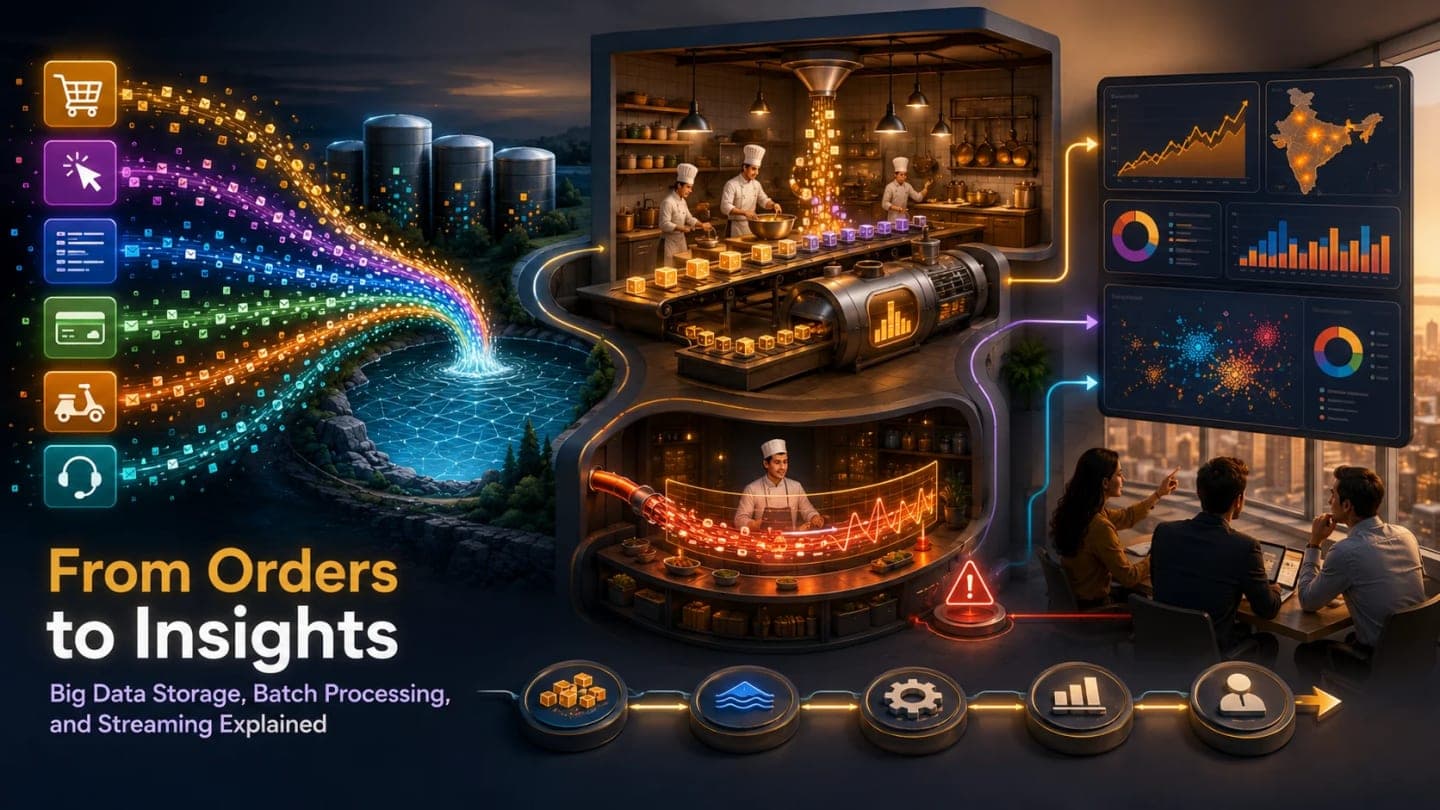
Listen to this article
Checking audio support
Storage Series Path: From Stored Data to Useful Answers
This final storage layer makes more sense after the previous pieces: The App That Needed a Memory: Storage Fundamentals and CAP Theorem Explained Clearly for fundamentals, The Register or the Flexible Box: SQL vs NoSQL Explained Without the Holy War for database models, When One Database Gets Tired: Replication, Sharding, and Polyglot Persistence Explained for database scaling, The Pantry for Photos, Videos, and Backups: Object Storage Explained with S3-Style Thinking for object storage, and When One Disk Is Not Enough: File Systems and Distributed Storage Explained Through SnackNow for distributed file storage.
SnackNow started with a simple need: remember things. Remember users, orders, payments, menu items, sessions, photos, backups, logs, and analytics files. But storage is only the beginning. Meera now asks harder questions.
Which snacks sell most during cricket breaks? Which city has the most failed deliveries? Which coupon actually increases orders? Which users may churn? Which payment failures look suspicious? How many menu views become orders? Can fraud be detected immediately?
Aman realizes SnackNow no longer just needs to store data. It needs to turn huge data into insight before the business question goes cold.
Reader promise: this piece explains Big Data without turning it into a parade of tool names. Every component appears because SnackNow has a real problem to solve.
SnackNow Has Data, But Now It Wants Answers
A normal database is great when the app asks, what is this user's order? It is not automatically great when an analyst asks, scan months of clicks, logs, payments, delivery events, coupon usage, app errors, and support signals to explain what changed last weekend.
Big Data begins when the question changes from, can we store this order, to, can we understand millions of orders, clicks, logs, and events fast enough to make decisions?
Big Data is data that is too large, too fast, too varied, or too messy for traditional storage and processing tools to handle comfortably.
SnackNow Data | Normal Question | Big Data Question | Why It Gets Hard |
|---|---|---|---|
Orders | Did Riya pay? | Which coupon changed order behavior across cities? | Large historical scans |
Clicks | Did user tap menu? | How many menu views become orders in real time? | High event velocity |
Logs | Did service error? | Which service causes failed deliveries during rush? | Huge semi-structured files |
Payments | Was this payment successful? | Which payment pattern looks suspicious right now? | Real-time detection |
Delivery events | Where is this driver? | Which routes create the most delay? | Continuous geospatial events |
Images/support files | Where is this file? | Which complaints are rising by item and city? | Varied data shapes |
Takeaway: Big Data is not just more rows. It is a different kind of pressure on storage, processing, trust, and time.
The Vs of Big Data: Why This Is Hard
Interviews often ask for the 5 Vs of Big Data: Volume, Velocity, Variety, Veracity, and Value. This series also includes Variability as a sixth useful lens because real systems do not receive data at a perfectly polite pace.
Visual purpose: This visual helps you understand why SnackNow's data is hard from multiple angles at once.
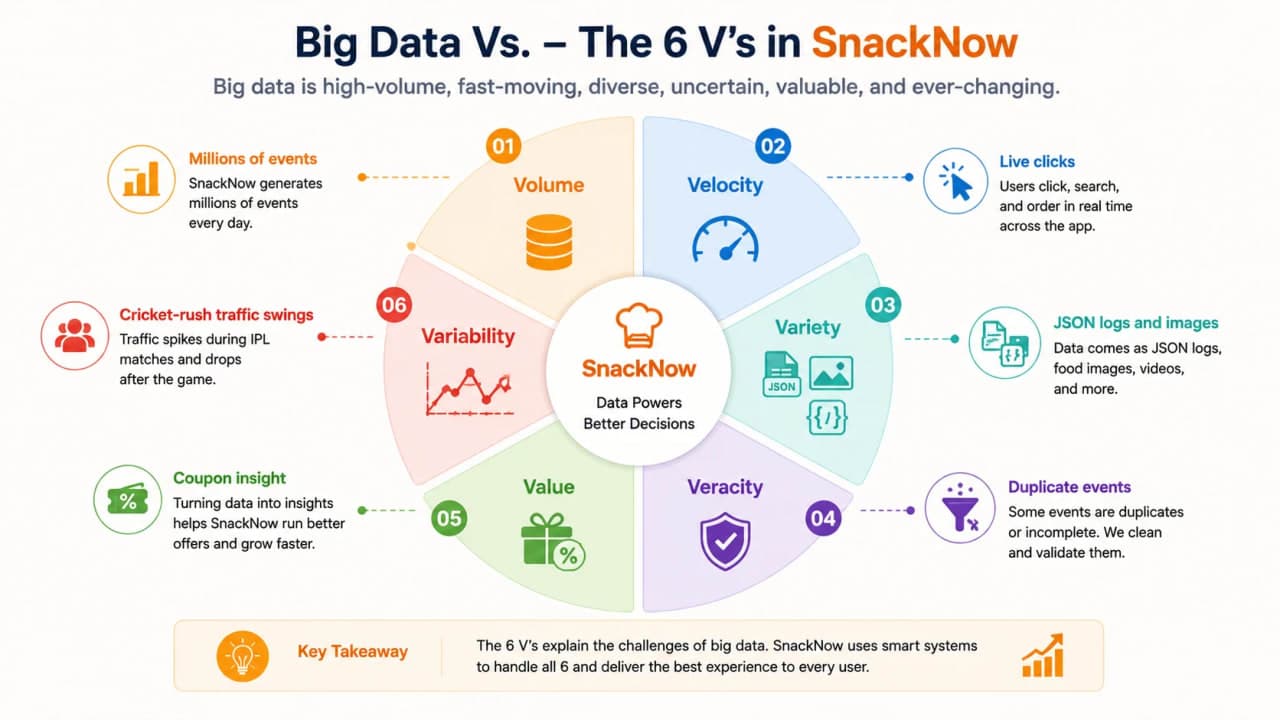
How to read this visual: each V is a different kind of stress. A good Big Data design has to respect all of them, not just Volume.
V | Plain Meaning | SnackNow Example | System Design Impact |
|---|---|---|---|
Volume | A lot of data | Terabytes of logs and events | Horizontal storage and processing |
Velocity | Data arrives fast | Live clicks and payments | Ingestion queues and stream processing |
Variety | Different shapes | SQL rows, JSON logs, images, CSV exports | Flexible storage and schema strategy |
Veracity | Trust and quality | Duplicate events or bad timestamps | Validation, cleaning, lineage |
Value | Useful business outcome | Coupon insight or fraud prevention | Do not collect data with no purpose |
Variability | Patterns change | Cricket rush, festival spikes, city behavior shifts | Elastic capacity and adaptive pipelines |
Takeaway: a system can fail because data is too large, too fast, too mixed, too dirty, too pointless, or too unpredictable.
When Does a Workload Become a Big Data Problem?
Not every large table is Big Data. If one database can store it, query it, protect it, and serve the product without drama, it may still be ordinary application data. A workload becomes Big Data when size, speed, or variety breaks the usual tools.
Workload | Big Data? | Why | Better Approach |
|---|---|---|---|
Riya's current order | No | Small transactional lookup | Relational database |
Month of clickstream events | Yes | Millions of semi-structured events | Data lake plus batch processing |
Payment fraud signal | Yes | Needs low-latency detection | Stream processing |
One restaurant menu | No | Small structured/flexible data | SQL or document database |
ML training on delivery history | Yes | Large historical datasets | Lake storage plus Spark |
App error logs across services | Yes | High volume and varied format | Ingestion pipeline and analytics storage |
Static food image delivery | No, not by itself | File serving problem | Object storage and CDN |
Takeaway: Big Data is about workload pressure, not bragging rights.
Why Traditional Databases Struggle
SnackNow's order database is designed for correctness and fast product behavior. It should protect checkout, payments, refunds, and order status. If heavy analytics starts scanning months of orders while users are paying, the business has created an avoidable fight inside its most sensitive system.
Traditional relational databases can struggle with petabyte scale, high ingestion velocity, semi-structured logs, huge read/write pressure, complex joins over massive histories, and the cost of scaling vertically.
Do not run every analytics query on the same database that accepts payments.
Visual purpose: This visual helps you see why production transactions and heavy analytics should not always share the same storage path.
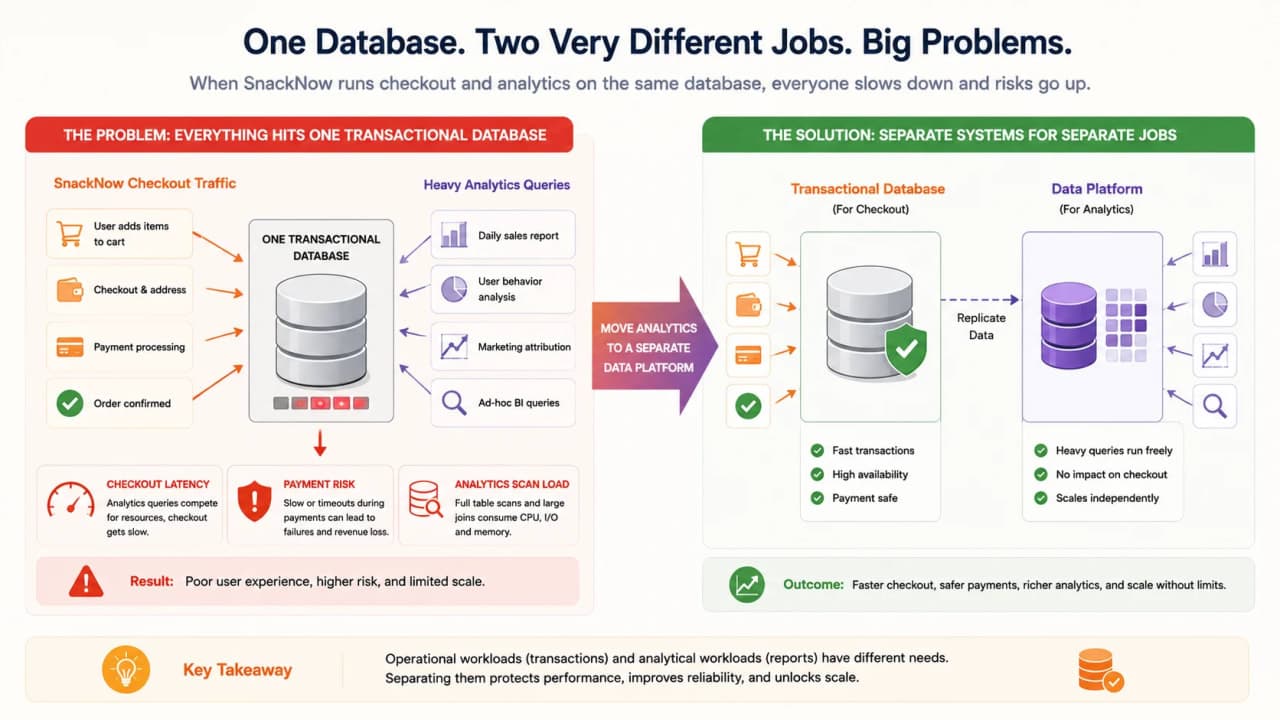
How to read this visual: checkout traffic needs predictable low-latency correctness, while analytics scans need large historical reads. Mixing both blindly can hurt the product.
Pressure | What Happens | SnackNow Risk | Better Direction |
|---|---|---|---|
Huge scans | Database reads too much history | Checkout slows | Move analytics to data platform |
High ingestion | Writes pile up | Logs and events compete with orders | Use Kafka/Kinesis and lake storage |
Varied formats | Rigid schema becomes awkward | JSON logs and files do not fit neatly | Raw lake plus schema-on-read or Delta |
Cost | Vertical scaling gets expensive | Bigger DB for wrong workload | Decouple compute and storage |
Operational risk | Analytics breaks production | Payment path gets unstable | Separate OLTP and analytics concerns |
Takeaway: keep the order database excellent at orders. Build analytics paths for analytics.
HDFS vs S3: Two Ways to Store Big Data
HDFS and S3-style object storage can both store large analytics data, but they feel different operationally. HDFS is closely tied to Hadoop-style clusters and high-throughput batch workloads. S3-style storage is managed, cloud-native, durable, and works well when compute can be decoupled from storage.
Visual purpose: This visual helps you choose between cluster-style storage and cloud-native lake storage.
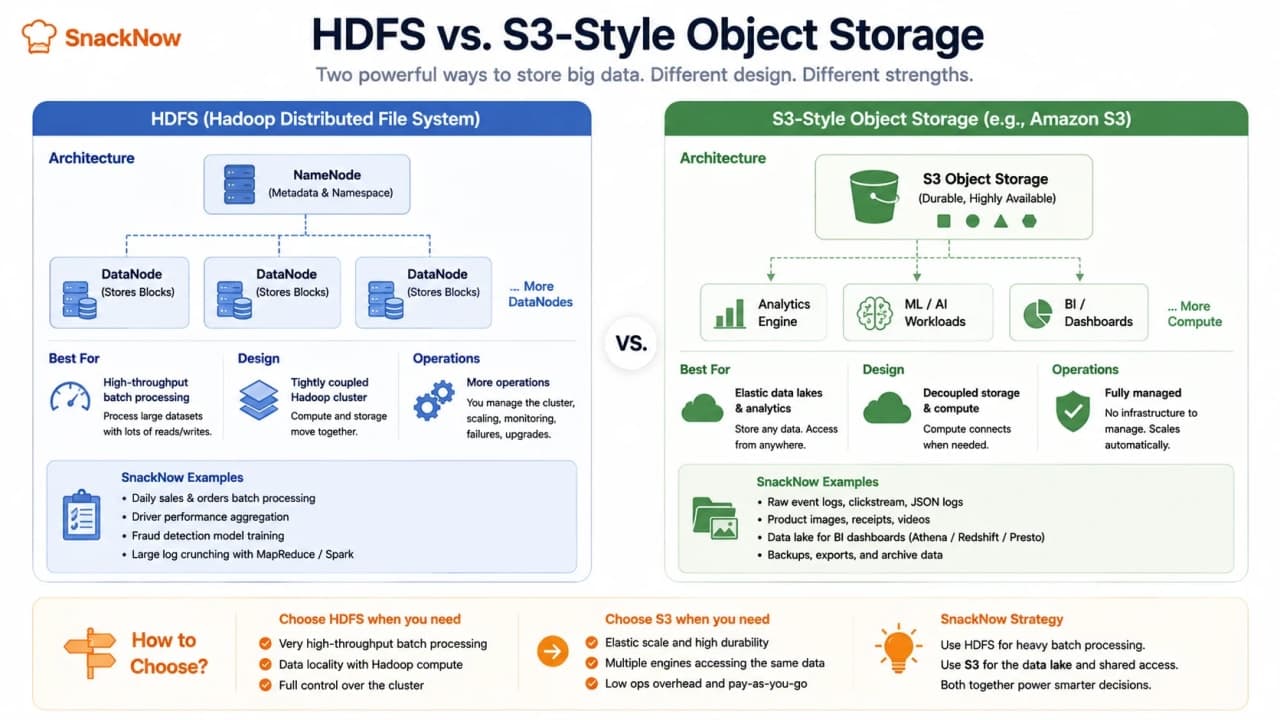
How to read this visual: HDFS keeps compute and storage close inside a cluster. S3-style storage lets different compute engines read the same durable object store.
Feature | HDFS | S3/Object Storage | SnackNow Decision |
|---|---|---|---|
Management | Cluster managed by team | Managed cloud service | Use S3-style if ops should stay lighter |
Scalability | Add cluster nodes | Elastic managed scale | Cloud lake favors S3-style |
Cost model | Infrastructure and operations | Storage, requests, retrieval, egress | Model total workload cost |
Compute coupling | Tighter with Hadoop cluster | Decoupled compute engines | S3 helps multiple tools share data |
Batch fit | Strong | Strong with Spark/managed engines | Both can work |
Cloud fit | Possible but less natural | Very strong | Modern cloud pipeline leans S3-style |
Takeaway: HDFS is not obsolete in every world; S3-style storage is often the natural foundation for cloud-native data lakes.
Data Lake: Store Raw Data First, Understand Later
A data lake stores raw structured, semi-structured, and unstructured data so different teams can process it later. SnackNow can place raw logs, click events, delivery GPS events, payment events, support files, and transformed reports into one analytics storage foundation.
That does not mean everything becomes useful automatically. A data lake without ownership, cataloging, schema discipline, and retention can become a data swamp: lots of data, little trust.
Visual purpose: This visual helps you understand how raw data becomes dashboards and ML datasets.
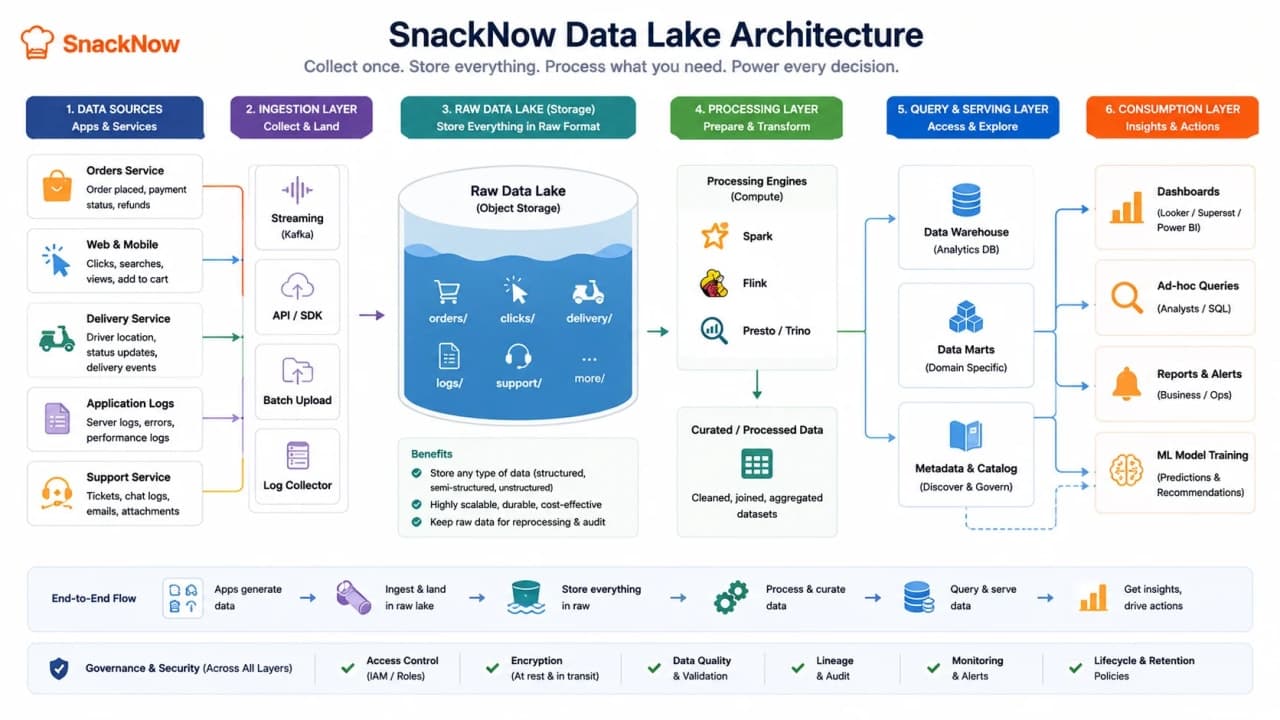
How to read this visual: the lake is not the final answer. Ingestion brings data in, processing cleans and shapes it, query engines ask questions, and dashboards or models consume the results.
Lake Zone | Meaning | SnackNow Example | Rule |
|---|---|---|---|
Raw | Original ingested data | Untouched click logs | Keep traceability |
Cleaned | Validated and normalized | Fixed timestamps and city names | Apply quality checks |
Curated | Business-ready datasets | Daily city sales table | Document meaning |
Archive | Old retained data | Last year's raw logs | Use lifecycle policy |
Takeaway: a lake needs governance. Otherwise it is just a storage pond with confusing labels.
Delta Lake: Giving Rules to the Lake
Delta Lake is a storage layer that sits on top of data-lake files, often in S3 or HDFS. Its job is to make lake data more reliable for analytics and machine learning.
It adds ACID transactions, schema enforcement, time travel, and performance optimizations such as compaction. That means concurrent jobs can write and read with more discipline, invalid data can be rejected, and teams can inspect older versions when something goes wrong.
Visual purpose: This visual helps you see Delta Lake as rules and history on top of lake storage, not a totally separate universe.
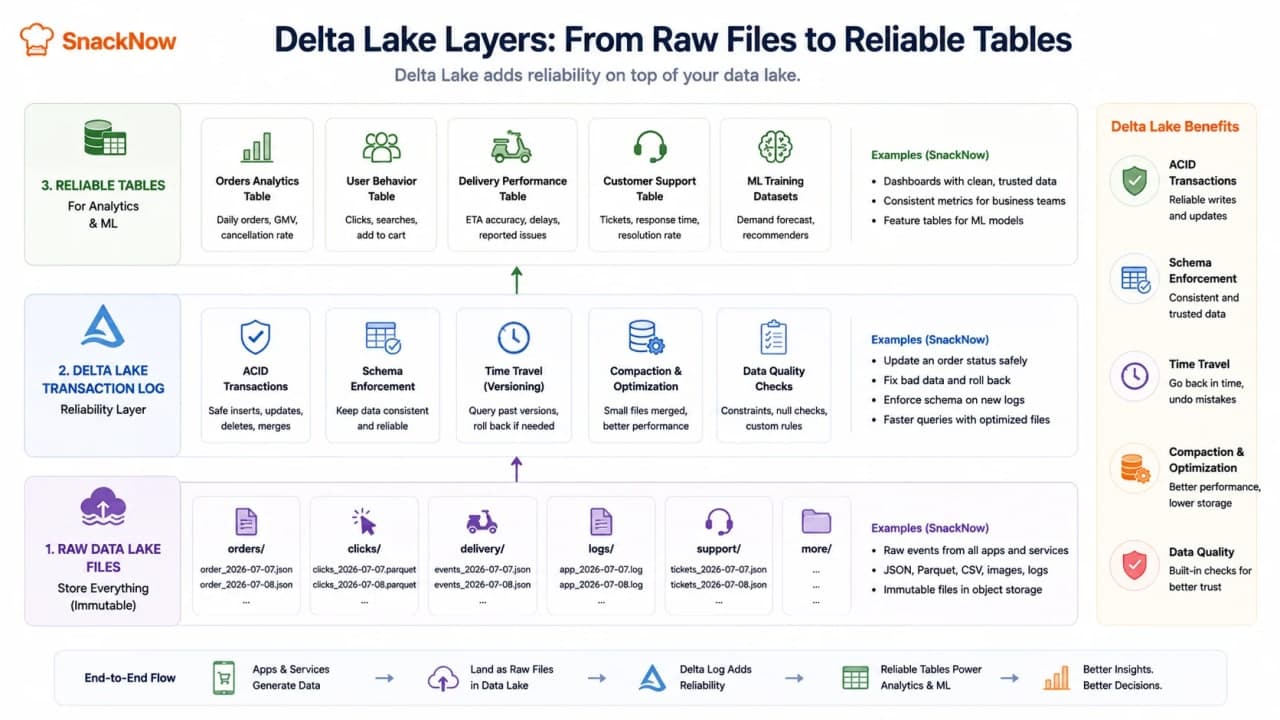
How to read this visual: raw files are still underneath. The Delta transaction log records changes and gives analytics jobs a consistent table view.
How is it so far?
Vote with other readers
Delta Lake Feature | Plain Meaning | SnackNow Value |
|---|---|---|
ACID transactions | Reliable concurrent reads/writes | Dashboard does not read half-written data |
Schema enforcement | Reject wrong-shaped data | Missing user_id or wrong timestamp is caught |
Time travel | Read older table versions | Recover after bad ETL job |
Compaction/optimization | Make small files query better | Faster analytics scans |
Reliable tables | Lake data behaves more like managed datasets | Trusted reporting and ML training |
Takeaway: Delta Lake helps a data lake act less like a dumping ground and more like a production analytics foundation.
Batch Processing and Stream Processing
Batch processing handles data in chunks. It is like cleaning the kitchen after the day ends. You collect the day's events, run a job, and produce a report. Nightly sales, weekly retention, coupon performance, historical fraud analysis, and ML training are natural batch jobs.
Stream processing handles events as they arrive. It is like reacting at the live counter while orders are still coming in. Fraud alerts, delivery delay alerts, live dashboards, monitoring, and recommendation updates often need stream processing.
Visual purpose: This visual helps you understand the time difference between batch and streaming.
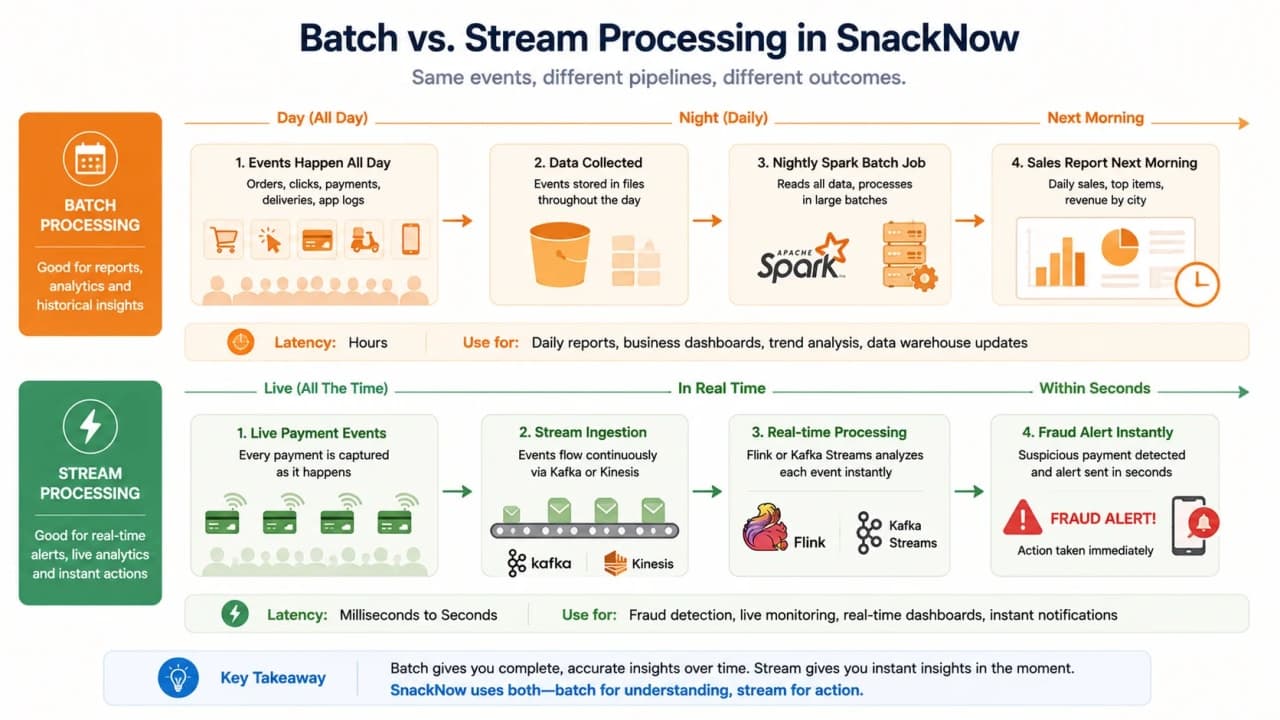
How to read this visual: batch waits for a chunk of data and then processes it. Streaming reacts continuously as events move through the system.
Need | Batch | Stream | SnackNow Example | Better Choice |
|---|---|---|---|---|
Nightly sales report | Strong | Possible but unnecessary | Yesterday's city sales | Batch |
Fraud detection | Too late alone | Strong | Suspicious payment pattern | Stream plus batch model training |
Delivery delay alert | Too late | Strong | Driver route delay | Stream |
ML training | Strong | Possible for online features | Churn model training | Batch |
Real-time dashboard | Laggy | Strong | Live orders per minute | Stream |
Monthly finance report | Strong | Unnecessary | Revenue reconciliation | Batch |
Recommendation refresh | Strong for scheduled | Strong for live behavior | Menu suggestions | Depends on freshness need |
Batch is for later understanding. Stream is for immediate reaction.
Designing a Terabytes-Per-Day Log Pipeline
Now give SnackNow a serious requirement: process terabytes of logs every day, detect suspicious payment behavior quickly, produce daily business reports, support ad-hoc SQL analytics, and archive old data without letting costs run wild.
Visual purpose: This visual ties the whole pipeline together so every tool has a job.
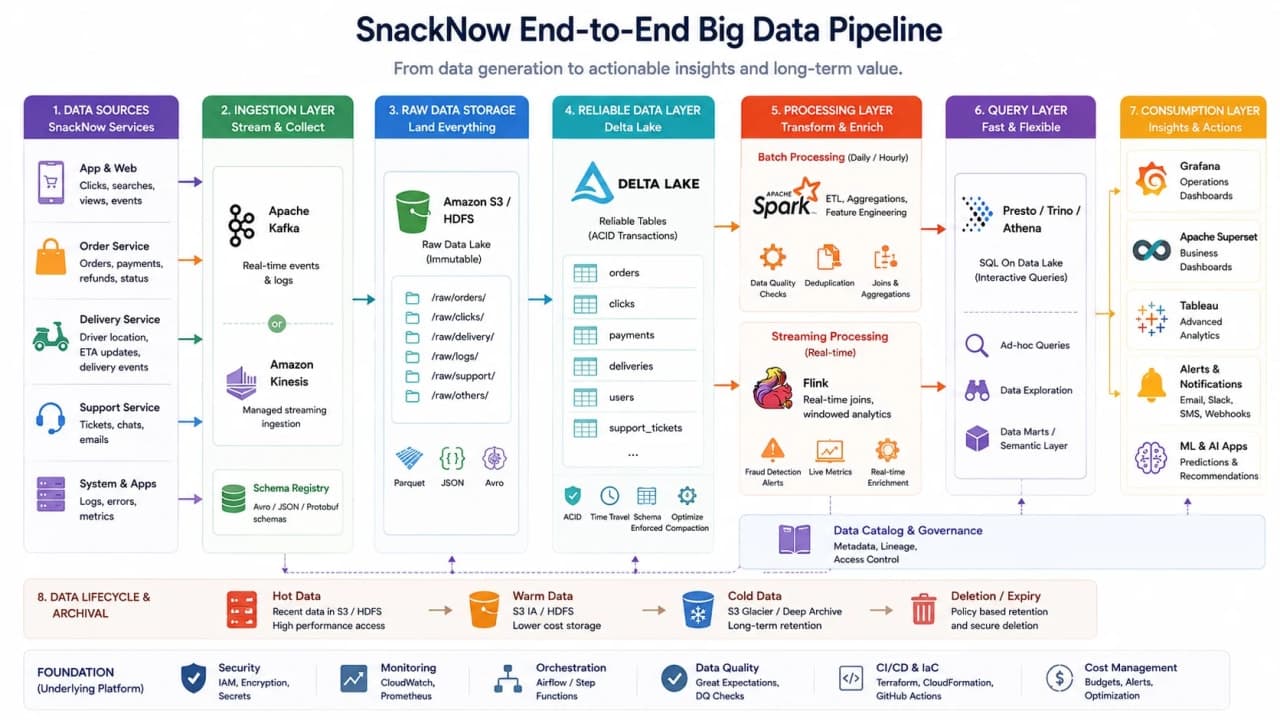
How to read this visual: ingestion catches fast events, storage keeps raw durable data, processing creates value, query engines let humans ask questions, dashboards show results, and lifecycle rules control long-term cost.
1. Apps and services produce logs/events.
2. Kafka or Kinesis ingests events in real time.
3. Raw events land in S3, HDFS, or Delta Lake tables.
4. Spark batch jobs clean, aggregate, and train models.
5. Flink or Kafka Streams detects live anomalies.
6. Presto, Trino, Athena, or Redshift Spectrum serves ad-hoc SQL.
7. Grafana, Superset, or Tableau visualizes metrics.
8. Lifecycle rules archive or delete old data.
Stage | Purpose | Common Tools | SnackNow Example |
|---|---|---|---|
Ingestion | Absorb events reliably | Kafka, Kinesis | Orders, clicks, payment events |
Raw storage | Keep original data | S3, HDFS | Raw logs by date and service |
Reliable lake tables | Governed analytics datasets | Delta Lake | Clean delivery events |
Batch processing | Historical ETL and aggregates | Spark, MapReduce | Daily coupon report |
Stream processing | Low-latency detection | Flink, Kafka Streams | Fraud alert |
Query layer | Interactive analytics | Presto, Trino, Athena, Redshift Spectrum | Analyst SQL |
Visualization | Show metrics | Grafana, Superset, Tableau | Operations dashboard |
Archive | Control retention cost | Lifecycle policies | Move old logs to cold storage |
Takeaway: a Big Data system is a pipeline, not a single magic database.
Storage and Processing Framework Decision Table
Need | Storage Choice | Processing Choice | Why |
|---|---|---|---|
Raw logs | S3 or HDFS | Spark later | Cheap durable storage with batch processing |
Real-time alerts | Kafka/Kinesis event stream plus lake sink | Flink or Kafka Streams | Events must be processed immediately |
Nightly ETL | Delta Lake or lake files | Spark | Large historical transformations |
Ad-hoc SQL analytics | S3/Delta/HDFS datasets | Presto, Trino, Athena, Redshift Spectrum | Query large datasets without moving everything |
ML training data | Curated lake tables | Spark/ML tooling | Large clean historical datasets |
Long-term archive | S3 archive tiers/object storage | Rare restore jobs | Retention with lower cost |
Metrics dashboard | Aggregated tables/time-series store | Stream or batch aggregates | Fast display without scanning raw logs |
Takeaway: do not start with tool names. Start with latency, data shape, scale, query pattern, and cost.
Data Quality: Veracity Matters
Bad data creates confident wrong decisions. If SnackNow has duplicate events, missing user_id values, incorrect timestamps, inconsistent city names, delayed events, or corrupted logs, a dashboard can look polished while lying quietly.
Data Quality Problem | SnackNow Example | Fix |
|---|---|---|
Duplicate events | Same payment event emitted twice | Deduplication keys and idempotent processing |
Missing user_id | Anonymous event in checkout funnel | Validation and fallback identity rules |
Bad timestamp | Late event appears in wrong day | Event-time handling and watermarking |
Inconsistent city names | Delhi, New Delhi, delhi | Reference mapping and normalization |
Corrupted logs | Broken JSON line | Quarantine and parsing alerts |
Schema drift | Field changes without notice | Schema enforcement and versioning |
Delayed events | Driver GPS arrives late | Late-arrival handling |
Takeaway: if data is not trustworthy, faster processing only makes wrong answers arrive sooner.
Cost and Governance
Big Data platforms can become expensive because they make it easy to keep everything and scan everything. Storage cost matters, but compute jobs, SQL query scans, duplicate datasets, egress, and long retention can hurt just as much.
Practice | Why It Helps | SnackNow Example |
|---|---|---|
Partition data | Queries scan less | date=2026-07-07/city=delhi |
Use columnar formats | Analytics reads fewer bytes | Parquet or ORC for reports |
Compress files | Lower storage and network | Compressed click logs |
Compact small files | Faster queries and less metadata pain | Merge tiny event files |
Lifecycle policies | Move old data cheaper | Archive logs after 180 days |
Access control | Protect sensitive data | Limit payment event access |
Data catalog | Help teams find trusted datasets | Document curated tables |
Retention policy | Avoid forever storage by accident | Delete unneeded raw events |
The cheapest data is the data you do not store, process, scan, duplicate, or keep forever without a reason.
Common Beginner Mistakes
Mistake | Why It Hurts | Better Thinking |
|---|---|---|
Calling any large table Big Data | Misses workload pressure | Ask what broke: size, speed, variety, or trust |
Running heavy analytics on OLTP DB | Hurts checkout and payments | Separate transactional and analytical paths |
Collecting data without questions | Creates cost without value | Tie data to business decisions |
Ignoring data quality | Dashboards lie | Validate, clean, and track lineage |
Using stream when batch is enough | Adds complexity | Use streaming only when delay matters |
Using batch when real-time is needed | Alerts arrive too late | Use stream processing for urgent reactions |
Ignoring schema evolution | Pipelines break silently | Version and enforce schemas |
Making a data swamp | Nobody trusts the lake | Catalog, govern, and curate |
Scanning full datasets | Slow and expensive queries | Partition, prune, and optimize |
Confusing Kafka with a database | Wrong retention and query model | Kafka is an event log, not primary analytical storage |
Thinking Delta Lake replaces all DBs | Wrong tool boundary | Delta improves lake analytics, not checkout transactions |
Interview-Ready Answers
What are the 5 Vs of Big Data?
The common 5 Vs are Volume, Velocity, Variety, Veracity, and Value. They explain the scale, speed, shape, trust, and business usefulness of data.
Why is Variability sometimes included as a sixth V?
Variability captures changing patterns. SnackNow may see cricket-rush spikes, festival behavior, city-level differences, and changing data meaning over time.
Why do traditional databases struggle with Big Data workloads?
They are built primarily for structured transactional workloads and often scale vertically. Massive analytics, high ingestion velocity, varied formats, and huge historical scans can overload them or make them expensive.
Compare HDFS and S3.
HDFS is a distributed file system tightly connected to Hadoop-style clusters and high-throughput batch work. S3-style object storage is managed, cloud-native, durable, and decouples storage from many compute engines.
When would you choose HDFS over S3?
Choose HDFS for controlled on-prem or private Hadoop clusters where compute and storage are intentionally close and batch analytics dominates.
When would you choose S3 over HDFS?
Choose S3-style storage for cloud-native data lakes, elastic workloads, lighter operations, durable object storage, and many independent compute/query engines.
What types of workloads qualify as Big Data problems?
Clickstream analysis, fraud detection, IoT streams, ML training, real-time bidding, petabyte-scale logs, video analytics, and large multi-source analytics can qualify when traditional tools break on size, speed, or complexity.
What is batch processing?
Batch processing handles data in chunks. It is strong for nightly reports, historical analysis, ETL, model training, and jobs where results can arrive later.
What is stream processing?
Stream processing handles events as they arrive. It is strong for fraud alerts, live dashboards, monitoring, delivery-delay alerts, and other low-latency reactions.
Which would you use for fraud detection and why?
Use stream processing for real-time fraud detection because the alert must happen while the payment or order is still relevant. Batch can still train fraud models from historical data.
What is Delta Lake?
Delta Lake is a storage layer on top of data lakes that adds ACID transactions, schema enforcement, time travel, and performance optimizations.
How does Delta Lake improve traditional data lakes?
It makes lake data more reliable for concurrent reads and writes, prevents bad schema changes, enables rollback or historical reads, and improves query performance through optimization.
How would you design a system to process terabytes of logs daily?
Use Kafka or Kinesis for ingestion, S3/HDFS/Delta Lake for durable storage, Spark for batch ETL, Flink or Kafka Streams for real-time alerts, Presto/Trino/Athena for querying, dashboards for visualization, and lifecycle policies for retention.
What storage and processing frameworks would you use and why?
Use S3 or HDFS for raw storage, Delta Lake for reliable lake tables, Kafka or Kinesis for ingestion, Spark for batch, Flink or Kafka Streams for streaming, and Presto/Trino/Athena/Redshift Spectrum for SQL analytics. The final choice depends on latency, scale, data shape, and cost.
One-Page Cheat Sheet
Concept | Simple Meaning | SnackNow Hook | Use When | Watch Out For |
|---|---|---|---|---|
Big Data | Data too large/fast/varied for normal tools | Millions of events | Analytics at scale | Tool-name worship |
Volume | Lots of data | Terabytes of logs | Horizontal scale | Storage cost |
Velocity | Fast arrival | Live payments/clicks | Ingestion and streaming | Backpressure |
Variety | Many data shapes | SQL, JSON, images | Lake storage | Schema chaos |
Veracity | Trust quality | Duplicate events | Validation | Wrong dashboards |
Value | Business usefulness | Fraud prevented | Decision-making | Collecting junk |
Variability | Changing patterns | Cricket rush spikes | Elastic design | Over/under capacity |
HDFS | Cluster file storage | Analytics cluster | Hadoop-style batch | Operations burden |
S3 | Managed object storage | Cloud data lake | Elastic durable storage | Egress/scans |
Data Lake | Raw analytics storage | Logs and events | Many source types | Data swamp |
Delta Lake | Reliable lake tables | Trusted reports | ACID/schema/time travel | Not OLTP replacement |
Batch Processing | Process chunks later | Nightly report | Historical jobs | Slow for alerts |
Stream Processing | Process events live | Fraud alert | Immediate reactions | Complexity |
Kafka | Event conveyor belt | Payment events | Ingestion/event streams | Not a database |
Kinesis | Managed event ingestion | Cloud stream | AWS-native streaming | Provider fit |
Spark | Large-scale batch engine | Daily ETL | Big historical jobs | Cluster cost |
Flink | Stream processing engine | Live anomaly detection | Low-latency events | Operational skill |
Presto/Trino | Interactive SQL query engines | Analyst questions | Ad-hoc lake queries | Scan cost |
Athena | Serverless SQL on S3 | Quick cloud queries | Occasional analytics | Per-query scans |
Parquet/ORC | Columnar analytics formats | Curated reports | Efficient scans | Bad file layout |
FAQs
What are the 5 Vs of Big Data?
The common 5 Vs are Volume, Velocity, Variety, Veracity, and Value. They describe how much data exists, how fast it arrives, how many shapes it has, how trustworthy it is, and what business outcome it can create.
Why is Variability sometimes included as a sixth V?
Variability describes changing traffic and meaning over time. SnackNow may see quiet mornings, cricket-break spikes, festival traffic, and changing user behavior, so the platform must handle shifting patterns.
Why do traditional databases struggle with Big Data?
Traditional transactional databases are excellent for orders and payments, but heavy analytics can create scale, cost, schema, ingestion, and performance problems when data becomes massive, fast, and varied.
What is batch processing?
Batch processing handles data in chunks, such as nightly sales reports, weekly retention analysis, or historical model training. It favors throughput over immediate results.
What is stream processing?
Stream processing handles events as they arrive, making it useful for fraud alerts, delivery-delay detection, real-time dashboards, monitoring, and live personalization.
What is Delta Lake?
Delta Lake is a reliability layer on top of data-lake storage. It adds ACID transactions, schema enforcement, time travel, and performance optimizations for analytics and machine-learning workloads.
Final Storage Series Mental Model
SnackNow started by needing memory. Then it learned that different data needs different homes. Orders and payments need disciplined databases. Flexible catalogs may need NoSQL. Busy databases may need replicas and shards. Photos and backups belong in object storage. Huge files may need distributed storage. Massive logs and events need Big Data pipelines.
Storage design is not about memorizing product names. It is about asking: What is the shape of the data? How fast is it written? How often is it read? How correct must it be? How long must it live? How much will it cost? Once you ask those questions, the storage choice becomes much less mysterious.
Lock in the takeaway
Frequently asked questions
What are the 5 Vs of Big Data?
The common 5 Vs are Volume, Velocity, Variety, Veracity, and Value. They describe how much data exists, how fast it arrives, how many shapes it has, how trustworthy it is, and what business outcome it can create.
Why is Variability sometimes included as a sixth V?
Variability describes changing traffic and meaning over time. SnackNow may see quiet mornings, cricket-break spikes, festival traffic, and changing user behavior, so the platform must handle shifting patterns.
Why do traditional databases struggle with Big Data?
Traditional transactional databases are excellent for orders and payments, but heavy analytics can create scale, cost, schema, ingestion, and performance problems when data becomes massive, fast, and varied.
What is batch processing?
Batch processing handles data in chunks, such as nightly sales reports, weekly retention analysis, or historical model training. It favors throughput over immediate results.
What is stream processing?
Stream processing handles events as they arrive, making it useful for fraud alerts, delivery-delay detection, real-time dashboards, monitoring, and live personalization.
What is Delta Lake?
Delta Lake is a reliability layer on top of data-lake storage. It adds ACID transactions, schema enforcement, time travel, and performance optimizations for analytics and machine-learning workloads.