
Listen to this article
Checking audio support
Storage Series Path: Now The Files Are Getting Heavy
By now SnackNow has a storage foundation from The App That Needed a Memory: Storage Fundamentals and CAP Theorem Explained Clearly, a database-model choice from The Register or the Flexible Box: SQL vs NoSQL Explained Without the Holy War, database scaling from When One Database Gets Tired: Replication, Sharding, and Polyglot Persistence Explained, and file-like media storage from The Pantry for Photos, Videos, and Backups: Object Storage Explained with S3-Style Thinking. This piece handles the next pressure point: huge files that need parallel reads.
SnackNow has learned a lot about memory. Orders and payments belong in databases. Food photos, invoices, and backups fit better in object storage. Then the analytics team arrives with a new kind of problem: daily click logs, delivery tracking files, restaurant performance reports, fraud-detection datasets, and machine-learning training data.
These are not small profile pictures. They are huge files that must be stored safely, scanned by analytics jobs, and read in parallel without one server sweating through the whole company dashboard.
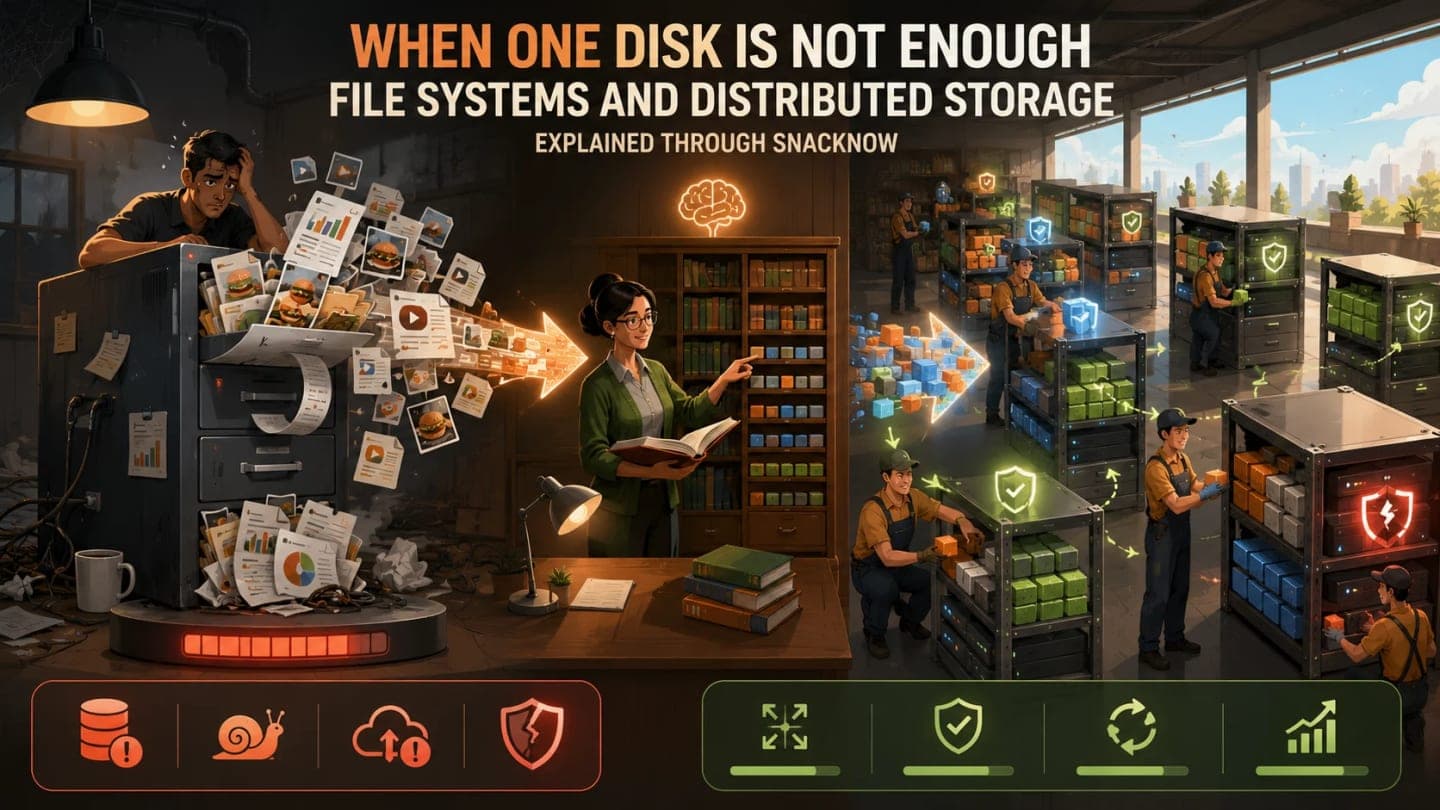
Reader promise: this piece explains file systems and distributed storage through one practical question: what happens when one disk is no longer enough?
SnackNow's Analytics Files Outgrow One Server
At the beginning, Aman keeps daily exports on one server. The layout looks innocent: a reports folder, a logs folder, and a few CSV files. Everyone knows where things are. A simple script pulls yesterday's orders and drops them into reports/2026/july/orders.csv.
Then the files grow. Delivery tracking logs become huge. Click events arrive all day. Fraud detection needs months of history. Restaurant analytics wants city-level reports. The same server now has to store more data, serve more readers, and survive as if it were not one physical machine.
The problem is no longer where to put a file. The problem is how to store huge files safely, read them in parallel, and keep going when machines fail.
Symptom | What SnackNow Feels | Hidden Cause | Storage Requirement |
|---|---|---|---|
Disk fills up | Daily exports stop midway | One machine has finite capacity | Horizontal scaling |
Reports are slow | Analytics job waits on one disk | No parallel reads | High throughput |
Backups are painful | Huge copy window | Large files on one server | Distributed backup strategy |
Server failure is scary | Files vanish from dashboards | Single point of failure | Replication and failover |
Many jobs fight | Reads queue behind each other | One storage path is overloaded | Parallel access |
Takeaway: one disk can be simple and fast locally, but it becomes a fragile filing cabinet when the organization grows around it.
What Is a File System?
A file system is the layer that decides how files are named, organized, stored, retrieved, protected, and described on disk. When you see folders, file names, paths, owners, permissions, sizes, and modified times, you are seeing the file system's work.
Traditional file systems such as ext4, NTFS, and XFS manage files on a single machine or volume. They are excellent for local disks, servers, laptops, and many normal application needs.
Visual purpose: This visual helps you understand how a file system organizes data before we distribute it.
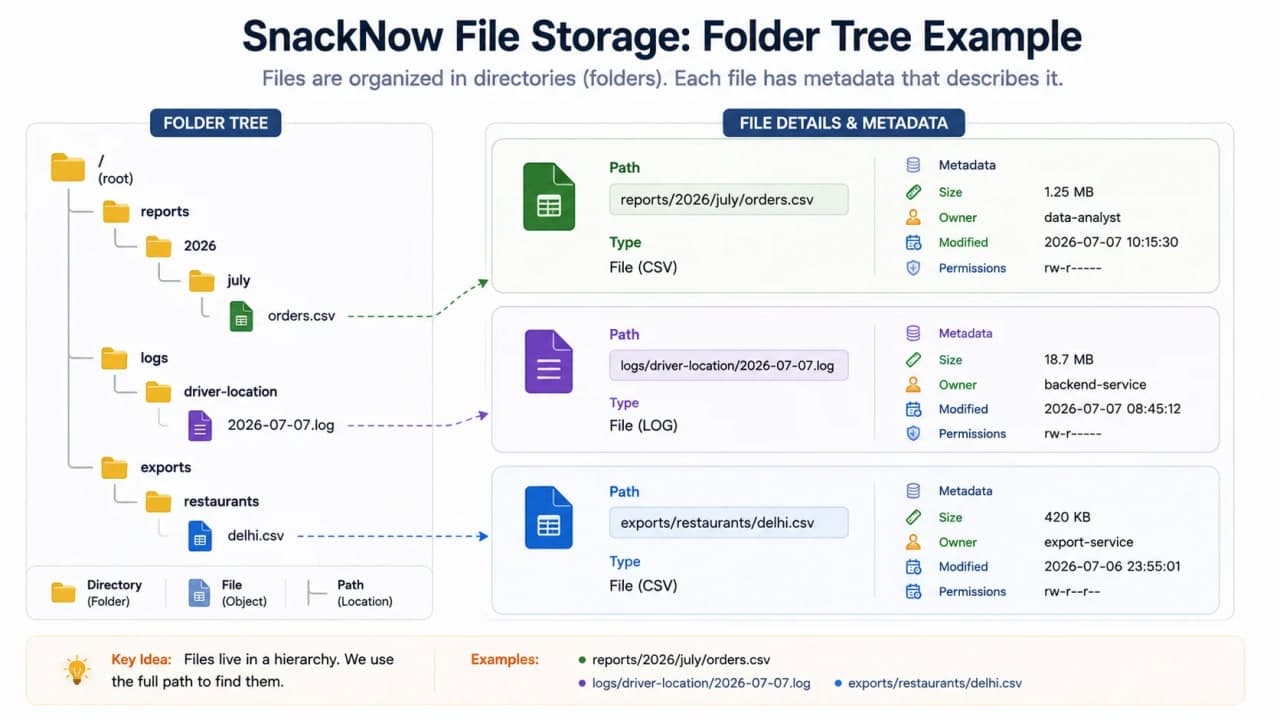
How to read this visual: the folder tree is the visible shape. Metadata and permissions are the control layer that tell the operating system how each file should behave.
Concept | Plain Meaning | SnackNow Example | Why It Matters |
|---|---|---|---|
File | Named piece of stored data | orders.csv | The thing applications read/write |
Directory | Container for files | reports/2026/july | Keeps files organized |
Path | Address of a file | reports/2026/july/orders.csv | Lets programs locate data |
Metadata | Information about the file | size, owner, modified time | Useful for operations and auditing |
Permissions | Who can read/write/execute | analytics team can read | Protects sensitive data |
Takeaway: a file system is both a storage map and an access rulebook.
Traditional File Systems: Good for One Machine
A traditional file system is like one office filing cabinet. It is close, familiar, and efficient when the work fits inside that office. If SnackNow has one reporting server and a modest amount of data, a local file system may be enough.
The trouble begins when the cabinet becomes the company warehouse. Local file systems are bounded by the disk, CPU, network, and failure domain of one machine.
Traditional File System | Helps With | Fails When | SnackNow Example |
|---|---|---|---|
ext4 | Reliable Linux local storage | Single machine is full or slow | One analytics VM |
NTFS | Windows local/server storage | Data must spread across many nodes | Windows report server |
XFS | Large local files and strong Linux workloads | Cluster-wide storage is needed | Big local log volume |
Local SSD volume | Low local latency | Many analytics workers need shared reads | Fast but isolated disk |
Takeaway: local file systems are not bad. They are simply designed for a smaller failure and scale boundary.
The Problem: One Disk Cannot Feed a Hungry Analytics Job
Now imagine a 2 TB delivery log file. One analytics job wants to scan it for late deliveries. Another wants fraud patterns. Another wants restaurant-level performance. If all of them read from one disk, that disk becomes the gatekeeper for every insight.
A big analytics workload needs many readers and many storage devices working at once. The goal is not only to save the file. The goal is to make the file usable at scale.
Visual purpose: This visual makes the single-node bottleneck visible.
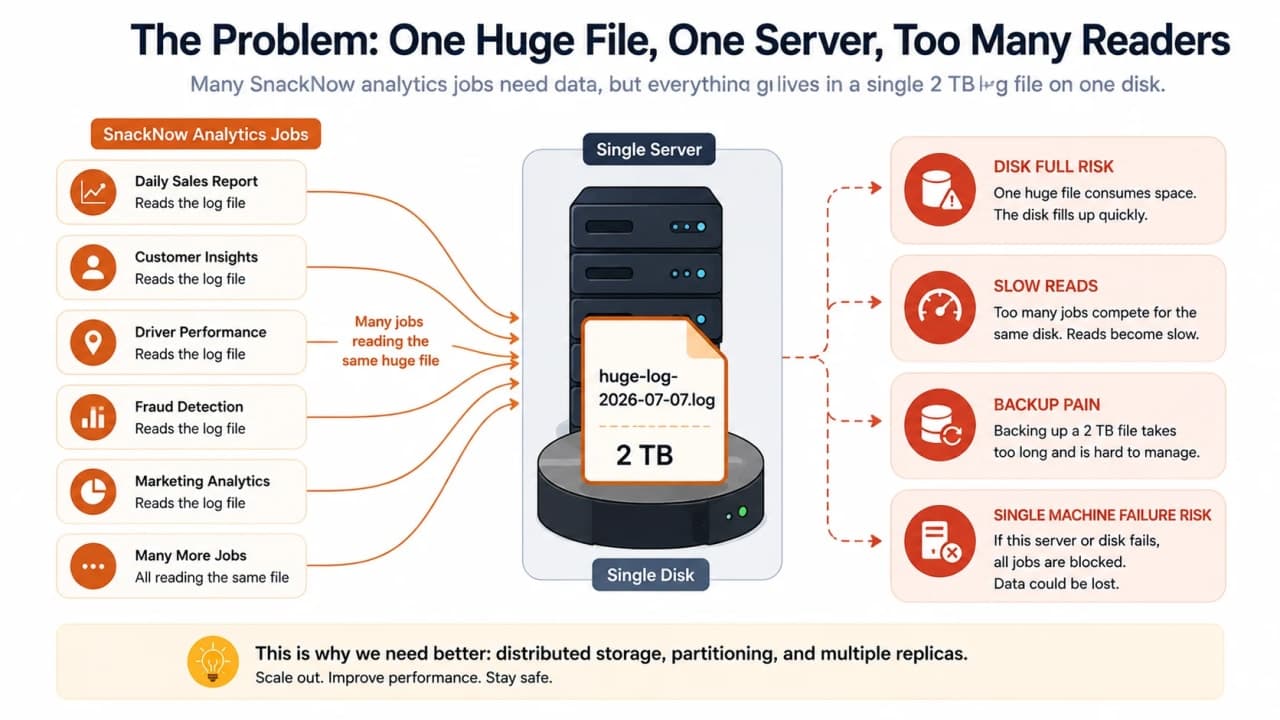
How to read this visual: the analytics workers are not slow because their code forgot coffee. They are slow because all roads lead to one disk.
Need | Why It Appears | Storage Behavior Required |
|---|---|---|
Parallel reads | Many jobs scan big files | Split data across nodes |
Fault tolerance | Machines fail | Keep extra copies |
High throughput | Analytics reads lots of bytes | Move many blocks at once |
Horizontal scaling | Data keeps growing | Add machines instead of replacing one giant box |
Operational visibility | Clusters drift and fail | Monitor health, usage, and replicas |
Takeaway: for analytics, throughput often matters more than the latency of one tiny file request.
Distributed File System: One Giant Filing System Across Many Machines
A distributed file system stores file data across multiple machines but gives users and jobs a shared filesystem view. To the analytics job, it can look like one place to read files. Under the hood, blocks are spread across many storage nodes.
The mental model is simple: a traditional file system is one office filing cabinet; a distributed file system is many warehouse racks acting like one giant filing system.
Visual purpose: This visual helps you understand the split between one user-facing namespace and many storage machines underneath.
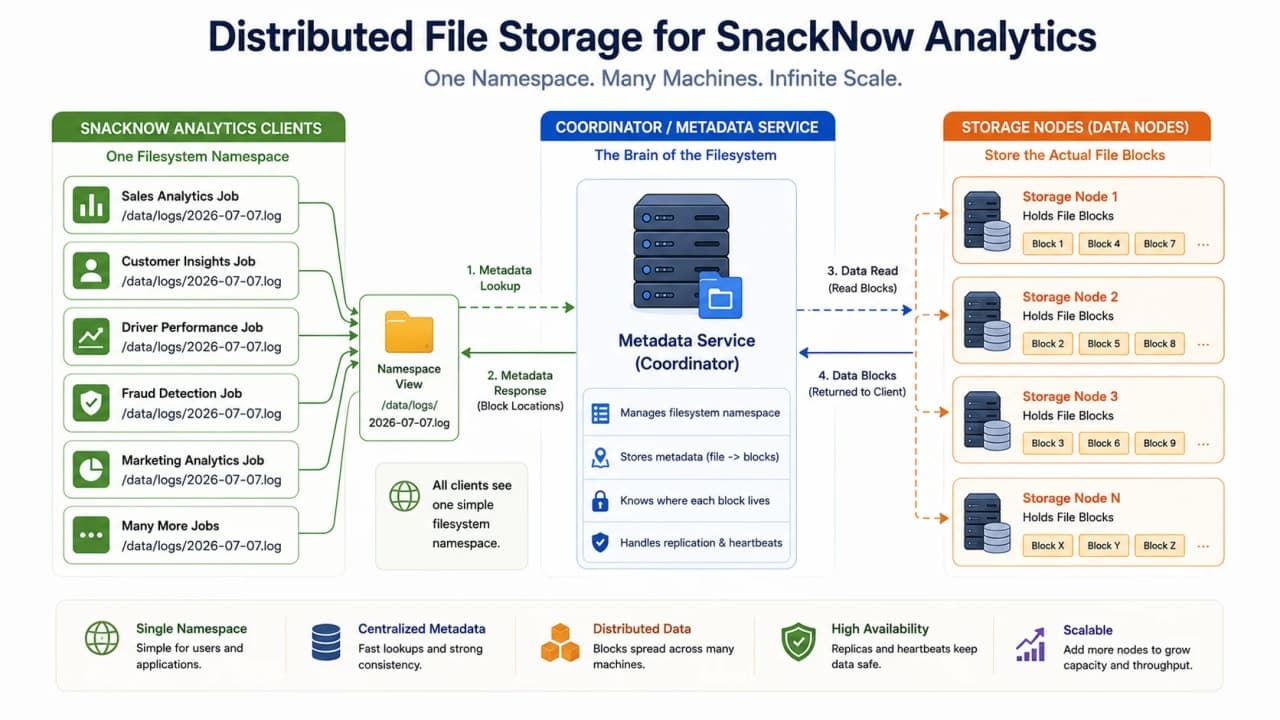
How to read this visual: the client sees one logical file system, while the actual data lives on multiple nodes behind the scenes.
DFS Benefit | What It Means | SnackNow Value |
|---|---|---|
Scalability | Add storage nodes | Keep years of logs |
Fault tolerance | Survive node failures | Dashboards keep working |
High availability | Serve data from replicas | Jobs do not stop on one disk loss |
High throughput | Read blocks in parallel | Large reports finish faster |
Shared access | Many clients can read same namespace | Analytics team sees common datasets |
Takeaway: a distributed file system is useful when the problem is millions of large blocks that must survive failures and be read in parallel.
HDFS Mental Model: Librarian and Storage Workers
HDFS means Hadoop Distributed File System. It was built for big data analytics, especially workloads that write large files and then read them in big parallel scans. It is not trying to be your laptop folder. It is trying to feed large data processing jobs.
HDFS has a clean mental model. The NameNode is the librarian or index manager. It knows the file hierarchy and where blocks live. The DataNodes are storage workers. They hold the actual blocks.
The NameNode stores metadata and block locations. DataNodes store the real file blocks.
Visual purpose: This visual helps you avoid confusing metadata with actual file data.
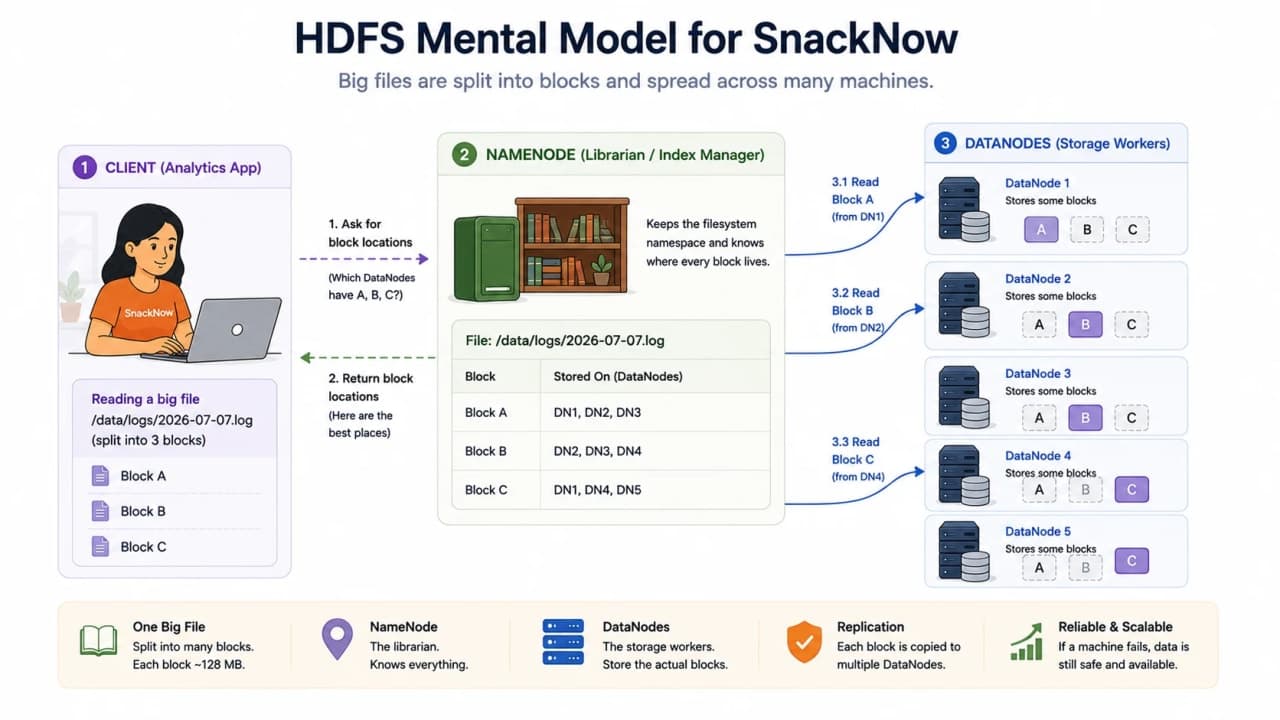
How to read this visual: the client asks the NameNode where the blocks are, then reads the data from DataNodes.
Component | Stores | Does Not Store | SnackNow Analogy | Failure Concern |
|---|---|---|---|---|
NameNode | File metadata and block locations | Actual file bytes | Librarian/index manager | Metadata service is critical |
DataNode | Actual blocks | Global namespace truth | Warehouse worker | Can fail if replicas exist |
Client | Request logic | Cluster state | Analytics job | Needs correct block locations |
Takeaway: if the NameNode is the library catalog, the DataNodes are the shelves with boxes.
Blocks: Large Files Become Smaller Pieces
Distributed file systems usually split large files into blocks. A 1 GB log file might become eight 128 MB blocks. Those blocks can be stored on different DataNodes and read in parallel.
This matters because one huge file should not force one disk to do all the work. Splitting into blocks lets the system distribute storage, distribute reads, and recover smaller pieces when a machine fails.
delivery-events-2026-07-07.log

Block A: 128 MB -> DataNode 1
Block B: 128 MB -> DataNode 2
Block C: 128 MB -> DataNode 3
Block D: 128 MB -> DataNode 4

Analytics workers can read blocks in parallel.
Block Idea | Why It Helps | SnackNow Example |
|---|---|---|
Large block size | Better for sequential analytics scans | Delivery log chunks |
Blocks on many nodes | Parallel reads | Many workers read at once |
Block-level recovery | Repair only missing pieces | Recreate Block C copy |
Block location metadata | Client knows where to read | NameNode returns DataNode list |
Takeaway: blocks turn one huge file into distributed, readable, recoverable pieces.
Replication: Why HDFS Can Survive Node Failure
How is it so far?
Vote with other readers
If each block lived on only one machine, distributed storage would still be fragile. HDFS improves reliability by keeping multiple copies of each block across different DataNodes. The replication factor says how many copies exist.
If the replication factor is 3, Block A may exist on DataNode 1, DataNode 3, and DataNode 5. If one node dies, the system can read another copy and create a new replica later.
Replication Factor | Durability | Storage Cost | Use Case |
|---|---|---|---|
1 | Low | 1x | Temporary data that can be regenerated |
2 | Moderate | 2x | Less critical internal data |
3 | Common strong default | 3x | Important analytics datasets |
More than 3 | Higher | Higher | Critical data or risky clusters |
Takeaway: replication buys fault tolerance by spending extra storage.
What Happens When a DataNode Fails?
DataNodes send heartbeats to the NameNode. A heartbeat is basically a repeated signal saying, I am alive and these blocks are still here. If a DataNode stops sending heartbeats, the NameNode marks it as failed.
Reads continue from other replicas. Then the system schedules new copies so the desired replication factor is restored. The user should not have to manually hunt for missing blocks.
Visual purpose: This visual explains failure recovery without making it abstract.
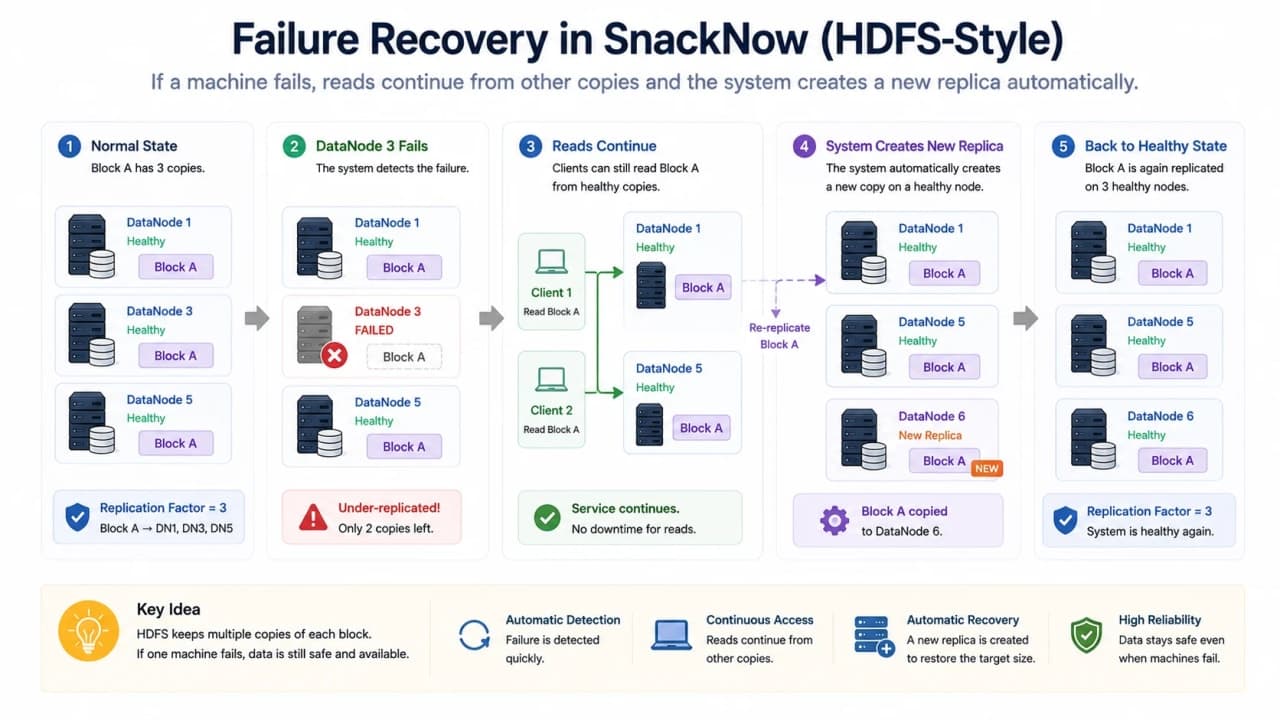
How to read this visual: one DataNode disappears, but replicated blocks let the system keep reading and rebuild protection elsewhere.
Event | System Reaction | Why It Matters |
|---|---|---|
Heartbeat stops | NameNode marks node unhealthy | Detects failure |
Block copy unavailable | Use another replica | Keeps reads alive |
Replication below target | Create replacement replica | Restores durability |
Cluster uneven after failure | Rebalance if needed | Keeps capacity healthy |
Takeaway: fault tolerance is a process, not just a checkbox. Detection, serving, repair, and rebalancing all matter.
Scalability and Rebalancing
Distributed storage scales horizontally by adding nodes. SnackNow can add more storage machines instead of buying one enormous server. But adding nodes does not automatically make every byte perfectly placed.
Clusters often rebalance data so storage usage becomes more even. Rebalancing helps capacity and performance, but it consumes network and disk bandwidth. It should be monitored and scheduled thoughtfully.
Operation | Benefit | Cost | Operator Watchpoint |
|---|---|---|---|
Add DataNode | More capacity and possible throughput | Cluster has to place or move data | Node health and disk balance |
Rebalance blocks | More even storage usage | Network and disk load | Run when cluster can tolerate movement |
Increase replication | Better fault tolerance | More storage used | Capacity and write overhead |
Compress files | Less storage and network | CPU cost | Compression format and job compatibility |
Partition file layout | Faster scans | More planning | Date/city/event folder design |
Takeaway: horizontal scaling gives room to grow, but operations still need discipline.
Latency vs Throughput
Latency is how long one request takes. Throughput is how much work the system completes over time. A bike can deliver one envelope quickly across the street. A freight system can move thousands of boxes per hour. They solve different problems.
Distributed file systems often optimize throughput more than tiny-file latency. Reading one small receipt may not be impressive. Scanning 5 TB of logs with many workers is where the design starts making sense.
Do not judge distributed storage only by one tiny read. Judge it by the workload it was built to carry.
Visual purpose: This visual separates latency from throughput so the performance tradeoff becomes obvious.
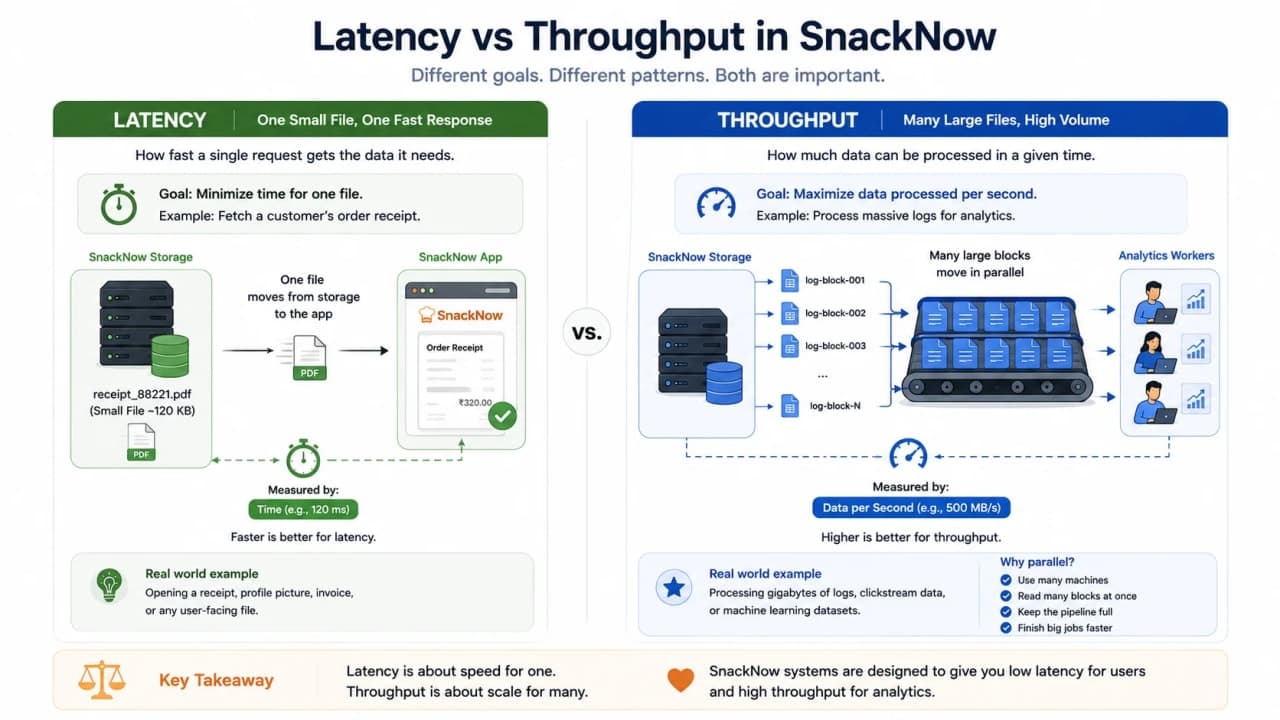
How to read this visual: latency asks, how long did this one box take? Throughput asks, how many boxes moved across the whole system?
Workload | Latency Need | Throughput Need | DFS Fit? | Why |
|---|---|---|---|---|
Read one receipt PDF | High | Low | Weak | Too small for distributed benefits |
Scan daily click logs | Moderate | High | Strong | Parallel block reads |
Generate monthly restaurant report | Moderate | High | Strong | Large historical files |
Serve profile avatar | High | Moderate | Weak | Object storage/CDN is better |
Machine-learning training data | Moderate | Very high | Strong | Large sequential reads |
Takeaway: distributed storage is often about moving a lot of data reliably, not winning every small request race.
HDFS vs CephFS vs GlusterFS
HDFS, CephFS, and GlusterFS all live in the distributed storage conversation, but they are not the same answer with different logos.
Need | HDFS | CephFS | GlusterFS | Better Choice |
|---|---|---|---|---|
Batch analytics with Hadoop/Spark | Very strong | Possible | Possible | HDFS |
POSIX-like shared filesystem | Limited fit | Strong | Strong | CephFS or GlusterFS |
Unified object/block/file ecosystem | No | Strong | Limited | Ceph |
Commodity scale-out shared volumes | Possible but not ideal | Possible | Strong simple option | GlusterFS |
Write-once-read-many log analytics | Strong | Possible | Possible | HDFS |
General app shared file storage | Weak | Stronger | Stronger | CephFS or GlusterFS |
Takeaway: choose based on access pattern, operational skill, ecosystem, and whether the workload is analytics-first or shared-filesystem-first.
File Storage vs Object Storage vs Distributed File System
SnackNow now has several storage choices. The mistake is trying to make one of them feel like all of them. A local file system, a distributed file system, object storage, and block storage solve different shapes of problems.
Storage Type | Access Style | Best For | Avoid When | SnackNow Example |
|---|---|---|---|---|
Local file system | Path on one machine | Small server files and local work | Many machines need shared huge data | One report server |
Distributed file system | Shared namespace across nodes | Large files and parallel analytics | Tiny low-latency file serving | Delivery logs for analytics |
Object storage | API, bucket, key, metadata | Images, videos, backups, archives | POSIX file locking is required | Food photos and backup files |
Block storage | Raw volume attached to compute | Database disks and VMs | Sharing files across analytics cluster | Database volume |
Takeaway: good architecture is often a storage mix, not a storage religion.
Designing SnackNow's High-Throughput Analytics Storage
A practical SnackNow design starts with ingestion. App events, delivery logs, order exports, and fraud signals arrive through pipelines. Large raw files land in distributed storage or object storage, depending on the analytics stack. Processing jobs read partitions in parallel and produce reports.
App Events / Delivery Logs / Order Exports
        -> Ingestion Pipeline
        -> Distributed Storage or Object Storage
        -> Spark / Hadoop / Analytics Jobs
        -> Aggregated Reports
        -> Dashboard Database
Design Choice | Why It Helps | SnackNow Example |
|---|---|---|
Partition by date | Jobs scan only needed days | logs/date=2026-07-07 |
Partition by city/event type | Avoid reading unrelated data | city=delhi/event=delivery |
Compress files | Reduce storage and network | Parquet or compressed logs |
Keep replication factor sane | Balance durability and cost | 3 for important datasets |
Monitor NameNode/DataNode health | Catch failures early | Heartbeat and capacity alerts |
Plan small-file strategy | Avoid metadata overload | Batch tiny events into larger files |
The file layout is part of the system design. Bad partitions can make a large cluster feel slow.
Common Beginner Mistakes
Mistake | Why It Hurts | Better Thinking |
|---|---|---|
Thinking file system and database are the same | Files and records have different access patterns | Use database for structured queries, files for file workloads |
Using DFS for every tiny file | Metadata and latency overhead | Batch tiny files or use better storage |
Ignoring the NameNode role | Misunderstands failure and metadata scaling | Protect and monitor metadata |
Forgetting replication cost | Storage bill surprises | Plan capacity with replica multiplier |
Confusing object storage with a file system | Wrong access model | Use object storage for API-based object workloads |
Assuming distributed is always faster | Bad fit for small low-latency requests | Match performance metric to workload |
Ignoring rebalancing | Hot or full nodes | Monitor and schedule data movement |
No partition plan | Jobs scan too much data | Partition by query pattern |
Interview-Ready Answers
What is the difference between a file system and a distributed file system?
A file system manages files on one machine or volume. A distributed file system spreads file blocks across many machines while presenting a shared filesystem view. SnackNow uses the distributed version when analytics files outgrow one server.
How does HDFS ensure fault tolerance and reliability?
HDFS splits files into blocks and stores multiple replicas of each block on different DataNodes. If one node fails, another replica can serve the read, and the system can create a replacement copy.
What roles do NameNode and DataNodes play?
The NameNode stores metadata such as file hierarchy and block locations. DataNodes store the actual blocks and report their health through heartbeats and block reports.
What are blocks in HDFS?
Blocks are large pieces of a file. Splitting files into blocks lets HDFS distribute storage, read in parallel, and recover smaller units when a node fails.
What is replication factor?
Replication factor is the number of copies kept for each block. A replication factor of 3 means the same block is stored on three different DataNodes.
What happens when a DataNode fails?
The NameNode stops receiving heartbeats, marks the node unhealthy, serves data from other replicas, and schedules new replicas to restore the target replication factor.
Explain latency vs throughput in distributed storage.
Latency is the time for one request. Throughput is total data moved over time. Distributed file systems often shine when many workers read large blocks in parallel, not when one tiny file needs instant access.
When would you use CephFS or GlusterFS over HDFS?
Use CephFS or GlusterFS when you need a more general POSIX-like distributed filesystem or shared volumes. Use HDFS when the workload is analytics-first, large-file, write-once-read-many processing.
How would you scale high-throughput analytics storage?
Split large files into blocks, distribute blocks across nodes, use replication, partition files by query pattern, compress data, monitor cluster health, and rebalance when nodes become uneven.
When would object storage be better than a distributed file system?
Object storage is better for images, videos, backups, archives, static files, and API-based object access. A DFS is better when analytics jobs need a shared filesystem-style view and parallel block reads.
One-Page Cheat Sheet
Concept | Simple Meaning | SnackNow Hook | Use When | Watch Out For |
|---|---|---|---|---|
File system | Organizes files on storage | reports folder | Local/server files | One-machine limit |
Directory | Folder/container | reports/2026/july | Human organization | Messy layout |
Metadata | Info about files | owner, size, modified time | Audit and operations | Metadata bottlenecks |
Permission | Access rule | analytics can read | Security | Overbroad access |
Distributed file system | Files across many machines | large log storage | Huge files and parallel reads | Tiny-file overhead |
HDFS | Analytics-focused DFS | delivery logs | Hadoop/Spark style scans | General file serving |
NameNode | Metadata manager | librarian | Block lookup | Critical service |
DataNode | Block storage worker | warehouse worker | Actual file data | Disk/node failure |
Block | Piece of a file | 128 MB log chunk | Parallel storage and reads | Too many tiny blocks/files |
Replication factor | Number of copies | 3 copies of Block A | Fault tolerance | Extra storage cost |
Rebalancing | Moving data evenly | new node joins cluster | Healthy capacity | Network/disk load |
Latency | Time for one request | one receipt read | Interactive requests | Not same as throughput |
Throughput | Data moved over time | 5 TB log scan | Analytics | Can hide slow single reads |
CephFS | Distributed POSIX-like FS | shared analytics files | Flexible distributed storage | Operational complexity |
GlusterFS | Scale-out shared file storage | commodity shared volume | Simpler file clusters | Workload fit |
FAQs
What is the difference between a file system and a distributed file system?
A traditional file system manages files on one disk or one machine. A distributed file system spreads file blocks across many machines while presenting a shared filesystem view to clients.
How does HDFS provide fault tolerance?
HDFS splits files into blocks and stores multiple replicas of each block on different DataNodes. If one DataNode fails, the system can read another replica and create a replacement copy elsewhere.
What does the NameNode store?
The NameNode stores metadata: file hierarchy, permissions, block locations, and replication information. It does not store the actual file contents.
What do DataNodes store?
DataNodes store the actual file blocks. They send heartbeats and block reports so the metadata service knows which blocks are alive and where they are located.
When is a distributed file system useful?
It is useful for large files, high-throughput analytics, parallel reads, horizontal storage scaling, and fault-tolerant storage across many machines.
Is distributed storage always faster?
No. It often improves throughput for large parallel workloads, but it can be slower for tiny files or low-latency single-request workloads.
Keep Reading the Storage Series
Distributed file storage explains how SnackNow stores huge files safely. The next step is turning those files and events into insight with From Orders to Insights: Big Data Storage, Batch Processing, and Streaming Explained.
Final Mental Model
When SnackNow stores a few files, one disk is enough. When it stores huge logs, reports, and analytics datasets, one disk becomes a tired filing cabinet.
Distributed storage splits files into blocks, spreads them across machines, keeps extra copies, and lets analytics jobs read in parallel. That is the point: not more complicated storage for its own sake, but storage that can keep working when the data, the readers, and the failures all grow up at the same time.
Lock in the takeaway
Frequently asked questions
What is the difference between a file system and a distributed file system?
A traditional file system manages files on one disk or one machine. A distributed file system spreads file blocks across many machines while presenting a shared filesystem view to clients.
How does HDFS provide fault tolerance?
HDFS splits files into blocks and stores multiple replicas of each block on different DataNodes. If one DataNode fails, the system can read another replica and create a replacement copy elsewhere.
What does the NameNode store?
The NameNode stores metadata: file hierarchy, permissions, block locations, and replication information. It does not store the actual file contents.
What do DataNodes store?
DataNodes store the actual file blocks. They send heartbeats and block reports so the metadata service knows which blocks are alive and where they are located.
When is a distributed file system useful?
It is useful for large files, high-throughput analytics, parallel reads, horizontal storage scaling, and fault-tolerant storage across many machines.
Is distributed storage always faster?
No. It often improves throughput for large parallel workloads, but it can be slower for tiny files or low-latency single-request workloads.