
Listen to this article
Checking audio support
Storage Series Path: Now We Are Storing Big Files
Before SnackNow moves files into object storage, the earlier storage choices still matter. The App That Needed a Memory: Storage Fundamentals and CAP Theorem Explained Clearly sets the foundation, The Register or the Flexible Box: SQL vs NoSQL Explained Without the Holy War explains database shape, and When One Database Gets Tired: Replication, Sharding, and Polyglot Persistence Explained shows what happens when that database starts to scale.
SnackNow already has databases for structured data, flexible storage choices for changing data, and scaling ideas for tired databases. Then Meera asks for high-quality food photos, complaint images, invoices, daily exports, raw logs, backups, and short food videos.
Aman looks at the database and quietly realizes: not everything deserves to live inside a database row.
Reader promise: this piece explains object storage using SnackNow, not cloud-documentation soup.
SnackNow’s Database Is Not a Photo Album
At first, someone suggests storing food photos directly in the database. It sounds simple. One order row, one image blob, done. But the database becomes heavy, backups grow huge, image delivery is slow, and every file operation starts bothering the system that should be protecting orders and payments.
Object storage is where SnackNow puts things that are too large, too flexible, or too file-like to live comfortably inside database rows.
File Type | What Happens If Stored Poorly | Better Direction |
|---|---|---|
Food photo | Database gets bloated and image delivery is slow | Object storage plus CDN |
Menu video | Large binary data hurts backups | Object storage with processing |
Invoice PDF | Needs secure file access | Object storage with access control |
Raw log archive | High volume and long retention | Object storage lifecycle tiers |
Backup file | Needs durability and cheap retention | Object storage archive tier |
Takeaway: databases remember the facts; object storage keeps the boxes.
What Is Object Storage?
Object storage manages data as objects. Each object usually contains three things: the data itself, a unique key, and metadata. The data might be a samosa image. The key might be menu/images/samosa-large.jpg. Metadata might say content type, owner, item ID, creation time, or retention policy.
Unlike a traditional file system, object storage is not mainly about nested folders. It is usually API-driven, massively scalable, and excellent for unstructured data.
Visual purpose: This visual helps you understand the object before learning buckets, keys, lifecycle, and security.
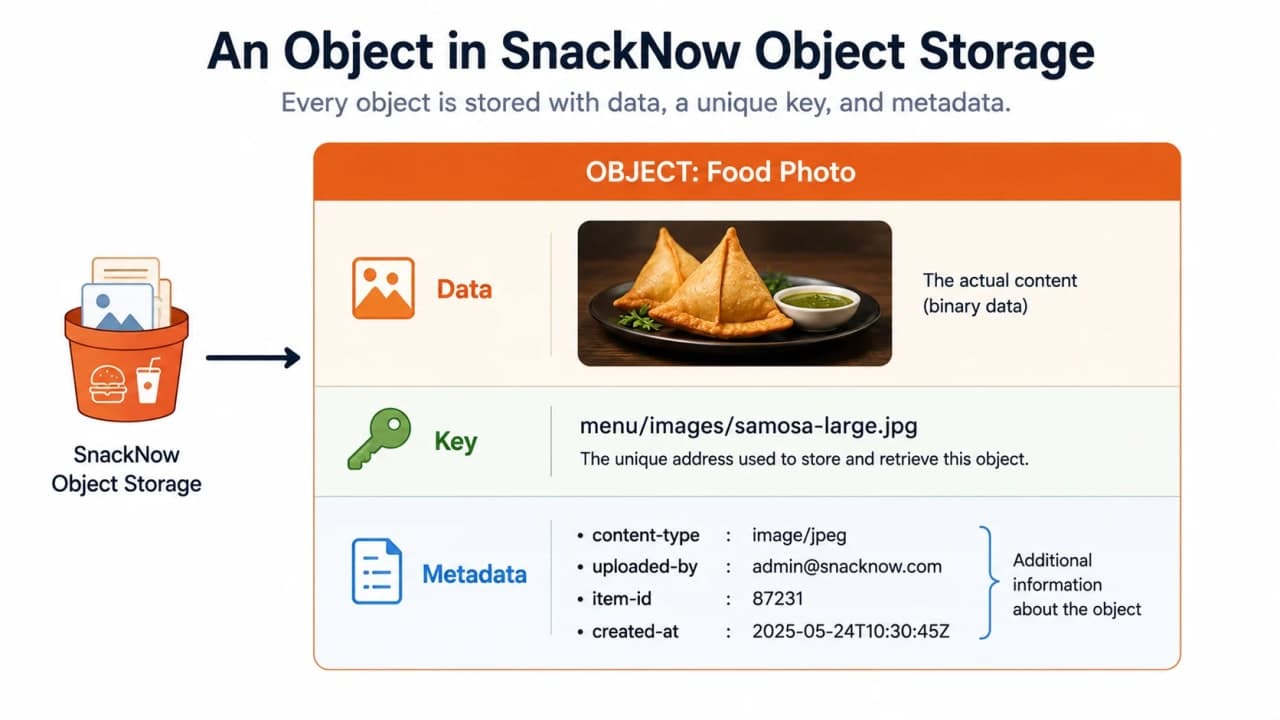
How to read this visual: the object is not just the file. The key finds it, and metadata makes it manageable.
Bucket, Object, Key, Metadata
A bucket is a logical container. An object is one stored item. A key is the object's address-like name. Metadata is the label stuck on the box.
For SnackNow, a bucket may hold menu images, complaint photos, invoices, and backups. The key gives every object a unique path-like name, even though object storage is usually flatter than a real folder system.
Visual purpose: This visual makes object storage terminology easier to remember.
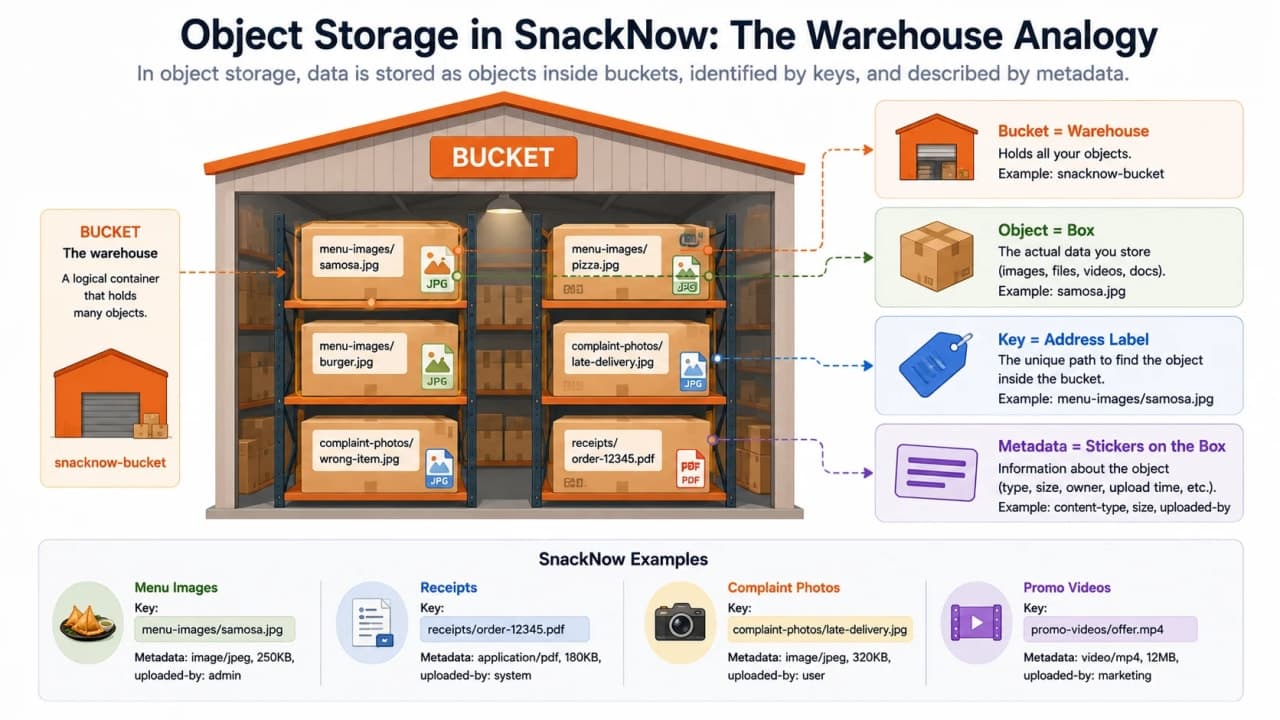
How to read this visual: think warehouse, boxes, labels, and stickers. That mental model is much safer than imagining a normal laptop folder.
Concept | Plain Meaning | SnackNow Example | Why It Matters |
|---|---|---|---|
Bucket | Logical container | snacknow-media | Groups objects |
Object | Stored item | samosa-large.jpg | The actual file-like data |
Key | Object address | menu/images/samosa-large.jpg | Used to find the object |
Metadata | Labels/tags | content-type, item-id | Useful for access, lifecycle, search |
Takeaway: the key is how the app finds the object; metadata is how operations understand it.
Object Storage vs File Storage vs Block Storage
Need | Object | File | Block | Best Choice |
|---|---|---|---|---|
Serving images | Strong | Possible | Weak | Object |
Shared team folder | Possible but awkward | Strong | Weak | File |
Database disk volume | Weak | Weak | Strong | Block |
Backups | Strong | Possible | Possible | Object |
Low-latency random writes | Weak | Possible | Strong | Block |
Media archive | Strong | Possible | Weak | Object |
Takeaway: object storage is excellent for large unstructured data, but it is not a replacement for every storage workload.
Why Object Storage Scales So Well
Object storage scales because it is designed as a distributed system with API-based access and massive parallel throughput. It does not need to behave like one local disk with tiny random writes.
That is why it is great for write-once-read-many workloads: food photos, videos, exports, backups, static assets, raw logs, and data lake files.
Object storage usually optimizes scale and throughput more than tiny low-latency mutations.
Common mistake: assuming object storage is always the fastest place for every kind of read or write. It is scalable, but not magical.
Common Platforms Without Turning This Into Cloud Docs
Platform | Type | Best For | SnackNow Use |
|---|---|---|---|
Amazon S3 | Managed object storage | Cloud-native media/backups/data lakes | Food photos and backups |
Google Cloud Storage | Managed object storage | Cloud apps and analytics | Exports and logs |
Azure Blob Storage | Managed object storage | Microsoft/cloud workloads | Documents and media |
MinIO | S3-compatible object storage | Self-hosted/hybrid needs | Internal object store |
Ceph | Distributed storage ecosystem | Object/block/file flexibility | Private infrastructure |
Takeaway: product names vary, but the object-storage mental model stays similar.
Upload Flow: How Riya’s Complaint Photo Reaches Object Storage
Riya receives the wrong snack and uploads a photo. SnackNow should not route the entire image through the backend if direct upload is possible. The backend can issue temporary permission and let the browser upload directly to object storage.
Visual purpose: This visual explains the secure upload flow using a presigned URL.
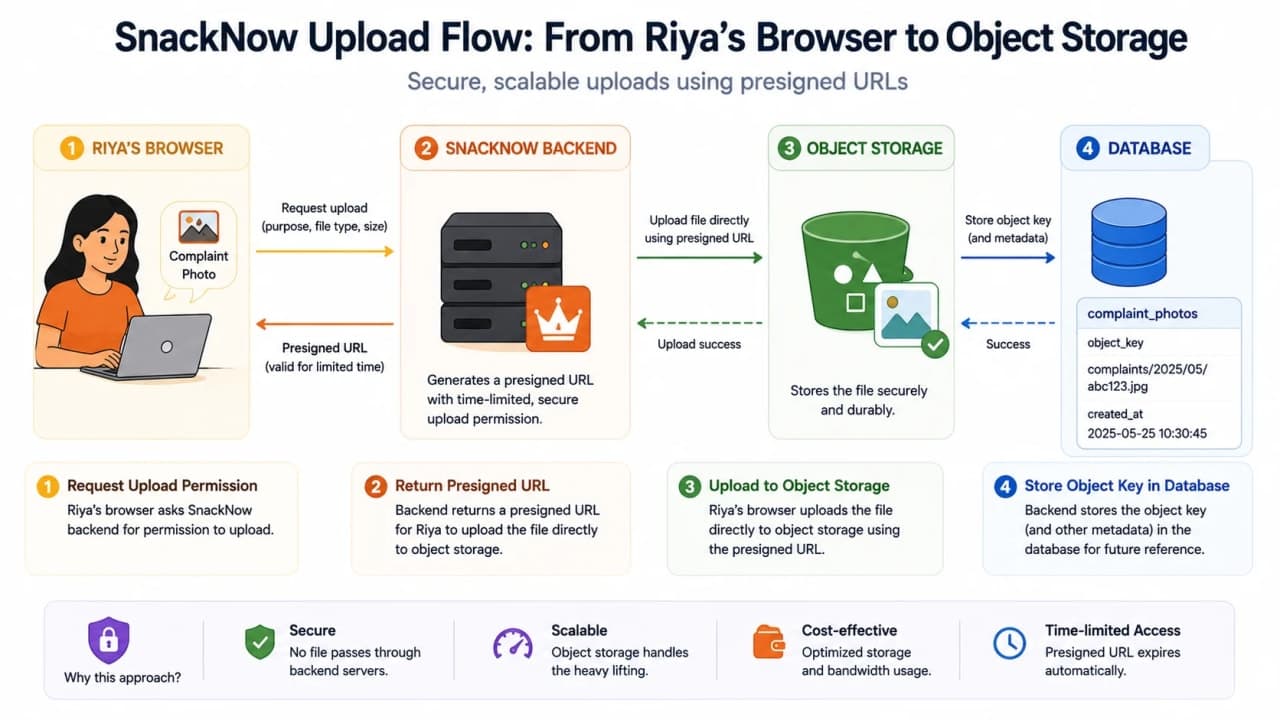
How to read this visual: the browser asks the backend for permission. The backend returns a temporary presigned URL. The browser uploads to object storage. The database stores the object key, not the whole file.
Step | What Happens | Why |
|---|---|---|
1 | Browser asks backend for upload permission | Backend checks user and file rules |
2 | Backend creates presigned URL | Temporary scoped access |
3 | Browser uploads directly to storage | Avoids heavy backend file traffic |
4 | Backend stores object key | App can find the file later |
5 | App renders through controlled URL/CDN | Fast and secure delivery |
How is it so far?
Vote with other readers
Takeaway: object storage holds the file; the database holds the reference and business metadata.
Metadata: The Label That Makes the Box Useful
Metadata Field | Example | Why SnackNow Uses It |
|---|---|---|
content-type | image/jpeg | Render correctly |
uploaded-by | user_123 | Ownership and audit |
item-id | samosa_101 | Connect image to menu item |
created-at | 2026-07-07 | Lifecycle and audit |
access-class | private | Security decisions |
retention | archive-after-180-days | Cost management |
Takeaway: metadata turns a pile of files into manageable storage.
Media Hosting Design: Food Photos and Videos
A strong media flow usually stores the original object, scans or moderates it, creates thumbnails or multiple resolutions, stores those outputs as new objects, and serves them through a CDN.
Upload -> Object Storage -> Processing Worker -> Thumbnails/Resolutions -> CDN -> User

Database stores:
- object key
- owner/item reference
- processing status
- safe public delivery URL or signed access rule
Takeaway: object storage is the file pantry; workers and CDNs make the pantry useful to users.
Backups and Archives: Cheap Memory for Old Data
SnackNow needs old backups and logs, but not all old data needs instant access. Object storage classes help move old data into cheaper tiers with slower retrieval.
Visual purpose: This visual helps you understand lifecycle rules over time.
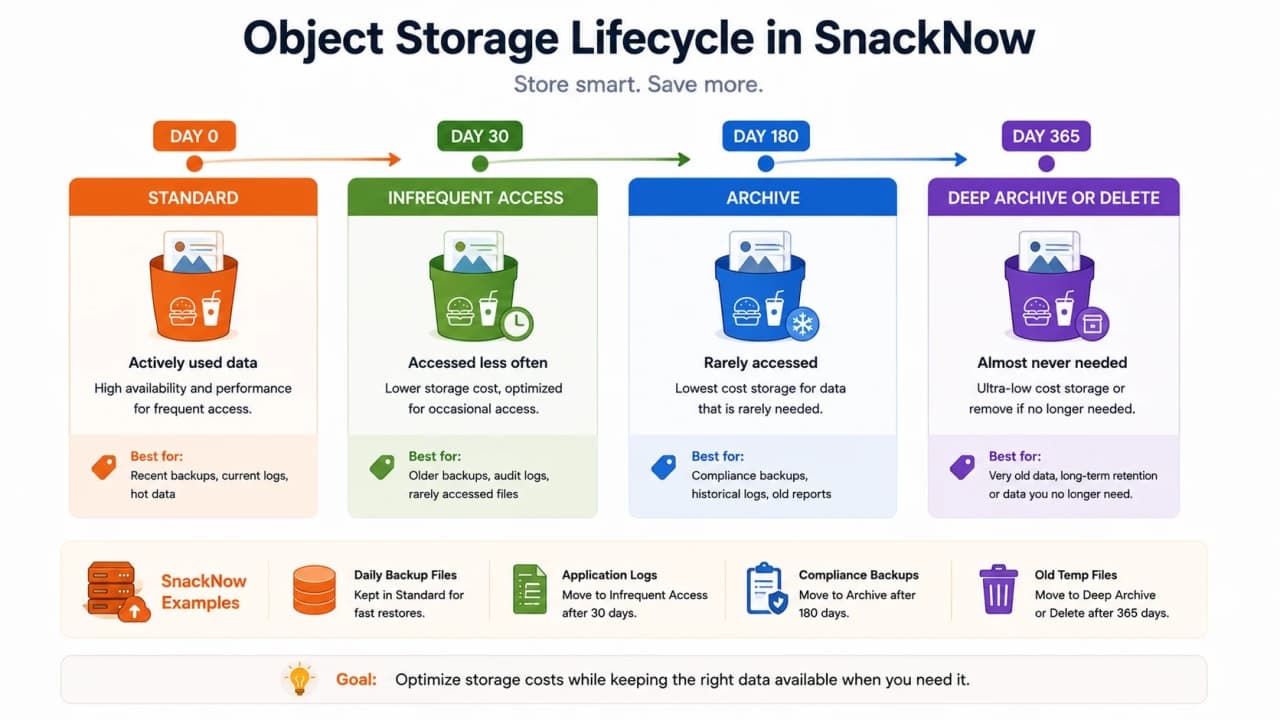
How to read this visual: new data stays in a fast standard class. Older data moves to cheaper tiers. Very old data may be archived deeply or deleted based on retention policy.
Storage Class | Access Speed | Cost | Best For | Bad For |
|---|---|---|---|---|
Standard | Fast | Higher | Active images/files | Old rarely used backups |
Infrequent Access | Fast-ish with retrieval cost | Lower | Occasional access | Frequently viewed assets |
Archive | Slow retrieval | Much lower | Compliance backups | Urgent restores |
Deep Archive | Very slow | Lowest | Long-term retention | Live app files |
Takeaway: cheap storage often means slower retrieval. That is fine only when the product can tolerate the delay.
Cost: Storage Is Not the Only Bill
Object storage bills are not only stored GB. There can be request cost, retrieval cost, lifecycle transition cost, replication cost, and egress cost when data leaves the provider or region.
Cost Type | What Triggers It | SnackNow Example | Optimization |
|---|---|---|---|
Stored GB | Objects kept over time | Millions of images | Compression, lifecycle |
PUT requests | Uploads/writes | Complaint uploads | Batch where sensible |
GET requests | Reads/downloads | Menu image views | CDN caching |
Egress | Data leaving network | Images served globally | CDN/regional design |
Archive retrieval | Reading cold data | Old backup restore | Plan restore windows |
Object storage can be cheap at rest and expensive at scale if request and egress patterns are ignored.
Security: Who Can Open Which Box?
A private user complaint photo should not become public because one image tag needed to load. Object storage security must be designed deliberately.
Visual purpose: This visual helps readers avoid the dangerous public-bucket shortcut.
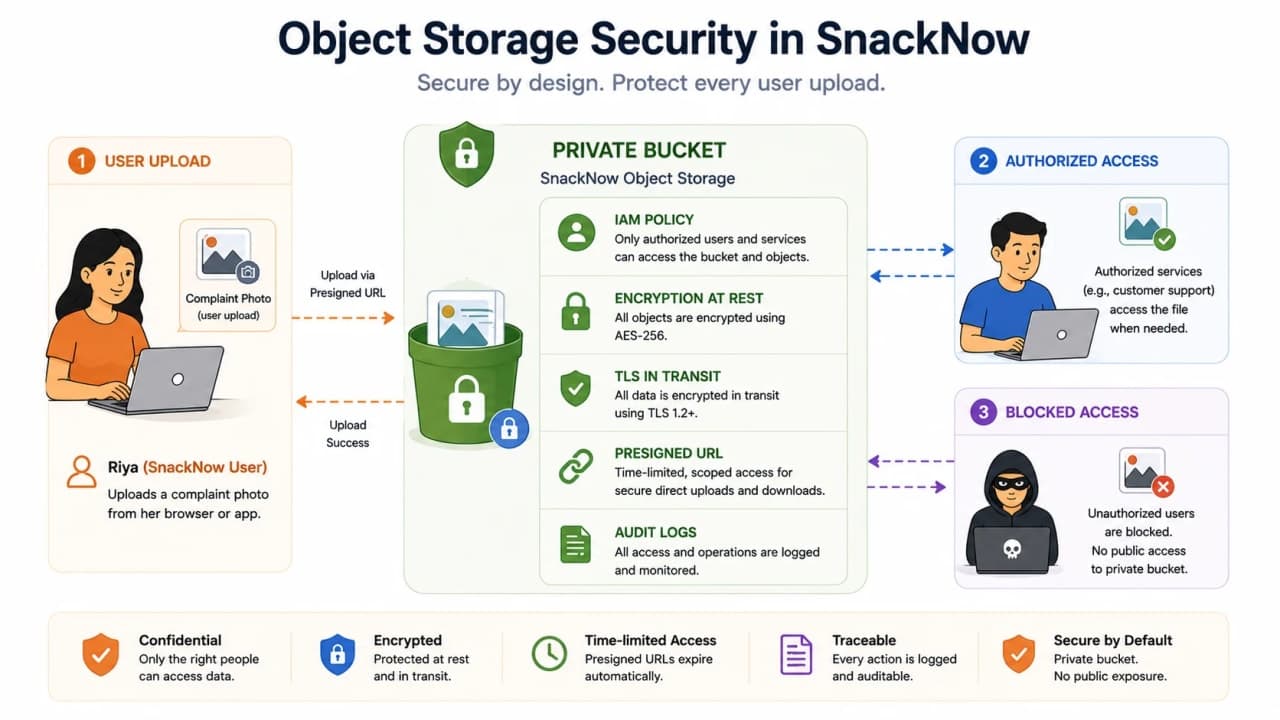
How to read this visual: storage security is layered. Policies decide who can act, encryption protects data, presigned URLs grant limited access, and audit logs record activity.
Security Need | Object Storage Feature | SnackNow Example |
|---|---|---|
Private uploads | IAM/bucket policy | Only backend can authorize uploads |
Temporary sharing | Presigned URL | Riya uploads complaint photo |
Protect stored data | Encryption at rest | Private invoices |
Protect transfer | TLS | Upload/download over HTTPS |
Audit access | Access logs | Who opened which file |
Key control | KMS/customer keys | Sensitive backups |
Warning: Do not make a private bucket public because one image needs to load. Fix the access path instead.
Performance Tradeoffs
Workload | Object Storage Fit? | Why |
|---|---|---|
Food images | Strong | Large files, read many times |
Backups | Strong | Durable and lifecycle-friendly |
Video uploads | Strong | Large object throughput |
Tiny random database writes | Weak | Not transactional block storage |
File locking workload | Weak | Object storage is not a normal shared filesystem |
Data lake raw files | Strong | Scalable storage for analytics |
Takeaway: use object storage for objects, not for pretending every storage problem is an object problem.
Common Beginner Mistakes
Mistake | Why It Hurts | Better Thinking |
|---|---|---|
Storing images directly in SQL rows | Heavy database and backups | Store object key in DB |
Confusing bucket with folder | Wrong mental model | Bucket is container, key names object |
Assuming always low latency | Bad fit for tiny random ops | Know access pattern |
Making bucket public | Security incident | Use policies and signed URLs |
Ignoring egress | Surprise bills | Use CDN and region planning |
No lifecycle rules | Old data stays expensive | Move/archive/delete by policy |
No encryption/audit | Compliance and trust risk | Use encryption and logs |
Interview-Ready Answers
What is object storage?
Object storage stores data as objects with data, a unique key, and metadata. It is designed for scalable unstructured data such as images, videos, backups, and logs.
When would you choose object storage over a file system?
Choose object storage when you need massive scale, API access, metadata, internet delivery, lifecycle management, or cost-effective storage for large unstructured files.
How would services securely share large files?
Use private buckets, IAM policies, encryption, audit logs, and presigned URLs for temporary scoped access. Store the object key and metadata in the database.
What are object storage performance tradeoffs?
Object storage is strong for large objects, parallel throughput, and write-once-read-many data. It is weak for tiny low-latency random writes, locking-heavy workloads, and database-style transactions.
One-Page Cheat Sheet
Concept | Simple Meaning | SnackNow Hook | Use When | Avoid When |
|---|---|---|---|---|
Object | Data plus key plus metadata | Food photo box | Large files | Relational records |
Bucket | Container | snacknow-media | Group objects | Per-user public folders |
Key | Object address | menu/samosa.jpg | Find an object | Business identity alone |
Metadata | Labels | content-type, item-id | Manage/search/lifecycle | Secret data labels |
Presigned URL | Temporary access | Upload complaint photo | Scoped upload/download | Permanent public access |
Lifecycle rule | Move/delete by age | Archive old logs | Cost control | Hot frequently used files |
Storage class | Cost/access tier | Standard vs archive | Retention planning | Unknown restore needs |
Egress | Data leaving network | Image delivery cost | Global serving | Ignored budgets |
IAM | Access policy | Backend upload rights | Secure operations | Public shortcut |
Encryption | Protect data | Invoices/backups | Sensitive files | Plain storage |
FAQs
What is object storage?
Object storage stores data as objects, where each object contains the data itself, a unique key, and metadata. It is useful for large unstructured data such as images, videos, backups, logs, and archives.
How is object storage different from file storage and block storage?
Object storage uses API-based access, keys, metadata, and a flat namespace. File storage uses folders and paths. Block storage provides raw low-level volumes often used by databases and virtual machines.
Should images be stored directly in a database?
Usually no. Store large images in object storage and keep the object key or metadata in the database. This keeps the database lighter and makes file delivery easier to scale.
What is a presigned URL?
A presigned URL is a temporary permissioned URL that lets a user upload or download a specific object without exposing private storage credentials.
What costs matter in object storage?
Object storage cost includes stored GB, PUT and GET requests, data egress, retrieval from archive tiers, replication, lifecycle transitions, and sometimes encryption or monitoring features.
Keep Reading the Storage Series
Object storage handles photos, videos, invoices, backups, and archives. If the problem becomes huge analytics files, continue with When One Disk Is Not Enough: File Systems and Distributed Storage Explained Through SnackNow.
When those files become events, logs, and insights, finish the path with From Orders to Insights: Big Data Storage, Batch Processing, and Streaming Explained.
Final Mental Model
When SnackNow stores an order, a database is perfect. When it stores a food photo, video, invoice, export, backup, or raw log archive, object storage makes more sense.
The database remembers where the box is. Object storage keeps the box safe, labeled, scalable, secure, and cost-managed.
Lock in the takeaway
Frequently asked questions
What is object storage?
Object storage stores data as objects, where each object contains the data itself, a unique key, and metadata. It is useful for large unstructured data such as images, videos, backups, logs, and archives.
How is object storage different from file storage and block storage?
Object storage uses API-based access, keys, metadata, and a flat namespace. File storage uses folders and paths. Block storage provides raw low-level volumes often used by databases and virtual machines.
Should images be stored directly in a database?
Usually no. Store large images in object storage and keep the object key or metadata in the database. This keeps the database lighter and makes file delivery easier to scale.
What is a presigned URL?
A presigned URL is a temporary permissioned URL that lets a user upload or download a specific object without exposing private storage credentials.
What costs matter in object storage?
Object storage cost includes stored GB, PUT and GET requests, data egress, retrieval from archive tiers, replication, lifecycle transitions, and sometimes encryption or monitoring features.