
Listen to this article
Checking audio support
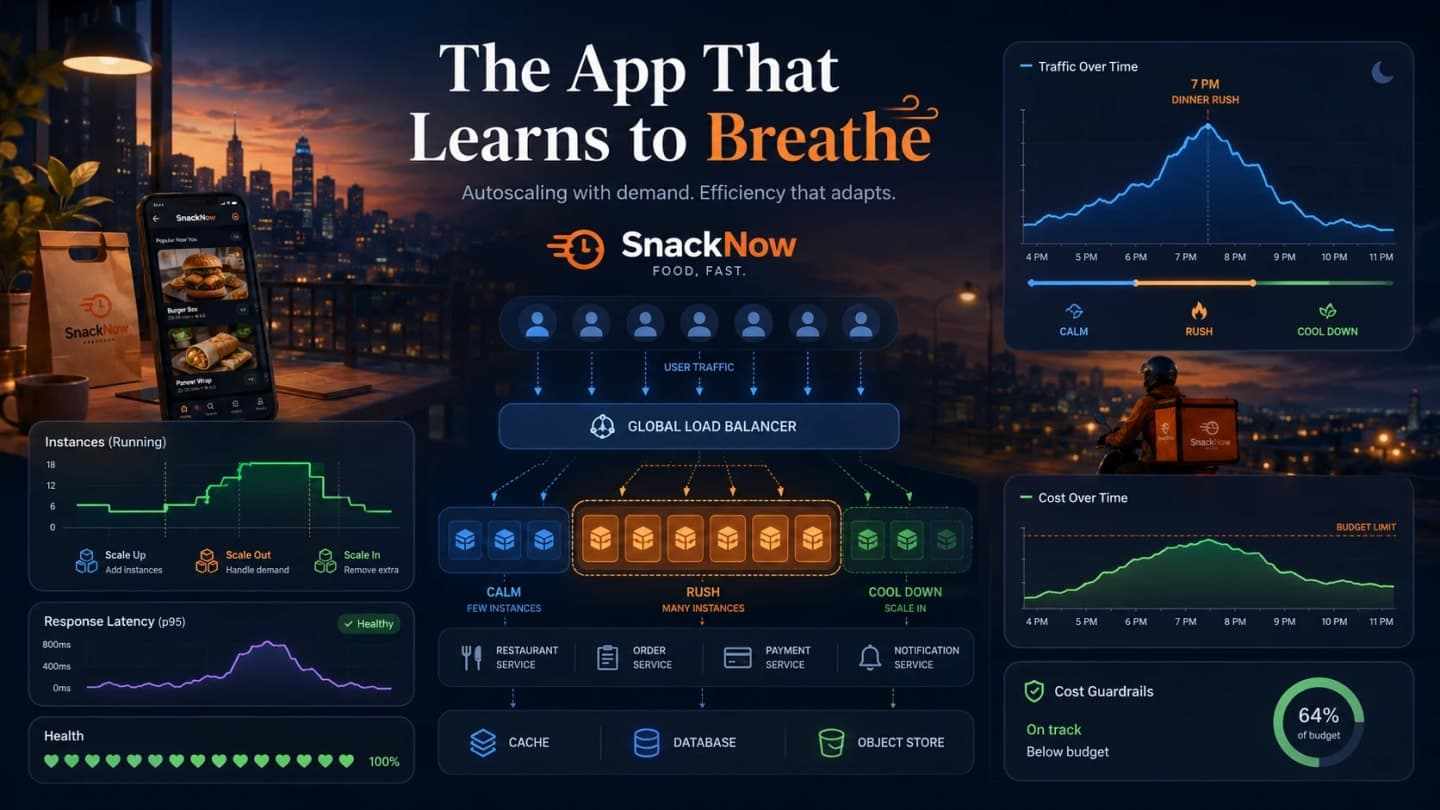
SnackNow can now survive more than one server because traffic passes through a load balancer. But Aman is still deciding capacity by hand, and this lesson explains how autoscaling helps the app add resources during pressure and remove them when the rush ends.
SnackNow now has multiple servers and a load balancer. The system is better. But Aman is still manually adding servers before the rush and forgetting to remove them when the crowd disappears. The app is stable, the cloud bill is dramatic, and Meera is looking at both.
For the foundation around this lesson, The 7 PM Rush: Scalability and Scaling Strategies Explained From Scratch explains capacity pressure from one overloaded server, and The Traffic Director: Load Balancing Explained Without Confusion explains how load balancing distributes requests before autoscaling changes the server count.
1. The Rush Returns, But Manual Scaling Breaks Down
The story has moved step by step. First, one server could not handle the chai-samosa rush. Then multiple servers needed a traffic director. Now the question changes again: how many servers should exist at any moment?
If SnackNow needs eight servers at 7 PM but only two at midnight, paying for eight all day is wasteful. Running only two during a rush is painful. Autoscaling is the habit of matching capacity to demand instead of guessing by hand.
Checkpoint: This article is about automatic capacity decisions, not another deep dive into load balancing.
2. Aman Is Still Adding Servers by Hand
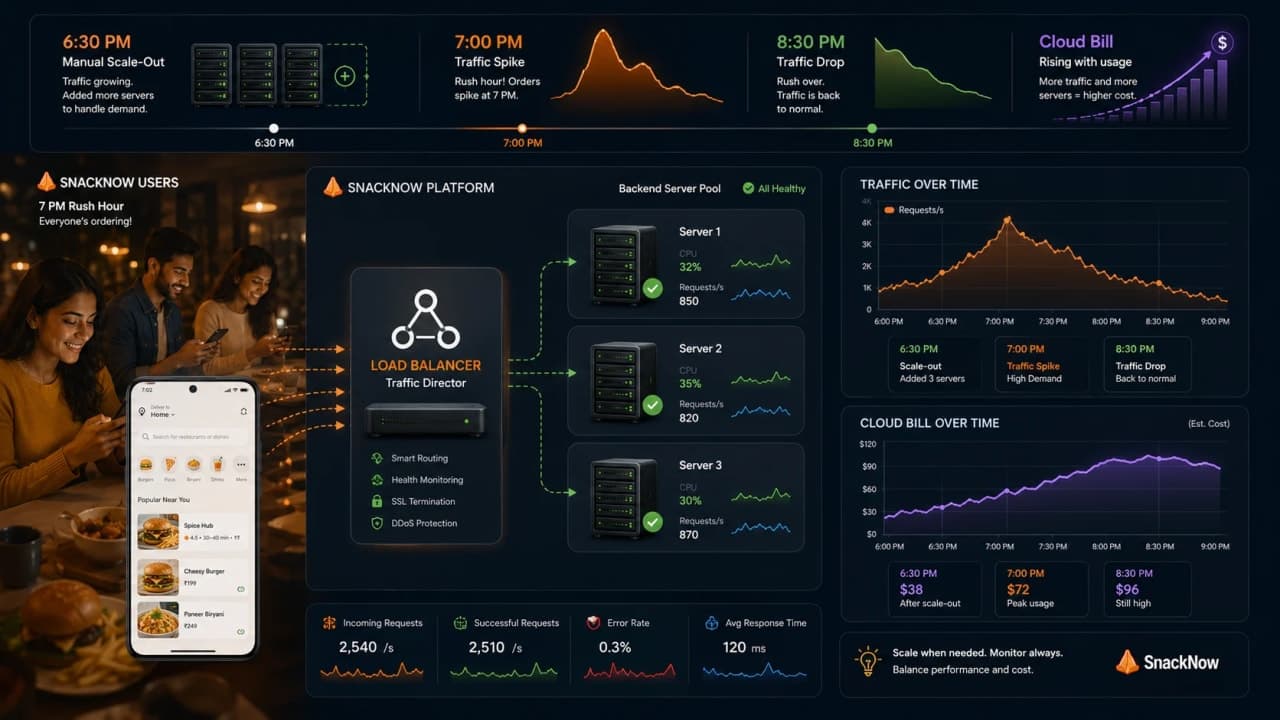
At 6:30 PM, Aman adds extra servers. At 7:05 PM, traffic is still rising. At 8:30 PM, the rush is gone, but the extra servers keep running because Aman finally went to eat dinner. The system survived. The bill did not enjoy the evening.
Manual scaling is okay while traffic is small and rare. It becomes risky when spikes are frequent, early, late, sudden, or tied to real-world chaos like cricket super overs and festival offers.
Manual scaling pain | SnackNow example | Why it hurts |
|---|---|---|
Too slow | Traffic spikes before Aman reacts | Users see latency first |
Too early | Servers run idle before rush | Cost rises |
Too late to scale in | Extra capacity stays overnight | Money leaks quietly |
Too few servers | Checkout queues grow | Orders fail |
Too many servers | Everything works but cost jumps | Budget suffers |
3. What Autoscaling Actually Does
Autoscaling watches signals such as CPU, request rate, latency, queue depth, or custom business metrics. When pressure crosses a rule, it adds resources. When pressure drops safely, it removes resources.
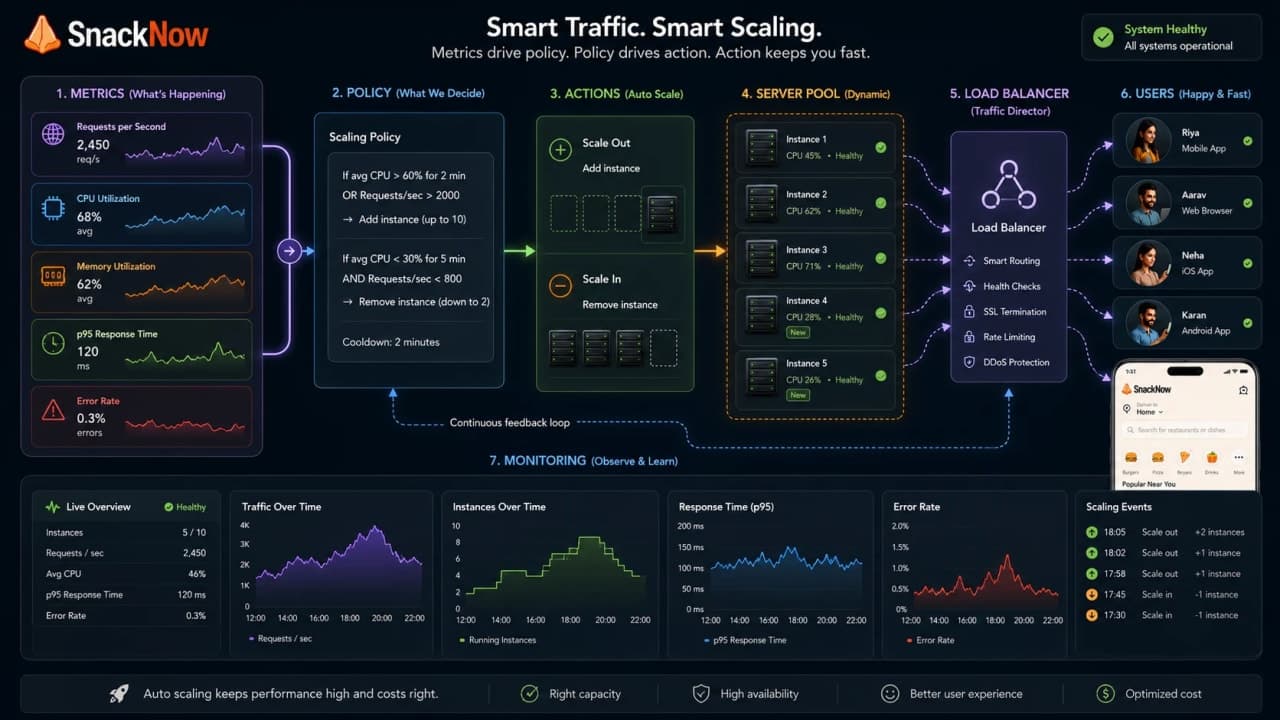
That is the core loop: observe pressure, compare it to policy, change capacity, route traffic, observe again. The cloud product names vary, but the mental model stays boring in the best way.
Part of loop | SnackNow version | Question it answers |
|---|---|---|
Metric | CPU, latency, queue depth, order attempts | How much pressure exists? |
Policy | Scale out above threshold | When should capacity change? |
Resource | App instances, pods, workers | What should be added or removed? |
Guardrail | Minimum and maximum capacity | How far may scaling go? |
Monitoring | Dashboard and alerts | Did it work safely? |
Autoscaling is not magic. It is measured automation with rules, limits, and feedback.
4. Horizontal Autoscaling: More Counters When the Queue Grows
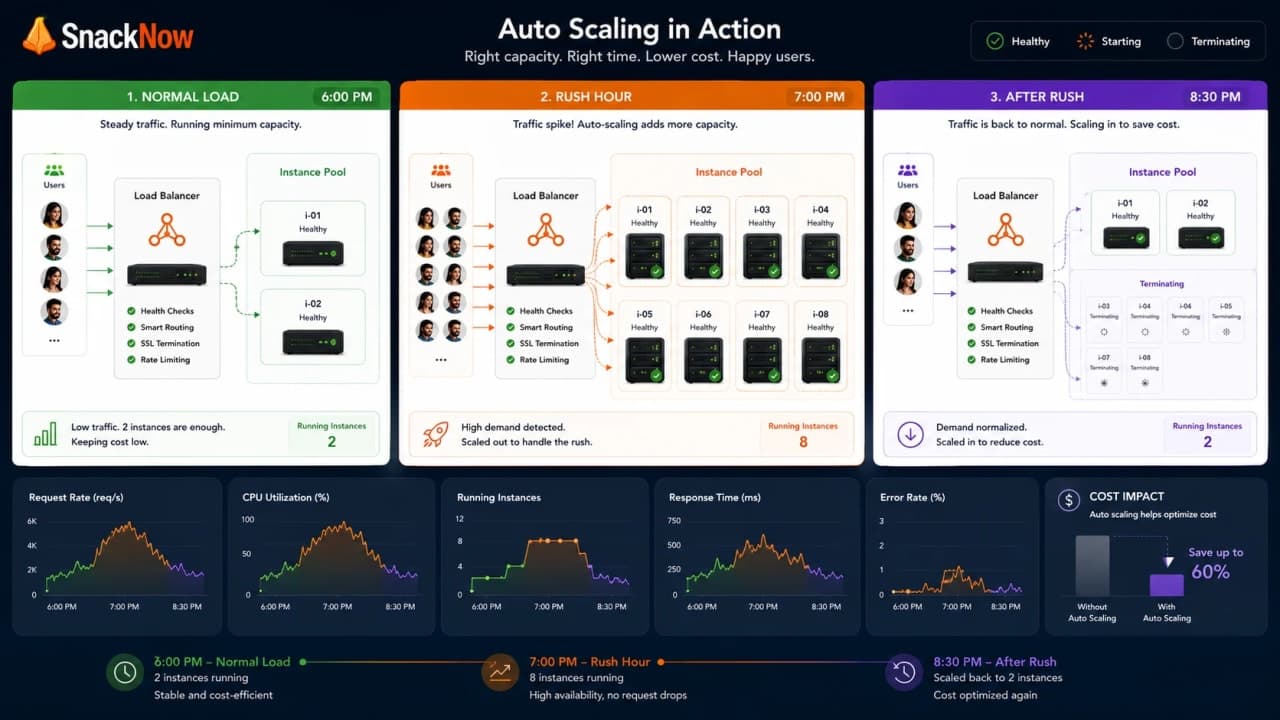
During the 7 PM rush, the most common autoscaling move is horizontal: add more app instances, containers, pods, or worker processes. The load balancer then has more healthy targets available.
Traffic state | Instance count | Why |
|---|---|---|
Normal afternoon | 2 app instances | Minimum availability without waste |
6:50 PM scheduled prep | 5 app instances | Prepare before known rush |
7:05 PM spike | 8 app instances | Reactive scale-out handles extra demand |
9:00 PM calm | 2 or 3 app instances | Scale in after demand drops |
Horizontal autoscaling works best when app instances are stateless or share state safely. If every instance has private memory that users depend on, adding more instances creates confusion instead of relief.
5. Vertical Autoscaling: Making One Server Stronger
Vertical autoscaling changes the resources of an existing machine or container: more CPU, more memory, or a larger instance size. It can help memory-heavy or CPU-heavy workloads, but it is not as instant or flexible as adding more replicas.
Vertical autoscaling helps when | It struggles when |
|---|---|
One workload needs more memory | Resizing requires restart or disruption |
A database or stateful service needs bigger resources | There is still one logical machine |
Traffic does not parallelize cleanly | Hardware and cost ceilings arrive |
Early systems need simple relief | High availability needs redundancy too |
In interviews, keep the distinction clear: horizontal autoscaling changes instance count; vertical autoscaling changes instance size.
6. Reactive Scaling: Responding After Pressure Appears
Reactive scaling waits for pressure. CPU crosses a threshold, latency rises, request rate increases, or queue depth grows. Then the system adds capacity.
Problem: add capacity without manual panic.

Scale out when average CPU > 70% for 5 minutes.
Scale in when average CPU < 35% for 15 minutes.
Keep minimum 2 instances and maximum 20 instances.
The first rule avoids reacting to one tiny spike. The second rule waits longer before removing capacity so the system does not bounce up and down. The min keeps SnackNow alive during quiet hours; the max protects the bill. This is useful for normal load changes, but dangerous when thresholds are too aggressive or a sudden spike outruns startup time.
Reactive scaling strength | Reactive scaling weakness |
|---|---|
Simple to understand | Always reacts after pressure begins |
Works well with reliable metrics | Can be late for sudden traffic |
Good first autoscaling policy | Bad thresholds cause flapping |
7. Predictive Scaling: Preparing Before the Rush
SnackNow's 7 PM traffic is not random anymore. If the app sees the same pattern every evening, predictive scaling can prepare capacity before the spike arrives.
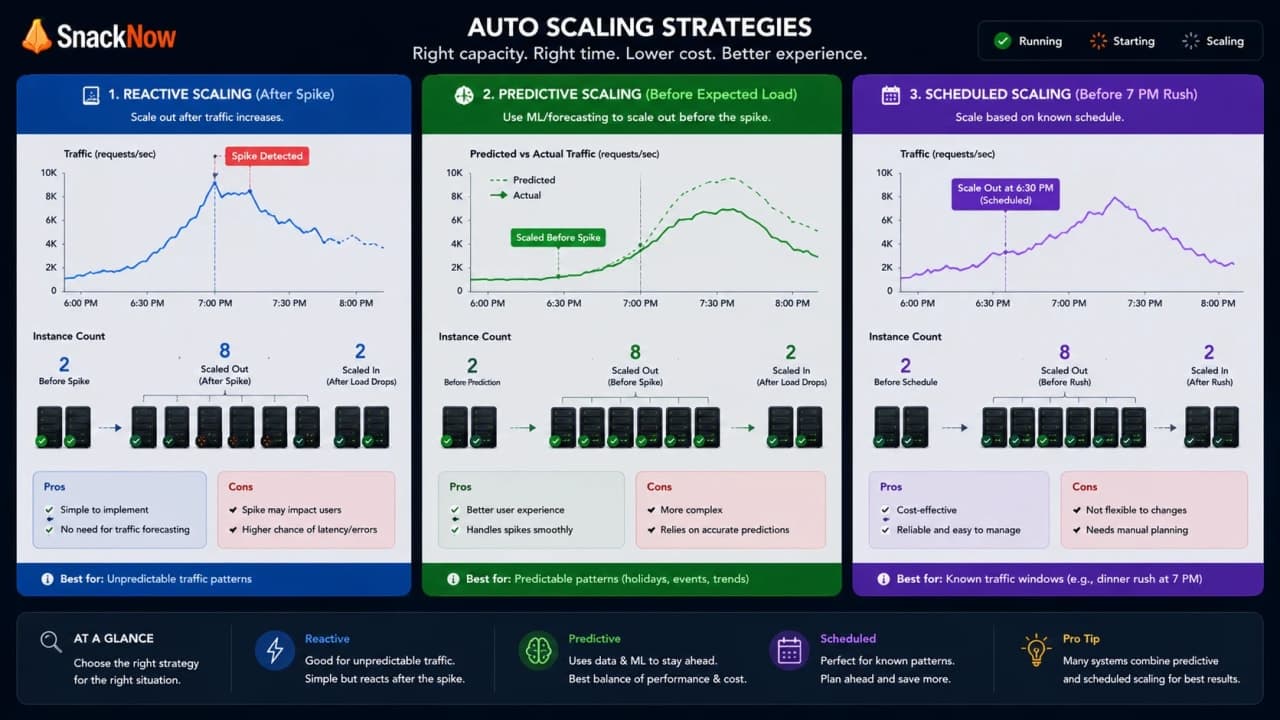
Predictive scaling uses historical patterns to forecast demand. It is helpful when traffic has rhythm. It is not a fortune teller. It cannot predict every viral post, celebrity mention, or unexpected match extension.
Good fit | Poor fit |
|---|---|
Daily or weekly traffic patterns | Completely unpredictable bursts |
Known seasonal events | First-time viral traffic |
Stable workload history | New product with little history |
Capacity needs warm-up time | Tiny workloads where manual/scheduled is enough |
Checkpoint: Predictive scaling is preparation, not prophecy.
8. Scheduled Scaling: When the Rush Is on the Calendar
Some traffic does not need prediction. SnackNow knows that match breaks and evening offers bring predictable pressure. Scheduled scaling adds capacity before the known event.
Schedule | Action | Why |
|---|---|---|
6:50 PM daily | Add extra app instances | Prepare before 7 PM rush |
7:00 PM to 8:30 PM | Keep higher minimum capacity | Avoid premature scale-in |
9:00 PM | Return to normal minimum | Reduce cost after rush |
Special campaign day | Raise max capacity temporarily | Allow larger safe burst |
Scheduled scaling is not fancy, but it is practical. If a rush is on the calendar, prepare before users suffer.
9. The Metric Trap: CPU Is Not the Whole Story
CPU is a useful signal, but it is not the only signal. SnackNow can have low CPU and still be slow because the database is waiting, a payment provider is timing out, or a queue is growing behind the scenes.
How is it so far?
Vote with other readers
Metric | Good for | Can mislead when |
|---|---|---|
CPU usage | Compute-heavy APIs | Bottleneck is database or network |
Memory usage | Memory-heavy services | Leak needs fixing, not only scaling |
Request rate | Traffic volume | Requests have very different cost |
Latency | User experience | Downstream dependency causes delay |
Error rate | Reliability | Scaling bad code only spreads errors |
Queue depth | Background workers | Downstream service cannot handle more workers |
Custom metric | Business pressure | Metric is noisy or poorly defined |
The best autoscaling signal is the one closest to the real pressure your workload feels. For web APIs that might be request rate or latency. For workers, queue depth often tells the truth sooner.
10. Queue Depth: The Line Outside the Kitchen
SnackNow sends notifications, receipts, and image processing jobs to background workers. The app may look fine while the queue silently grows. Queue depth tells Aman whether work is arriving faster than workers can finish it.
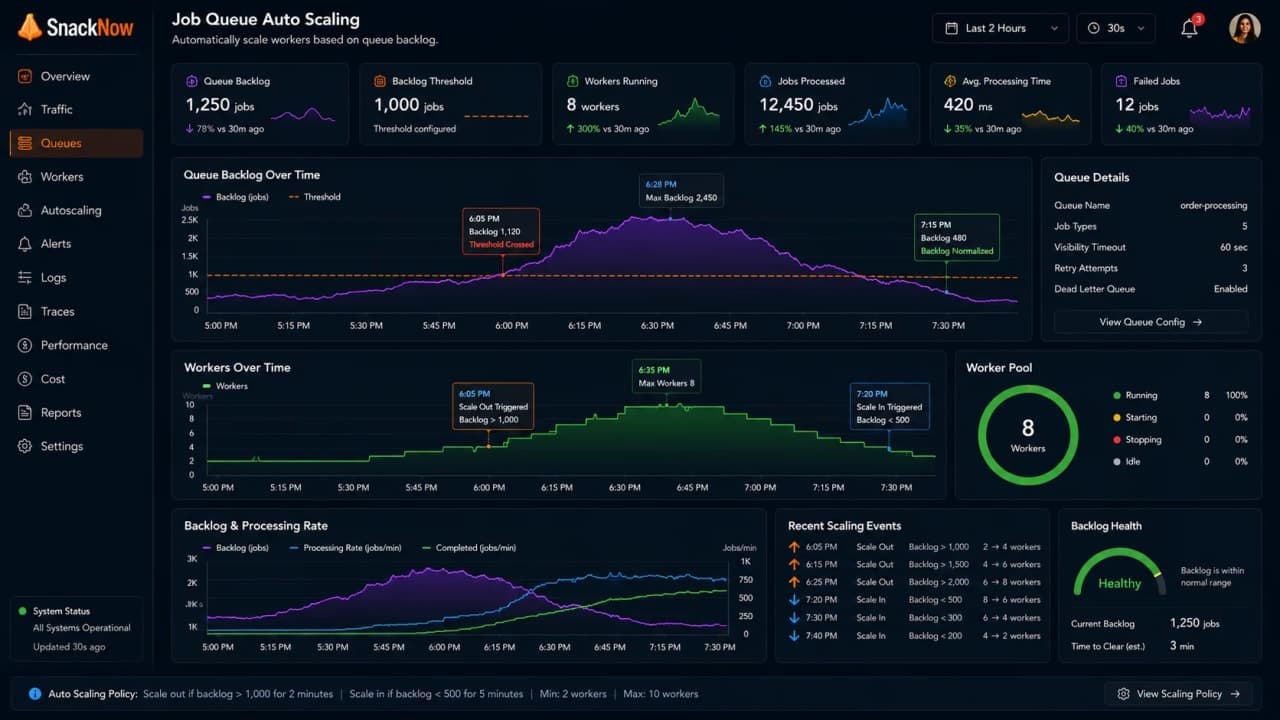
Queue signal | Meaning | Scaling response |
|---|---|---|
Pending jobs above 5,000 | Workers are falling behind | Add workers |
Pending jobs below 500 for 15 minutes | Backlog is under control | Remove extra workers |
Oldest job age increasing | Users may wait too long | Scale or optimize worker |
Downstream API throttling | More workers may worsen failures | Respect external limit |
The dangerous mistake is scaling workers without checking the downstream service. If the payment provider allows 100 calls per second, launching 1,000 workers does not create 1,000 safe payment calls.
11. Autoscaling in Cloud Providers: Same Idea, Different Names
AWS, Azure, and GCP use different product names, and each platform has its own knobs. But the model stays familiar: define metrics, define policies, adjust resources, watch results.
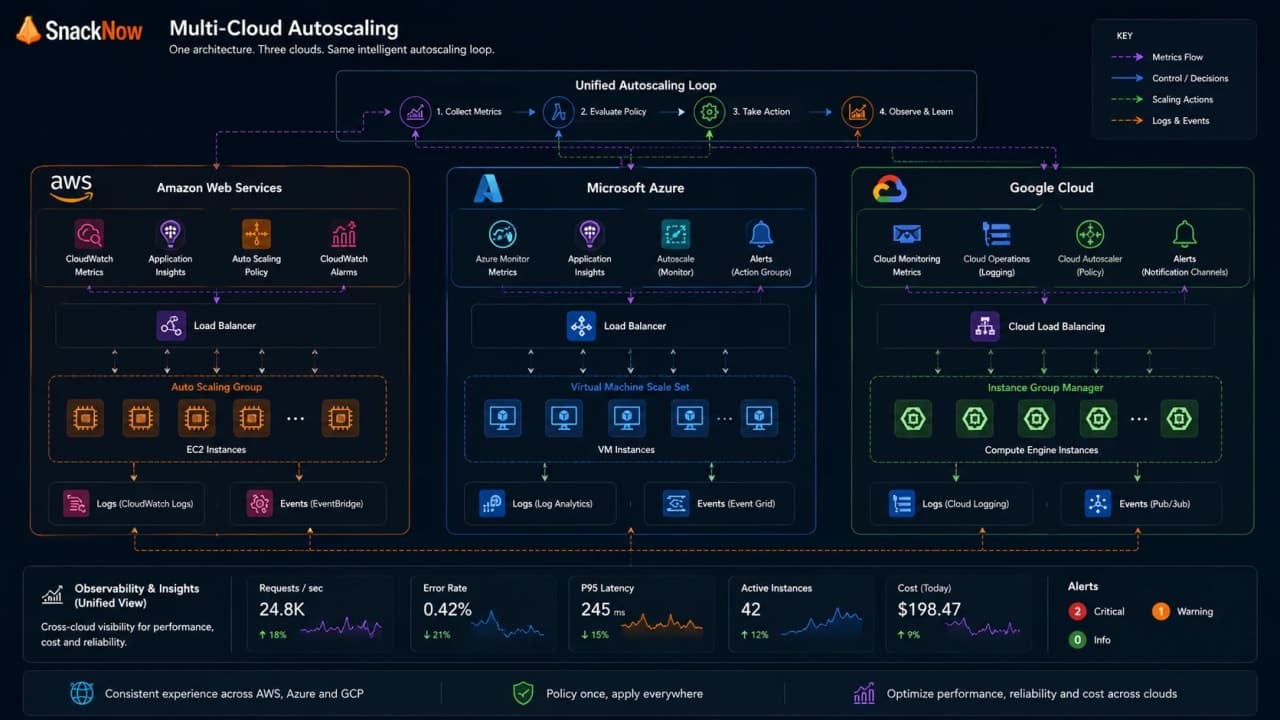
Cloud | Common autoscaling examples | Mental model |
|---|---|---|
AWS | EC2 Auto Scaling, ECS/EKS scaling, Lambda concurrency behavior | Policies adjust compute based on metrics or events |
Azure | Virtual Machine Scale Sets, App Service autoscale, AKS autoscaling | Rules and schedules adjust instances |
GCP | Managed Instance Groups, Cloud Run, GKE, Cloud Functions | Autoscalers react to load, metrics, or platform demand |
Do not memorize every service name first. In system design, start with the pressure signal, scaling policy, safe limits, and what traffic router will use the new capacity.
12. Container Autoscaling: Pods, Containers, and the Kitchen Staff
In a container platform, SnackNow may run as pods. A Kubernetes Horizontal Pod Autoscaler style setup observes metrics and adjusts pod count. More pods mean more workers behind the same service identity.
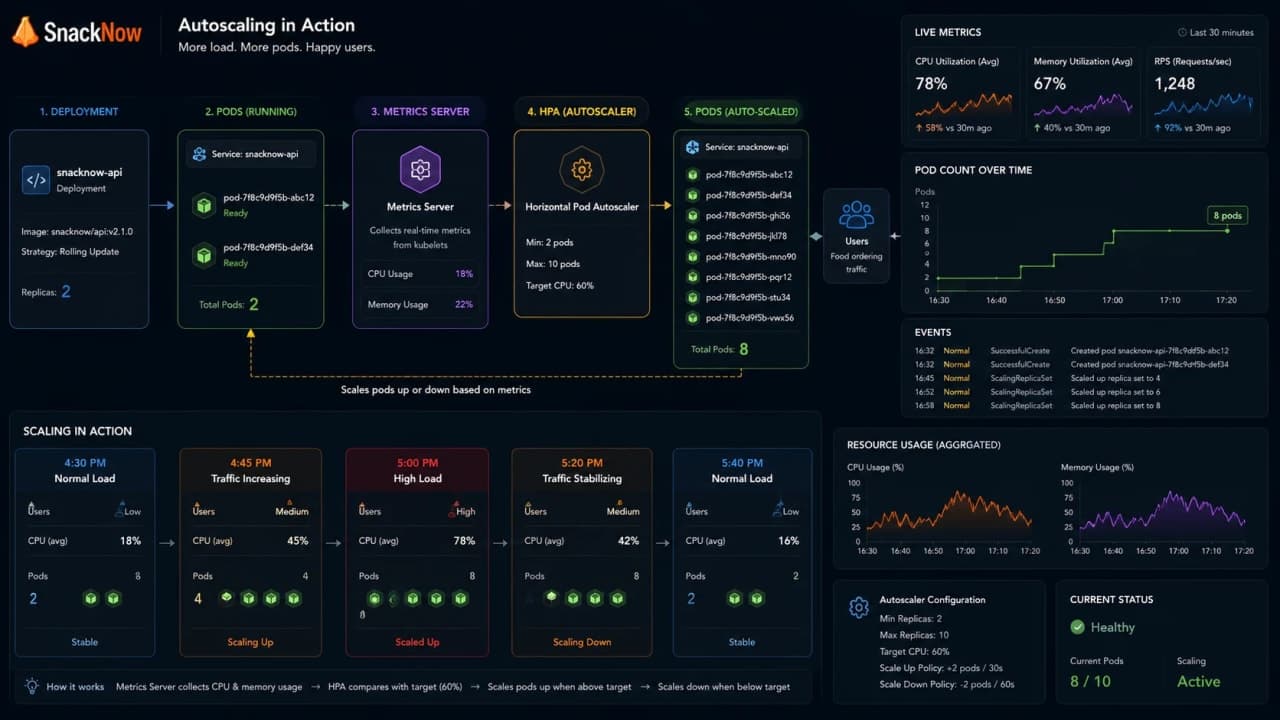
Container autoscaling needs | Why it matters |
|---|---|
Resource requests | Scheduler needs to know expected CPU and memory |
Resource limits | Protect cluster from runaway containers |
Metrics pipeline | Autoscaler needs trustworthy data |
Min and max replicas | Availability and cost guardrails |
Readiness checks | New pods should receive traffic only when ready |
Cluster capacity | Pods cannot start if nodes have no room |
HPA-style scaling changes pod count, but it still depends on correct metrics, resource requests, limits, and readiness.
13. Serverless Autoscaling and Scale-to-Zero
Serverless platforms can feel magical because they often scale automatically and may scale to zero when idle. That can be excellent for spiky or low-traffic workloads.
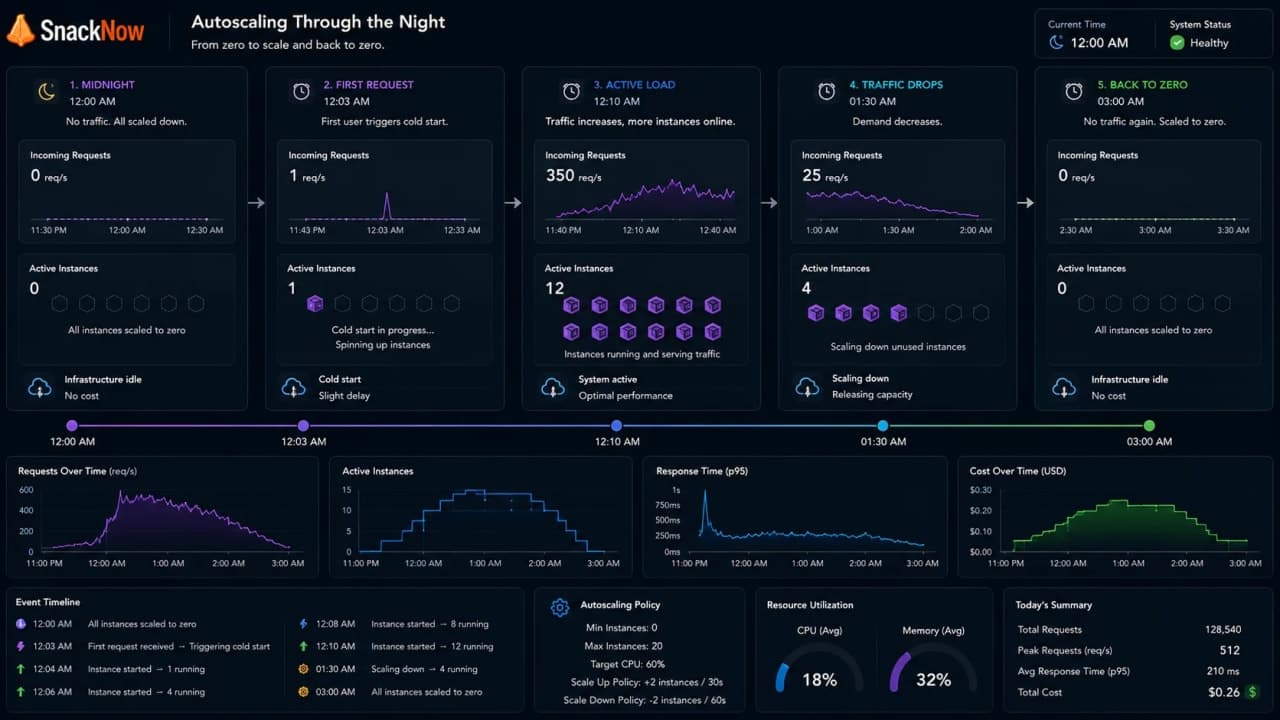
Serverless benefit | Serverless caution |
|---|---|
Pay less during idle periods | Cold starts may hurt first request |
Platform handles much scaling work | Concurrency and platform limits still exist |
Great for event-driven tasks | Long-running or stateful workloads may not fit |
Scale-to-zero saves money | Warm-up strategy may be needed for user-facing paths |
Serverless still has limits. It changes which problems you own, not whether problems exist.
14. Cold Starts and Scaling Delay: New Counters Need Time to Open
Autoscaling is not instant. A new server, container, or function instance must start, load code, connect to dependencies, pass readiness checks, and receive traffic.
Delay point | What happens | SnackNow symptom |
|---|---|---|
Metric window | System waits to confirm pressure | First users feel slow |
Provisioning | New resource starts | Capacity not available yet |
Warm-up | App loads code and caches | First requests are slower |
Health check | Target must pass readiness | Load balancer waits |
Routing | Traffic begins moving | Relief arrives after delay |
This is why scheduled or predictive scaling can help known rushes. If you know the queue will form at 7 PM, do not open the counter at 7:05 PM.
15. Cost Optimization: Scaling Should Not Burn Money
Meera does not want users complaining. She also does not want a cloud bill that behaves like a thriller. Autoscaling must protect user experience and cost at the same time.
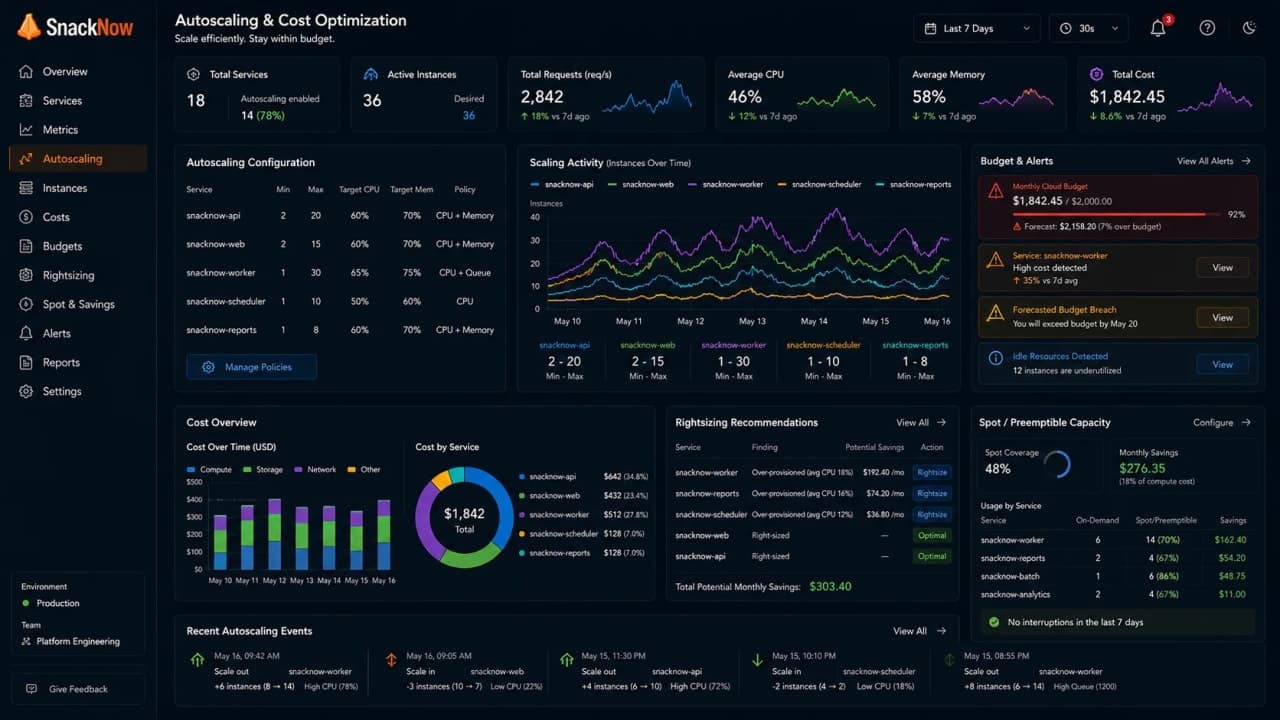
Cost guardrail | SnackNow use |
|---|---|
Minimum capacity | Keep at least two app instances for availability |
Maximum capacity | Prevent runaway scaling and surprise bills |
Scale-in policy | Remove idle capacity safely |
Scheduled capacity | Add only around known rushes |
Rightsizing | Use instance sizes that match workload |
Spot/preemptible capacity | Use for interruptible background jobs where safe |
Budget alerts | Notify before cost becomes a postmortem |
Autoscaling without maximum limits is not automation. It is an open-ended spending machine.
16. Over-Provisioning vs Under-Provisioning
Over-provisioning means SnackNow pays for capacity it does not need. Under-provisioning means users pay with latency, failed orders, and lost trust. Autoscaling tries to stay between both mistakes.
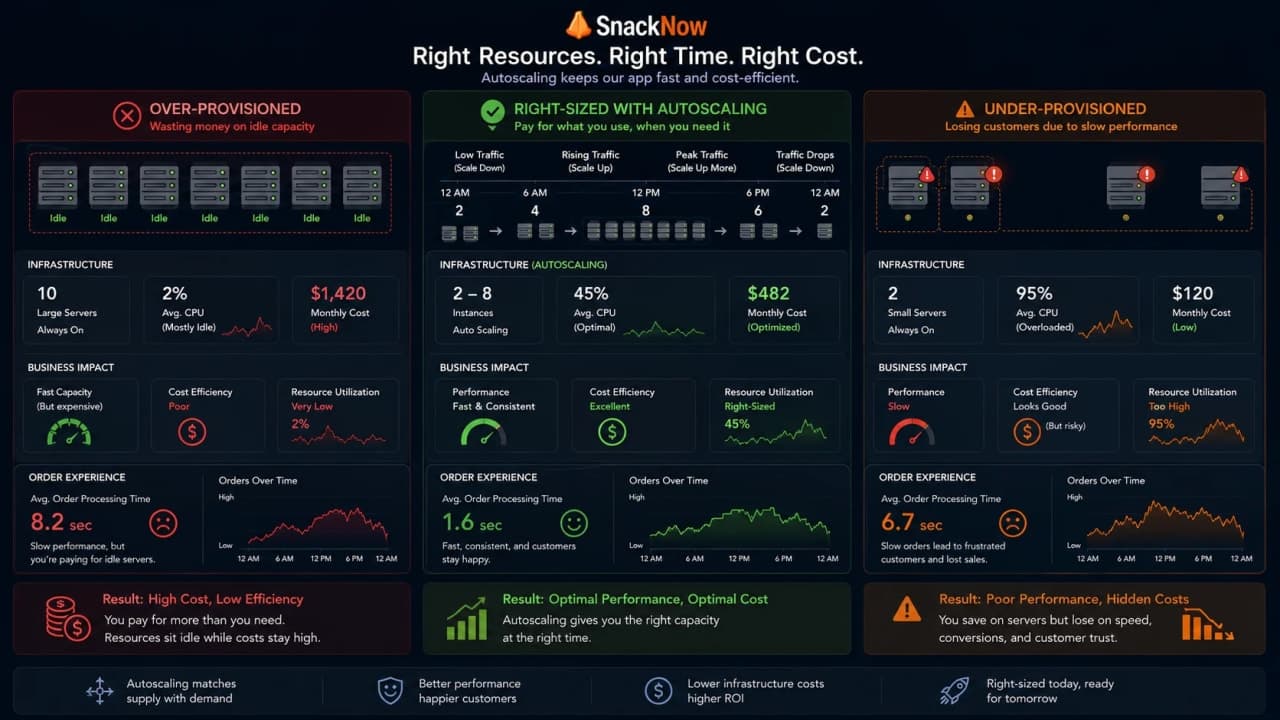
Problem | What it looks like | Cost |
|---|---|---|
Over-provisioning | Eight servers idle at midnight | Money wasted |
Under-provisioning | Two servers crushed at 7 PM | Users and orders lost |
Right-sizing | Enough capacity with safe headroom | Balanced user experience and spend |
Checkpoint: Good autoscaling is not maximum scaling. It is enough scaling with guardrails.
17. Why Autoscaling Can Still Fail During Sudden Spikes
A viral post hits at 6:41 PM. Traffic doubles before the normal schedule. The autoscaler notices, but new instances need time. Meanwhile, users are already tapping checkout.
Failure reason | SnackNow example | Mitigation |
|---|---|---|
Detection delay | Metrics need several minutes | Shorter windows where safe, predictive/scheduled prep |
Startup delay | Containers take time to become ready | Warm pools, pre-warming, smaller images |
Downstream bottleneck | Database cannot handle more app traffic | Cache, query optimization, read replicas, limits |
Quota limit | Cloud account cannot add more capacity | Quota planning and alerts |
Bad health checks | New instances receive traffic too soon | Readiness checks |
No max policy thinking | Scaling runs too far | Cost guardrails |
Autoscaling reduces manual panic. It does not remove capacity planning, load testing, or architecture discipline.
18. Autoscaling Challenges in Real-Time Systems
Real-time systems can be harder because connections live longer. A chat, live order tracker, or WebSocket stream may not move cleanly when a server is removed.
Challenge | Why it matters | Safer approach |
|---|---|---|
Long-lived connections | Scale-in can disconnect users | Connection draining |
Stateful sessions | New instance lacks context | Shared state or session handoff |
Reconnect storms | Many clients reconnect at once | Backoff and rate limits |
Sticky routing | Traffic imbalance grows | Careful affinity and monitoring |
Downstream fanout | More servers create more messages | Capacity plan message brokers |
This is where load balancing and autoscaling meet carefully. Removing capacity safely can matter as much as adding it.
19. Monitoring and Proactive Scaling
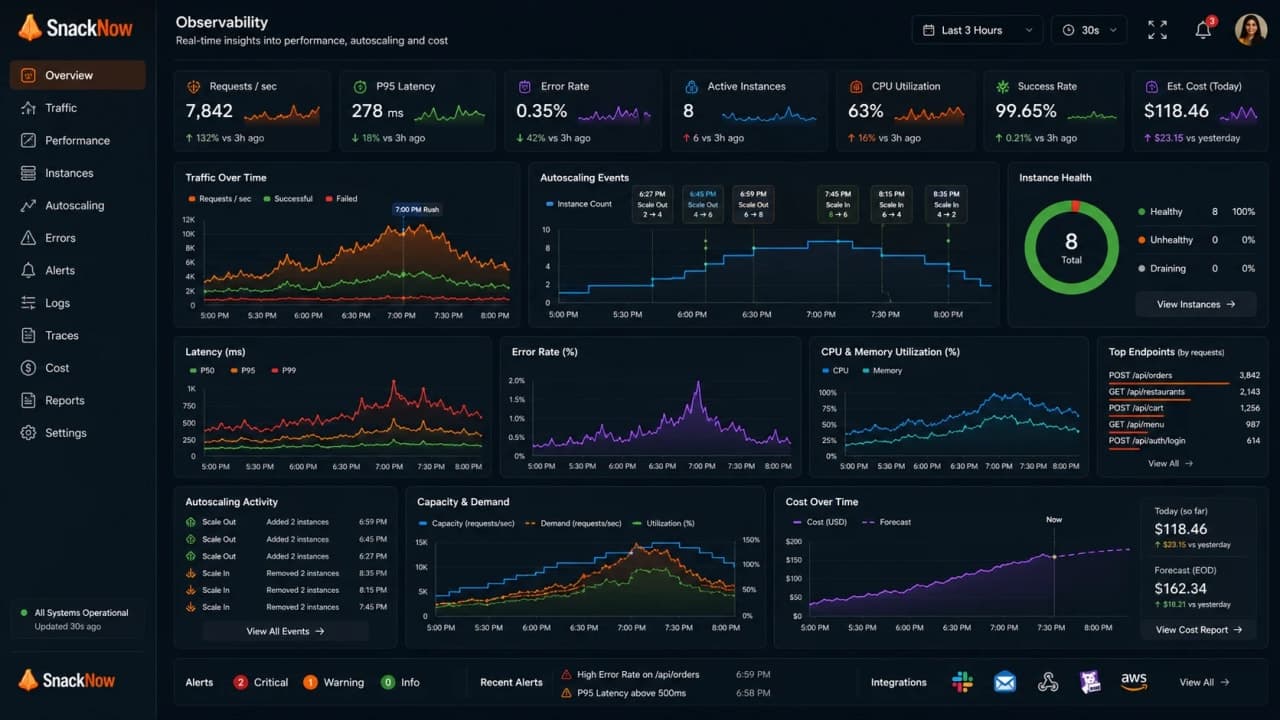
Autoscaling without monitoring is just a confident guess with a YAML file somewhere. Aman needs dashboards and alerts for CPU, latency, queue depth, error rate, saturation, scaling events, and cost.
What to monitor | Why |
|---|---|
Scaling events | Know when capacity changed |
Desired vs actual instances | Catch failed scaling |
Request latency | See user pain |
Queue depth and oldest job age | Catch background backlog |
Error rate | Scaling may not fix failures |
Cost per hour/day | Catch waste quickly |
Cloud quotas | Know when scaling will hit a ceiling |
Monitoring is part of autoscaling design, not a decoration added after production complains.
20. Designing Autoscaling for SnackNow
A practical SnackNow design combines scheduled, reactive, and workload-specific scaling. It also respects downstream limits instead of blindly adding app servers.
Component | Scaling Metric | Scaling Strategy | Why |
|---|---|---|---|
Menu API | Request rate and latency | Aggressive horizontal scale-out | Menu reads are frequent and user-visible |
Order API | Latency, error rate, CPU | Reactive plus scheduled evening capacity | Orders need reliability during rush |
Payment API | Latency, error rate, provider limits | Conservative scaling | External provider may bottleneck |
Notification workers | Queue depth and oldest job age | Worker autoscaling | Backlog matters more than CPU |
Image processing | Queue depth and cost | Batch/worker scaling with max limits | Work is async and cost-sensitive |
Admin dashboard | Low traffic and latency | Small fixed capacity | Not rush-critical |
Database read layer | Query latency and read load | Read replicas/caching, not only app autoscaling | App scale can overload DB |
Minimum two app instances stay alive. Scheduled scaling adds capacity at 6:50 PM. Reactive scaling handles surprise spikes. Maximum limits prevent billing disaster. Alerts tell Aman when scaling fails.
21. Common Beginner Mistakes
Autoscaling feels powerful, so beginners often expect it to clean up every architecture mess. It will not. It scales the shape you already designed.
Mistake | Why it hurts | Better thought |
|---|---|---|
Thinking autoscaling fixes bad architecture | Bad queries and locks still exist | Fix bottlenecks too |
Using only CPU | Queues or latency may be the real pressure | Pick workload-specific metrics |
No scale-in rules | Idle capacity stays expensive | Remove capacity slowly and safely |
Aggressive thresholds | Capacity flaps up and down | Use windows and cooldowns |
No minimum capacity | Cold quiet periods hurt availability | Keep safe baseline |
No maximum capacity | Cost can run away | Set hard limits |
Ignoring cold starts | New capacity arrives late | Pre-warm known rushes |
Ignoring database bottlenecks | More app servers overload DB | Scale data layer intentionally |
Ignoring queue depth | Workers fall behind silently | Scale workers by backlog |
Forgetting quotas | Cloud refuses more capacity | Plan quotas before events |
Not load testing policy | Autoscaling surprises production | Test scale-out and scale-in |
Confusing load balancing with autoscaling | Traffic direction and capacity adjustment differ | Use both together |
Autoscaling is powerful, but it needs good signals, safe limits, monitoring, and load tests.
22. Interview-Ready Answers
Here are the answers a developer can say clearly without turning the conversation into cloud certification notes.
Question | Interview-ready answer |
|---|---|
What is autoscaling? | It automatically adjusts compute resources based on demand so SnackNow handles rushes without paying for peak capacity all day. |
Horizontal vs vertical autoscaling? | Horizontal adds or removes instances, pods, or containers. Vertical changes CPU, memory, or size of an existing resource. |
Predictive autoscaling? | It uses historical patterns to prepare capacity before expected traffic, such as SnackNow's regular 7 PM rush. |
AWS, Azure, GCP autoscaling? | Names differ, but each watches metrics, applies policies, adjusts resources, and reports scaling events. |
Containerized app setup? | Set resource requests and limits, expose metrics, configure min/max replicas, readiness checks, and load-test the policy. |
Metrics to monitor? | CPU, memory, request rate, latency, error rate, queue depth, network traffic, custom business metrics, and cost. |
Cost optimization? | Right-size resources, set min/max limits, scale in safely, use schedules, budgets, alerts, and interruptible capacity where safe. |
Real-time challenges? | Long-lived connections, state, draining, reconnect storms, and message fanout make scaling harder. |
Reactive vs predictive vs scheduled? | Reactive responds after pressure appears, predictive prepares from patterns, scheduled prepares from known calendar events. |
Why can autoscaling fail? | Detection, startup, health checks, quotas, downstream bottlenecks, and cold starts can delay or block new capacity. |
23. One-Page Cheat Sheet
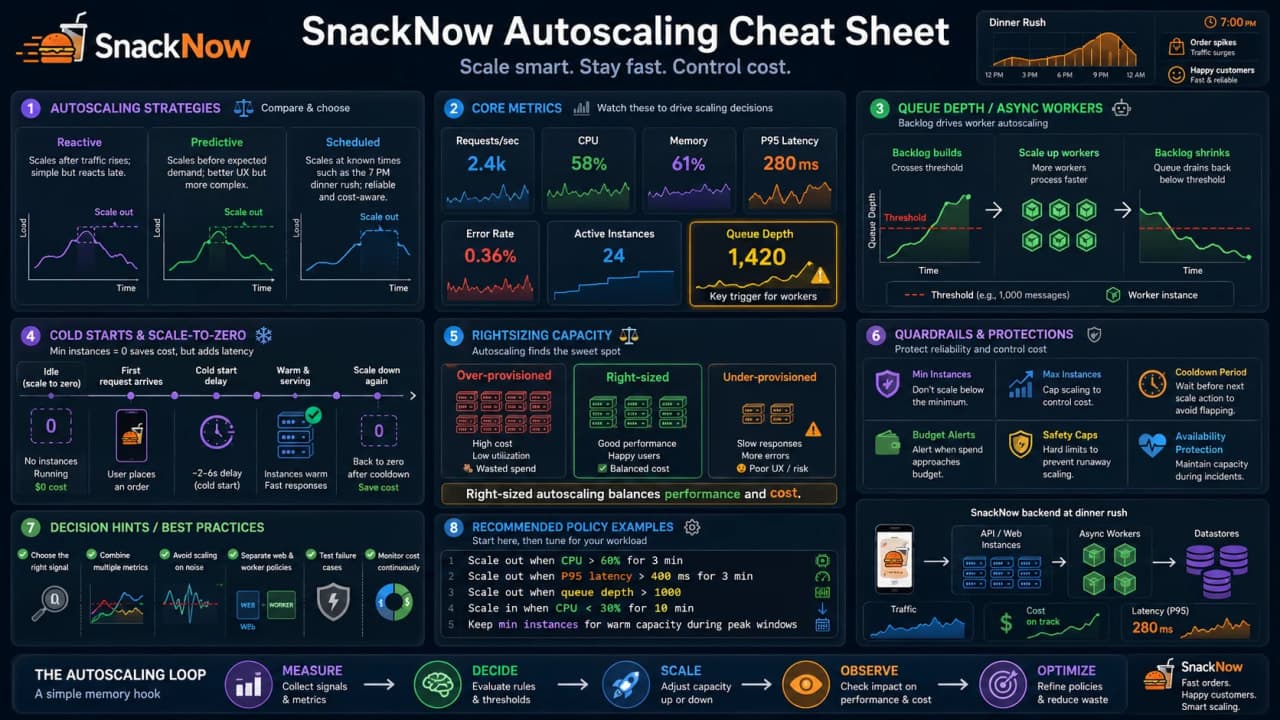
Concept | Simple Meaning | SnackNow Memory Hook | Best Used When | Common Mistake | Interview Keyword |
|---|---|---|---|---|---|
Autoscaling | Automatic capacity adjustment | App learns to breathe | Traffic changes | Expecting magic | Elasticity |
Horizontal autoscaling | More or fewer instances | More counters | Stateless APIs/workers | Ignoring state | Scale out/in |
Vertical autoscaling | Bigger or smaller resource | Stronger counter | Resource-heavy workload | Forgetting disruption | Scale up/down |
Reactive scaling | Respond after metrics rise | CPU crosses 70% | Normal variable load | Scaling too late | Threshold |
Predictive scaling | Prepare from history | 7 PM pattern | Repeatable traffic | Predicting surprises | Forecast |
Scheduled scaling | Calendar-based capacity | 6:50 PM prep | Known events | Forgetting exceptions | Schedule |
CPU metric | Compute pressure | App server busy | CPU-heavy APIs | Only signal | Utilization |
Memory metric | Memory pressure | Container near limit | Memory-heavy work | Scaling leaks | Memory |
Request rate | Traffic volume | Orders per minute | Web APIs | Ignoring request cost | RPS |
Queue depth | Backlog size | Kitchen line grows | Workers | Ignoring downstream | Backlog |
Latency | User delay | Checkout slow | User-facing APIs | Scaling wrong layer | P95/P99 |
Error rate | Failure signal | Payment failures | Reliability | Scaling bad releases | 5xx |
Custom metrics | Workload-specific pressure | Order attempts/minute | Business-critical paths | Noisy metric | Business metric |
Cold start | Warm-up delay | New counter opens slowly | Serverless/containers | Ignoring first users | Startup |
Scaling delay | Time before relief | Capacity arrives late | Sudden spikes | No pre-warm | Lag |
Over-provisioning | Too much capacity | Idle midnight servers | Over-safe systems | Wasting money | Waste |
Under-provisioning | Too little capacity | 7 PM queue | Cost-cut systems | User pain | Saturation |
Rightsizing | Correct capacity shape | Enough but not silly | Cost control | One-size instance | Optimization |
Scale-to-zero | No idle instances | Midnight zero | Event-driven workloads | Cold start surprise | Serverless |
Spot/preemptible | Cheaper interruptible compute | Image jobs | Non-critical workers | Using for checkout | Interruptible |
Cost guardrails | Budget limits and alerts | Meera sleeps better | Any autoscaling setup | No max capacity | Budgets |
24. Final Mental Model
SnackNow first learned that one server cannot handle every rush. Then it learned that multiple servers need a traffic director. Finally, it learned that humans should not manually guess server count every evening. Autoscaling watches the pressure, adds help when needed, removes extra help when traffic drops, and keeps the app useful without turning the cloud bill into a horror story.
You do not need to memorize every cloud product name first. Remember the 7 PM rush. If the queue grows, open more counters. If the rush ends, close the extra counters. If the rush is predictable, prepare early. If the bill grows, add guardrails. That is autoscaling.
Lock in the takeaway
Frequently asked questions
What is autoscaling, and why is it important in distributed systems?
Autoscaling automatically adjusts compute resources based on demand so the system can handle spikes without paying for peak capacity all day.
What is the difference between horizontal and vertical autoscaling?
Horizontal autoscaling adds or removes instances, pods, or containers. Vertical autoscaling changes CPU, memory, or resource size on an existing machine.
How does predictive autoscaling work?
Predictive autoscaling uses historical traffic patterns to prepare capacity before expected load arrives, such as SnackNow's repeated 7 PM rush.
How does autoscaling work in AWS, Azure, and GCP?
The product names differ, but the model is similar: watch metrics, apply scaling rules, adjust resources, and monitor the result.
How would you set up autoscaling for a containerized application?
Define resource requests and limits, expose reliable metrics, configure a pod autoscaler, set min and max replicas, and load test the policy.
What metrics should you monitor for autoscaling?
Monitor CPU, memory, request rate, latency, error rate, queue depth, network traffic, cost, and workload-specific business metrics.
How can autoscaling control cost?
Use right-sized instances, minimum and maximum limits, scale-in rules, scheduled capacity, spot or preemptible capacity where safe, and budget alerts.
What challenges appear in real-time autoscaling?
Long-lived connections, stateful sessions, reconnect storms, warm-up delay, and downstream limits can make real-time autoscaling harder than simple HTTP scaling.
What is the difference between reactive, predictive, and scheduled scaling?
Reactive scaling responds after metrics rise, predictive scaling prepares based on expected patterns, and scheduled scaling adds capacity at known times.
Why can autoscaling still fail during sudden spikes?
Autoscaling needs time to detect pressure, start resources, pass health checks, and route traffic. Sudden spikes can outrun that delay.