

Listen to this article
Checking audio support
SnackNow has already learned that one server cannot survive every rush. Now the team has three backend servers, but requests are still arriving unevenly, and this lesson explains how a load balancer becomes the calm traffic director between users and servers.
SnackNow has survived the first lesson. One server was not enough, so Aman added more backend servers. That sounds like progress until Riya opens the app and the system quietly asks the next painful question: who decides where her request should go?
For the surrounding path, The 7 PM Rush: Scalability and Scaling Strategies Explained From Scratch explains why SnackNow needed more than one server, and The App That Learns to Breathe: Autoscaling and Cloud Best Practices shows what happens after load balancing, when capacity itself must scale automatically.
1. The Rush Returns, But the Problem Changes
SnackNow already learned that traffic growth is not solved by hope. The team saw how load, latency, throughput, capacity, and bottlenecks behave when a chai-samosa combo becomes popular during a cricket break.
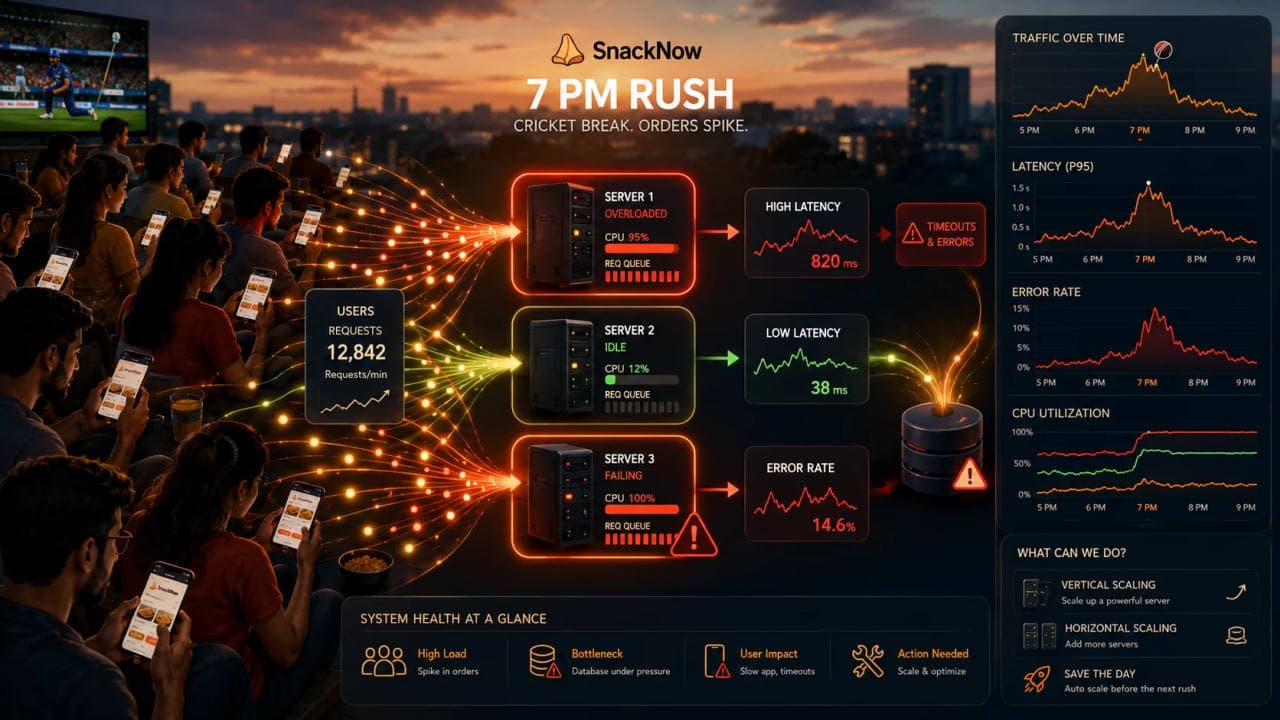
Now there are three app servers. That should feel safer. But if requests land randomly, one server can drown while another server sits almost bored. More servers do not help if traffic cannot reach them intelligently.
Checkpoint: This article is about distributing traffic safely, not about adding even more capacity.
2. SnackNow Has Three Servers, But No Traffic Director
At 7 PM, Riya taps Order Again. Server 1 receives a burst of menu, cart, and payment requests. Server 2 receives a few quiet menu reads. Server 3 is barely touched until it suddenly fails a health dependency. From the user's side, this feels random and unfair.
Aman cannot ask users to choose Server 1, Server 2, or Server 3. That would be comedy, not engineering. The system needs one front door and one decision maker behind that door.
Without a load balancer | What happens at SnackNow | Why users suffer |
|---|---|---|
Users hit servers unevenly | Server 1 gets most traffic | Latency rises even though spare capacity exists |
One server fails silently | Some requests still reach it | Random checkout failures appear |
Each server is exposed | Clients know backend addresses | Security and operations get messy |
Scaling is manual and fragile | New servers need client changes | Growth creates coordination work |
Checkpoint: The new problem is not capacity. It is traffic direction.
3. Why Load Balancing Is Needed
A load balancer appears when multiple servers exist and the system needs a clean way to use them. It receives incoming traffic, chooses a healthy backend, and forwards the request. Simple sentence, huge impact.
A load balancer is the traffic director that turns several servers into one usable service. It improves capacity use, availability, failover, and operational control. It also keeps users away from the awkward details of infrastructure.
Need | SnackNow version | Load balancer role |
|---|---|---|
Use all servers | Do not overload Server 1 while Server 2 waits | Spread requests |
Hide server details | Riya sees one app, not three machines | Provide a single entry point |
Survive failure | Server 3 crashes during checkout | Route away from unhealthy server |
Support growth | Aman adds Server 4 later | Include it in rotation without client changes |
Control traffic | Payment path needs careful handling | Use routing rules and policies |
4. The Load Balancer as a Single Entry Point
Riya still opens one SnackNow app. Her browser or phone sends the request to one public address. The load balancer receives it first, then forwards it to a backend server that should be able to handle it.
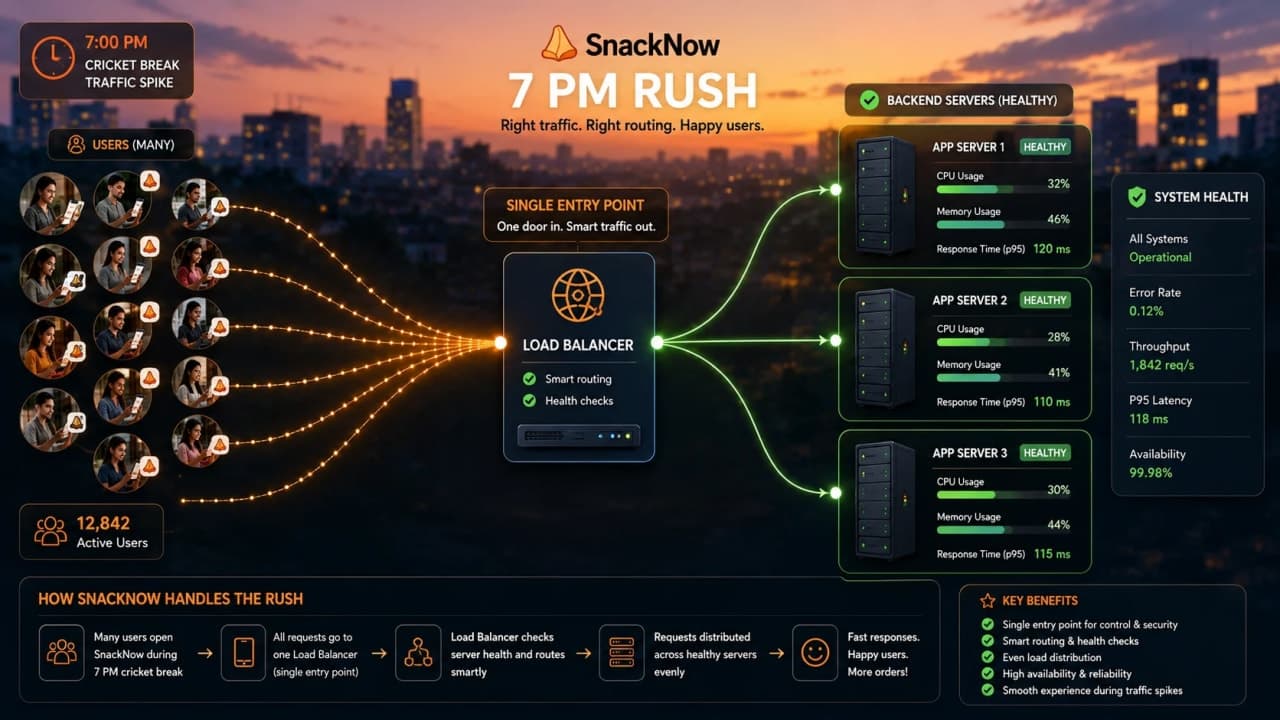
This single entry point keeps the user experience clean. It also gives Aman one place to enforce routing, TLS termination, rate limits, and health-aware traffic decisions.
Before | After |
|---|---|
Clients may know backend servers | Clients know only the load balancer address |
Adding a server needs messy coordination | New servers register behind the load balancer |
Failed backend may still receive traffic | Unhealthy backend can be removed from rotation |
Routing logic is scattered | Routing policy is centralized |
Checkpoint: To the user, SnackNow remains one app. Behind the scenes, traffic can move across many servers.
5. Health Checks: The Load Balancer Checks Who Is Awake
At 7:12 PM, Server 3 stops responding properly. The worst version of the system keeps sending users there. The better version checks each server repeatedly and only sends traffic to servers that look healthy.
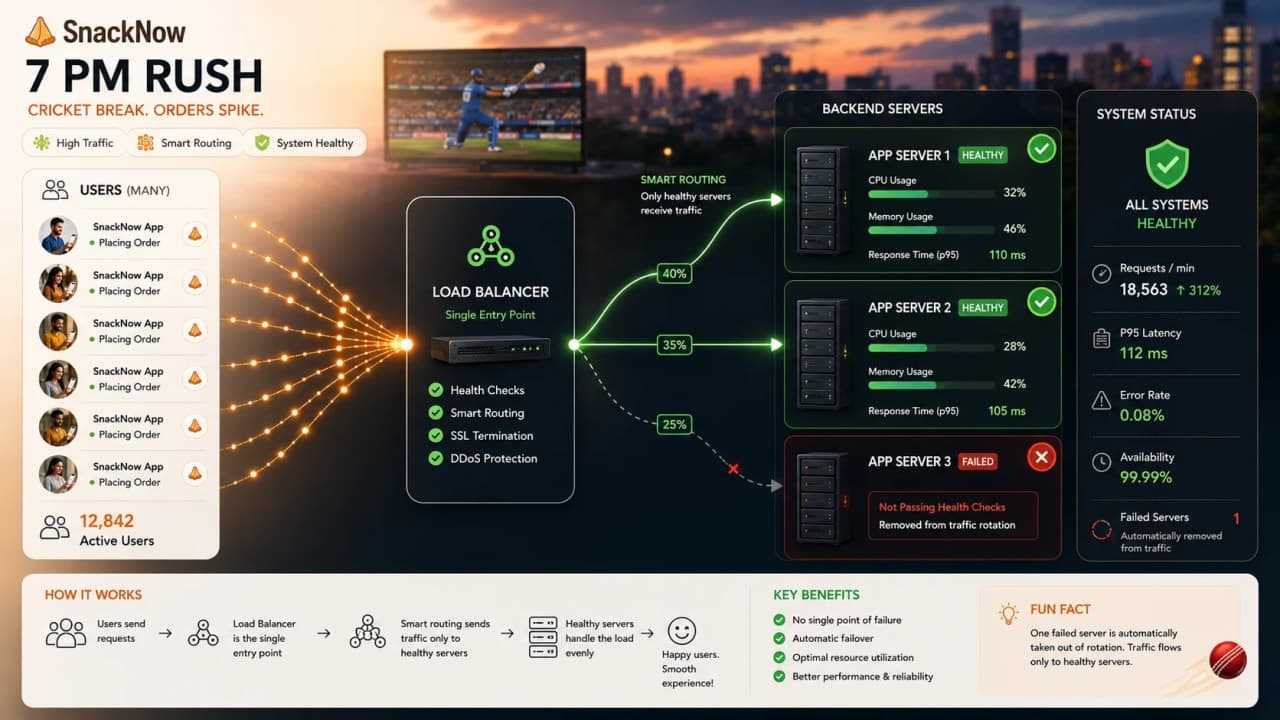
Problem: avoid sending users to a broken backend.

GET /health
200 OK = keep server in rotation
Timeout or 500 = remove server from rotation
The first line names the endpoint the load balancer calls. The 200 response means the server is alive enough to receive traffic. Timeout or 500 means users should be protected from it. This is useful for app-server health, but dangerous when the health check is too shallow and says healthy while the database, cache, or payment dependency is broken.
Health check style | What it catches | What it can miss |
|---|---|---|
TCP check | Port is open | App may be logically broken |
HTTP /health | App responds | Database may still be down |
Deep health check | Important dependencies are checked | Can become expensive or noisy |
Readiness check | Server is ready for traffic | Needs careful deploy integration |
A health check is only as useful as the truth it measures. A fake green check can be worse than no check because everyone relaxes while users fail.
6. Failover: When One Server Fails, Users Should Not Fall With It
Server 3 fails during payment confirmation. The load balancer notices and stops routing new requests there. Existing in-flight requests may still fail, but future users are sent to Server 1 or Server 2.
That behavior is failover. It is not magic healing. It is traffic avoidance. The system chooses a healthy path when one path becomes unsafe.
Failure event | Bad system | Load-balanced system |
|---|---|---|
Server crash | Some users keep hitting it | New traffic moves to healthy servers |
Slow backend | Queue grows silently | Health or latency policy can reduce traffic |
Bad deployment | All requests may break if one server is exposed | Instance can be drained or removed |
Zone issue | Single point outage | Redundant load balancing can route elsewhere |
Checkpoint: Failover works only when there are healthy alternatives and the load balancer itself is highly available.
7. Layer 4 Load Balancing: Fast Routing Without Reading the Order
Sometimes the load balancer does not need to understand the food order. It only needs to move the connection quickly using network-level details such as IP address, port, TCP, or UDP.
That is Layer 4 load balancing. It is usually fast and simple because it routes at the transport layer. It is useful for high-throughput TCP or UDP traffic where the balancer does not need to inspect HTTP paths.
Layer 4 can use | Example decision | Good fit |
|---|---|---|
Source IP | Keep connection handling simple | TCP services |
Destination IP | Route to target group | Network-level routing |
Port | Send port 443 traffic to HTTPS targets | Generic service distribution |
Protocol | TCP or UDP handling | Fast pass-through traffic |
The tradeoff is that Layer 4 cannot easily say, 'Menu requests go here, payment requests go there,' because it is not reading the HTTP request body or path.
8. Layer 7 Load Balancing: Smart Routing That Reads the Request
SnackNow's menu requests are cheap. Payment requests are sensitive. Admin requests should not be mixed with public traffic. Now the load balancer needs to understand more than a connection. It needs HTTP-level context.
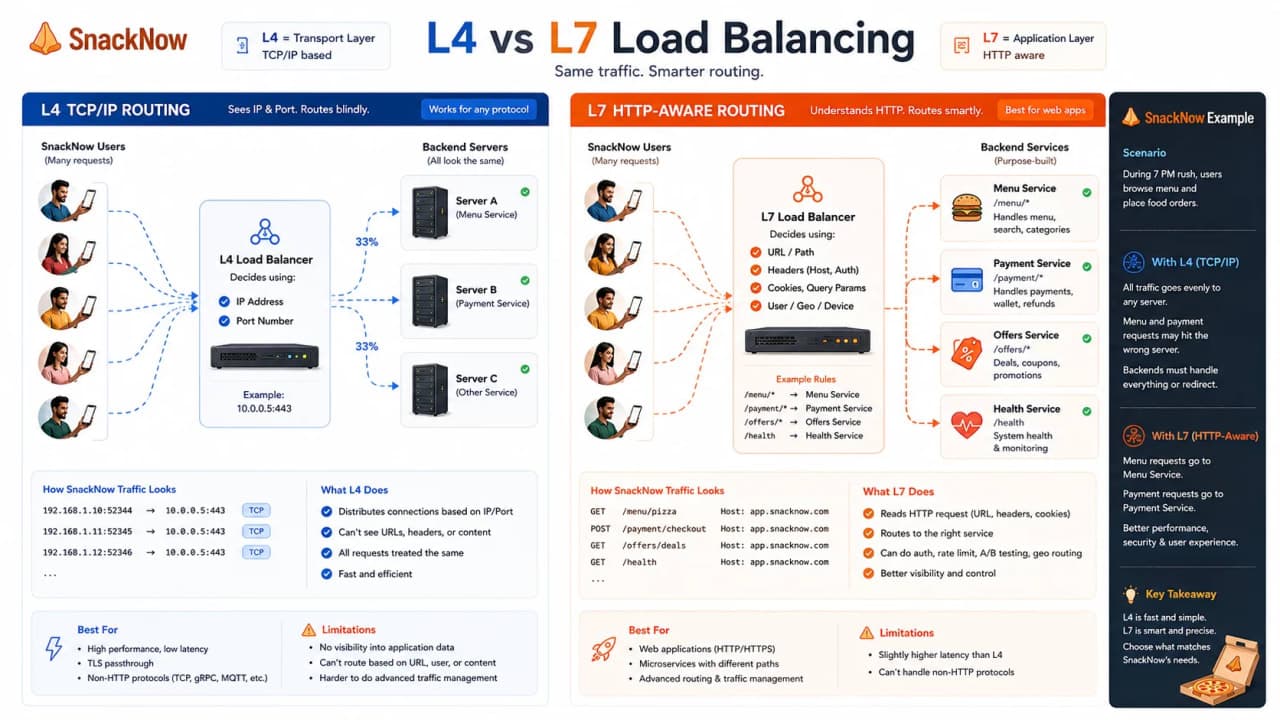
Layer 7 load balancing can route using hostnames, paths, headers, cookies, and sometimes request content. It is smarter, but it does more work.
Routing signal | SnackNow example | Why it helps |
|---|---|---|
Path | /menu goes to menu service | Different APIs can scale separately |
Host | admin.snacknow.example routes to admin service | Separate public and admin traffic |
Header | Mobile app version routes to safe backend | Gradual rollout |
Cookie | Sticky session decision | Stateful compatibility |
Request metadata | Premium checkout path gets stricter rules | Policy control |
Layer 4 is usually faster and simpler; Layer 7 is smarter and more policy-aware. Strong system design answers do not worship one layer. They match the layer to the job.
How is it so far?
Vote with other readers
9. Static vs Dynamic Load Balancing Strategies
Aman now needs an algorithm. Some algorithms follow a fixed pattern. Others react to live server conditions. That difference is the split between static and dynamic load balancing.
Strategy family | How it decides | SnackNow fit | Risk |
|---|---|---|---|
Static | Uses a predefined rule | Simple servers with similar capacity | Can ignore real-time overload |
Dynamic | Uses current load or performance signals | Variable request duration and uneven servers | Needs reliable metrics |
Hybrid | Uses weights plus live checks | Practical production setups | More tuning and monitoring |
Static is easier to understand. Dynamic is often better when real traffic is uneven. SnackNow has both quick menu reads and slower payment requests, so the choice matters.
10. Round Robin: One Request at a Time
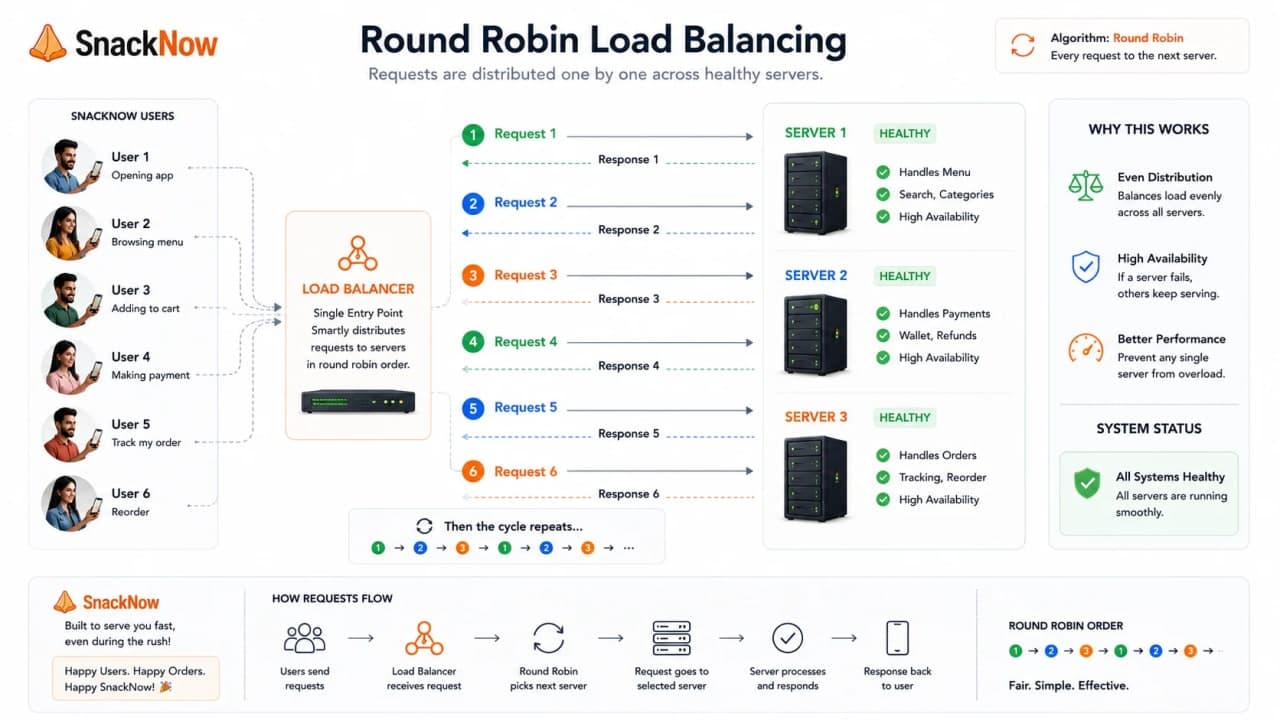
Round Robin is the easiest algorithm to explain. Request 1 goes to Server 1, request 2 goes to Server 2, request 3 goes to Server 3, then the cycle repeats.
Where it shines | Where it struggles |
|---|---|
Servers have similar capacity | One request takes much longer than another |
Requests cost roughly the same | One server already has slow in-flight work |
You need simple distribution | Backend health and load vary heavily |
Round Robin is fair by count, not always fair by effort. A menu request and a payment request may both count as one request, but they do not cost the same.
Checkpoint: Round Robin is a good first mental model, but it is not automatically the best production policy.
11. Least Connections: Send Work to the Least Busy Server
At 7:20 PM, Server 1 has many slow checkout requests still open. Server 2 has only a few active requests. If the next user arrives, sending them to Server 2 is more sensible than blindly following the next turn in line.
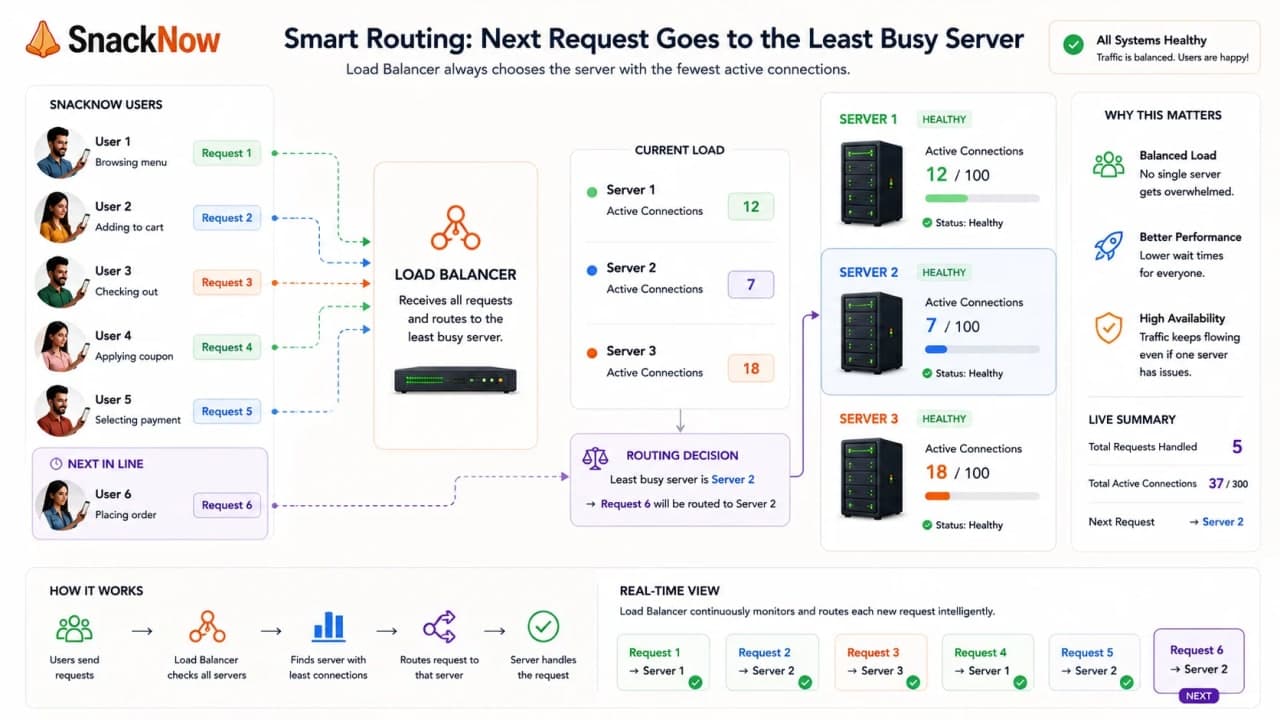
Least Connections looks at active connections and sends new work to the backend with fewer active connections. It helps when request durations vary.
Algorithm | Best when | SnackNow example | Caution |
|---|---|---|---|
Round Robin | Requests are similar | Menu reads are uniform | Ignores active load |
Least Connections | Some requests last longer | Checkout waits on payment | Connection count may not equal CPU cost |
Least Response Time | Latency signal is reliable | Choose the fastest healthy server | Metrics must be accurate |
Checkpoint: Least Connections asks a better question than 'whose turn is it?' It asks 'who is less busy right now?'
12. IP Hashing: Keeping Riya on the Same Server
Suppose SnackNow still has session data tied to one server. If Riya moves between servers, her cart may behave strangely. IP Hashing tries to route the same client to the same backend by hashing a client identifier such as IP.
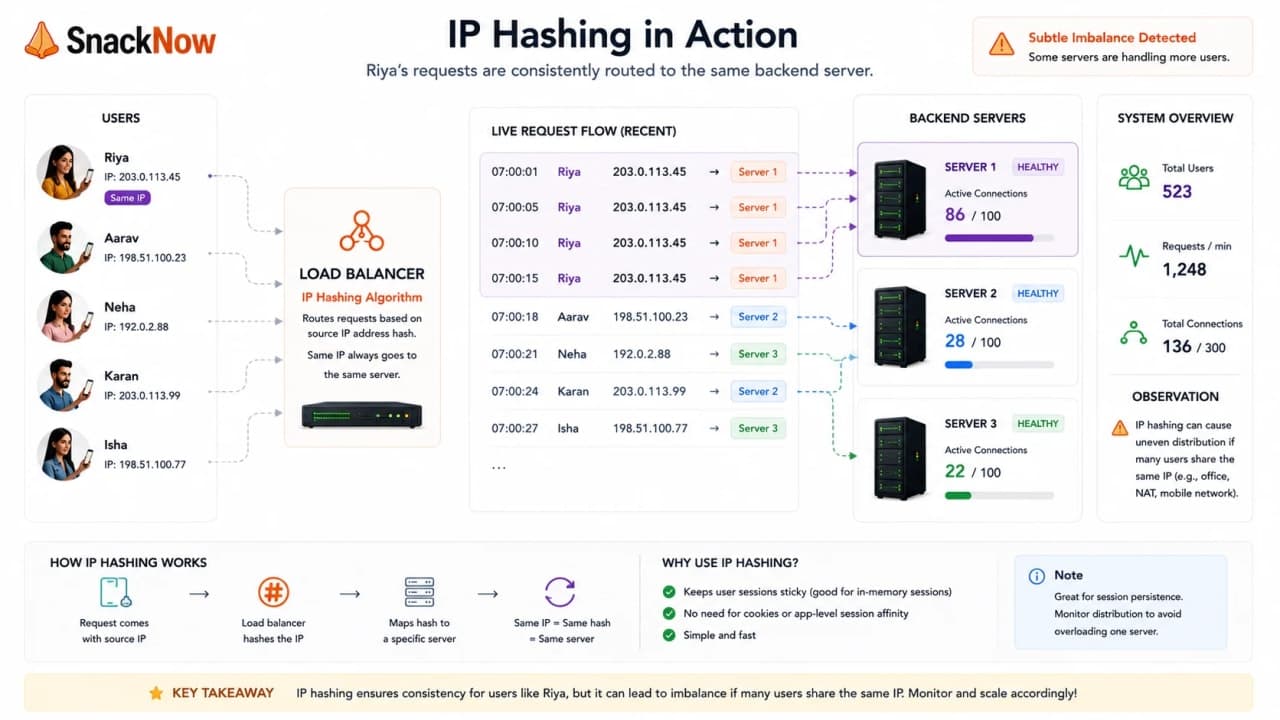
IP Hashing can help session persistence, but it can also create uneven traffic. If many users come from the same network or NAT, one backend may get more traffic than expected.
Benefit | Risk | Better long-term direction |
|---|---|---|
Same user tends to hit same server | Uneven load | Externalize session state |
Can rescue older stateful apps | Harder failover when server dies | Use shared session store |
Simple mental model | Client IP may not represent one user | Use only when the tradeoff is accepted |
13. Weighted Load Balancing: Bigger Servers Get More Orders
Server 1 is larger than Server 2 and Server 3. Treating them equally is polite but not wise. Weighted load balancing lets the stronger server receive a larger share of traffic.
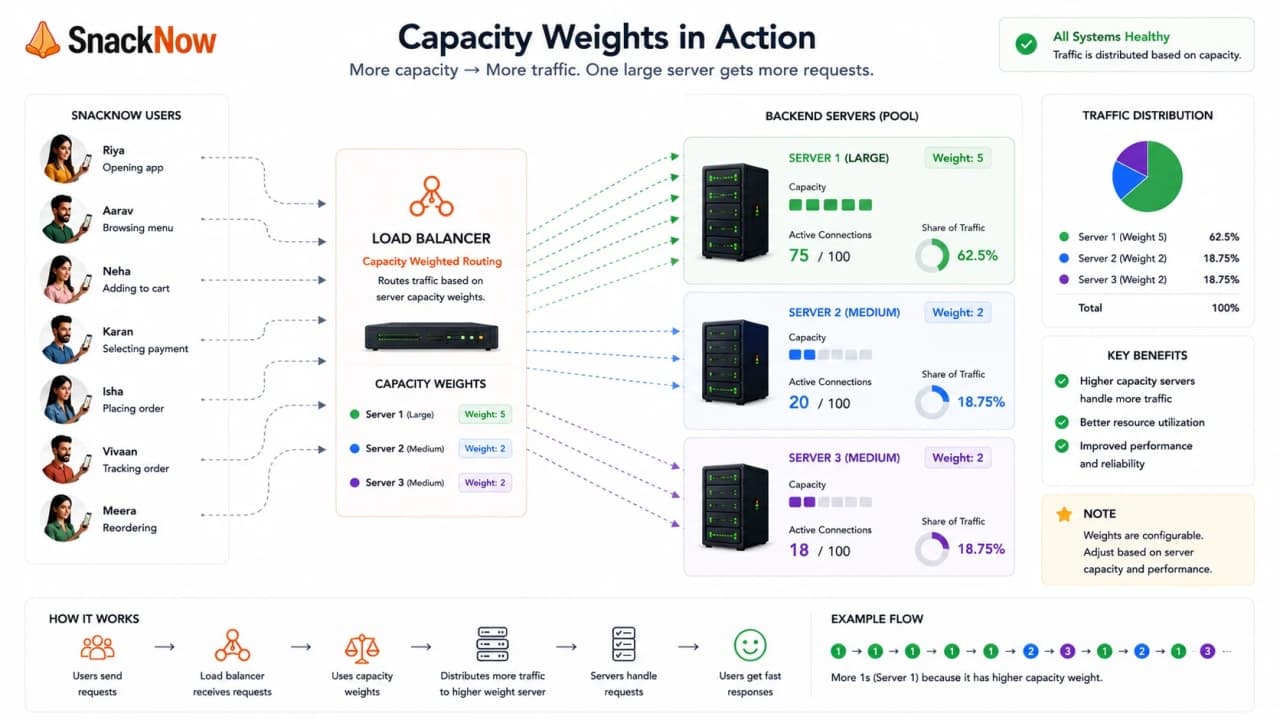
Server | Capacity | Weight | Meaning |
|---|---|---|---|
Server 1 | Large instance | 5 | Receives more traffic |
Server 2 | Medium instance | 3 | Receives moderate traffic |
Server 3 | Small instance | 2 | Receives fewer requests |
Weighted routing is useful during migrations, mixed hardware, canary releases, and gradual traffic shifts. The mistake is forgetting to revisit weights after traffic or infrastructure changes.
14. Least Response Time and Adaptive Load Balancing
By now Aman knows that connection count is useful but incomplete. A server with fewer connections may still be slower because its database path is struggling. Least Response Time and adaptive strategies use live performance signals.
Strategy | What it watches | Why it helps | Risk |
|---|---|---|---|
Least Response Time | Latency and sometimes connection count | Avoids slow backends | Bad metrics create bad routing |
Adaptive | Real-time health, load, latency, errors | Responds to changing conditions | More complex to operate |
Weighted adaptive | Capacity plus live signals | Good for uneven fleets | Requires careful monitoring |
These strategies feel smarter because they are. But smarter does not mean free. They need trustworthy measurements and sane fallback behavior.
15. Hardware vs Software vs Cloud Load Balancers
A load balancer can be a physical appliance, a software service such as NGINX or HAProxy, or a managed cloud load balancer. The idea is the same; the operational responsibility changes.
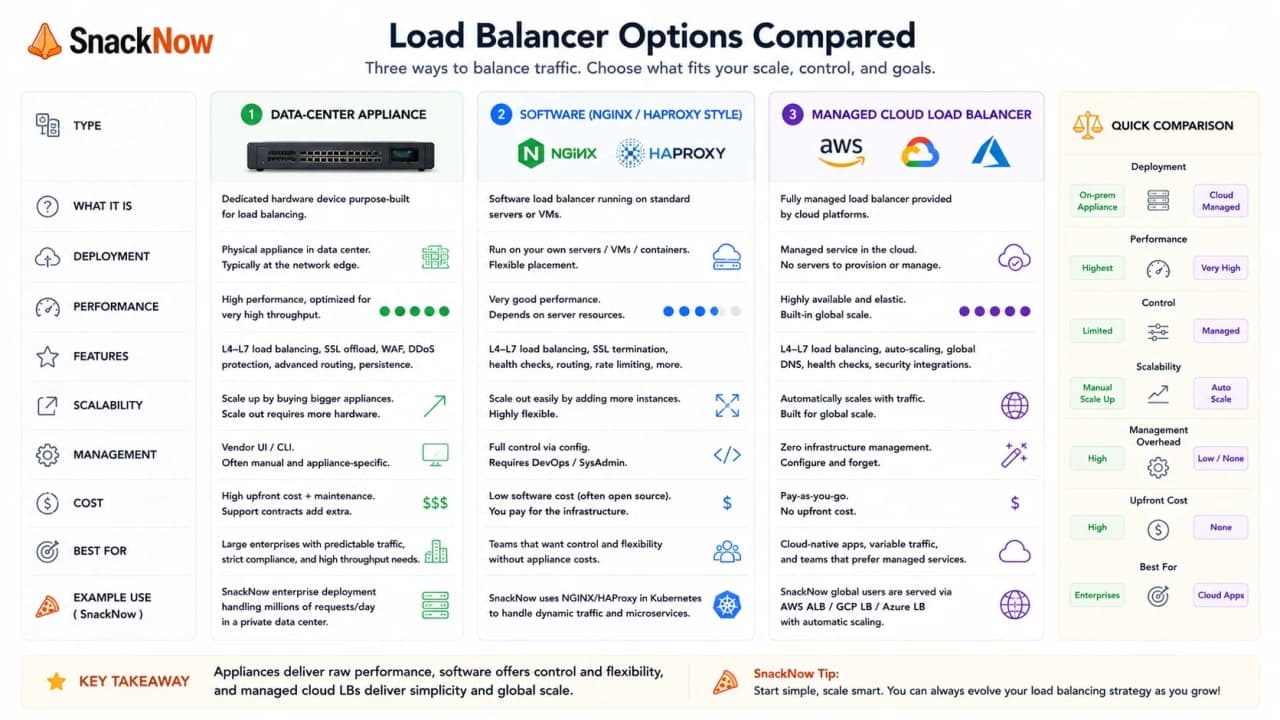
Type | What it is | Best used when | Tradeoff |
|---|---|---|---|
Hardware | Dedicated appliance | Data centers with strict appliance needs | Expensive and less flexible |
Software | Self-managed proxy/load balancer | Teams need control and custom rules | You operate and scale it |
Cloud managed | Provider-operated load balancer | Cloud apps needing availability and automation | Provider limits and pricing matter |
For SnackNow, a cloud managed load balancer is the practical default. Aman can focus on health checks, target groups, routing rules, and observability instead of maintaining hardware.
16. Load Balancing and Security
The load balancer sits at the front door, so it can also become a security checkpoint. It can terminate TLS, hide backend servers, apply rate limits, and route traffic through protection layers.
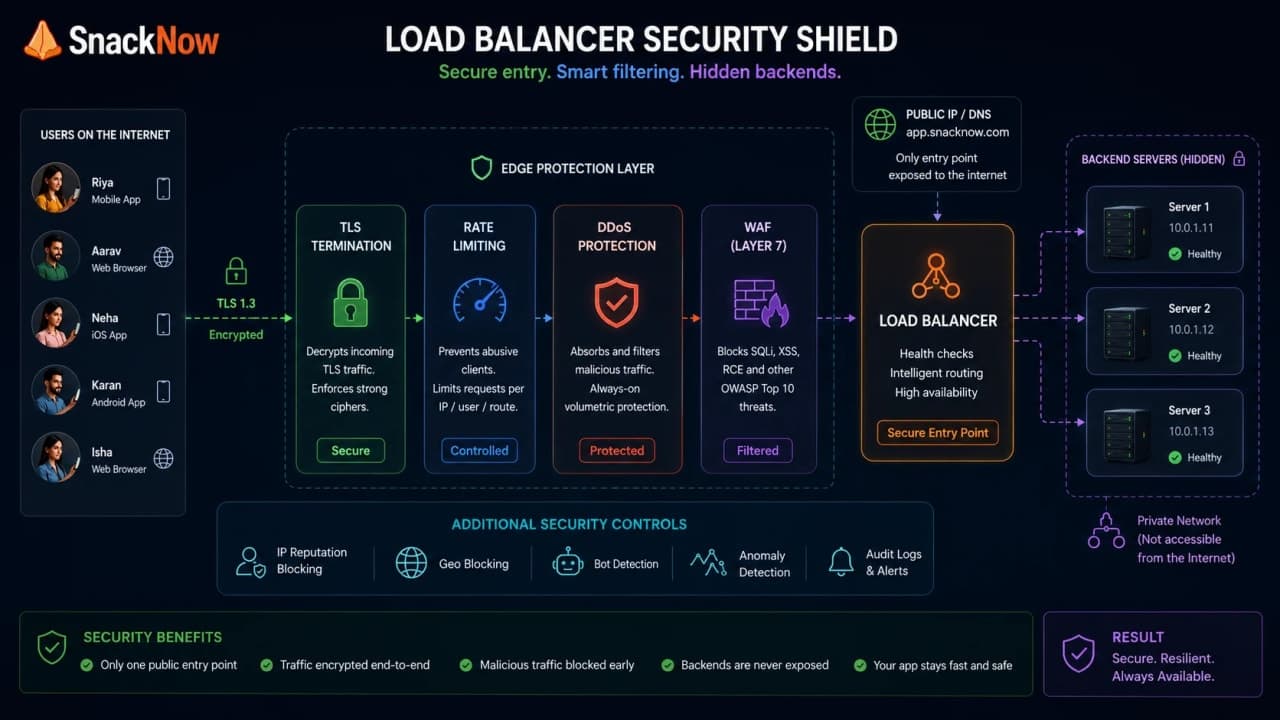
Security feature | SnackNow value | Mistake to avoid |
|---|---|---|
SSL/TLS termination | Central place for certificates | Weak cipher or renewal mistakes |
Rate limiting | Slow abusive clients | Blocking real users during spikes |
DDoS protection | Absorb or filter malicious traffic | Assuming app logic is now safe |
WAF-style filtering | Block known bad patterns | Treating WAF as the only security layer |
Backend hiding | Servers are not directly public | Leaving bypass paths open |
A load balancer improves security posture, but it does not replace authentication, authorization, input validation, database security, or good application design.
17. Sticky Sessions: Helpful Shortcut, Dangerous Habit
Sticky sessions make the same user return to the same backend for a while. This can help older apps that keep session state in server memory. It can also hide a design problem until traffic grows.
Sticky sessions help when | Sticky sessions hurt when |
|---|---|
Legacy app stores state locally | One server gets a large user cluster |
Short-term migration needs compatibility | A failed server loses local session state |
WebSocket or stateful flow needs continuity | Autoscaling and failover need flexibility |
Sticky sessions are a compatibility tool, not a substitute for clean shared state. Use them knowingly. Do not use them because the system forgot where user state should live.
18. Choosing the Right Load Balancing Strategy
Aman now has a menu of options. The mature answer is not 'use the fanciest algorithm.' The mature answer is 'choose the simplest strategy that matches traffic, server capacity, session needs, and failure behavior.'
Situation | Good starting strategy | Why |
|---|---|---|
Same servers, similar requests | Round Robin | Simple and predictable |
Long checkout requests | Least Connections | Avoids already busy servers |
Uneven server sizes | Weighted | Matches traffic to capacity |
Need path-based API routing | Layer 7 | Routes by HTTP meaning |
High-throughput TCP service | Layer 4 | Fast and simple |
Stateful legacy sessions | Sticky or IP Hash temporarily | Keeps session continuity |
Changing real-time performance | Least Response Time or adaptive | Uses live signals |
Checkpoint: There is no universal best load balancing strategy. There is only the best fit for the current workload.
19. Debugging Load Balancer Problems in SnackNow
When load balancing breaks, symptoms can be confusing. Users say 'app slow.' Aman needs to ask sharper questions: is traffic uneven, are health checks wrong, are sticky sessions trapping users, or is a backend dependency slow?
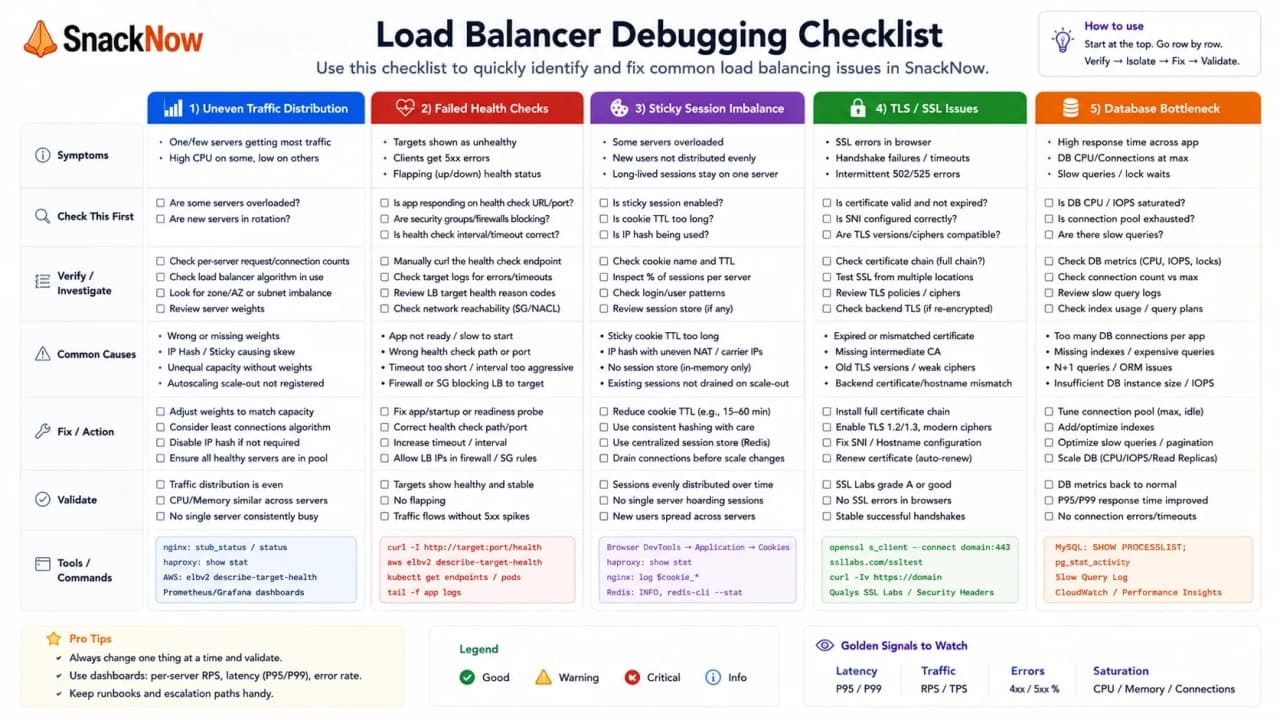
Symptom | Likely cause | What to check |
|---|---|---|
One server overloaded | Bad weights, sticky sessions, hash imbalance | Backend request distribution |
Users get random 5xx | Unhealthy server still in rotation | Health check path and thresholds |
Checkout slow everywhere | Downstream payment or database bottleneck | Dependency latency, DB metrics |
New server receives no traffic | Not registered or failing readiness | Target group registration |
TLS errors | Certificate or termination issue | Certificate chain and listener config |
Traffic drops after deploy | Bad routing rule | Path, host, and priority rules |
A load balancer can hide server failure from users, but it can also hide the real bottleneck from engineers if observability is weak.
20. Common Beginner Mistakes
Most load balancing confusion comes from treating it like a magic performance switch. It is not. It is traffic management, health-aware routing, and policy enforcement.
Mistake | Why it hurts | Better thought |
|---|---|---|
Adding load balancer before multiple backends | Nothing useful to distribute | Use it when traffic needs routing or HA |
Ignoring health checks | Broken servers still receive traffic | Use readiness and meaningful checks |
Using Round Robin for uneven requests | Slow requests pile up | Consider Least Connections or latency-aware routing |
Forgetting sticky session imbalance | One backend becomes hot | Prefer shared state |
Treating load balancer as API Gateway | Different responsibilities get mixed | Use each tool for its job |
Assuming it fixes database bottlenecks | DB remains slow | Optimize downstream systems |
Making the load balancer single point of failure | Front door can go down | Use managed or redundant load balancing |
Checkpoint: Load balancing makes multiple servers usable. It does not fix every slow dependency behind them.
21. Interview-Ready Answers
Here are answers Aman could give in an interview without sounding like he memorized a glossary. Each answer stays tied to SnackNow's actual problem.
Question | Interview-ready answer |
|---|---|
What is load balancing? | It distributes incoming traffic across healthy backend servers so SnackNow can use capacity evenly and avoid overloading one server. |
Layer 4 vs Layer 7? | Layer 4 routes using IP, port, TCP, or UDP details. Layer 7 routes using HTTP-level information such as path, host, headers, and cookies. |
How does failover work? | The load balancer detects unhealthy servers through health checks and stops sending new requests to them. |
Round Robin vs Least Connections? | Round Robin is simple turn-by-turn routing. Least Connections is better when active request duration varies. |
Why Weighted Load Balancing? | It gives stronger servers more traffic and weaker servers less, matching traffic share to capacity. |
Software over hardware? | Software load balancers are flexible, automatable, and cloud-friendly, while hardware appliances suit specific data-center needs. |
Design for food ordering? | Put redundant load balancers before stateless app servers, use health checks, TLS termination, rate limits, monitoring, and the right routing strategy. |
Choosing a strategy? | Consider traffic type, request duration, server capacity, session state, health checks, security, and operational complexity. |
Security benefit? | It hides backends, terminates TLS, applies rate limits, helps with DDoS controls, and centralizes front-door policy. |
When introduce one? | When there are multiple backend servers, high availability needs failover, or clients need one stable entry point. |
22. One-Page Cheat Sheet
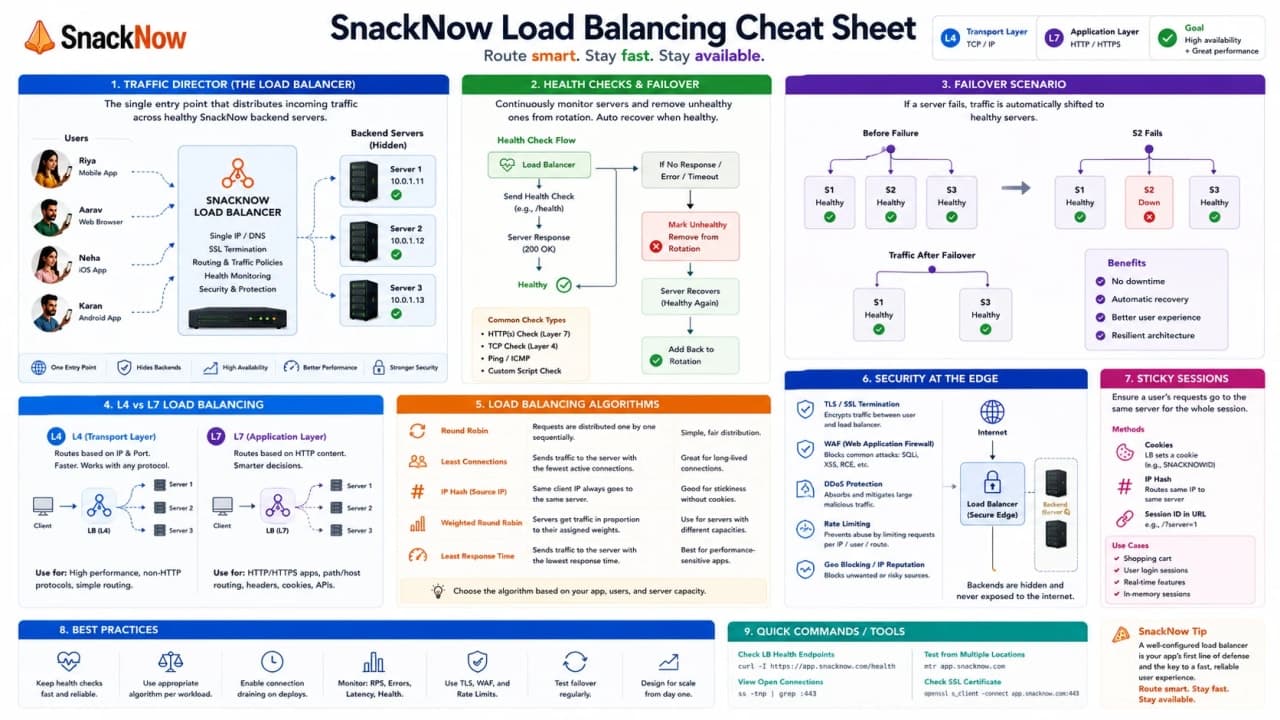
Concept | Simple Meaning | SnackNow Memory Hook | Best Used When | Common Mistake | Interview Keyword |
|---|---|---|---|---|---|
Load Balancer | Traffic director | One front door for three servers | Multiple servers exist | Thinking it fixes all bottlenecks | Distribution |
Health Check | Server truth check | Is Server 3 awake? | Avoid broken targets | Checking only open port | Readiness |
Failover | Route around failure | Stop sending traffic to crashed server | High availability | No healthy spare | HA |
Layer 4 | Transport-level routing | Fast TCP routing | Simple high-throughput traffic | Expecting path routing | TCP/UDP |
Layer 7 | HTTP-aware routing | /menu vs /payment | API and web routing | Ignoring overhead | HTTP routing |
Round Robin | Turn-by-turn | Server 1, 2, 3, repeat | Similar servers and requests | Ignoring slow requests | Static |
Least Connections | Least busy | Send next order to less busy server | Variable request duration | Connection count is not all cost | Dynamic |
IP Hashing | Same client same backend | Riya returns to Server 2 | Session compatibility | Uneven load | Persistence |
Weighted | Capacity-based split | Bigger server gets more orders | Uneven server sizes | Stale weights | Weight |
Least Response Time | Fastest healthy backend | Avoid slow server | Latency signal is trusted | Bad metrics | Latency-aware |
Adaptive | Live signal based | React to current pressure | Changing workloads | Too much complexity | Real-time policy |
Sticky Sessions | User sticks to backend | Old cart state stays put | Legacy stateful apps | Avoiding shared state forever | Affinity |
SSL Termination | TLS ends at front door | Central certificate point | Certificate management | Weak backend policy | TLS |
DDoS Protection | Absorb/filter attack traffic | Protect front door | Internet-facing apps | Assuming app is safe | Mitigation |
Rate Limiting | Slow abusive traffic | Protect checkout | Burst control | Blocking real users | Throttling |
Hardware LB | Physical appliance | Data-center appliance | Strict appliance needs | Low flexibility | Appliance |
Software LB | Self-managed proxy | NGINX/HAProxy style | Control and customization | Ops burden | Proxy |
Cloud LB | Managed front door | Provider handles HA | Cloud systems | Ignoring limits/cost | Managed |
23. Final Mental Model
SnackNow added more servers, but more counters alone did not solve the evening rush. Someone had to guide each customer to the right counter, avoid broken counters, notice slow counters, and keep traffic moving. That is the load balancer's job.
A load balancer is not there because architecture diagrams look lonely. It is there because once users should see one app and engineers run many servers, the system needs a calm traffic director between both worlds.
Once traffic can be distributed safely, the next pain is different: deciding when to add or remove servers without humans panicking every evening.
Lock in the takeaway
Frequently asked questions
What is load balancing, and why is it important?
Load balancing distributes incoming requests across healthy backend servers so capacity is used evenly and users are not tied to one overloaded machine.
What is the difference between Layer 4 and Layer 7 load balancing?
Layer 4 routes using connection details such as IP, port, TCP, or UDP. Layer 7 understands HTTP-level details such as paths, headers, cookies, hostnames, and API routes.
How does a load balancer handle high availability and failover?
It checks server health and stops routing traffic to failed instances, sending requests to healthy servers instead.
How do Round Robin and Least Connections differ?
Round Robin sends requests in order. Least Connections looks at active load and sends new work to the server with fewer active connections.
What are the advantages of Weighted Load Balancing?
Weighted Load Balancing lets stronger servers receive more traffic while smaller servers receive less, which helps when backend capacity is uneven.
When would you use a software load balancer over a hardware one?
Use software load balancers when you need flexibility, automation, cloud-style deployment, and easier configuration changes without buying dedicated hardware appliances.
How would you design load balancing for a food ordering app?
Use a redundant load balancer in front of stateless app servers, health checks, failover, proper algorithm selection, TLS termination, rate limits, and monitoring.
What factors matter when choosing a load balancing strategy?
Traffic shape, request duration, server capacity, session needs, health checks, security requirements, latency, and operational complexity all matter.
How does a load balancer improve security?
It can hide backend servers, terminate TLS, apply rate limits, route suspicious traffic through WAF-style checks, and absorb some DDoS protection patterns.
When should you introduce a load balancer?
Introduce it when one backend server is no longer enough, traffic must be distributed across multiple instances, or high availability needs failover.