

Listen to this article
Checking audio support
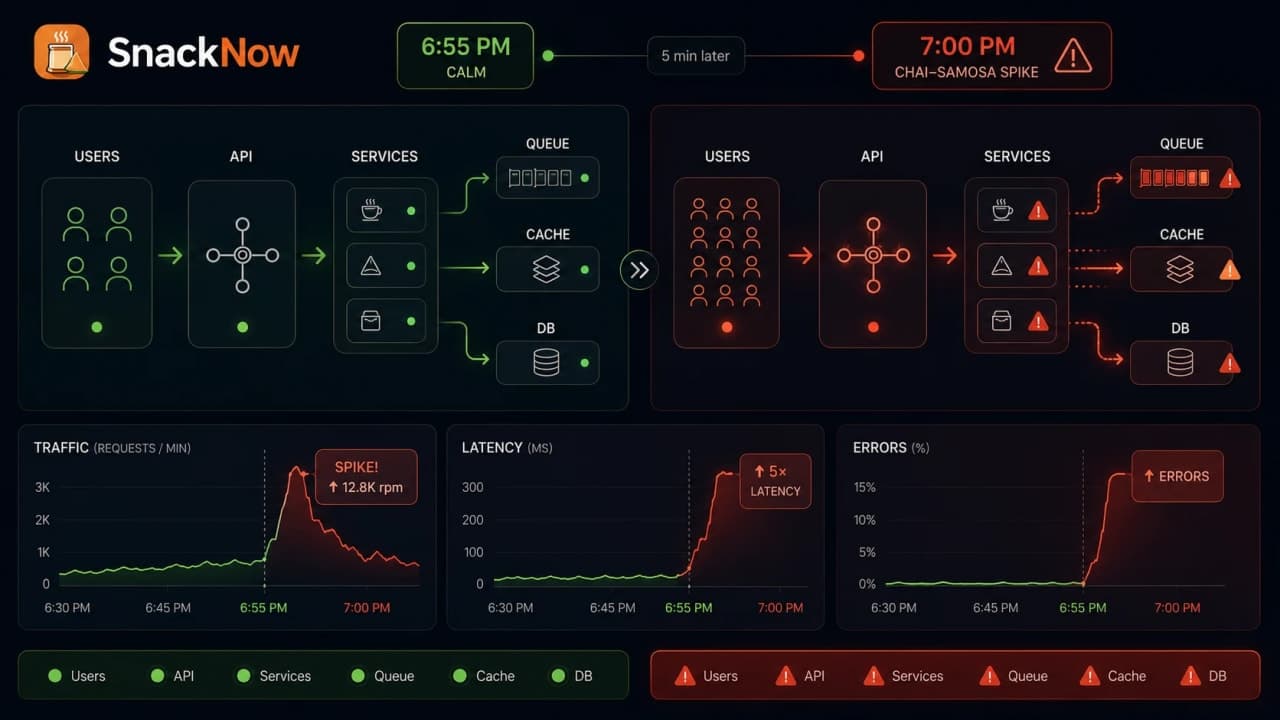
SnackNow looks calm at 6:55 PM: one food-ordering app, one backend server, and Riya trying to order chai and samosa before the cricket match resumes. Five minutes later, the same app is under pressure, and this lesson turns that rush into a clear explanation of scalability, bottlenecks, and scaling strategies.
The goal is simple: by the end, you should be able to explain scalability without sounding like you swallowed a cloud architecture brochure.
When the foundation is clear, two connected SnackNow lessons continue the same story: The Traffic Director: Load Balancing Explained Without Confusion explains how requests should be distributed across healthy servers, and The App That Learns to Breathe: Autoscaling and Cloud Best Practices explains how capacity can grow or shrink automatically without Aman staring at graphs all evening.
1. At 6:55 PM, SnackNow Looks Perfect
At 6:55 PM, SnackNow is calm. Riya opens the app to order chai and samosa before the cricket match resumes. The menu loads fast. The cart updates instantly. Payment looks ready. Nobody is thinking about Scalability yet, because the app feels fine.
Aman, the backend engineer, glances at the dashboard. One server is handling the evening traffic without complaint. Meera, the owner, launches a Chai + Samosa Evening Combo at 7 PM. Nice offer. Dangerous timing.
At 7:00 PM, thousands of users open the app during the match break. Menus slow down. Cart updates spin. Payments timeout. Some users see errors. The code did not suddenly become bad. The app met more users than it was prepared to handle.
Checkpoint: Scalability begins when normal behavior changes only because load increased.
2. At 7:02 PM, the App Starts Breathing Hard
Riya taps Add Samosa. The spinner stays longer than usual. She taps again because, obviously, humans and spinners have trust issues. Now two cart requests are waiting. The payment page opens slowly. Aman sees CPU climbing, response time rising, and errors appearing.
This is the moment where five basic words become useful: Load, Latency, Throughput, Capacity, and Availability. They are not dictionary items. They are what the team watches while SnackNow is under pressure.
Term | Simple meaning | SnackNow example | What happens when it gets worse |
|---|---|---|---|
Load | How much work arrives | Thousands open menu at 7 PM | Server queues grow |
Latency | Delay for one request | Menu takes 4 seconds instead of 300 ms | Users feel the app is slow |
Throughput | Work handled per second | Orders processed per second | Requests wait or fail |
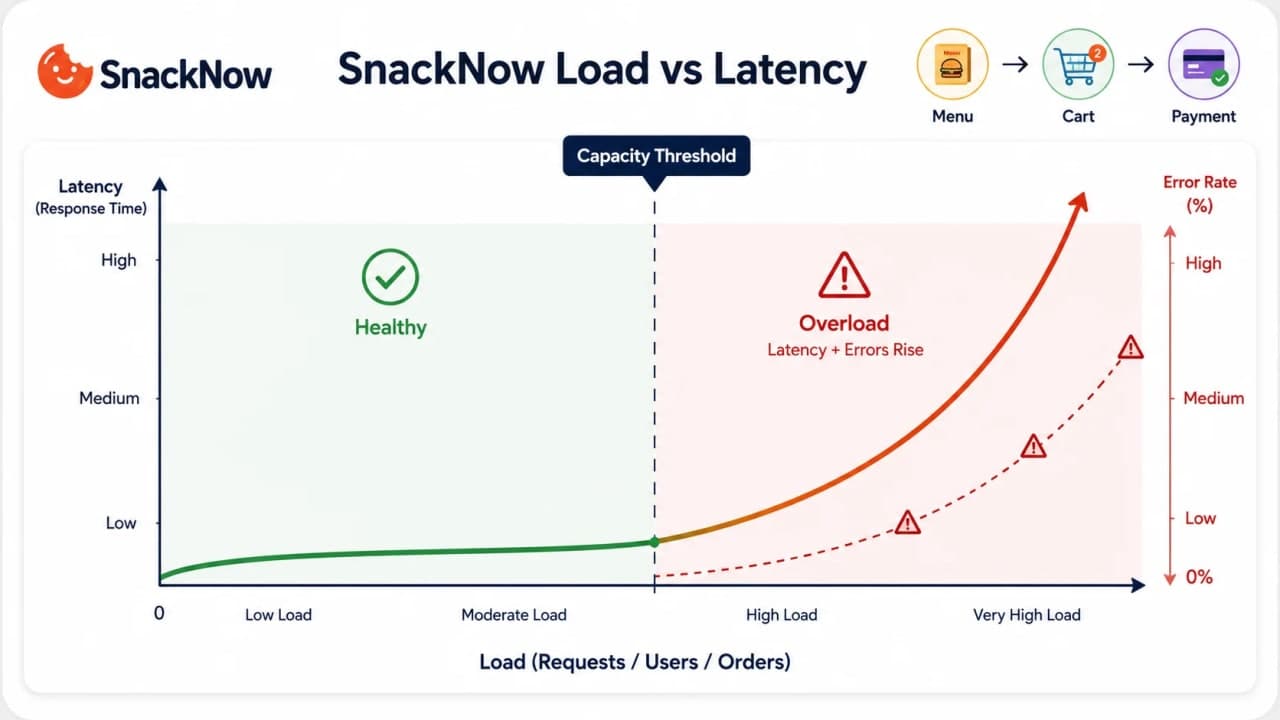
Capacity | Maximum useful work before pain | Server handles 200 requests/sec comfortably | After capacity, latency jumps |
Availability | Can users use the system? | Checkout reachable during rush | Outage or partial outage |
Error rate | Percentage of failed requests | Payment API returns timeout | Trust drops quickly |
Scalability is the ability of a system to handle more work without losing acceptable performance and reliability. Acceptable matters. A system does not need magic. It needs to stay useful under its expected pressure.
3. Scalability Is Not Speed. It Is Staying Useful Under Pressure
SnackNow at 6:55 PM is fast. SnackNow at 7:05 PM is slow. The same app, same code, same database, same server. What changed? The load.
A fast app with ten users is not automatically scalable. A scalable app keeps serving when ten users become ten thousand users, when data grows, when a festival offer goes live, or when the company expands into another city.
Pressure | What increases | What the system must protect |
|---|---|---|
More users | Concurrent sessions and requests | Login, menu, cart, checkout |
More data | Rows, indexes, files, analytics | Query time and storage cost |
Peak event | Sudden request burst | Latency and availability |
Regional growth | Network distance and traffic spread | Response time and routing |
Business expectation | SLA or user patience limit | Reliability and trust |
Interview-ready answer: Scalability is not raw speed. It is the system's ability to maintain acceptable performance, throughput, and availability as users, traffic, or data increase.
Checkpoint: The question is not 'is it fast now?' The question is 'what happens when pressure arrives?'
4. The Four Pain Signals: Latency, Bottlenecks, Downtime, and Cost
Meera sees complaints. Aman sees graphs. Riya sees only one thing: SnackNow is annoying right now. In system design, that annoyance usually maps to four pain signals.
Pain signal | What Riya sees | What Aman checks | Common cause | First fix direction |
|---|---|---|---|---|
Latency | Menu and cart feel slow | P95/P99 response time | CPU saturation, slow DB query, network hop | Find slow path, cache, optimize, add capacity |
Bottleneck | Everything waits behind one slow step | Database locks, queue depth, one hot endpoint | Single overloaded component | Fix that component first |
Downtime | App or checkout unavailable | Health checks, error rate, deploy events | Server crash, dependency failure | Failover, redundancy, safer deploys |
Cost | Users may be fine, bill is not | Cloud spend, idle servers, bandwidth | Over-provisioning, no limits | Rightsize, set limits, scale with demand |
A bottleneck is the most important one to respect. One slow component can make the whole system look slow. If the database is stuck, adding more app servers may only create more database traffic and louder alerts.
Warning: Scaling is not medicine for every illness. Sometimes the cure is query optimization, caching, queueing, or removing a lock.
5. The First Investigation: Where Is the System Actually Hurting?
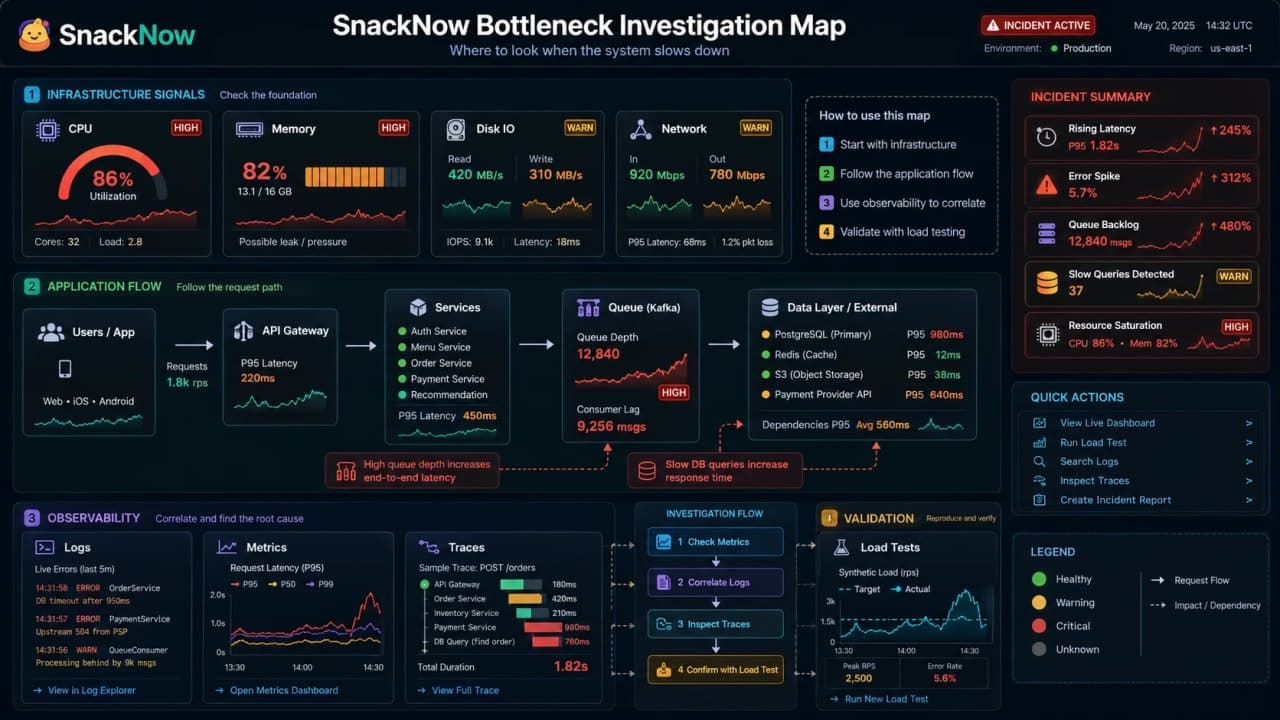
Meera says, 'Add more servers.' Aman says, 'Maybe. But first we need to know what is actually slow.' This is the line that separates system design from expensive guessing.
Before scaling, check | Why it matters |
|---|---|
CPU usage | High CPU may mean app server needs capacity or code optimization |
Memory usage | Full memory can cause swapping, crashes, or garbage collection pain |
Disk I/O | Slow reads/writes can delay logs, files, or database work |
Network traffic | Bandwidth or dependency calls may be the limit |
Database slow queries | One query can block many requests |
Queue length | Backlog shows work arriving faster than it is processed |
Request latency distribution | P95/P99 reveals what average hides |
Error rate | Timeouts and 5xx responses show reliability damage |
Logs, metrics, traces | Together they show what happened, how often, and where |
Load tests | Controlled traffic shows the breaking point before production does |
If the menu API is slow, it could be app CPU, database query time, cache misses, static asset delivery, or a remote service. Guessing 'server is small' may work once. It will betray you later.
Interview-ready answer: To identify a bottleneck, I would inspect metrics, logs, traces, load tests, queue depth, and response-time distribution before adding infrastructure blindly.
Checkpoint: Measure the pain before buying capacity. Otherwise you may scale the wrong layer.
6. The First Fix: Buy a Bigger Server
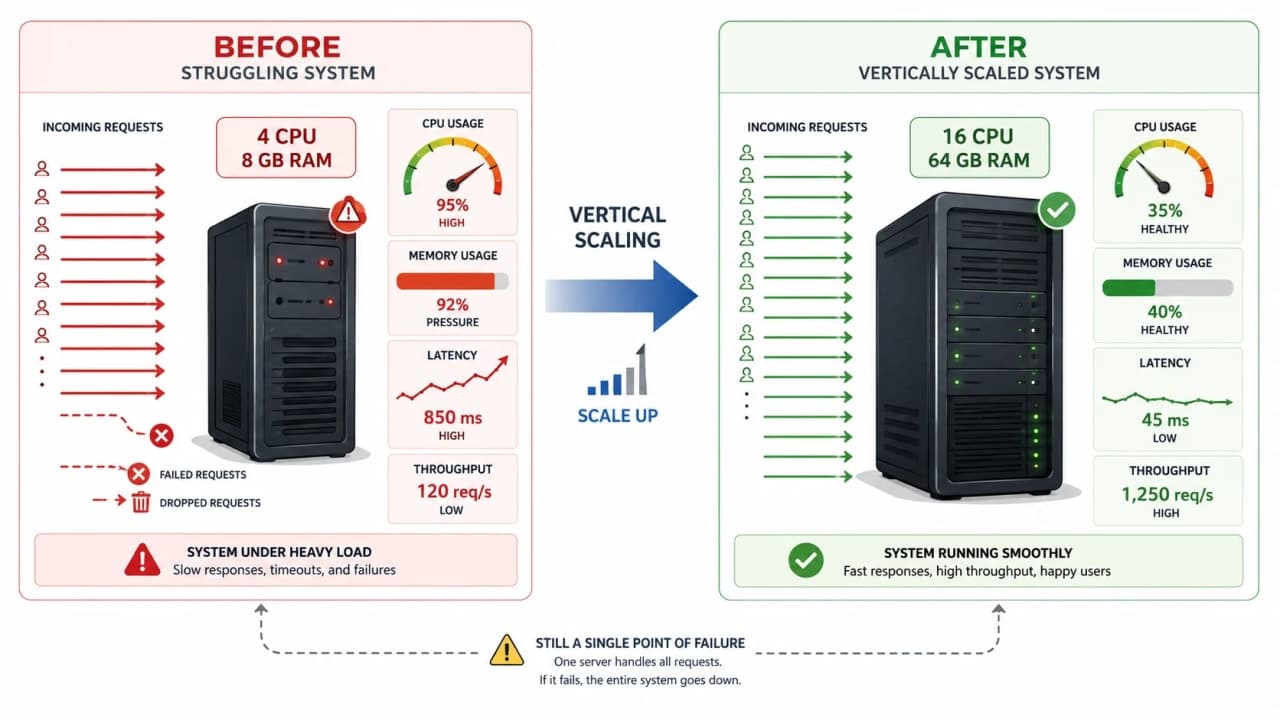
At 7:20 PM, Aman has one quick fix: make the current server stronger. More CPU. More RAM. Faster disk. The same SnackNow app now has a bigger machine underneath it.
That fix has a name: Vertical Scaling. If the app is a chai counter, vertical scaling is giving the same counter a bigger stove, a wider table, and faster staff. Same counter. More capacity.
Vertical scaling | Why it helps | Where it fails |
|---|---|---|
More CPU | Handles more concurrent computation | Bad algorithms can still waste CPU |
More RAM | Keeps more data/cache in memory | Memory leaks still grow |
Faster disk | Improves reads/writes | Slow queries still hurt |
Bigger network capacity | Moves more data | Remote dependency latency remains |
Same architecture | Fast relief without big refactor | Still one machine and one failure point |
Problem: estimate whether vertical scaling buys enough time.

Before: one server handles about 200 requests/sec.
After upgrade: one bigger server handles about 700 requests/sec.
Evening rush: traffic reaches about 1,200 requests/sec.

Result: vertical scaling improves capacity, but the rush can still exceed it.
Line by line, the math says this: the old server was too small, the bigger server helps, but 1,200 requests per second still beats 700. Useful? Yes. Infinite? Not even close.
Tip: Vertical scaling is especially practical for early systems, monoliths, urgent relief, and teams that are not ready for distributed complexity.
How is it so far?
Vote with other readers
7. The Bigger Server Helps... Until It Does Not
For one week, SnackNow is fine. Riya's cart works. Meera relaxes. Aman sleeps like a person again. Then the next offer goes viral: Cold Coffee + Momos during another match break.
The bigger server climbs toward its limit. Every machine has a ceiling: hardware limits, operating system limits, price limits, maintenance risk, and one very uncomfortable fact: if that one machine dies, the whole app can go down.
Vertical scaling is often the first practical move, but it is rarely the final strategy for high-growth systems.
Checkpoint: Vertical scaling bought time. It did not buy infinity.
8. The Second Fix: Add More Servers
The next idea is not to make one counter gigantic. It is to open more counters. SnackNow adds more app servers so requests can be spread across them.
That is Horizontal Scaling: adding more machines or instances instead of only making one machine stronger. It can increase capacity and resilience, but it also introduces coordination problems.
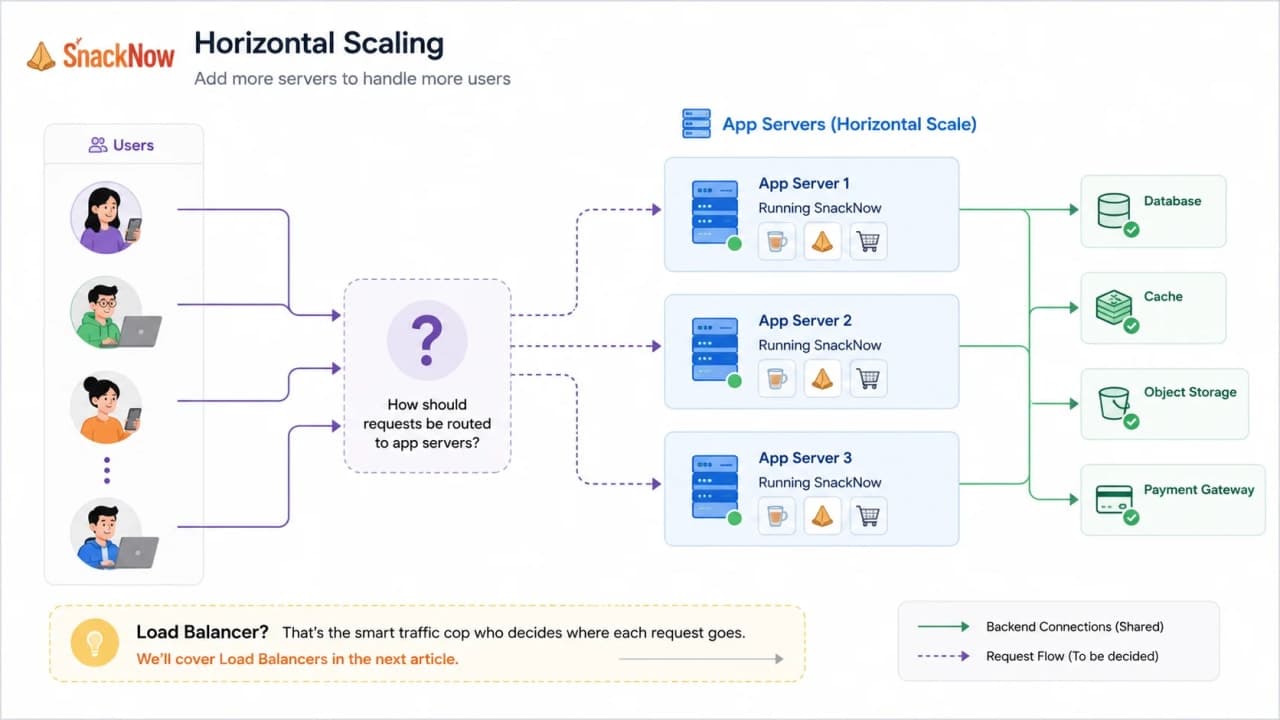
Horizontal scaling | Benefit | New problem it creates |
|---|---|---|
More app servers | More request capacity | Needs traffic distribution |
Multiple healthy instances | Better fault tolerance | Needs health checks and failover |
Stateless web APIs | Any server can serve any request | State/session must be externalized |
Separate busy parts | Scale menu, cart, payments differently | More deployment and monitoring work |
Cloud-friendly growth | Add/remove instances as needed | Cost limits and automation become important |
Database stays shared | App tier grows quickly | Database may become the next bottleneck |
Once SnackNow has many servers, someone must still decide which server gets each request. That is the exact problem The Traffic Director: Load Balancing Explained Without Confusion explains in detail: users should keep seeing one simple app while the system quietly chooses a healthy backend.
9. The Hidden Rule: Horizontal Scaling Works Best When Servers Are Stateless
Horizontal scaling sounds easy until Riya's cart disappears. Imagine Server 1 remembers her cart in its own memory. Her next request reaches Server 2. Server 2 has no idea she added samosas.
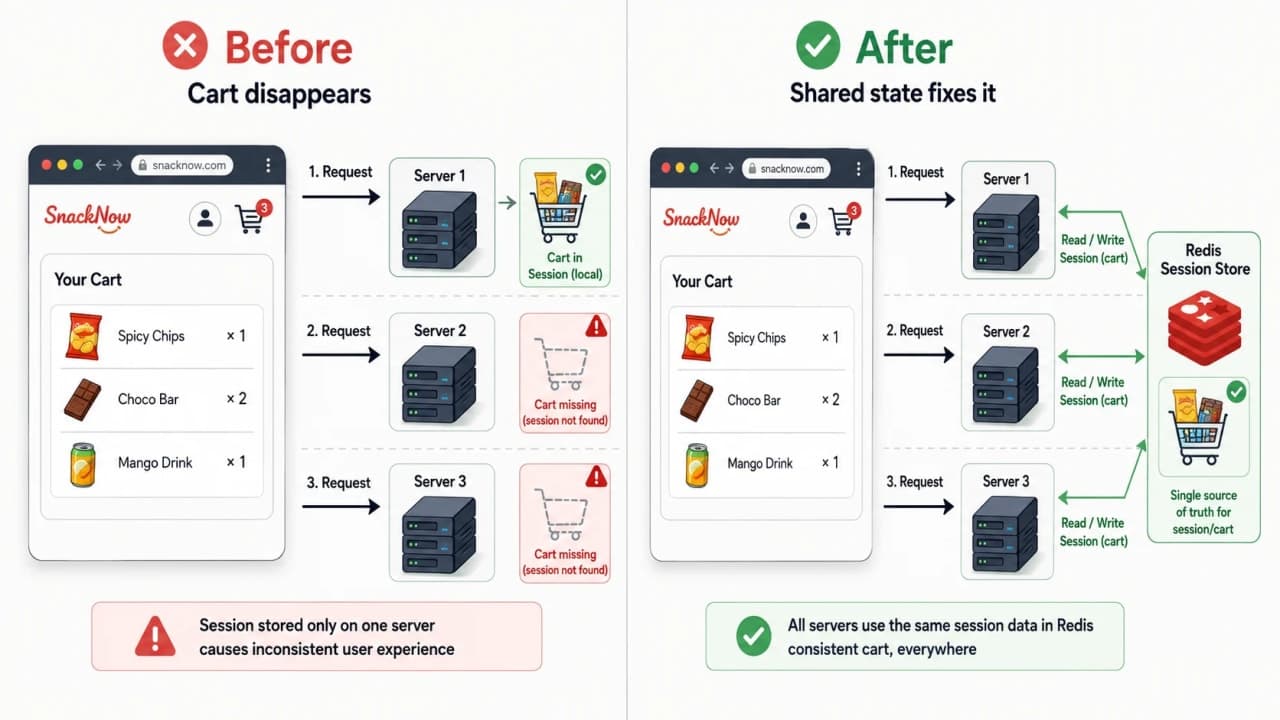
This is why horizontal scaling works best when servers are stateless for request handling: any healthy server can process the next request because important state lives somewhere shared or verifiable.
Problem | Why it hurts horizontal scaling | Common fix |
|---|---|---|
Cart stored only in one server memory | Next request may hit another server | Shared session store such as Redis |
Login session tied to one instance | User appears logged out randomly | Database-backed session or token |
Temporary checkout state in process memory | Restart loses state | Persist state in DB/cache |
Sticky sessions used blindly | One server can become overloaded | Use carefully, prefer shared state where possible |
Background work done synchronously | Requests wait too long | Queue non-critical work |
Any-server-can-handle-any-request is the quiet superpower behind clean horizontal scaling.
Checkpoint: Before adding servers, ask: if request two goes to a different server, does the system still work?
10. The Practical Middle Path: Diagonal Scaling
Real teams rarely jump from one tiny server to a perfect distributed system. That jump sounds impressive in interviews and expensive in real life.
Diagonal Scaling is the practical middle path. Start vertical because it is simple. Move horizontal when traffic patterns, reliability needs, and team maturity justify the complexity.
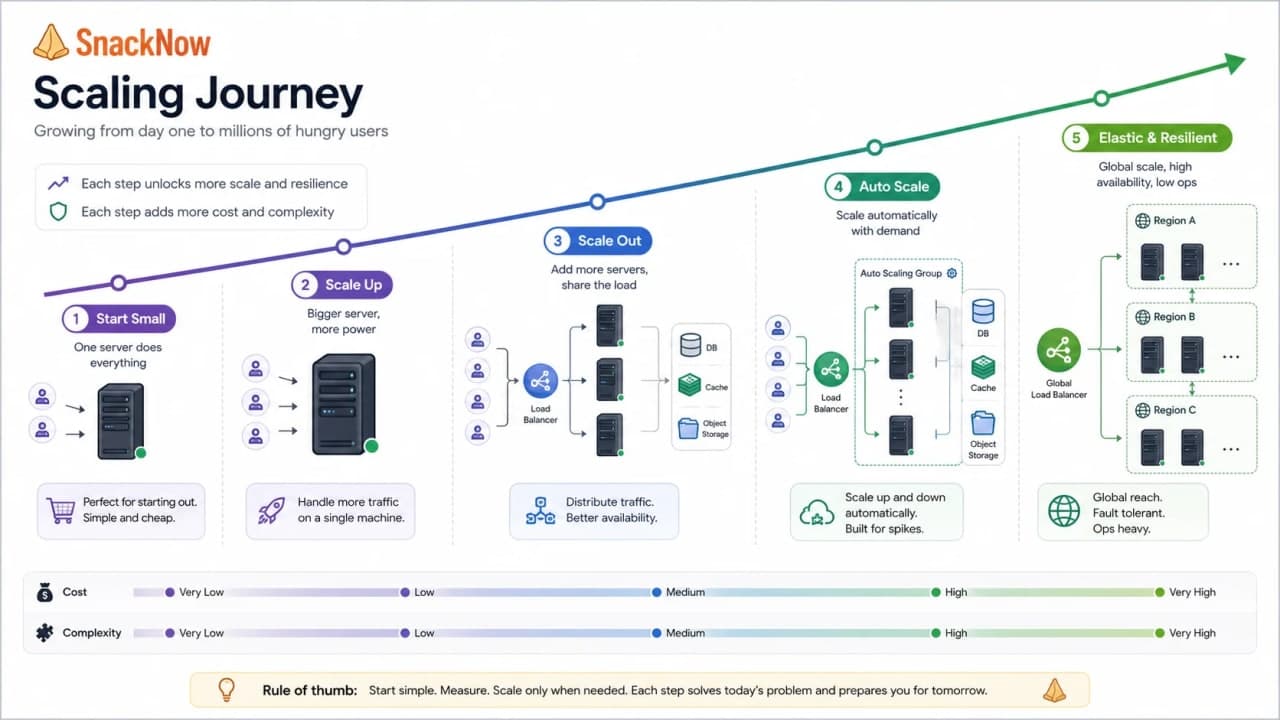
Stage | What SnackNow does | Why it makes sense |
|---|---|---|
Stage 1 | One small server | Cheap and simple while learning product demand |
Stage 2 | Bigger server | Quick relief without distributed complexity |
Stage 3 | Multiple app servers | Traffic now exceeds one machine's useful ceiling |
Stage 4 | Separate hot paths | Menu, cart, payments, and workers can scale differently |
Stage 5 | Autoscaling later | Capacity changes automatically when patterns are understood |
Diagonal scaling is often the most realistic path: simple first, distributed later.
11. Cost vs Complexity vs Performance
Scaling always asks for payment. Sometimes the payment is money. Sometimes it is operational complexity. Sometimes it is slower development because every change now crosses more moving parts.
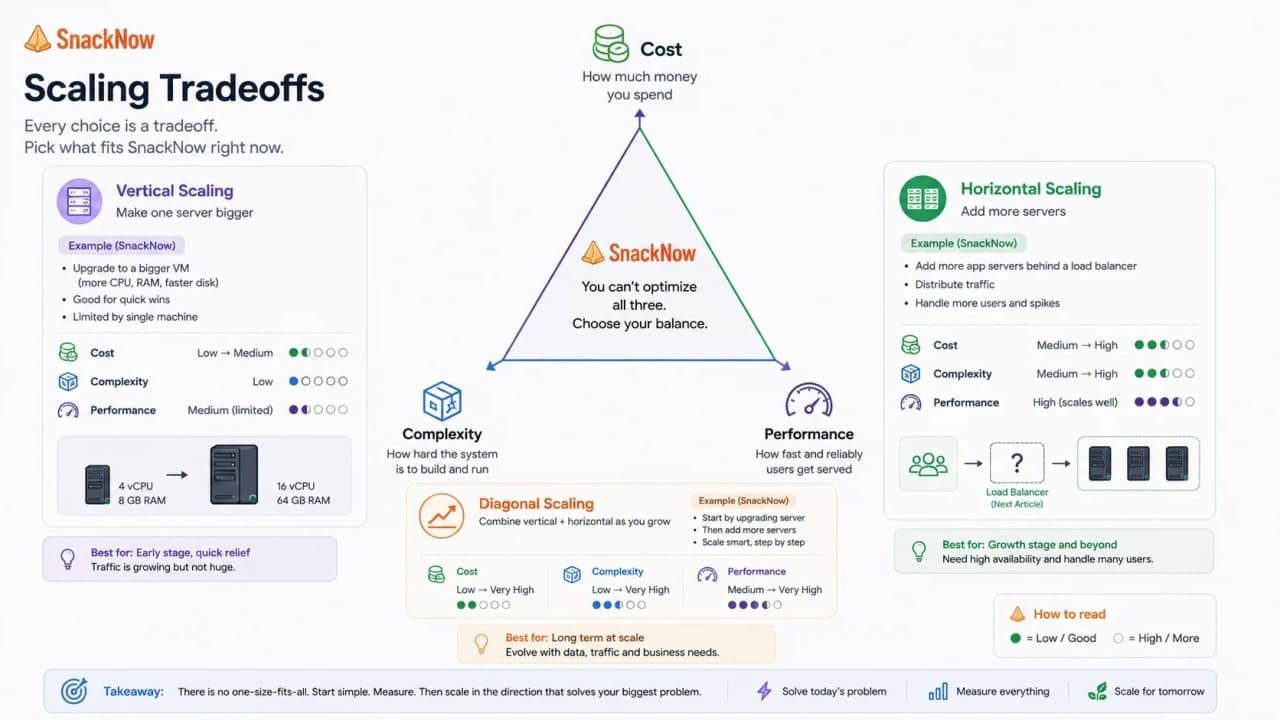
Strategy | Cost | Complexity | Performance potential | Best for | Risk |
|---|---|---|---|---|---|
Vertical | Low to medium early, expensive at high end | Low | Good until machine limit | MVPs, monoliths, quick relief | Single point of failure |
Horizontal | Can grow with demand, but ops cost rises | Medium to high | High for parallel workloads | Stateless APIs, cloud systems | State, coordination, database pressure |
Diagonal | Balanced over time | Gradual | Good migration path | Growing startups and practical teams | Can delay needed architecture work if ignored too long |
This is why 'horizontal is better' is a weak answer. Better for what? Traffic pattern? Team size? Cost limit? Failure tolerance? Interviewers listen for judgment, not slogans.
Interview-ready answer: I would balance scalability with cost by measuring bottlenecks, choosing the simplest strategy that meets current needs, setting capacity limits, monitoring usage, and evolving the architecture only when demand justifies it.
12. When Horizontal Scaling Will Not Help
Here is the trap: SnackNow adds five app servers, but payment still times out. Why? Because the payment provider is slow. Or the database has a lock. Or the checkout query scans every order since 2020. More app servers can now send more traffic into the same stuck place. Great, we invented a bigger traffic jam.
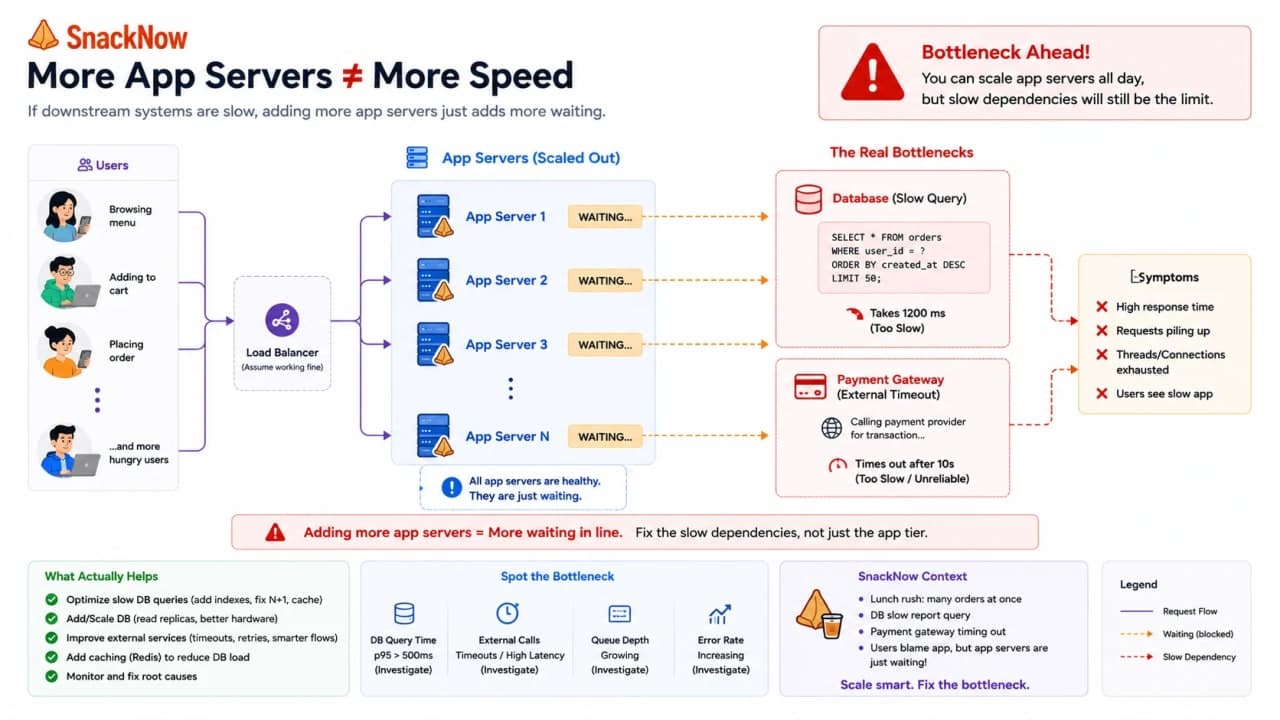
Horizontal scaling does not help much when... | SnackNow version | Better direction |
|---|---|---|
The database is the bottleneck | One slow order query blocks checkout | Index, query optimize, cache, read replicas where appropriate |
The work is not parallelizable | One global coupon lock serializes all orders | Remove lock or redesign workflow |
The app depends on shared memory | Cart exists only inside one server | Externalize session/cart state |
A third-party API is slow | Payment gateway times out | Timeouts, retries with backoff, async confirmation |
The code is inefficient | Menu endpoint recomputes everything | Optimize code, cache menu |
The service is single-threaded | One process cannot use added machines well | Process model or architecture change |
More infrastructure is not automatically better architecture. Sometimes the correct fix is smaller and more boring: add an index, cache one response, move a slow task to a queue, or stop holding a lock too long.
Warning: If the bottleneck is downstream, horizontal scaling the upstream layer can make the downstream failure louder.
13. A Simple Decision Framework
Aman needs a way to choose without turning every incident into a debate club. The decision starts with questions, not with favorite tools.
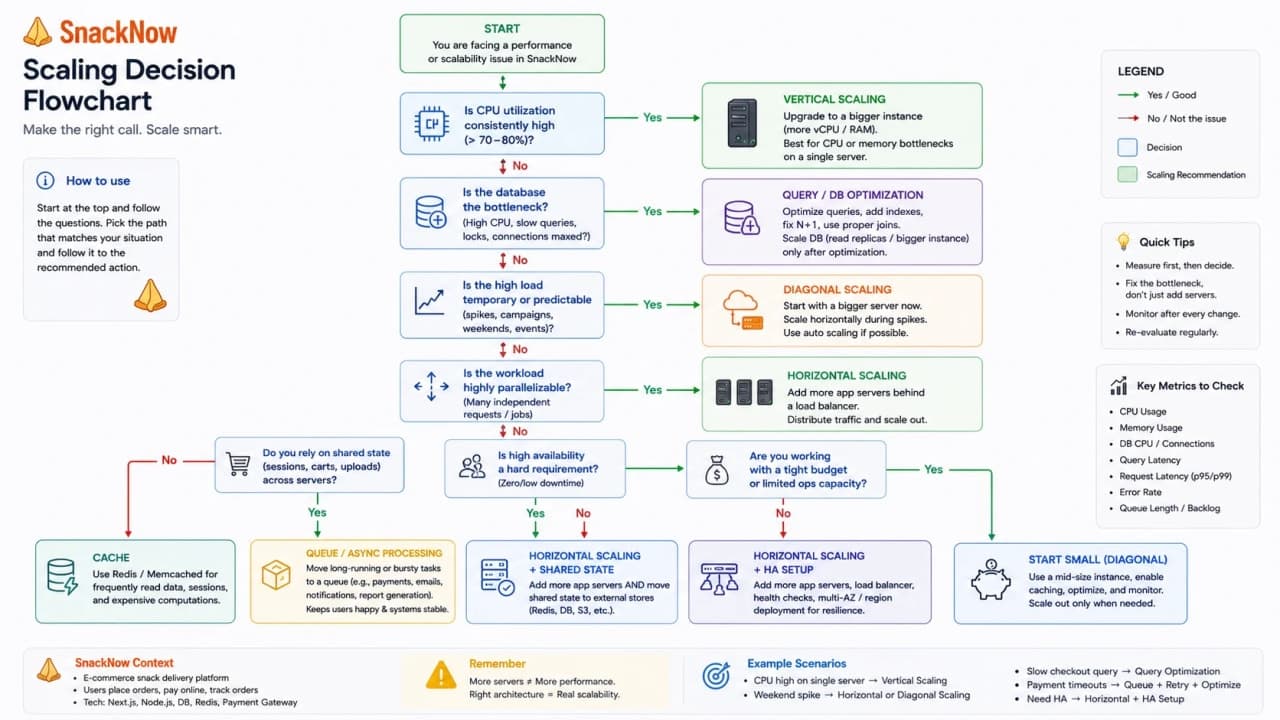
Situation | Best first move | Why |
|---|---|---|
Small MVP | Vertical scaling or optimize current server | Avoid premature distributed complexity |
Sudden temporary spike | Short-term vertical bump, cache hot reads, protect queues | Quick relief while measuring |
CPU-heavy monolith | Vertical scaling first, then split hot paths if needed | One app may not be ready for many instances |
Stateless web API | Horizontal scaling | Requests can spread cleanly |
Database bottleneck | Query/index/cache/read strategy | More app servers do not fix DB pain |
Queue backlog | Add workers or reduce job cost | Scale the work processor, not only the web app |
Global traffic growth | Horizontal scaling plus routing/CDN planning | Distance and redundancy matter |
Cost-sensitive startup | Diagonal scaling | Spend complexity only when demand proves it |
Tip: In interviews, name the bottleneck first, then the scaling move. It sounds practical because it is practical.
14. Debugging SnackNow's 7 PM Rush
Let us turn the story into a debugging checklist. This is the part you can actually use in real incidents and interviews.
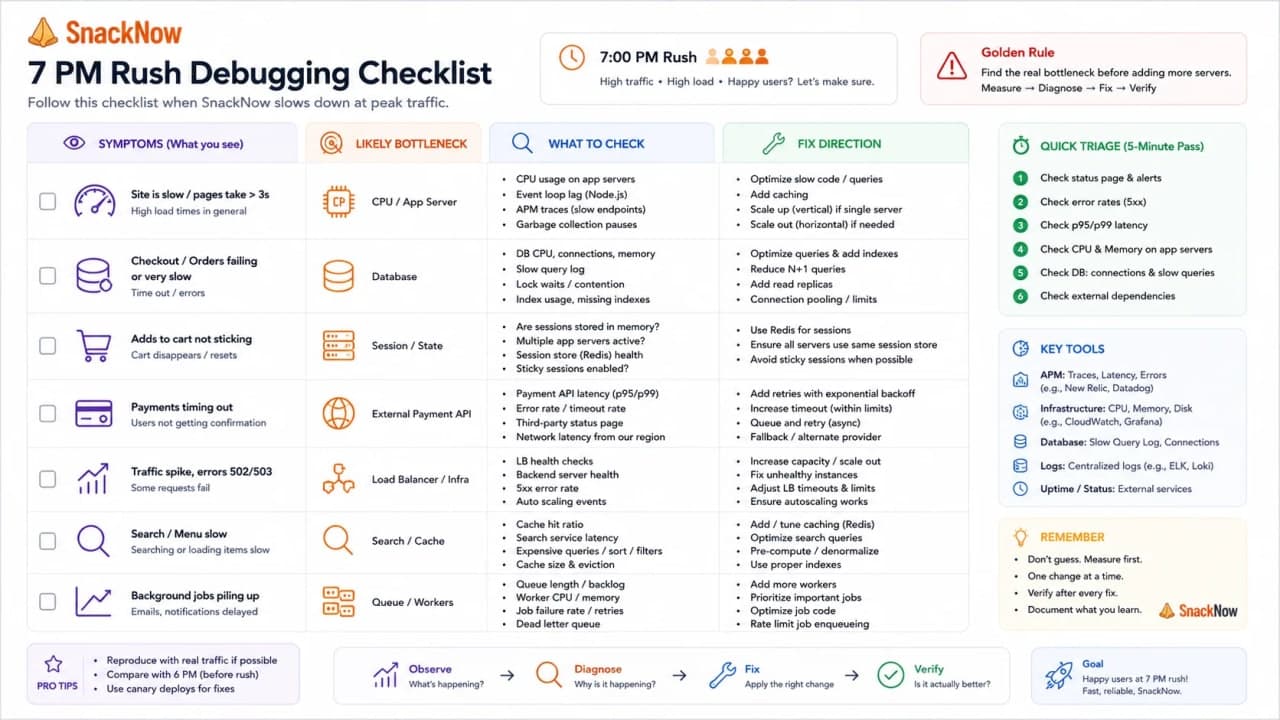
Symptom | Likely bottleneck | What to check | Fix direction |
|---|---|---|---|
Menu slow | App CPU, DB query, cache miss, static assets | Endpoint latency, query plan, cache hit ratio | Cache menu, optimize query, add capacity |
Cart update spins | Session/state issue, DB write pressure | Session store, write latency, locks | Shared session, queue low-priority work, optimize writes |
Cart disappears | State stored on one server | Request routing and session storage | Shared session store or stateless token plan |
Payment timeout | External provider or synchronous checkout | Provider latency, retry rate, timeout settings | Timeouts, idempotency, async payment confirmation |
Error rate rises | Overloaded server or dependency failure | 5xx logs, health checks, saturation | Fail fast, shed load, scale correct layer |
Server cost explodes | Over-provisioning or no limits | Idle capacity, autoscaling bounds, bandwidth | Rightsize, budgets, max limits |
Checkpoint: A symptom is not a diagnosis. Slow menu, disappearing cart, and payment timeout can come from different layers.
15. Common Beginner Mistakes
The good news: most beginner scaling mistakes are predictable. The better news: once you can name them, you stop making them as often.
Mistake | Why it misleads | Better thought |
|---|---|---|
Thinking scalability means only adding servers | Scaling may need code, data, cache, queues, or limits | Find the bottleneck first |
Scaling before measuring | You may pay for the wrong capacity | Use metrics, logs, traces, load tests |
Calling vertical scaling bad | It is often the right early move | Use it when simplicity matters |
Assuming horizontal is always better | It adds coordination and state problems | Use it for parallel/stateless work |
Ignoring database bottlenecks | DB often becomes the limit | Optimize data path separately |
Ignoring sessions | Users randomly lose carts or login | Externalize state |
Forgetting cost | A fast bill can still be a failure | Set budgets and capacity limits |
Confusing latency and throughput | Fast single request and high total capacity are different | Measure both |
Believing autoscaling fixes bad architecture | It can scale bad behavior too | Fix design flaws before automation |
Adding complexity too early | Distributed systems slow teams down | Grow architecture with demand |
The mature answer is usually not 'use more servers'. It is 'measure, remove the bottleneck, then scale the right layer'.
16. The Interview Version: Say This Clearly
Interview answers should be short enough to say under pressure, but grounded enough to prove you understand production tradeoffs. Here are clean versions connected to SnackNow.
Question | Interview-ready answer |
|---|---|
What does scalability mean? | It means SnackNow can handle more users, requests, or data while keeping performance, reliability, and availability acceptable. |
Why do systems need to scale? | Because traffic, data, regions, and peak events grow. Without scaling, latency rises, errors increase, and users leave. |
Main challenges while scaling? | Latency, bottlenecks, downtime risk, operational complexity, and cost. |
How do you identify a bottleneck? | Use metrics, logs, traces, load tests, queue depth, slow queries, and response-time distribution before adding capacity. |
Why does latency increase with scale? | More requests compete for limited CPU, memory, database connections, queues, and network/dependency paths. |
How do you reduce latency? | Optimize slow paths, cache hot data, reduce network calls, move non-critical work async, and add capacity where measured. |
What is vertical scaling? | Increase resources of one machine, such as CPU, RAM, disk, or network capacity. |
What is horizontal scaling? | Add more machines or instances and distribute work across them. |
What is diagonal scaling? | Start vertical for simplicity, then move horizontal when demand and reliability needs justify it. |
When would horizontal scaling not help? | When the real bottleneck is a database lock, slow query, external API, shared memory, global lock, or non-parallel workload. |
When choose vertical over horizontal? | When the app is early, monolithic, nearly fits one machine, or the team needs quick relief without distributed complexity. |
How balance scale with cost? | Measure demand, right-size resources, set bounds, monitor spend, and avoid over-provisioning. |
Interview-ready answer: A strong scalability answer explains load, bottleneck, strategy, tradeoff, and cost in that order.
17. One-Page Cheat Sheet
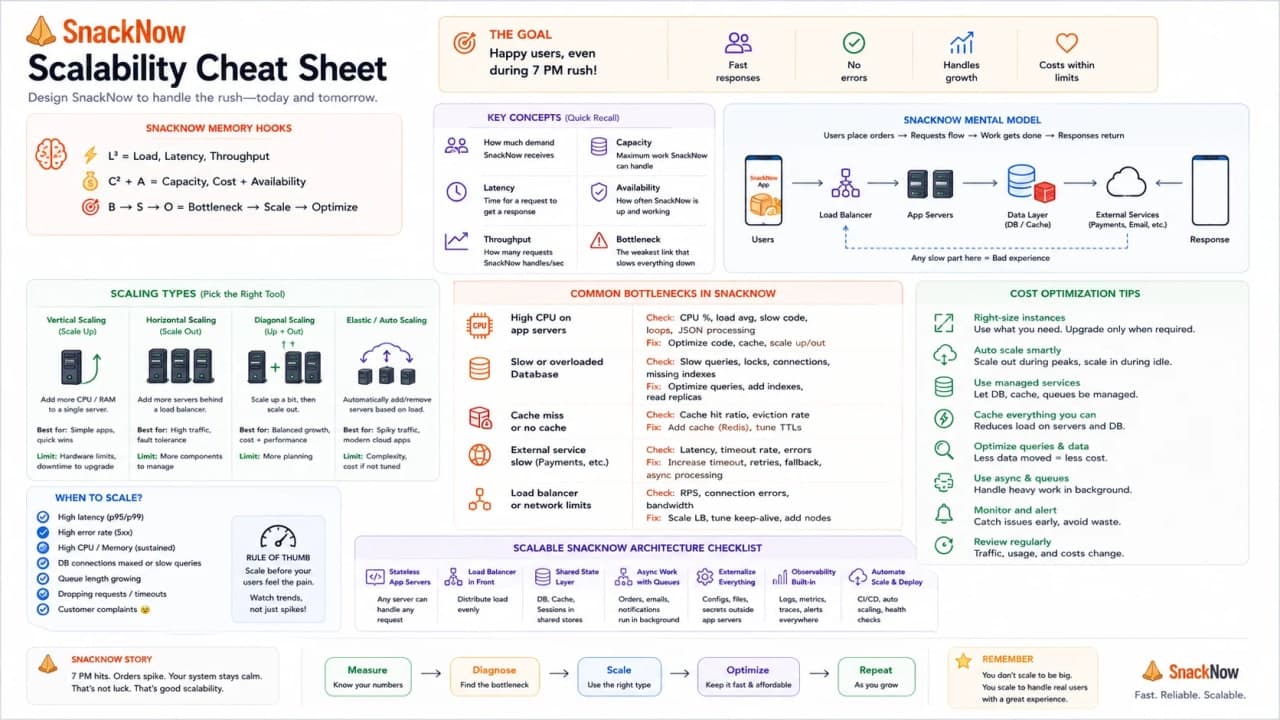
Concept | Simple meaning | SnackNow memory hook | Best used when | Common mistake | Interview keyword |
|---|---|---|---|---|---|
Scalability | Handle more work acceptably | 7 PM rush stays usable | Users/data/traffic grow | Calling it just speed | Growth under load |
Load | Incoming work | Many users open app | Sizing capacity | Ignoring peak traffic | Requests/sec |
Latency | Delay per request | Menu takes 4 seconds | User experience | Using averages only | P95/P99 |
Throughput | Work per time | Orders/sec | Capacity planning | Confusing with latency | RPS/TPS |
Bottleneck | Slowest limiting part | DB lock blocks checkout | Debugging slowdowns | Scaling wrong layer | Constraint |
Vertical scaling | Bigger one machine | Bigger chai counter | Early/simple systems | Thinking it is bad | Scale up |
Horizontal scaling | More machines | More counters | Stateless parallel work | Ignoring state | Scale out |
Diagonal scaling | Vertical then horizontal | Grow in stages | Practical product growth | Waiting too long | Hybrid path |
Bottleneck detection | Measure where pain starts | Aman's dashboard | Before scaling | Guessing | Observability |
Cost optimization | Enough capacity, not waste | Rush ready without idle bill | Cloud systems | No max limits | Rightsizing |
18. Final Mental Model
SnackNow did not need a complex system at 6:55 PM. It needed one good server. At 7:02 PM, traffic changed the problem. First, Aman measured the pain. Then he made the server bigger. Later, the team added more servers. Eventually, they chose the middle path: simple when small, distributed when growth demanded it.
You do not need to memorize scaling like a dictionary. Remember the 7 PM rush. More people arrive, the counter slows down, one bigger counter helps for a while, then more counters become necessary. That is Scalability.
Once SnackNow adds more servers, a new routing problem appears: Riya should still see one simple app, while the system quietly decides which healthy server should handle each request.
Lock in the takeaway
Frequently asked questions
What does scalability mean in system design?
Scalability means a system can handle more users, requests, or data while keeping performance, reliability, and availability within acceptable limits.
Is scalability the same as speed?
No. Speed is how fast the app feels under current load; scalability is whether it stays useful when load grows.
What is the difference between latency and throughput?
Latency is the delay for one request. Throughput is how much work the system handles per unit of time.
How do you identify a bottleneck before scaling?
Check metrics, logs, traces, CPU, memory, database queries, queue depth, error rate, and load-test behavior before adding infrastructure.
What is vertical scaling?
Vertical scaling increases the capacity of one machine by adding CPU, memory, disk, or network resources.
What is horizontal scaling?
Horizontal scaling adds more machines or instances so traffic can be distributed across them.
What is diagonal scaling?
Diagonal scaling is a hybrid path: start by scaling one machine up, then add more machines when growth justifies the complexity.
When does horizontal scaling not help?
It does not help much when the bottleneck is a slow database query, global lock, external API, stateful session problem, or non-parallel workload.
Why does scaling increase cost?
More CPU, memory, servers, bandwidth, monitoring, and operational complexity cost money, especially when capacity is over-provisioned.
What is the best first scaling strategy for a small app?
For many early apps, vertical scaling is the simplest first move, but the team should measure bottlenecks and design a path toward horizontal scaling later.
Why do stateless servers matter for horizontal scaling?
If any healthy server can handle any request, traffic distribution is easier. Shared session storage or stateless tokens help avoid cart and login confusion.
How should you answer scalability questions in interviews?
State the load, identify bottlenecks, compare vertical, horizontal, and diagonal scaling, explain tradeoffs, and mention cost and reliability.