The Order That Disappeared: Backup and Recovery Strategies Explained Through SnackNow

A mistaken command deletes hundreds of SnackNow orders and replication copies the damage. Learn how backups, PITR, RPO, RTO, retention, immutability, and restore testing recover the business.

Listen to this article

0:0028:57

Checking audio support

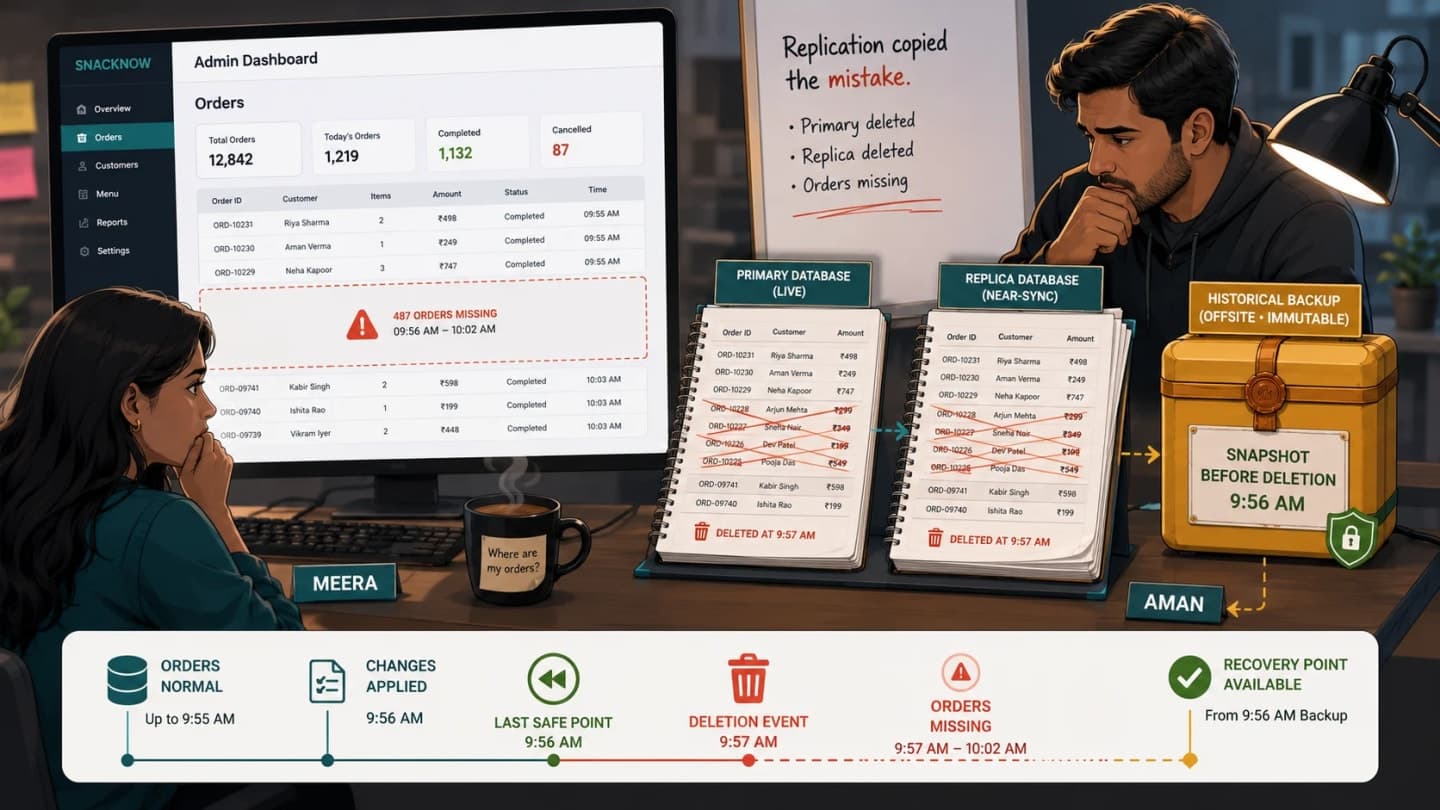
Meera and Aman discovering that hundreds of SnackNow orders disappeared from both the primary database and its replica after a mistaken deletion

Replication kept SnackNow's databases synchronised, including the human mistake that erased valid orders.

The App Is Running, but Yesterday's Orders Are Gone

SnackNow now survives an application-server failure. Redundant instances, readiness checks, and controlled failover keep the service reachable. The following morning, Meera opens the admin dashboard and finds a different kind of disaster: hundreds of yesterday's orders are missing. The component-level path behind that survival is explained in High Availability vs Fault Tolerance: Failover Explained; this incident begins where the live copies are available but wrong.

Aman traces the gap to an incorrect maintenance command at 9:57 AM. It deleted valid order rows. Database replication worked exactly as designed and sent that deletion to the read replica. Both live copies now agree perfectly on the wrong state. The app starts, health checks pass, and new requests can succeed, yet historical orders needed for fulfilment, refunds, and accounting have disappeared.

Meera: 'But we had replication. Wasn't that our backup?'

Aman: 'Replication kept the systems in sync. It also kept the mistake in sync.'

The story event is a human command, the visible symptom is missing orders, and the technical cause is logical deletion rather than hardware loss. Availability can remain high while data integrity is broken. Redundancy limits failures only inside its design boundary; a synchronised replica protects against loss of one database process, not against every valid-looking write sent to all copies.

A live copy helps the service continue. A historical copy helps the business go back.

The design decision is to add recoverable history with explicit recovery targets and tested restoration. The consequence is a path back before 9:57 AM. The tradeoff is storage, automation, security, retention, and rehearsal cost. At work, classify the failure before choosing the tool: hardware loss may need failover, while deletion or corruption may need an earlier point. Memory callback: the live register and its photocopy can share the same crossed-out pages; only the sealed copy preserves the previous truth.

Backup, Replication and Failover Solve Different Problems

Aman places the deleted order in the centre and applies three mechanisms to the same incident.

Mechanism

Primary job

Outcome after the 9:57 deletion

Replication

Keep another live copy synchronised

The deletion is copied to the replica

Failover

Move service to a functioning system

Traffic moves, but the served data is still deleted

Backup

Retain a recoverable historical copy

The team can restore state from before the deletion

Replication reduces downtime and can reduce data loss for some failure classes, but it normally follows legitimate database operations, including accidental deletes and bad migrations. Failover changes which system serves traffic; it does not reconstruct missing history. Backup creates an independent enough recovery point that can be selected and restored later.

The decision is not to choose one of the three. SnackNow needs them for different reasons: replication and failover support availability, while backup and recovery address historical restoration. The consequence is broader resilience. The tradeoff is that the team must know which mechanism owns which incident and avoid promoting a damaged copy as if it were recovery.

In a workplace interview, say the failure first. 'The primary host died' can justify replica promotion. 'A delete propagated everywhere' requires recoverable history. The earlier replication, sharding, and polyglot persistence lesson explains live data distribution; here the central question is what state can be reconstructed after the live system becomes wrong.

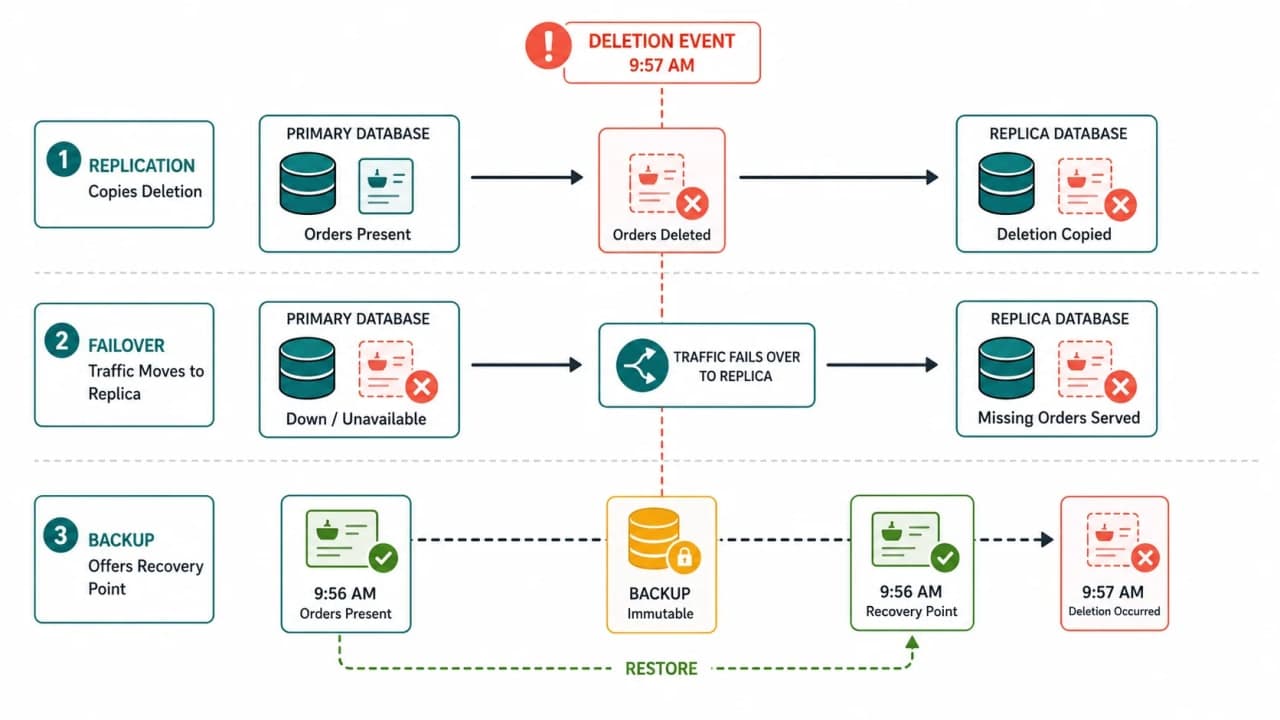
Reader question: What does replication, failover, and backup each do after the same mistaken deletion?

Why this visual is needed: All three involve another copy or system, which makes their failure outcomes easy to confuse.

Three-lane SnackNow diagram showing a deleted order replicated to a replica, failover serving the same deletion, and backup restoring an earlier version
The same deletion proves that replication, failover, and backup protect against different failures.

How to read it: Follow the deletion through each lane and ask whether the mechanism copies current state, moves service, or exposes older state.

What to remember: Replication preserves current state, failover changes the serving system, and backup preserves history.

What SnackNow Must Back Up

Meera asks for a database backup. Aman turns the request into a recovery inventory because a database alone may not reconstruct a working product.

  • Transactional database: orders, payments, refunds, restaurant assignments, and the relationships that make them meaningful.

  • Object metadata and uploaded objects: receipts, menu photos, invoices, or documents, including the mapping from database record to object key.

  • Configuration and infrastructure definitions: versioned settings and infrastructure-as-code required to recreate compatible resources.

  • Schema and migrations: the exact application and database shape that can read the restored data.

  • Queue state where business-critical: durable pending work or enough source truth to rebuild it safely without duplicate side effects.

  • Encryption-key strategy: documented access to the keys needed to decrypt backups, with protected lifecycle and recovery ownership.

  • Audit logs: evidence of who changed what, retained according to security, operational, and compliance requirements.

Plaintext secrets should not be copied casually into every archive. Prefer references to a managed secret system, separately protected recovery procedures, and least-privilege access. The same caution applies to unnecessary caches, generated thumbnails, and data that can be deterministically rebuilt; copying everything increases exposure and recovery noise.

The story symptom is a database that can be restored but an application that still cannot locate receipt objects or decrypt protected fields. The technical cause is an incomplete dependency inventory. The decision is to map each critical business journey to its data, schema, keys, objects, and rebuild instructions. The consequence is a coherent restore. The tradeoff is ownership across teams and services. At work, ask, 'What else must be true for this restored row to become a usable order?' Memory callback: the sealed register matters only if the team also has the index, keys, and instructions to read it.

Full Backup: Copy the Whole Register

A full backup copies the complete selected dataset at a defined point or consistent boundary. In the register memory anchor, SnackNow seals a complete copy on Monday. Restoring that backup can be operationally simple because the base does not depend on a chain of daily change files.

The visible advantage is fewer restore pieces. The technical cost is reading, transferring, and storing a large volume repeatedly. For a small orders database, a nightly full may be acceptable. For multiple terabytes, a daily full can exceed the backup window, consume I/O needed by customers, and multiply storage cost.

The design decision is to use full backups as periodic bases where their size and window are affordable. The consequence is simpler restoration and an independent foundation for later changes. The tradeoff is backup duration, performance impact, and storage. At work, measure both backup and restore throughput; a full copy that finishes overnight may still take too long to restore. Memory callback: the sealed full register is easy to understand, but expensive to photocopy every day.

Incremental Backup: Save Only What Changed Last

An incremental backup copies changes since the most recent backup of any type. After Monday's full, Tuesday's envelope contains Tuesday changes. Wednesday's contains only changes since Tuesday's incremental. Thursday's contains only changes since Wednesday's incremental.

The story benefit is small, fast daily copies. The recovery dependency is a chain: to reconstruct Thursday, SnackNow needs Monday's full plus Tuesday, Wednesday, and Thursday incrementals in order. If Wednesday's envelope is missing or corrupt, later changes may not be usable even though Thursday's backup job is green.

The design decision is to reduce routine backup volume while monitoring every chain component. The consequence is lower backup-window and storage pressure. The tradeoff is a more complex, potentially slower restore and greater chain fragility. At work, time an end-to-end restore of the longest allowed chain. Memory callback: each daily change envelope is small, but none tells the whole week alone.

Differential Backup: Save Everything Changed Since Full

A differential backup copies all changes since the most recent full backup. Tuesday's folder contains Tuesday changes. Wednesday's contains Tuesday plus Wednesday. Thursday's contains Tuesday through Thursday. The folder grows as the week progresses.

To restore Thursday, SnackNow needs Monday's full plus the latest Thursday differential. That is fewer restore dependencies than the incremental chain, but Thursday's backup is larger than one Thursday incremental. A new full backup resets the differential baseline.

The design decision balances daily backup cost against restore simplicity. The consequence is a shorter restore chain. The tradeoff is growing backup size until the next full. At work, choose based on measured recovery targets, data change rate, storage, and operational reliability, not a claim that one backup type is universally best.

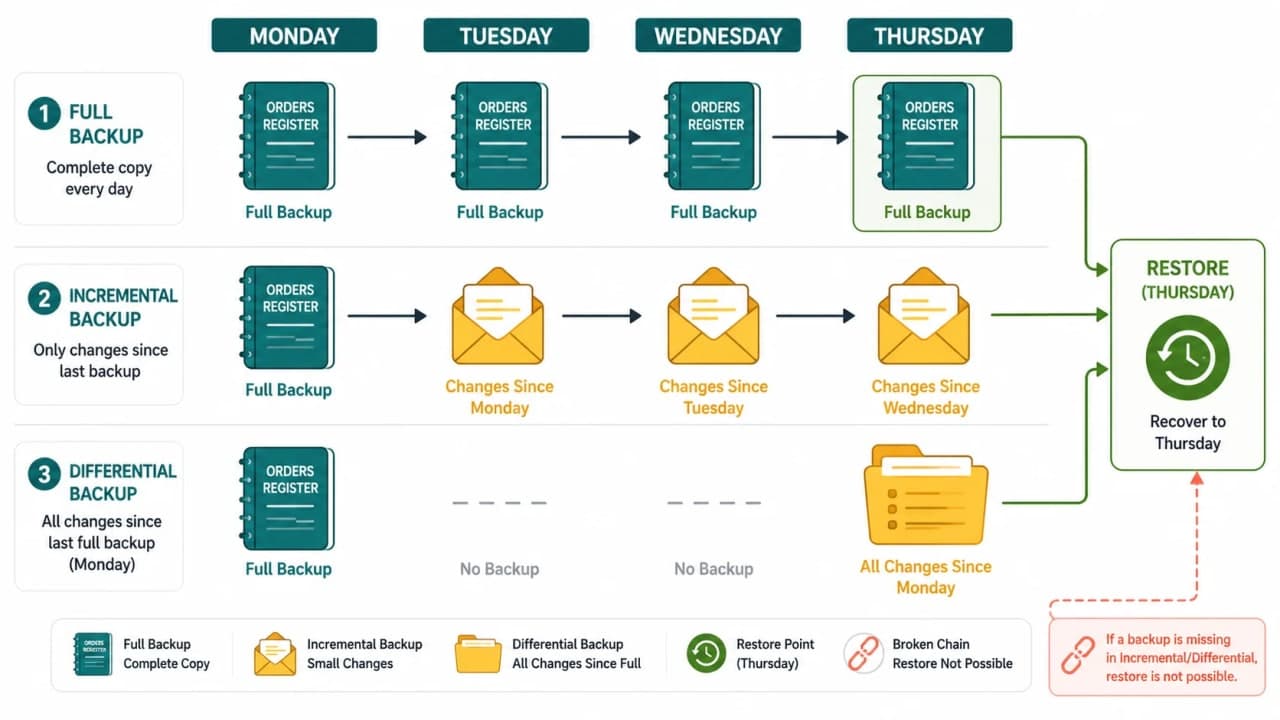
Reader question: Which files must SnackNow assemble to restore Thursday under each strategy?

Why this visual is needed: Backup size makes sense only when paired with the restore path and dependency chain.

Monday to Thursday SnackNow backup calendar comparing full, incremental, and differential backup contents and restore paths
A Thursday restore exposes the real tradeoff among full, incremental, and differential backup chains.

How to read it: Begin with Monday's full. Then trace the pieces required by the Thursday restore in each lane.

What to remember: Incremental minimises each backup; differential shortens the restore chain; full minimises dependencies.

Reconstructing Thursday

  • Daily full strategy: restore Thursday's full backup. The restore set has one backup, but creating it consumed the most daily I/O and storage.

  • Incremental strategy: restore Monday's full, then Tuesday, Wednesday, and Thursday incrementals in order. Every required link must be present and valid.

  • Differential strategy: restore Monday's full, then Thursday's differential. The daily differential was larger, but restoration has fewer steps.

Snapshots Are Fast, but What Exactly Are They?

A snapshot records the state of a storage volume, disk, database service, or other supported resource at a point in time. Many platforms create snapshots quickly by tracking changed blocks with copy-on-write or related mechanisms instead of copying every byte immediately. The exact behaviour is product-specific.

A crash-consistent volume snapshot resembles storage after an abrupt power loss; the database may need recovery from its own logs. A database-consistent snapshot coordinates writes or uses service-aware mechanisms so the captured state satisfies the database's consistency requirements. Multi-volume or multi-service applications need a coordinated boundary, or one restored component may represent 10:00 while another represents 10:03.

The visible trap is a fast snapshot job that lives in the same account, region, storage system, or permission boundary as production. A snapshot is not automatically offsite, immutable, encrypted with recoverable keys, or independently restorable. Its dependency on the source platform and its deletion permissions matter.

The design decision is to document consistency semantics, copy or protect snapshots across appropriate failure and credential domains, set retention, and test restoration. The consequence is efficient recovery points. The tradeoff is platform dependence and hidden storage or transfer cost. The object storage article helps explain versioning and object durability, while this recovery plan must still prove that the snapshot can rebuild the database. Memory callback: a fast photograph of the register is useful only if it captured a readable page and survives the incident.

Transaction Logs and Point-in-Time Recovery

SnackNow does not want to return to last night's backup and lose an entire morning of valid orders. The target is 9:56 AM, one minute before the deletion. Point-in-time recovery, or PITR, combines a suitable base backup with a continuous sequence of transaction or write-ahead log records.

The team restores the base into an isolated environment, replays the ordered log stream, and stops before the destructive transaction at 9:57. The base supplies the starting database; the logs describe committed changes after that base. Missing log segments, unusable keys, incompatible software, or a base outside retention can break the path.

PITR is not simply undoing one SQL statement on the live primary. The restored database must be validated: order counts, payments-to-orders reconciliation, schema compatibility, critical queries, and the exact boundary around the bad command. The team then chooses how to return corrected data or service without overwriting newer valid work blindly.

The design decision is continuous, monitored log archiving plus periodic compatible base backups. The consequence is a fine-grained recovery point and lower potential data loss. The tradeoff is log storage, retention, replay time, and operational care. PostgreSQL's official continuous archiving and point-in-time recovery guidance describes this base-plus-WAL model. At work, test a timestamp between two transactions and prove the result. Memory callback: the security-camera rewind stops at 9:56, but someone must still verify what the camera recovered.

Reader pulse

How is it so far?

No reaction selected.

Reader pulse

Vote with other readers

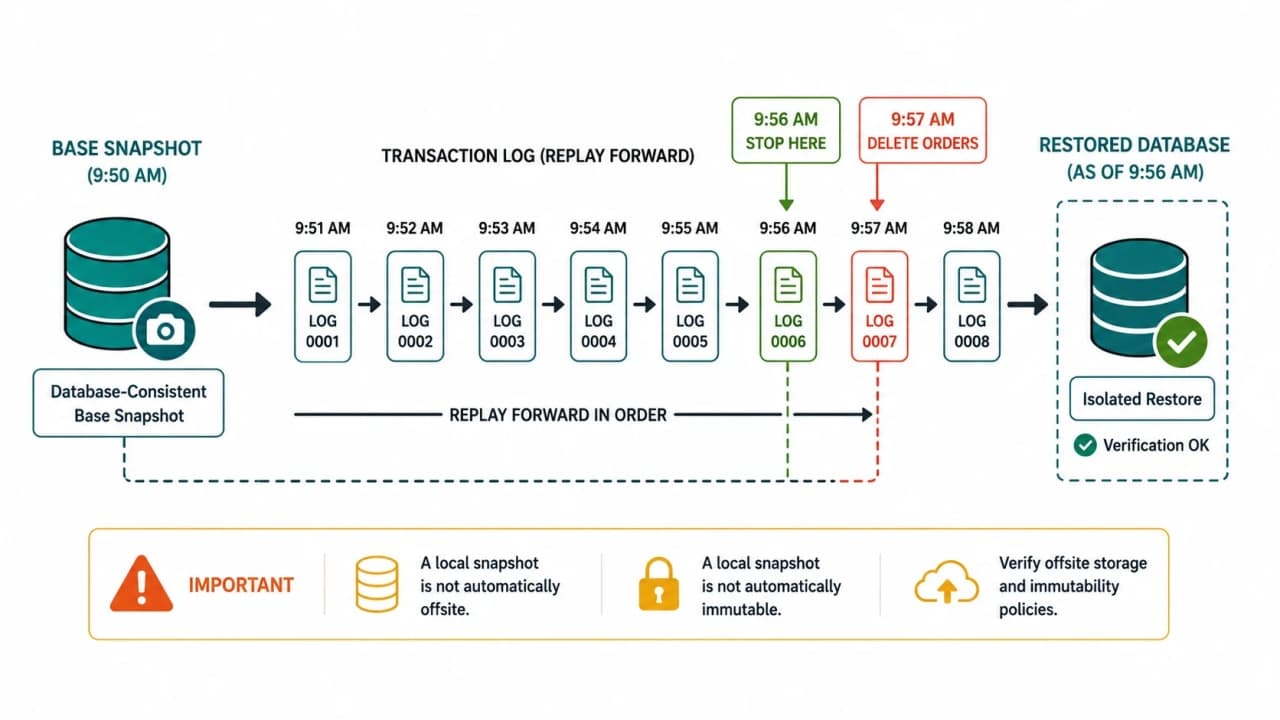
Reader question: How can SnackNow return to 9:56 AM when the deletion occurred at 9:57 AM?

Why this visual is needed: PITR is often presented as a button, hiding its base, ordered logs, stop condition, and validation.

SnackNow point-in-time recovery timeline from base snapshot through transaction log replay to 9:56 AM before a 9:57 AM deletion
Point-in-time recovery rebuilds SnackNow from a consistent base and replays logs only to the moment before deletion.

How to read it: Start at the consistent base, replay logs forward, stop before the red deletion, and validate the isolated result.

What to remember: The base supplies the database; logs supply the journey to the chosen time.

RPO: How Many Minutes of Orders Can SnackNow Lose?

Recovery Point Objective, or RPO, is the maximum acceptable data-loss window measured in time. If SnackNow accepts an RPO of five minutes for orders, the business is saying recovery may return to a point no more than five minutes before the incident under the scoped conditions. It is a business tolerance translated into a recovery design target.

The visible consequence of missing the RPO is valid orders, payments, or updates that occurred after the last recoverable point but before deletion. For the payment and order database, that can mean financial reconciliation and customer support, so the target may be very low. Recommendation events can often tolerate a larger gap because profiles can relearn. A weekly marketing report may tolerate a day or more.

Backup frequency is only one input. An hourly scheduled job does not guarantee one-hour RPO if the job fails silently, remains in an inaccessible location, captures inconsistent state, or cannot be restored. Log capture, snapshot success, retention, corruption detection, and recovery tooling determine the achievable result.

The design decision is a distinct RPO per data domain based on impact. The consequence is focused spending: critical orders receive continuous logs and frequent recovery points, while rebuildable analytics can use cheaper retention. The tradeoff is that lower RPO usually increases write-path, storage, monitoring, and operational cost. At work, ask the owner to price one minute of missing data. Memory callback: acceptable missing pages define RPO, not the speed of rebuilding the cupboard.

RTO: How Long Can SnackNow Stay Broken?

Recovery Time Objective, or RTO, is the maximum acceptable duration for restoring the scoped service after disruption. It answers a different question from RPO. RPO asks how far back the data may go; RTO asks how long the business can wait before service is safely usable.

SnackNow's recovery clock includes detection, incident decision, provisioning an isolated environment, locating keys and backups, restoring data, replaying logs, starting compatible application services, validating orders and payments, and returning traffic. A dashboard that says 'database restore completed' does not mean restaurants can fulfil orders safely.

The technical cause of missed RTO is often outside copy speed: a runbook references an old secret, DNS still points elsewhere, a schema version is wrong, or validation is manual and undefined. The decision is to automate repeatable steps, pre-stage what the target justifies, assign authority, and measure the entire drill. The consequence is a realistic recovery target. The tradeoff is preparation cost and maintained standby capability.

At work, start the RTO clock at the defined incident boundary and stop it only when the business journey passes validation. Memory callback: the recovery clock does not stop when files arrive; it stops when Riya's restored order is safely usable. The reason safely usable service matters more than a running database comes from System Reliability Explained: MTBF, MTTR and SLA, which defines the complete reliability promise.

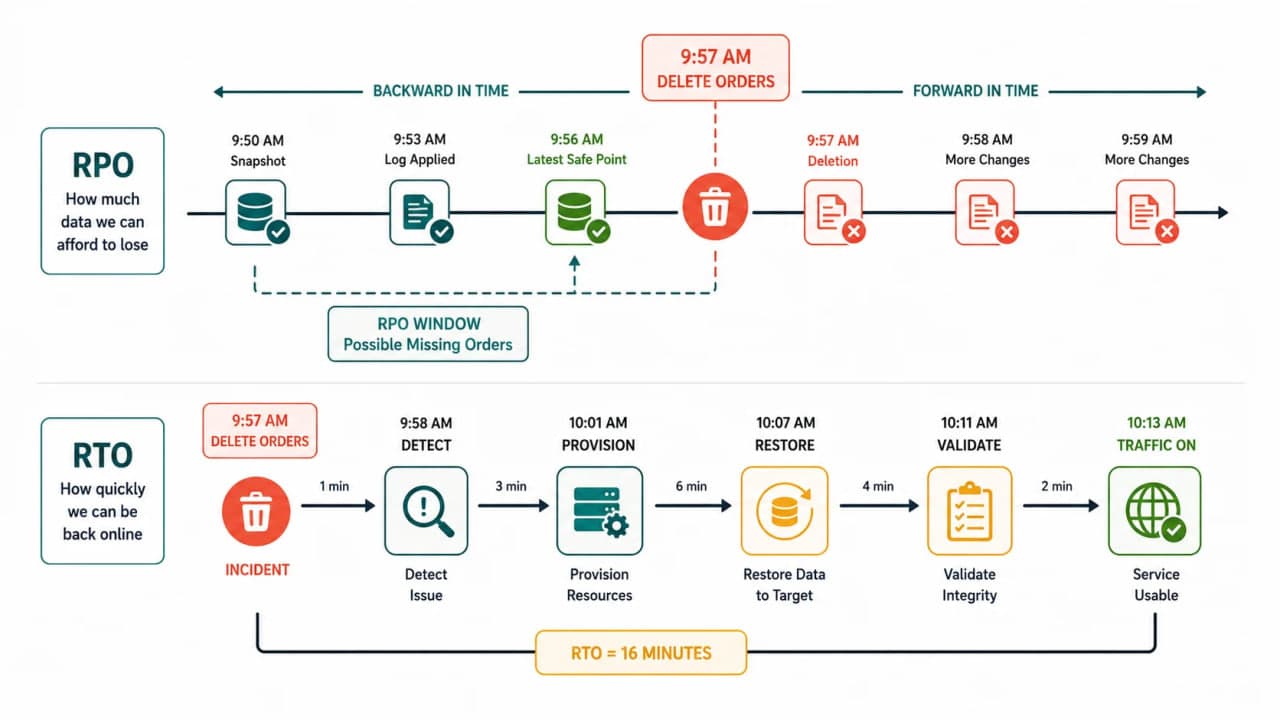
Reader question: Which clock measures missing orders, and which measures unavailable service?

Why this visual is needed: Both objectives use time, so readers frequently reverse them or reduce RTO to file-copy duration.

Two SnackNow incident clocks showing RPO backward from deletion to recovery point and RTO forward through restoration to usable service
RPO limits how far SnackNow may rewind and lose orders; RTO limits how long recovery may take before service is safely usable.

How to read it: Measure backward to the latest recoverable data for RPO, then forward through the complete recovery journey for RTO.

What to remember: RPO points backward to data; RTO points forward to service.

Cold, Warm and Hot Recovery

Recovery readiness changes how much infrastructure and data preparation exists before an incident. These labels are relative, so SnackNow documents the concrete resources and steps instead of relying on temperature words alone.

Readiness

What exists before the incident

Recovery and cost tendency

Cold

Backups and rebuild instructions; little running capacity

Lowest standing cost, longest provisioning and restore time

Warm

Some infrastructure, recent data, images, and tested automation are prepared

Moderate cost and recovery time

Hot

A continuously or nearly ready environment and current data path

Fastest recovery tendency, highest cost and coordination

A weekly report service may rebuild cold because an eight-hour RTO is acceptable. Orders may need warm recovery with infrastructure and recent base data prepared. A narrowly scoped payment function may justify hotter readiness. The choice still needs data restoration, integrity, and an authority plan; a running environment is not proof that historical corruption can be reversed.

The story event is Meera asking how much the company will pay to shorten the recovery clock. The decision aligns readiness with RTO, RPO, and business impact. The consequence is predictable preparation. The tradeoff is standing spend and synchronisation complexity. At work, ask what exactly is running, current, and tested. Memory callback: cold means rebuilding the recovery desk, warm means supplies are staged, and hot means the desk is almost ready to serve.

The 3-2-1 Rule and Ransomware Reality

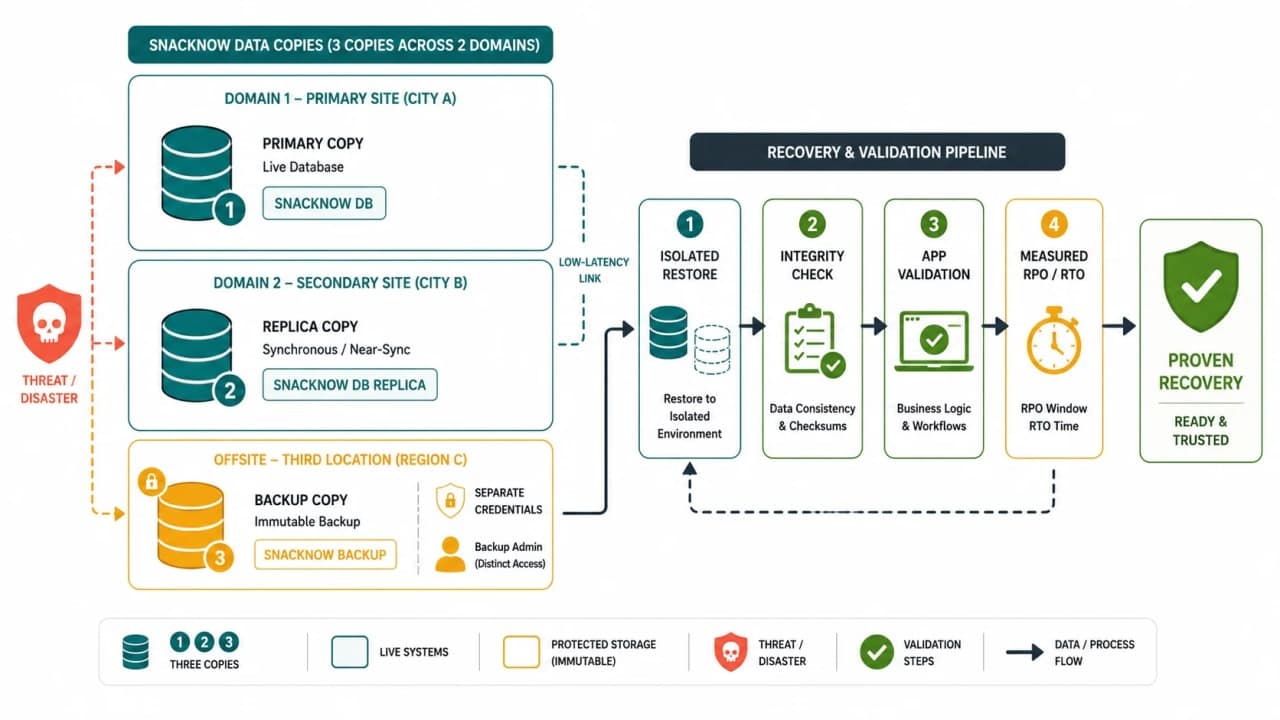
The classic 3-2-1 rule provides a memorable baseline: keep three copies of important data, on two different media or sufficiently independent failure domains, with one copy offsite. SnackNow maps this to three locked cupboards, but immediately translates the metaphor into actual accounts, storage services, locations, credentials, and retention policies.

Modern threats add an important question: can the same compromised identity delete or encrypt every copy? An always-online backup in another location may still be destroyed if production credentials control it. SnackNow adds an immutable or retention-locked copy where appropriate, object or backup versioning, separate administrative credentials or account boundaries, encryption at rest and in transit, least-privilege access, and protected key recovery.

Encryption is necessary but not sufficient. If attackers can delete encrypted backups, recovery still fails. If keys are lost, the team has protected data it can never read. Retention also needs a reason: short history may not outlast delayed corruption, while unlimited retention expands cost, privacy exposure, and compliance obligations.

The design decision is independent, access-isolated, versioned recovery copies with explicit retention. The consequence is resistance to local failure and some destructive attacks. The tradeoff is cost, governance, key management, and controlled deletion. At work, simulate compromise of the production administrator and ask which recovery point remains unreachable to that identity. Memory callback: three cupboards help only when one stolen key cannot open all three.

A Backup Is Not Proven Until Restore Works

Aman proudly shows seven green backup jobs. Meera asks him to restore one. The first attempt fails because an encryption key reference changed. The second restores rows, but the application cannot read them with the current schema. Green copy jobs had measured activity, not recoverability.

A backup report proves that data was copied. A restore test proves that the business can recover.

SnackNow automates sample restores into isolated environments, verifies checksums and database consistency, runs order-to-payment reconciliation, starts a compatible application version, and exercises a small set of critical user journeys. Periodic full-environment drills test infrastructure, identity, networking, object data, keys, and runbook authority. Monitoring tracks backup age, missing log segments, failed jobs, retention gaps, capacity, restore duration, and validation failures.

The story symptom is a green dashboard beside an unusable restore. The technical cause is testing only backup creation. The design decision is to treat restoration as a production capability with scheduled drills and evidence. The consequence is measured achievable RPO and RTO. The tradeoff is compute, staff time, secure test handling, and cleanup. At work, record the latest successful restore time and the exact business checks that passed. Memory callback: the sealed register earns trust only after someone opens a copy and fulfils an order from it.

Reader question: What must happen between creating three protected copies and declaring SnackNow recoverable?

Why this visual is needed: Copy dashboards hide whether the data survives compromise and becomes a valid running service.

SnackNow 3-2-1 backup layout with immutable offsite copy flowing into isolated restore, integrity validation, application checks, and measured recovery
SnackNow trusts backups only after protected copies survive the threat and a tested restore proves the business journey works.

How to read it: Trace independent protected copies into an isolated restore, integrity checks, application validation, measured targets, and recorded evidence.

What to remember: Copies create options; restore evidence creates confidence.

Backing Up a Large Database Without Stopping SnackNow

As the orders database grows into terabytes, daily logical full exports can compete with production I/O and exceed the available window. SnackNow combines database-aware online base backups or snapshots with continuous transaction-log archiving so ordinary writes continue. The exact mechanism follows the database service's consistency guarantees.

Backups may be offloaded from a suitable replica to reduce primary load, but only after accounting for replication lag, replica workload, and the fact that logical mistakes still propagate. Compression reduces storage and transfer at CPU cost. Encryption protects data but adds key dependencies. Parallel backup and restore can shorten the window but may saturate disks, network, or destination services. Storage tiers reduce long-retention cost but can lengthen retrieval time and therefore RTO.

The design decision is an incremental or log-based strategy with periodic bases, controlled concurrency, monitored windows, tiered retention, and restore benchmarking. The consequence is scalable protection without stopping orders. The tradeoff is a more complex chain and dependency on intact logs and tooling. The earlier database performance optimisation article provides the production workload lens; backup work must have its own budget so protection does not become the outage.

At work, test a restore at production scale. A 20 GB sample cannot prove a 20 TB database will meet RTO. Memory callback: copying the growing live register needs scheduled bandwidth, while log envelopes preserve the changes between bases.

A Practical Microservices Backup Plan

Service/data

Recovery method

Target example

Restore proof

Orders and payments

Base backups plus continuous logs and protected retention

Very low RPO; short business-approved RTO

Reconcile payment, order, item, and fulfilment invariants

Menu and catalog

Database backup plus versioned object references

Moderate RPO and RTO

Restaurant can view and update a restored menu

Object uploads

Versioning, lifecycle retention, inventory, and independent copy where required

RPO tied to upload importance

Restore object and resolve it from restored metadata

Notification history

Backup audit records; rebuild transient delivery work from source truth

Higher RPO may be acceptable

No duplicate customer message during replay

Analytics

Protect raw source and definitions; recompute derived aggregates

Higher RPO/RTO

Metric sample matches source events

Configuration and IaC

Version control plus protected release artifacts and recovery access

Low change-loss tolerance

Provision compatible isolated environment

Table takeaway: Every service gets the recovery target its business consequence demands, not the same expensive policy by default.

The inventory names an owner, backup mechanism, retention, key dependency, RPO, RTO, restore order, and validation test for every critical data set. Queue state receives special judgment: durable commands with business meaning may need protection, while work derivable from the transactional source can be rebuilt. The distributed storage lesson explains how data spans storage nodes; recovery still needs a coherent application-level result.

The story consequence is that restoring orders no longer leaves photos, schema, or configuration behind. The tradeoff is service-by-service ownership. At work, review the inventory after every new data store or critical workflow. Memory callback: one missing cupboard label can turn a complete-looking backup into an incomplete business. If the primary location itself becomes unavailable, Disaster Recovery in System Design: RTO, RPO and DR turns these recovery assets into a second operating environment.

Common Misunderstandings

Claim

Why it fails

SnackNow correction

Memory line

Replication is backup

Valid deletes and corruption can propagate

Keep independent historical recovery points

The photocopy repeats crossed-out pages

A successful job guarantees recovery

Copying does not test decryption, restore, schema, or app behaviour

Automate isolated restores and business validation

Open the sealed register

Snapshots are always independent

They may share platform, account, location, or deletion permissions

Document semantics and protect copies across boundaries

A photo can burn with the room

Incremental is always best

Long chains increase restore dependencies

Choose from backup window and recovery target

Small envelopes form one fragile chain

RPO and RTO are the same

One limits data loss, the other service recovery time

Measure backward and forward on the same incident

Pages versus clock

Hourly backup guarantees one-hour RPO

Jobs, retention, consistency, and restores can fail

Measure achievable recoverability

A schedule is not a recovery point

Encryption removes access risk

Keys, deletion rights, and compromised identities still matter

Separate credentials, keys, and least privilege

A locked cupboard can still be destroyed

Offsite is ransomware-safe

Shared credentials may delete remote copies

Add immutability, versioning, and account isolation

One key must not open every cupboard

Retention can be decided later

History, cost, privacy, and compliance are designed together

Set tested retention from incident and policy needs

Old pages have a price and a purpose

Recovery ends when the database starts

The business journey may still be wrong

Validate app, keys, objects, state, and traffic

The clock stops when orders work

Table takeaway: A backup strategy is credible only when it names the failure, historical point, complete restore set, validation evidence, and target.

Memory Reconstruction: Rebuild Recovery from the Missing Orders

A. Deletion Timeline

9:56 AM: orders are correct. 9:57 AM: an incorrect maintenance command deletes records. Seconds later: replication copies the delete. 10:04 AM: Meera notices missing orders. The team isolates writes, chooses 9:56 as the target, restores a base, replays logs to the stop point, validates business invariants, reconciles newer work, and returns a safe service.

B. Replica-vs-Backup Contrast

Say this without notes: the replica is a live, synchronised copy useful for availability. The backup is retained history useful for restoration. Failover to the replica after a logical delete changes the server but not the wrong state. Recovery from a protected point changes the state back to a selected history.

C. Weekly Backup Calendar

Draw Monday through Thursday. Put one full on Monday. For incremental, add separate Tuesday, Wednesday, and Thursday envelopes. For differential, redraw a growing folder containing every change since Monday. Then point to the exact Thursday restore pieces before checking the article.

D. Thursday Restore Reconstruction

Full: Thursday full only. Incremental: Monday full plus Tuesday, Wednesday, and Thursday increments in order. Differential: Monday full plus Thursday differential. Now remove Wednesday's incremental and explain the chain risk. Then remove Thursday's differential and explain why Wednesday's differential restores only through Wednesday.

E. RPO/RTO Clock Exercise

Assume the latest verified recovery point is 9:55, deletion starts at 9:57, detection occurs at 10:04, restore begins at 10:15, validation passes at 10:47, and traffic returns at 10:52. State the possible data gap from the recovery point, then calculate service recovery using the team's defined RTO start. Explain why a database-complete timestamp at 10:39 is not the end if validation fails.

F. Three Locked Cupboards

Name all three copies, the two independent media or failure domains, the offsite copy, the credential boundary, immutability or versioning control, encryption key owner, and retention. If one production administrator can erase every cupboard, redesign the boundary.

G. Cause -> Choice -> Consequence

Cause: an accepted deletion propagated to every live copy. Choice: protected historical bases plus continuous logs. Consequence: SnackNow can select 9:56, at the cost of storage and replay complexity. Cause: green copy jobs did not prove usability. Choice: isolated restore drills and application validation. Consequence: measured RPO/RTO and real confidence, at the cost of recurring test work.

H. Spoken Retelling and Workplace Scenario

A developer deploys a bad migration at 2:00 PM. The schema and data become wrong on the primary and replica. Explain how you would recover to 1:59 PM without assuming the latest snapshot is sufficient.

A strong retelling identifies a compatible base backup, confirms the transaction-log chain covers 1:59, restores into isolation, replays to the safe boundary, uses the matching application and schema definitions, validates data and business invariants, plans reconciliation for valid work after the point, controls writes and traffic, and records actual RPO/RTO. It also explains why immediate replica failover would preserve the bad migration.

Final Mental Model

The live register stayed available, and its photocopy agreed with it. That agreement was the problem: both had accepted a human mistake. The sealed backup and change history gave SnackNow a previous truth, but only a tested restore turned that truth into a usable service.

Design backup from the restore backward: choose the business point, list every dependency, and prove the journey.

Replication helped SnackNow survive hardware failure, but it faithfully copied a human mistake. Backup gave the team history. Recovery turned that history back into a working service. RPO decided how much could be lost, and RTO decided how long the business could wait.

Reader checkpoint

Lock in the takeaway

Frequently asked questions

Why is database replication not a backup?

Replication keeps another live copy synchronised, so valid-looking deletions, corruption, and bad migrations can propagate. A backup retains recoverable historical points with suitable independence, retention, and restore procedures.

What is the difference between full, incremental, and differential backups?

A full backup copies the complete selected dataset. An incremental copies changes since the most recent backup of any type. A differential copies all changes since the most recent full backup, growing until the next full.

What is the difference between a snapshot and a backup?

A snapshot records resource state using platform-specific semantics and may be fast, but it is not automatically database-consistent, offsite, immutable, or independent of the source account and storage. A backup strategy defines protection, retention, access, and tested restoration.

How does point-in-time recovery work?

PITR restores a compatible base backup and replays an ordered transaction or write-ahead log stream to a selected moment, then validates the recovered database before returning service or data.

What is RPO vs RTO?

RPO is the maximum acceptable data-loss window, measured backward from an incident to the recoverable point. RTO is the maximum acceptable time to restore a safely usable service, including detection, provisioning, restoration, validation, and traffic return.

What are cold, warm, and hot recovery?

Cold recovery rebuilds most resources from backups and usually costs least but takes longest. Warm recovery pre-stages some resources and recent data. Hot recovery keeps an environment continuously or nearly ready, typically reducing recovery time at higher cost and complexity.

What is the 3-2-1 backup rule?

Keep three copies of important data, across two different media or independent failure domains, with one copy offsite. Modern plans often add immutability or versioning, separate credentials, encryption, protected keys, and explicit retention.

Why must teams test backup restoration?

A successful copy job does not prove that data can be decrypted, restored at scale, read by a compatible application, reconciled, and returned within RPO and RTO. Restore tests produce that evidence and expose missing dependencies.

How should a large database be backed up with minimal downtime?

Use database-aware online base backups or snapshots, continuous log archiving for PITR, controlled offloading, compression, encryption, parallelism, tiered retention, and production-scale restore tests while monitoring performance impact and every chain dependency.

Reader discussion

What readers think

0 comments
0/1200